
Is Vid Rush free to use


Table of contents
1. What Vid Rush offers and how its pricing actually works
2. Why free video tools often cost you more in the long run
3. What to use instead if you want professional video output without the limitations
If you have been searching for "is Vid Rush free," you are probably trying to figure out whether you can use the platform without spending any money. That is a fair question before you commit time to learning a new tool. Vid Rush does offer a free tier, but there is a real difference between having access and having something you can actually use to build a content operation. This post breaks down what the free plan gives you, why free video tools tend to cost you more than you expect, and what a better alternative looks like if your goal is to publish polished videos consistently without a steep learning curve or an unpredictable monthly bill.
What Vid Rush offers and how its pricing actually works
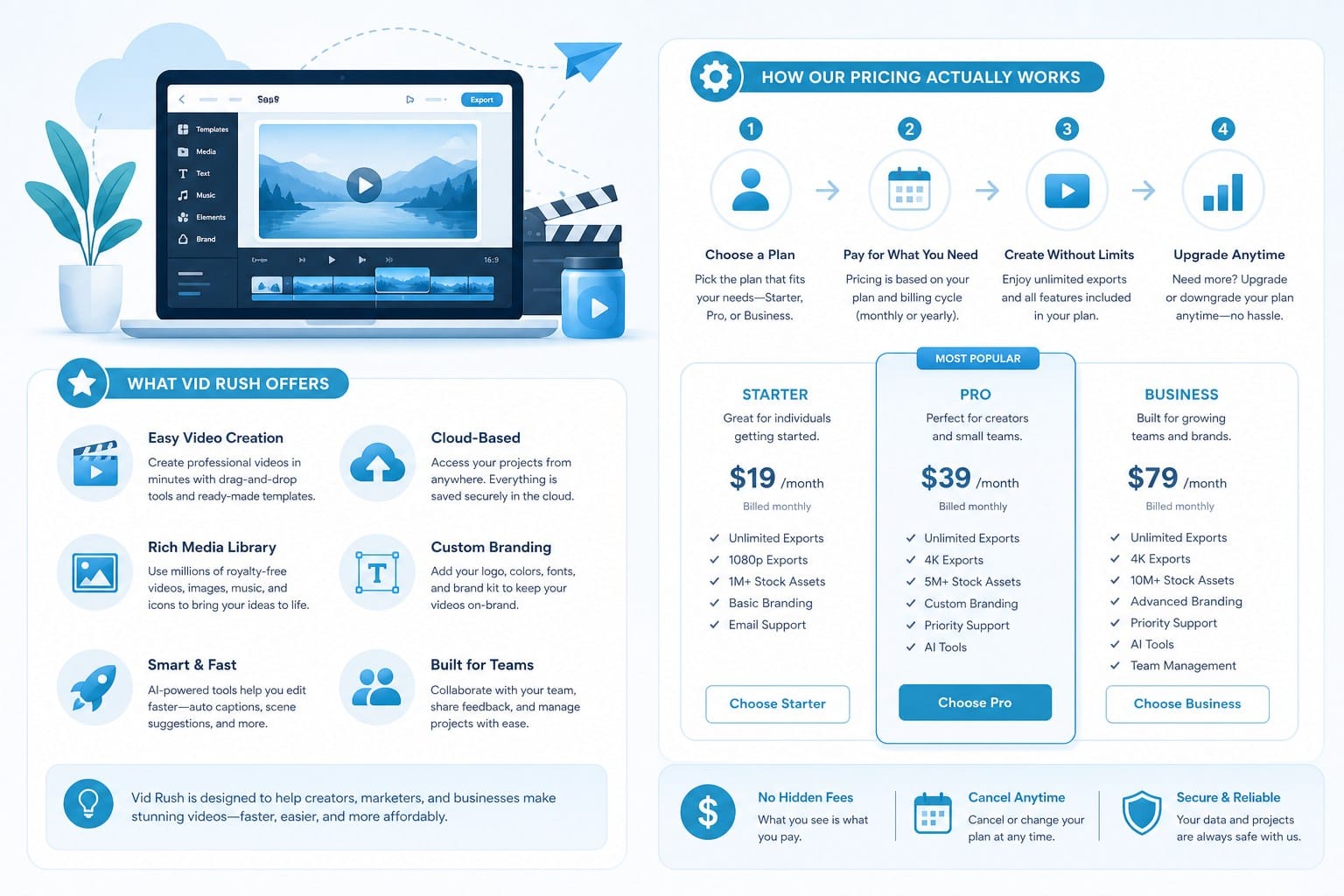
Vid Rush is a browser-based video creation tool that lets users build short promotional clips, slideshows, and template-driven videos using stock footage and basic editing features. Like most tools in this category, it runs on a freemium model. You can sign up without a credit card and start working inside the platform right away. But the free tier comes with real constraints that become obvious the moment you try to publish something.
The most immediate limitation is the watermark. Every video you export on the free plan gets a Vid Rush logo stamped onto it. If you are creating content for a YouTube channel, a client, or any platform where you want people to take your brand seriously, a watermark is a hard stop. It signals that you are using a free tool, which undercuts the credibility you are trying to build. Removing the watermark requires a paid subscription, and that is by design. The watermark is not a bug. It is a conversion mechanism.
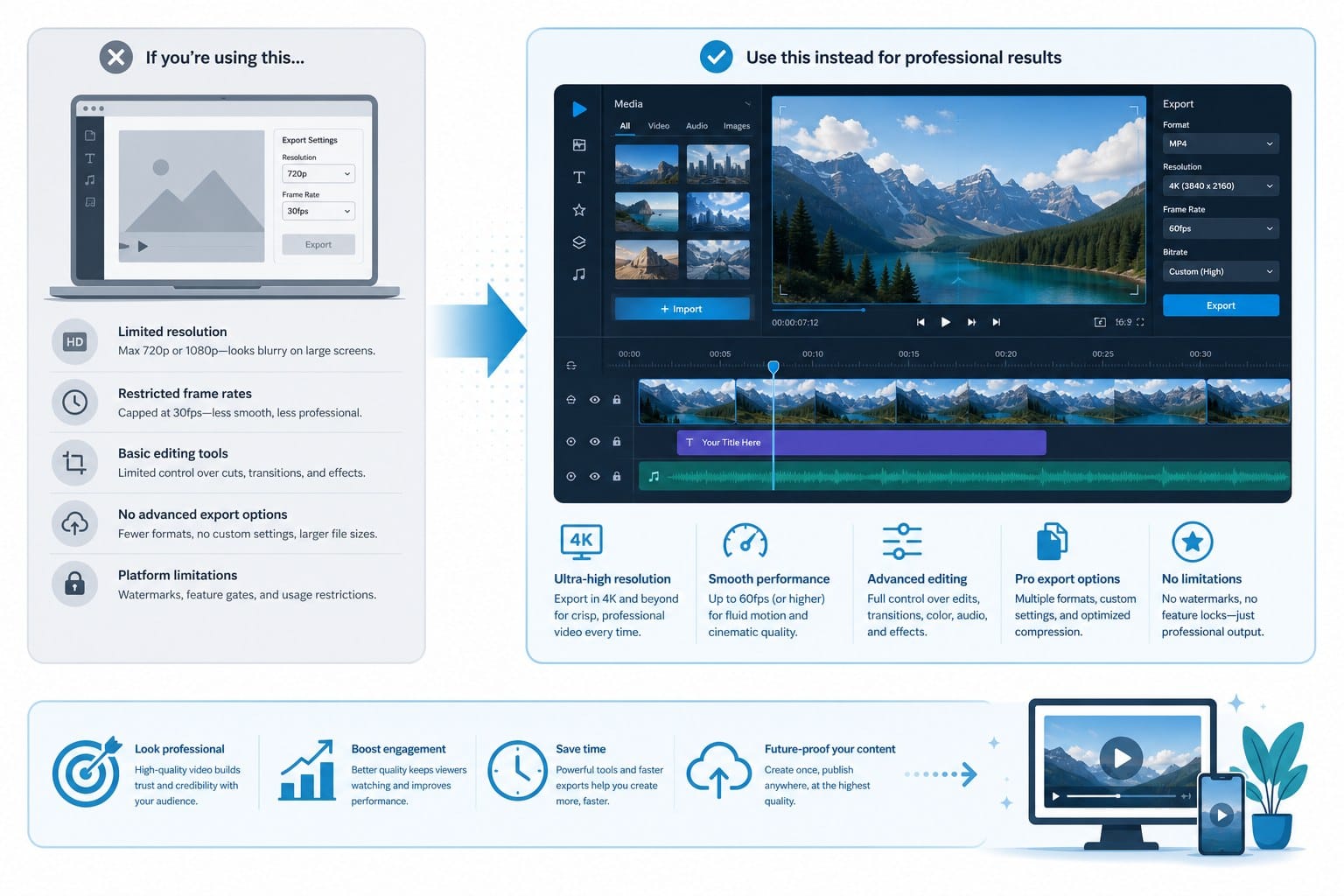
Resolution is the next wall you hit. Free plan exports are typically capped at lower quality than what YouTube, Instagram Reels, or TikTok recommend for optimal playback. YouTube suggests 1080p as a baseline for most content. If your tool is outputting at a lower resolution, your videos will look soft or compressed compared to what other creators are publishing. Viewers notice that, even when they cannot articulate why.
The asset library on the free tier is also restricted. You get access to a subset of templates and stock footage, not the full catalog. That limits your creative options and can make your videos look repetitive if you are publishing regularly. Paid plans unlock a larger selection, but by that point you are already paying a monthly fee before you have confirmed the tool fits your workflow.
Storage limits and export caps round out the picture. Free users on most platforms in this category are allowed a set number of exports per month, sometimes as few as five. For a creator trying to publish consistently, running out of exports two weeks into the month is a real problem.
So is Vid Rush free? Technically yes. You can create something without paying. But the free version functions more like a demo than a working tool. It shows you what the platform can do and then puts the useful parts behind a paywall. That is a completely normal business model, but it means the answer to your question depends on what you are trying to accomplish.
If you want to experiment with the interface, test a template, or see how the editing workflow feels, the free plan does that job. If you want to build and publish real content, you will hit the ceiling fast.
Vid Rush is also worth understanding in terms of what kind of video it is actually built for. The platform leans toward short-form promotional content. Template-based slideshows, product showcases, and clips designed to run under two minutes are squarely in its wheelhouse. That is a legitimate use case for some creators, particularly those making social media ads or quick promotional snippets for local businesses.
But if you want to produce a 10-minute YouTube video with a clear narrative arc, a documentary-style format, or a structured educational explainer, Vid Rush is not really the right tool. Even on a paid plan, the platform is not designed for long-form content or for creators who need a fully automated production pipeline that takes a topic and turns it into a finished video. The tool requires you to bring your own script, your own structure, and your own creative direction. It then helps you execute visually, but the heavy lifting is on you.
That distinction matters a lot depending on where you are in your content strategy. A creator who already has a script written and just needs a fast way to layer footage and music onto it might find Vid Rush useful. A creator who wants to go from a topic idea to a publishable video without doing all the intermediate work themselves will find the tool falls short.
Understanding that gap before you invest time in learning the platform is worth doing. The question of whether Vid Rush is free is really a smaller version of the question of whether Vid Rush is the right tool for what you are trying to build. For many creators, the honest answer to both questions is no, but for different reasons.
One more thing worth noting is the commercial rights situation on the free tier. If you are creating videos for clients, running a monetized YouTube channel, or building any kind of business around your content, you need to know that the footage, music, and graphics in your videos can be used commercially without licensing issues. Free tiers frequently restrict commercial use or leave the terms vague enough that you cannot be confident. When your business depends on that content, ambiguity in the terms of service is a real liability.
Paid plans on most platforms address this more clearly, but it is still worth reading the fine print before you assume that a paid subscription automatically grants full commercial rights. Some platforms have carve-outs for certain asset types even on paid tiers. Knowing what you are agreeing to before you build a library of content on a platform is just good practice.
Why free video tools often cost you more in the long run
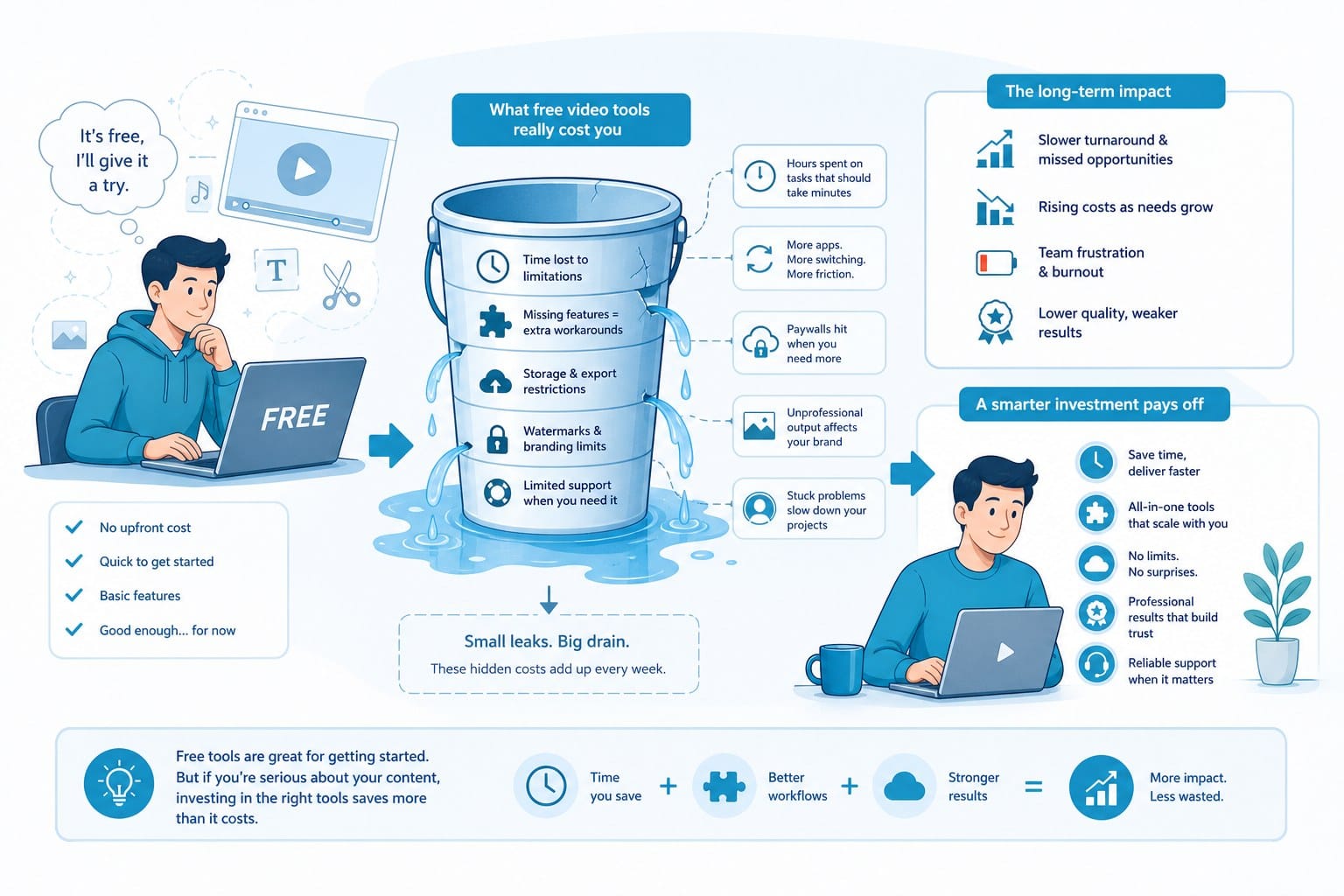
There is a cost to free tools that most creators do not calculate upfront. It is not a dollar amount. It is time. When a tool has limited automation and a shallow feature set, you end up doing significant manual work to fill in the gaps. You write your own scripts from scratch. You search for footage that fits your topic and check whether it is licensed for commercial use. You cut and arrange clips by hand. You find background music and hope it does not trigger a copyright claim. You record or hire a voiceover. You export, review, and re-export until the output looks right.
For a single video, that process might take 8 to 12 hours depending on the length and complexity. For a creator trying to publish two or three videos a week on a faceless YouTube channel, that math does not work. You would be spending 20 to 36 hours a week just on production, before you do any promotion, community management, or strategy work. That is more than a full-time job, and it is not sustainable for most people operating without a team.
The invisible cost of that time is real. If you value your working hours at even a modest rate, spending 10 hours to produce one video that a more capable tool could generate in a fraction of that time represents a significant opportunity cost. You could be spending those hours on strategy, on audience development, on creating more content, or on work that actually generates revenue.
Free tools also tend to create quality ceilings that limit your growth. The output from a template-based slideshow tool looks like the output from a template-based slideshow tool. Audiences on YouTube and TikTok are increasingly sophisticated about production quality, and content that looks visually generic has a harder time standing out. If your tool only supports a narrow visual format, your content will share that limitation until you switch tools or invest significantly in supplementing what the tool cannot do.
Educational content, documentary formats, and structured explainer videos require more than a template and some stock footage. They require a clear narrative arc, research-backed information, good pacing, and a voiceover that sounds natural. Free tools rarely address more than one or two of those requirements. The rest is on you to provide, and providing it consistently at scale requires either a lot of personal time or a team.
AI-powered platforms change the economics of this in a meaningful way. Instead of paying a low monthly fee and supplying all the labor yourself, you use a platform that handles research, scripting, footage sourcing, voiceover generation, and editing as part of a single automated workflow. The output is a finished video that is ready to review and publish, not a collection of assets you still have to assemble.
Credits-based pricing, the model that platforms like Cliptude use, is also more transparent than flat subscriptions. You pay for what you create rather than for access to a dashboard you might only use occasionally. If you are producing heavily one month and barely at all the next, your costs reflect that. A flat subscription charges you the same amount regardless of output, which means you are often paying for capacity you are not using.
For solo creators and small teams managing content for multiple clients or channels, usage-based pricing makes budget planning more straightforward. You know what each video costs to produce, and you can evaluate whether the output justifies the spend. That is a cleaner calculation than trying to amortize a monthly subscription fee across an unpredictable production volume.
Commercial rights are another factor that free tools handle poorly. When you are monetizing a YouTube channel, running ads against your content, or creating videos for clients who will use them commercially, you need certainty about what you are allowed to do with the footage, music, and graphics in your videos. Free tools often restrict commercial use on the free tier, and even paid tiers sometimes have asset-specific limitations that are buried in the terms of service.
Building a content library on a platform without understanding those rights is a real risk. A copyright claim on a monetized video can pull revenue or get the video taken down entirely. A client discovering that the footage in their video cannot be used commercially puts you in a difficult position. Choosing a platform that clearly grants commercial rights as part of the standard offering eliminates that risk.
There is also the compounding effect of quality over time. Creators who publish consistently tend to improve their content and grow their audience faster than creators who publish sporadically. If a tool limits how much you can produce in a month, either through export caps, time constraints, or workflow friction, it limits your ability to compound. Every week without a published video is a week without new data on what works, new subscribers, and new opportunities for the algorithm to surface your content.
Free tools are not always the wrong starting point. If you are just beginning and want to learn what video creation involves before committing to a platform, experimenting with a free tier makes sense. But if you have already done that experimenting and you are now trying to build something real, the right question is not what tool is cheapest. It is what tool gives you the best return on the time and money you put in.
If you want a side-by-side comparison of what a more capable alternative offers compared to Vid Rush, this breakdown of a Vidrush alternative for AI-powered video creation walks through the key differences in concrete terms and is worth reading before you make a decision.
What to use instead if you want professional video output without the limitations
If the reason you are asking whether Vid Rush is free is that you are looking for a cost-effective way to produce real video content at scale, the more useful question is what tool gives you the best output relative to the time and money you actually spend. That reframe matters because the cheapest tool by subscription price is almost never the cheapest tool when you factor in production time, quality, and rights.
Cliptude is built for the creator who wants to publish high-quality, long-form videos consistently without appearing on camera and without spending most of their week on production. The platform takes a prompt or a script as the starting point and handles the rest of the workflow from there. That includes researching the topic, writing a structured script, sourcing relevant footage, generating a voiceover in a natural-sounding voice, adding motion graphics where appropriate, and editing everything into a finished video that is ready to publish or needs only light review.
That automated pipeline is the core difference between Cliptude and a tool like Vid Rush. Vid Rush gives you a workspace and a set of assets and expects you to do the editorial and organizational work yourself. Cliptude does that work for you and delivers an output. For a creator who is trying to publish consistently rather than learn a new editing environment, that distinction is the whole game.
The range of video formats the platform supports is also worth noting because most low-cost tools are built for one narrow format and force you to adapt your content strategy to fit the tool. Cliptude supports documentaries, listicle videos, whiteboard-style explainers, stickman animated educational content, YouTube Shorts, and music videos. That range means the platform can grow with your content strategy rather than becoming a constraint on it.
If you start with listicle content and later want to move into documentary-style videos or educational explainers, you do not have to rebuild your workflow on a new platform. You work within the same system and adjust the format you are requesting. For creators who manage multiple channels or produce content across different formats for different clients, that flexibility has real practical value.
The usage-based credit model is a meaningful structural advantage for independent creators and small teams. You buy credits and use them when you create. You do not pay a flat monthly fee that charges you whether you produce one video or twenty. When you are in a high-output period, you spend more. When you are not, you spend less. That mirrors how most content operations actually work, where production volume varies month to month based on campaigns, client work, or personal schedule.
For creators who are managing costs carefully while trying to grow, that kind of flexibility makes the economics of a platform like Cliptude easier to justify. You can evaluate the cost of each video as a unit and compare it against the time that video would have taken to produce manually. That calculation usually resolves clearly in favor of the automated approach once you account for the full cost of your time.
Commercial rights are included as a standard part of what you get when you create a video on Cliptude. You can monetize it on YouTube, use it in client deliverables, publish it across platforms, and license it without reviewing terms-of-service fine print to figure out what is and is not allowed. That clarity is especially important for creators who are building a business around their content rather than just experimenting with the format.
For YouTube specifically, the production pipeline is designed with the platform's format requirements in mind. A 10-minute documentary-style video with a structured narrative, relevant footage that matches the content, a clean voiceover, and appropriate pacing is a fundamentally different product than a two-minute slideshow with stock photos and text overlays. The first is something you can upload to a monetized channel and expect to perform. The second is something that might get views early on but will not sustain audience growth over time because it does not deliver enough value per viewing session.
Viewers who watch a 10-minute video all the way through are telling the algorithm something important about your content. Watch time is one of the strongest signals YouTube uses to determine which videos to recommend. If your tool can only produce short-form content or content that viewers drop off from quickly because it lacks depth, your ability to grow organically is limited regardless of how frequently you publish.
If you want to understand what the production workflow actually looks like from prompt to published video, this article on text to video: create polished YouTube content with AI walks through the practical steps in detail. It covers how to frame a prompt, what the automated process generates, and what light editing looks like before you hit publish. That hands-on breakdown is useful if you want to know what you are committing to before you start.
For creators producing content aimed at regional audiences or non-English speaking markets, Cliptude also supports multilingual video creation. The ability to generate a fully produced video in a specific regional language without hiring a separate voiceover artist or translator is a significant advantage for anyone building a channel around a community that prefers to consume content in their native language. This guide on how to create Kannada YouTube videos with AI shows how that process works for one specific language market and gives you a concrete sense of what is possible.
The bottom line on Vid Rush is that the free version exists and does what free versions of video tools typically do. It lets you explore the interface, test a few templates, and see whether the general approach appeals to you. What it does not do is give you a functional tool for building a content operation. The watermarks, resolution caps, export limits, and asset restrictions that define the free tier are not minor inconveniences. They are the actual product, designed to show you what you cannot have until you pay.
For any creator who is serious about publishing consistently and growing a channel or a content-based business, the question of whether Vid Rush is free is less important than the question of whether it is the right tool. A platform built around template assembly and short-form promotional clips is a different product than a platform built to take a topic from idea to published long-form video with minimal manual work in between.
If you have been cycling through free tools and hitting the same walls repeatedly, whether that is watermarks, limited exports, low resolution, or the simple fact that you are doing most of the production work yourself, the right move is to try a platform that is designed for the goals you actually have rather than one that is designed to get you to upgrade. The output quality, the time you get back, and the ability to publish at a pace that actually moves the needle are all things that only show up clearly once you are working with a tool built for serious content creation.
Ready to take the next step?
Ready to stop working around the limits of free tools and start publishing videos that actually look professional? Visit Cliptude to see how the AI-powered production pipeline works and what you can create with your first prompt.



