The Ultimate Guide: How to Make YouTube Videos and Go Viral in 2026 (With AI)

YouTube crossed 2.7 billion logged-in users in 2024. By 2026, it's not just the second-largest search engine in the world; it's where careers get built, businesses grow, and some people make more money than their parents did in a lifetime. The wild part? The tools available to a solo creator today are the same ones powering channels with millions of subscribers.
This guide walks you through the full process, from picking a topic to getting seen by the right people. I'll cover the gear, the strategy, the AI shortcuts, and the growth plays that actually work right now.
How to make a YouTube video: start here
The biggest mistake new creators make is trying to make a video for everyone. A video about 'productivity' is too wide. A video about 'how software engineers manage ADHD without medication' is for someone specific. The more specific you get, the easier it is to find an audience that actually cares.
Before you record anything, spend time figuring out your niche. Not just your topic, but the specific type of person you're making content for. What do they already know? What problem keeps them up at night? Once you have that, every video decision gets easier.
A good way to find winning topics is to look at what's already working. Kliptory is a free YouTube research tool that shows you trending videos in any niche, filtered by view count, duration, and an Outlier Score that tells you how far a video outperformed a channel's average. I use it to spot which topics are pulling way above normal for channels in a given space before I ever start scripting. It's the fastest shortcut I've found for going from a vague idea to a specific, proven concept.
Essential gear in 2026 (it's not what you think)
A lot of people stall on starting because they think they need a fancy camera setup. They don't. Your smartphone shot at 4K with a $20 lapel mic will beat a professional camera in a badly lit room every time. Gear anxiety is procrastination dressed up as preparation.
The three things that actually matter are lighting, audio, and framing. Everything else is nice to have.
Lighting: the Window Light trick. Sit facing a window, not with the window behind you. Natural light from the front softens your face and removes harsh shadows. If you're shooting at night, a basic ring light pointed at your face does the same job for about $30.
Audio: the Clap Test. Clap once in the middle of the room and listen. If you hear the sound bounce back at you, you're in a room with too much echo. Moving to a smaller room, recording in a closet full of clothes, or hanging a blanket behind you will fix it faster than any microphone upgrade.
Framing: the Rule of Thirds. Your eyes should sit in the top third of the frame, not dead center. Center-framed shots look like security camera footage. Top-third framing looks intentional and professional without any extra gear.
The 'one goal' rule every video needs
Every YouTube video should do exactly one of three things: educate, entertain, or persuade. A video that tries to do all three usually does none of them well.
I personally think this is the most underrated rule in content creation. When you decide upfront which one you're going for, the script writes itself. An educational video needs clear structure and payoffs. An entertainment video needs energy and memorable moments. A persuasion video needs a clear argument and a single call to action.
Pick one. Write for that one. Don't add the other two 'just to be safe.'
How to make YouTube videos using AI
This is where things have changed the most. Two or three years ago, making a documentary-style video meant sourcing footage, writing a script, recording voiceovers, editing everything together, and adding motion graphics. That process took days of work per video.
Cliptude handles all of that automatically. You type a topic like 'The rise of Nvidia' or paste a full script, and the platform does the rest. It writes the script if you don't have one, pulls relevant stock footage and YouTube A-roll, generates motion graphics like maps and timelines, adds a realistic AI voiceover with proper pacing, and exports the finished video ready to upload.
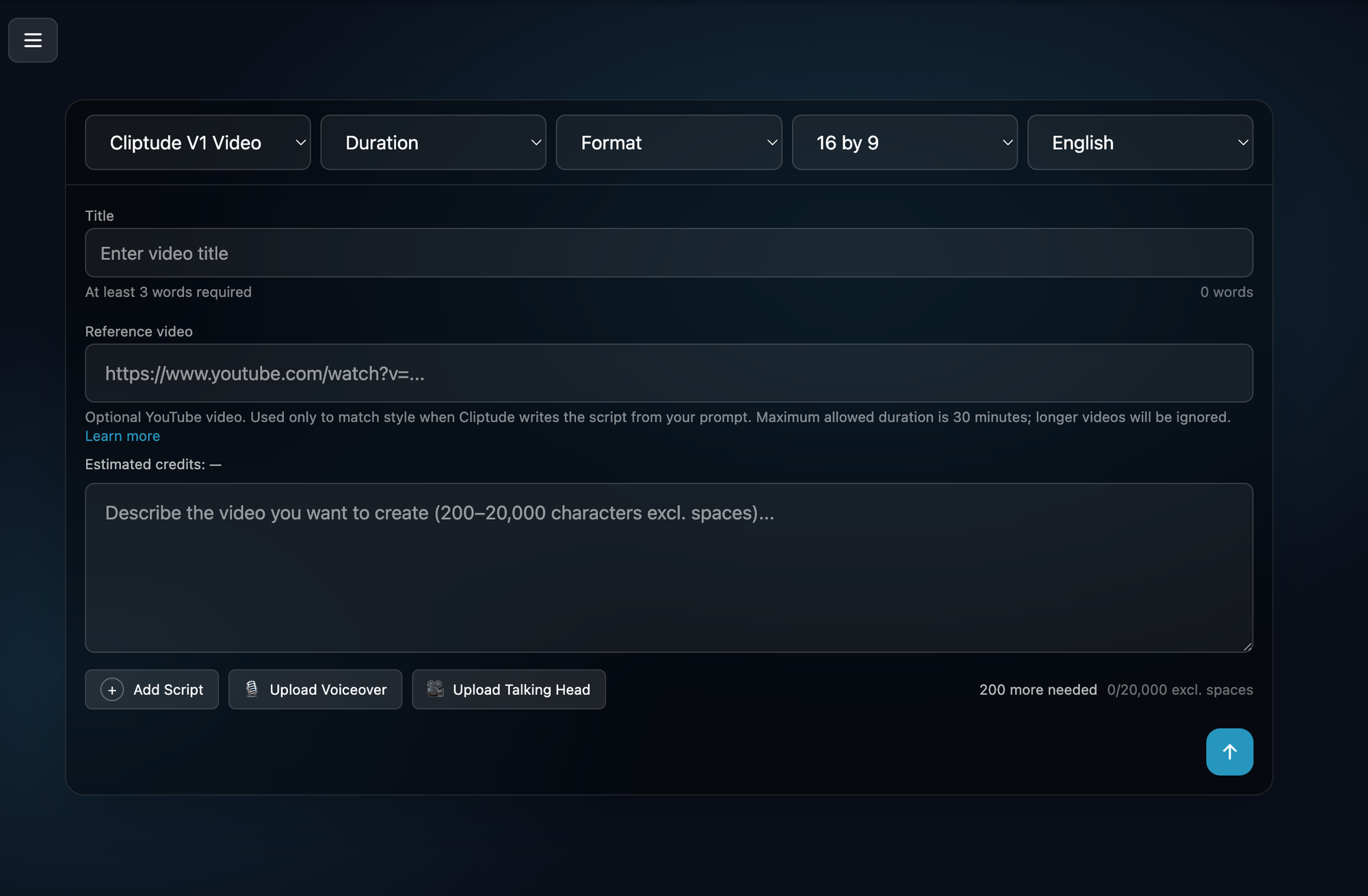
The documentation at cliptude.com/docs explains how the pipeline works in detail. The platform runs a chain of AI models: one for scripting, one for voiceover synthesis, one for footage matching, and one for final assembly. You get the full video as a download, plus the audio, video, and SRT subtitle files as separate stems if you want to do any post-editing yourself.
Billing is credit-based at roughly 55 credits per minute of output video, and you get a cost estimate before rendering starts. That's a useful detail because there are no surprises on your invoice.
For creators who want to post more often without burning out, or who want to test a new niche before investing hours of editing time, this kind of tool makes a real difference. You can validate a concept with an AI-produced video, see if it gets traction, and then decide if it's worth producing a more polished version. It changes the economics of content experimentation.
Advanced growth: how to make your YouTube video go viral in 2026
Viral isn't magic. Most videos that blow up do so because they picked the right topic, packaged it well, and published at the right moment. The algorithm doesn't reward luck; it rewards signals. And there are a few specific strategies that generate those signals faster than anything else.
The Short-to-Long strategy
YouTube Shorts are the fastest way to build top-of-funnel awareness without spending money. The play here isn't to treat Shorts as a separate content line; it's to use them as trailers for your long-form videos.
Take the most interesting 30 to 60 seconds of a long video, cut it as a Short, and end with a clear reason to watch the full version. A Short that drives 10,000 views can push several hundred people to your main video in the first 48 hours. That's exactly the window where the algorithm decides whether to recommend it widely.
SEO vs. the recommendation feed
These are two different games and most creators only play one. Search engine optimization (SEO) on YouTube means your video shows up when someone types a query into YouTube or Google. The recommendation feed is how YouTube decides what to show to people who weren't searching for you at all.
For SEO, timestamps are one of the most underused tools available. Adding chapters with descriptive titles makes your video eligible for Google Search rich results, where a specific segment of your video can show up as a featured snippet. If someone searches 'how does compound interest work,' Google might surface the 45-second clip from your 12-minute video that explains exactly that.
For the recommendation feed, what matters is click-through rate (CTR) and watch time. Your title and thumbnail drive CTR. Your script and pacing drive watch time. Nailing both in the first 30 seconds of a video is where most channel growth actually happens.
Engagement loops in the first two hours
The algorithm treats comments as a quality signal, especially in the first two hours after posting. Replying to every comment in that window keeps viewers in a conversation, raises the comment count, and tells YouTube the video is generating real interaction.
A lot of successful creators set a two-hour alarm after every upload and spend it in the comments. It sounds simple because it is. It just requires doing it every single time.
Community tab mastery
A lot of creators ignore the Community tab until they have hundreds of thousands of subscribers. That's a mistake. The Community tab shows up in subscribers' feeds between uploads and keeps your channel active even when you're not posting.
Polls work especially well because they take minimal effort from the viewer and generate engagement data you can actually use. Ask 'Which video should I make next?' with two real options. You get comment activity, you get real data on what your audience wants, and you stay visible in the feed without publishing anything new.
What actually separates channels that grow from channels that don't
Consistency in quality beats frequency. Posting twice a week with poorly made videos is worse than posting once a week with a video people actually finish watching. Watch time percentage matters more than view count. A video with 5,000 views and a 65% average view duration will be pushed harder by the algorithm than one with 50,000 views and a 22% drop-off rate.
A lot of you have been sitting on a video idea for weeks or months, waiting to feel ready. The gap between idea and publication is smaller than it's ever been, especially with Kliptory narrowing down the topics worth pursuing and Cliptude handling production. The only thing left to do is start.
The action plan is simple: pick a niche, research one proven topic on Kliptory, write or generate your first script, and publish. Everything else comes from doing that repeatedly.
Once you get your title, just enter it to cliptude.com and what your idea come to life in hours.
Frequently asked questions
How do I make my first YouTube video with no equipment?
Start with your smartphone. Modern phones shoot 4K video, which is better quality than most dedicated cameras from five years ago. A $15 to $30 lapel mic handles audio. Sit near a window for lighting. That setup is genuinely all you need to publish your first video.
How do I make a YouTube video using AI?
Cliptude lets you go from topic to finished video without manual editing. You provide a prompt or a script, and the platform generates the script if needed, sources footage, adds voiceovers, creates motion graphics, and exports the final video. It's a full production pipeline, not just a single AI feature.
What makes a YouTube video go viral?
There's no single formula, but the most repeatable path is picking a topic with proven traction (check the Outlier Score on Kliptory), packaging it with a strong title and thumbnail, and publishing when your audience is most active. The algorithm rewards high CTR and long watch time above everything else.
Does the YouTube algorithm still favor watch time in 2026?
Yes. Watch time and average view duration are still the clearest signals YouTube uses to decide how widely to recommend a video. A video that keeps people watching to the end will consistently outperform one that gets views but loses the audience in the first minute.
How long should a YouTube video be?
Long enough to cover the topic well, short enough that people finish it. For educational content, 8 to 15 minutes tends to hit the sweet spot. For entertainment, shorter is usually better. The right length is whatever lets you maintain a high average view duration for your specific audience.
How do I find good YouTube video ideas?
Kliptory's Outlier Score is one of the best tools for this. It shows you which videos are performing way above a channel's average, which signals that the topic has real demand in the algorithm. Browse channels in your niche, filter for high Outlier Scores, and look for patterns. You can start for free at kliptory.com with no account required.
Is AI-generated content allowed on YouTube?
Yes, with transparency requirements. YouTube's policy requires creators to disclose when AI has been used to generate realistic content, particularly synthetic voices or faces. Cliptude's documentation at cliptude.com/docs covers the platform's position on YouTube's inauthentic content policies and how to stay compliant.