
How to make a YouTube documentary without showing your face

Table of contents
1. Planning your faceless documentary from concept to script
2. Recording narration, sourcing footage, and building your visual layer
3. Using AI to speed up production and scale your documentary channel
You do not need to appear on camera to build a successful YouTube documentary channel. Thousands of creators publish compelling long-form content every week without ever showing their face, and many of them are quietly earning full-time income from it. If you have been wondering how to make a YouTube documentary without showing your face, you are in the right place. This guide walks through the entire process, from picking a topic and writing a script, to sourcing footage, recording narration, and editing a finished video that feels polished and professional. I will also show you how AI tools have changed the game for solo creators who want to produce documentary-quality content without a film crew, a camera operator, or years of editing experience.
Planning your faceless documentary from concept to script
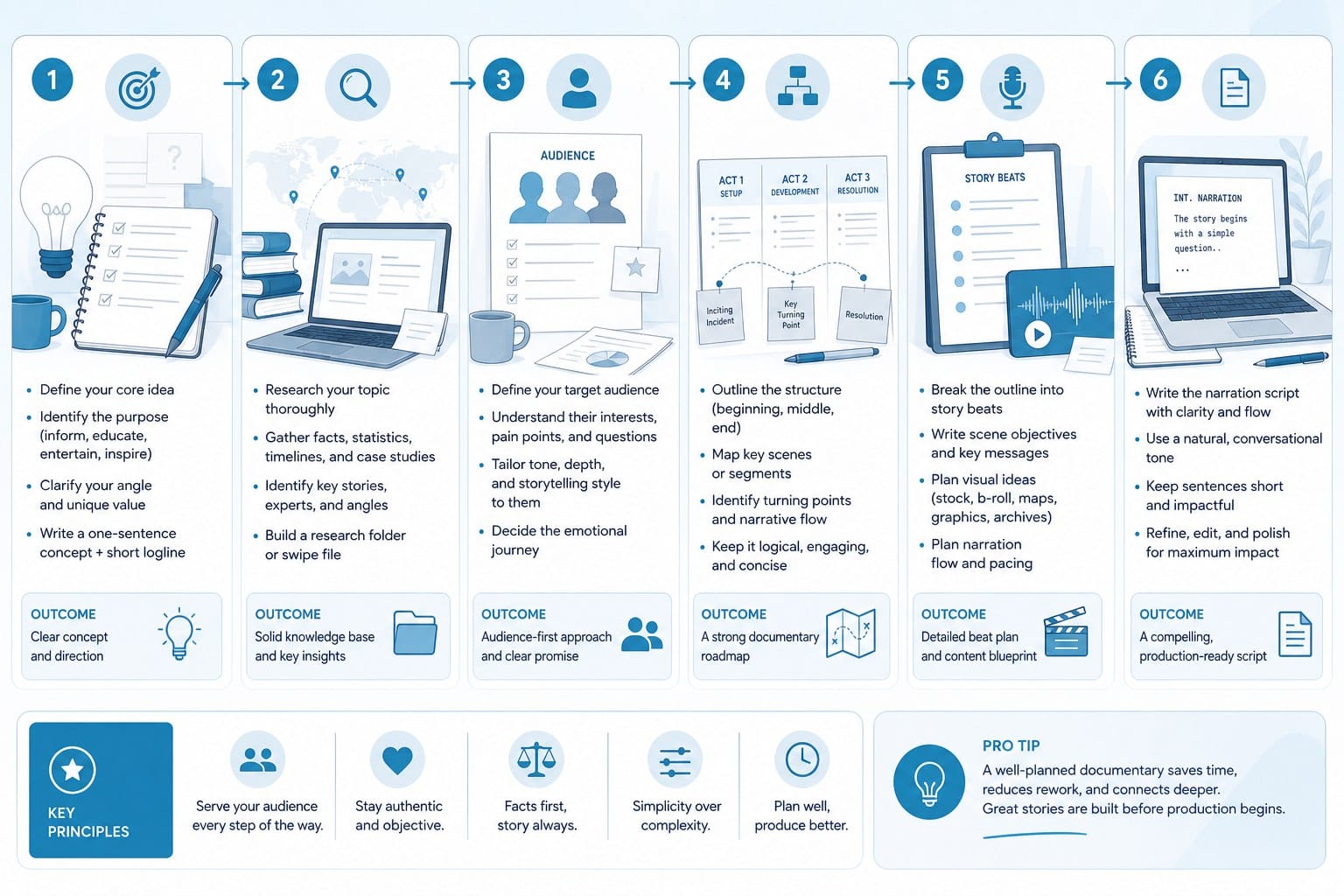
Every good documentary starts with a clear idea. The topic you choose will shape every decision that follows, so it is worth spending real time here before you touch any editing software.
Start by asking yourself what subjects genuinely interest you. Documentaries about true crime, history, science, nature, finance, conspiracy theories, and unsolved mysteries tend to perform well on YouTube because people search for them consistently. You do not need to be a journalist or a filmmaker to cover these topics. You need curiosity, solid research habits, and a clear point of view.
Once you have a topic, narrow it down to a specific angle. A documentary about World War II is too broad. A documentary about the secret network of tunnels soldiers used during the Battle of Stalingrad is specific enough to hold a viewer's attention for twenty minutes or more. Specific angles also help you rank for longer, more targeted search queries, which matters a lot when you are building a faceless channel from scratch.
Researching your topic thoroughly is non-negotiable. Use a mix of sources: academic papers, news archives, books, government records, and reputable websites. Take detailed notes and track where every claim comes from. This matters because your narration will drive the entire video, and you want that narration to be accurate, credible, and engaging.
Writing the script comes next, and this is where most first-time documentary creators get stuck. A documentary script is not the same as a blog post or a news article. It needs to feel like a story. That means it has a beginning that hooks the viewer, a middle that builds tension or reveals information in a logical sequence, and an end that delivers a satisfying conclusion or leaves the viewer thinking.
Here is a simple structure that works well for YouTube documentaries:
Open with a strong hook in the first thirty seconds. This could be a surprising fact, a dramatic question, or a brief preview of the most compelling moment in the video. You are competing with every other video in the YouTube feed, so your opening needs to earn the click.
Move into context. Tell the viewer what they need to know to understand the story. Keep this tight. You do not want to dump five minutes of background information before anything interesting happens.
Build the main narrative in clear chapters or segments. Each segment should answer one key question or reveal one key piece of information. Think of it as giving the viewer a reason to keep watching at the end of every section.
Wrap up with a conclusion that ties the story together. You can include your own analysis, a call to reflect, or a question that opens the door to further research.
Aim for a script that would take between twelve and twenty-five minutes to read aloud at a natural pace. That puts your finished video in the sweet spot for YouTube's algorithm, which tends to favor videos that generate strong watch time.
If writing a full script feels overwhelming, AI platforms can help you get a first draft done quickly. Tools like Cliptude can take a simple prompt or a rough outline and generate a structured documentary script automatically, which you can then edit and refine. This is especially useful when you are covering a topic that requires pulling together a lot of scattered information into a coherent narrative.
Once your script is locked, read it out loud from start to finish. Listen for sentences that feel awkward or too long. Rewrite anything that does not sound like natural speech. Your narrator will be reading these words, and they need to flow smoothly when spoken.
Recording narration, sourcing footage, and building your visual layer
The visual layer of a faceless documentary is what separates a video that feels professional from one that feels like a PowerPoint presentation with a voice playing over it. Getting this right takes some planning, but it is absolutely achievable without a camera or a film crew.
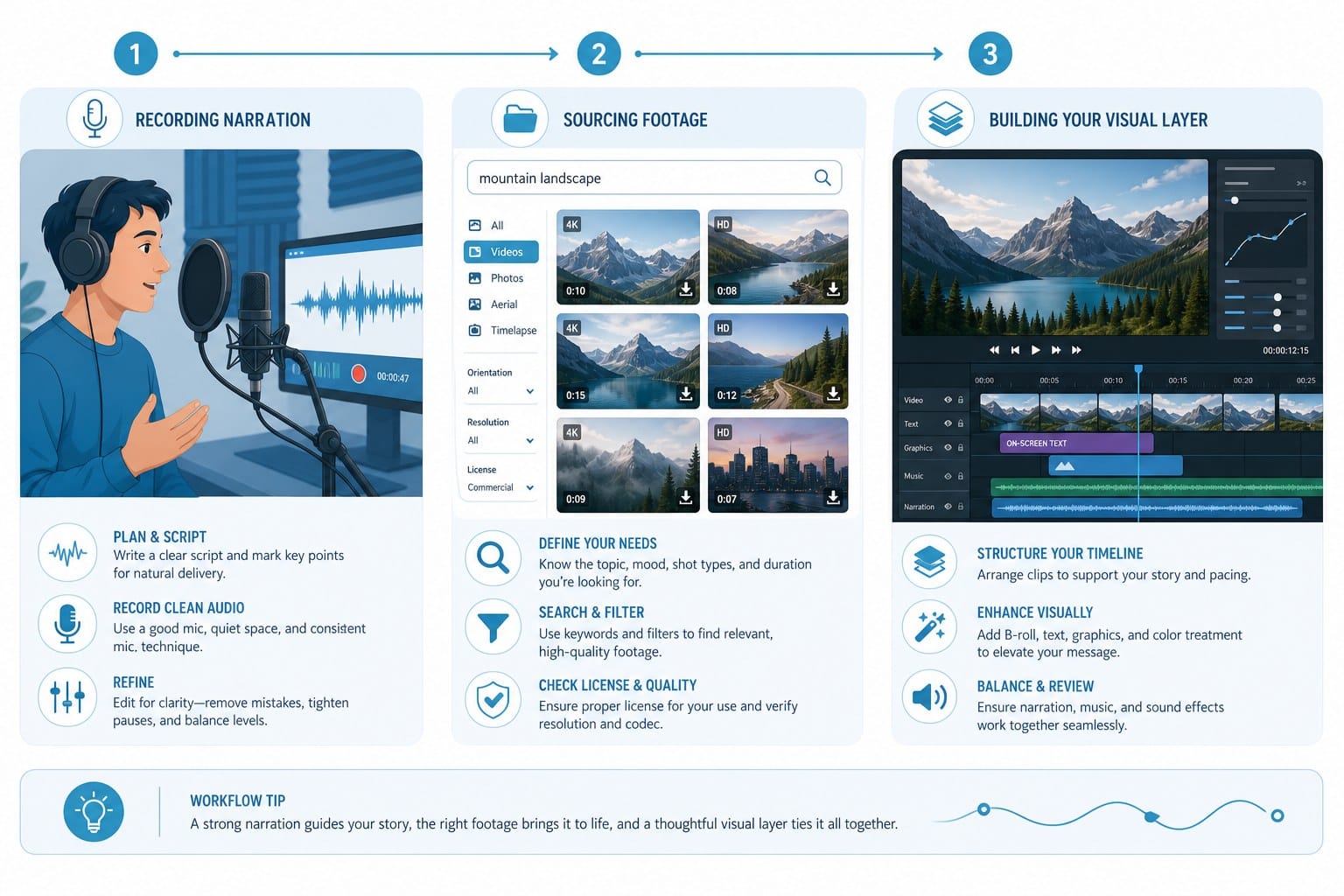
Start with your narration. This is the backbone of the entire video. You have two main options: record your own voice, or use an AI voice generator.
If you decide to record your own voice, you do not need a professional studio. A quiet room, a decent USB microphone, and free software like Audacity are enough to produce clean audio. Hang a blanket behind you if your room has an echo. Speak slowly and clearly, and record in short segments so mistakes are easy to fix. Good narration sounds conversational, not like someone reading from a teleprompter.
If you prefer not to use your own voice, AI voice tools have improved dramatically. Many creators use them to produce narration that sounds natural and consistent across videos. Some platforms, including Cliptude, generate AI voiceovers as part of the video production process, which saves a significant amount of time if you are producing multiple videos per month.
Once your narration is recorded, you need footage to fill the screen. This is the part that trips up most people who are learning how to make a YouTube documentary without showing their face, because they assume they need original video clips.
You do not. There is a large ecosystem of royalty-free and creative commons footage available online. Sites like Pexels, Pixabay, and the Internet Archive offer free video clips that you can use legally in YouTube videos. NASA and various government agencies also publish footage in the public domain that works well for science and history documentaries.
For historical documentaries, you can often build your entire visual layer from old photographs, newspaper clippings, maps, and archival footage. Adding slow pans and zooms to still images, a technique sometimes called the Ken Burns effect, makes static images feel dynamic and cinematic. Most video editing software includes a version of this effect.
Motion graphics are another strong option. Animated text, charts, maps, timelines, and data visualizations help explain complex information clearly and keep the viewer engaged. If you are not a motion graphics designer, you can use templates in tools like Adobe After Effects or CapCut, or let an AI platform generate graphics automatically based on your script.
Screen recordings work well for tech-focused documentaries or explainer content. If your documentary involves showing how something works on a computer or phone, recording your screen is a clean, simple solution that requires no camera at all.
For creators who want a more stylized look, whiteboard or stickman animation formats are worth exploring. These formats work especially well for educational content, and they give your channel a distinct visual identity that viewers recognize immediately. Cliptude supports multiple animation styles, so you can produce this kind of content directly from a script without hiring an animator.
When you are assembling your footage, think about pacing. The visual layer should change every three to five seconds in most cases. If a single clip sits on screen for too long without movement, viewers start to disengage. Cut between clips, add text overlays, insert maps or graphics, and use b-roll to break up any long sections of talking.
Background music is the final piece of the audio layer. Choose music that fits the tone of your documentary without overpowering the narration. Sad and tense topics call for slower, more atmospheric tracks. Uplifting or educational topics work better with lighter instrumental music. Sites like YouTube Audio Library and Free Music Archive offer tracks you can use without worrying about copyright claims. Make sure to check the license for each track before using it.
Color grading your footage is an optional step that makes a real difference in how professional the final video looks. Most editing software includes basic color correction tools. You can also apply a LUT, which is a preset color profile, to give your entire video a consistent visual style. Many free LUTs are available online for software like DaVinci Resolve, which is free to download and widely used by indie documentary makers.
Thumbnails deserve their own mention here. A great thumbnail is the single most important factor in whether someone clicks your video. For documentary content, bold typography, high-contrast images, and a clear subject work best. If you want to optimize your thumbnails systematically, reading up on tools and strategies for thumbnail design can make a measurable difference in your click-through rate. Resources like this guide on clickbait thumbnail generator: create high-CTR YouTube thumbnails automatically walk through that process in detail, and this one on how to use a YouTube thumbnail text generator effectively covers the text side of thumbnail design specifically.
Using AI to speed up production and scale your documentary channel
Producing one documentary-length video every month or two is manageable for most solo creators. But if you want to grow a YouTube channel into a reliable income source, you eventually need to increase your output without burning out or spending more money than you are making.
This is where AI-powered video production tools change the equation. I want to be direct about what these tools can and cannot do, because there is a lot of hype in this space and it is easy to have unrealistic expectations.
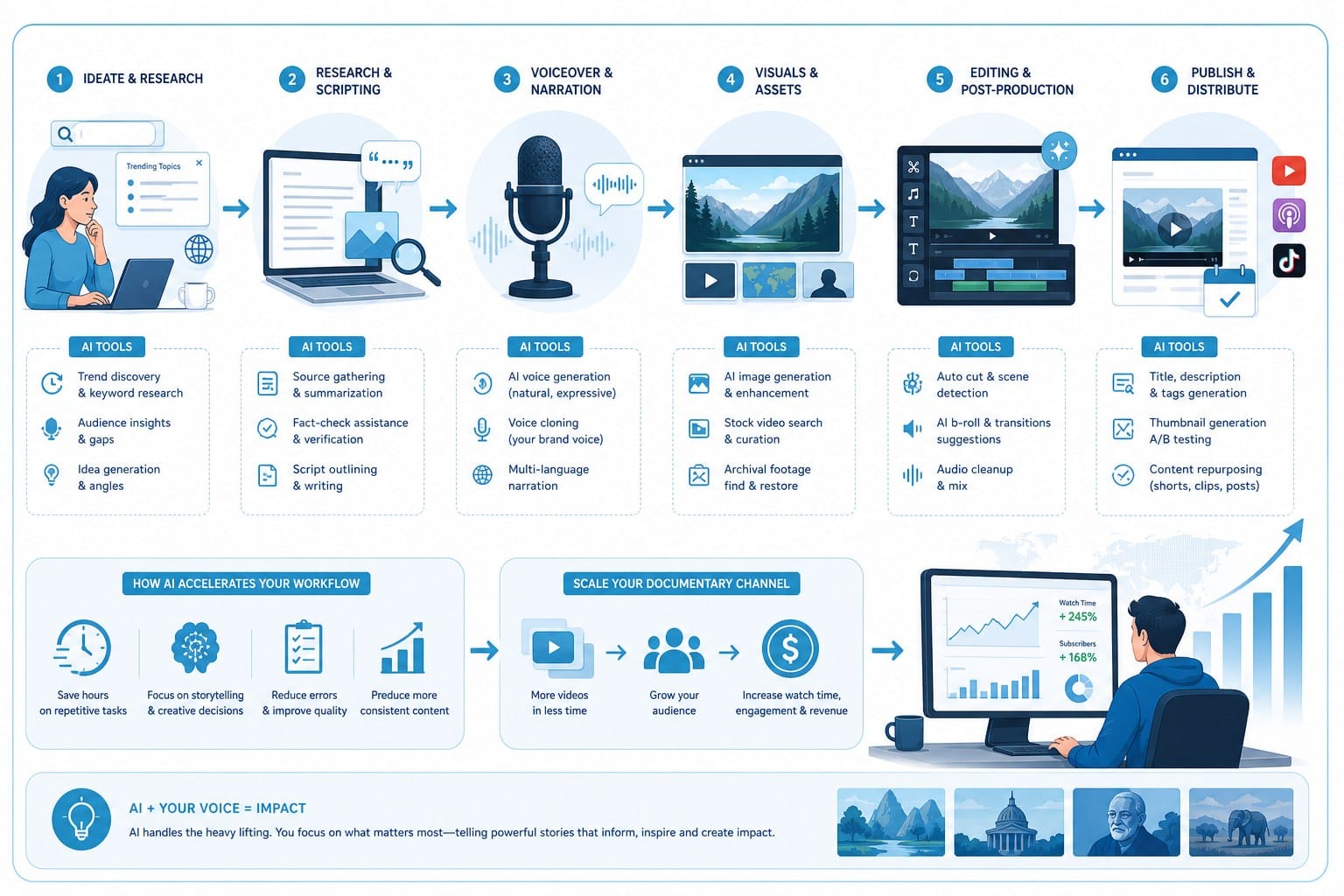
AI tools are genuinely excellent at several stages of the documentary production process. They can research topics and summarize information from large amounts of text. They can generate structured scripts based on a prompt or an outline. They can match script segments to relevant footage automatically. They can generate voiceovers, motion graphics, and subtitles without manual input. And they can assemble a rough cut that you can review and refine.
What AI tools are not going to do is replace your editorial judgment. You still need to decide what story to tell, what angle to take, and what makes the content worth watching. The creative direction comes from you. The AI handles the production labor.
Cliptude is built specifically for this kind of workflow. You start with a prompt or a script, and the platform automatically researches the topic, generates a narration script, sources relevant footage, creates motion graphics, adds a voiceover, and produces an edited video ready for review. This covers the parts of documentary production that typically take the most time: research, writing, and editing.
For creators building faceless channels, this kind of automation is significant. It means you can produce more videos per month without hiring a team, and you can maintain consistent quality even when you are working on multiple projects at once.
Usage-based pricing, which is how Cliptude structures its credits, also makes the cost predictable. You pay for what you produce rather than committing to a flat monthly fee whether you use the platform or not. For solo creators who are still finding their footing, that kind of flexibility matters.
That said, I would not recommend relying entirely on AI output without reviewing and editing the finished video. Watch the full cut before you publish. Check that the footage matches what the narration is describing. Make sure the pacing feels right. Add or remove clips where needed. Fix any awkward transitions. The goal is to use AI to handle the heavy lifting so you can focus your time on the decisions that actually require a human mind.
One area where AI tools are particularly useful for faceless documentary channels is multilingual content. If you want to reach audiences in other languages without hiring translators or voice actors, AI platforms can generate scripts and voiceovers in languages other than English. For example, creators targeting South Asian audiences can produce content in Urdu or Hindi without speaking those languages fluently. There is a detailed breakdown of how this works for YouTube content in this article on Urdu AI video generator for professional YouTube content, which gives you a sense of what is possible.
Beyond production tools, growing a faceless documentary channel requires the same fundamentals as any YouTube channel. Consistency matters. Publishing on a regular schedule tells the algorithm that your channel is active and signals to your audience that there is more content coming. Even one video per week is enough to build meaningful momentum over six to twelve months.
Search-optimized titles and descriptions help people find your videos. Research what people are actually searching for in your niche using YouTube's search suggestions, Google Trends, and tools like TubeBuddy or VidIQ. Write titles that match real search queries without being misleading. Your description should summarize the video clearly and include relevant terms naturally.
Engagement signals matter to the YouTube algorithm. Encourage viewers to like, comment, and subscribe at natural points in your video, not just at the end. Ask a question at the close of the video that invites a response. Respond to comments in the first few hours after publishing, because early engagement signals help the algorithm decide whether to recommend your video more broadly.
Chapter markers, also called timestamps, improve the viewer experience for long-form content. They let viewers jump to the section they are most interested in, which can actually increase overall watch time by making the video feel more accessible. Add them to every video over ten minutes.
Monetization for faceless documentary channels comes from several directions. YouTube's Partner Program is the most common starting point, and it requires one thousand subscribers and four thousand watch hours in the past twelve months. Once you qualify, ad revenue scales with your views. Documentaries with longer runtimes tend to generate more ad revenue per video because they carry more mid-roll ad slots.
Sponsorships are the other major income source for documentary creators. Brands in adjacent niches, such as book subscription services, online learning platforms, or VPN providers, frequently sponsor documentary and educational channels. A channel with a focused audience and consistent publishing is attractive to sponsors even if the total subscriber count is relatively modest.
Membership programs, affiliate partnerships, and selling your own digital products are additional options that many creators add once their channel has a loyal audience.
The honest answer to how long it takes to make this work is: it depends on the quality of your content, the size of the niche you choose, and how consistently you publish. Most channels that succeed do so after twelve to eighteen months of regular output. The creators who give up before that window often do so because production felt too labor-intensive to sustain. Reducing that labor through AI tools is one of the most practical ways to stay in the game long enough to see results.
If you are serious about learning how to make a YouTube documentary without showing your face and building it into something sustainable, the combination of solid storytelling, smart footage sourcing, and AI-assisted production is the most efficient path available right now. Start with a topic you genuinely care about, write a script that tells a real story, and use every tool at your disposal to produce something worth watching.
Ready to take the next step?
Ready to produce your first faceless documentary without the overwhelm? Cliptude handles the research, scripting, footage sourcing, motion graphics, and editing so you can focus on the story. Visit https://cliptude.com to start your first project today.



