
How to create YouTube documentaries with AI in minutes

Table of contents
1. Why YouTube documentaries are one of the best content formats right now
2. How the AI documentary creation process actually works
3. Tips for making AI-generated documentaries that people actually watch
Making YouTube documentaries used to take weeks of work. You had to research a topic, write a script, hunt down footage, record a voiceover, edit everything together, and then do it all over again for the next video. For most solo creators, that process is exhausting. It is also expensive when you factor in stock footage licenses, editing software, and the hours you pour into every single project. But things have changed. AI-powered video tools now let you go from a simple idea to a finished, polished documentary in a fraction of the time it used to take. In this article, I will walk you through exactly how that works, what the process looks like step by step, and how a platform like Cliptude makes the whole thing manageable even if you have never edited a video in your life.
Why YouTube documentaries are one of the best content formats right now
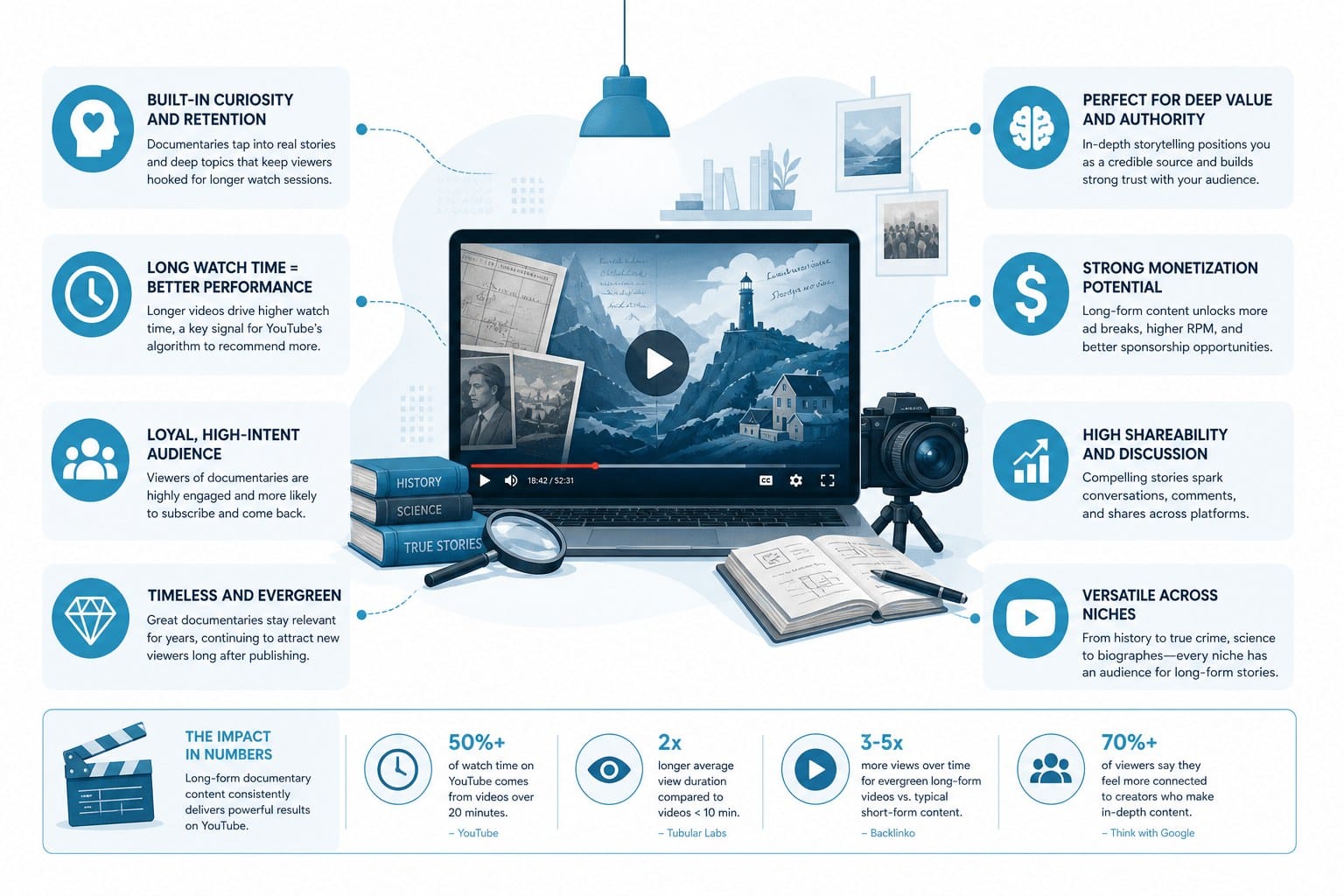
YouTube documentaries have been growing steadily in popularity for years. People are not just going to YouTube to watch funny clips or cooking tutorials anymore. They are going there to learn, to be surprised, and to spend 20 to 40 minutes diving deep into a topic they care about. True crime, history, science, unsolved mysteries, space exploration, business scandals, urban legends, and environmental stories are all performing well. Audiences for this kind of content are engaged, loyal, and they watch for a long time. That watch time matters a lot for monetization.
For faceless YouTube channel creators specifically, documentaries are an especially smart format. You do not need to appear on camera. You do not need a studio. You just need a compelling topic, solid narration, and visuals that keep viewers watching. When those three things come together, a documentary-style video can pull serious numbers even on a brand new channel.
The challenge has always been production. A proper documentary requires research, a structured script with a clear arc, footage that matches what is being said at every moment, transitions, music, and clean audio. Doing all of that manually takes real skill and real time. A solo creator doing this from scratch might spend 15 to 30 hours on a single video. That pace is hard to sustain, especially when you are trying to build a channel that posts consistently.
This is exactly where AI changes the game. Platforms built for video generation can now handle most of the heavy lifting automatically. Research, scripting, footage sourcing, motion graphics, editing, and final export can all happen in one pipeline. The result is a video that looks like it took a full production team to make, but actually came together in under an hour.
There is also a monetization angle worth thinking about. YouTube's Partner Program requires 1,000 subscribers and 4,000 watch hours before you can start earning ad revenue. Long-form documentary content builds watch hours faster than short clips because people stay longer. If you can produce quality YouTube documentaries consistently, you can hit those thresholds faster and start earning sooner. Many creators are also licensing their AI-generated videos for commercial use, selling content to brands, or repurposing it across platforms.
The bottom line is that documentary-style content is high value, highly watchable, and increasingly easy to produce with the right tools. You do not need a camera crew. You do not need a film school degree. You need a good topic and a platform that can turn it into a finished video.
How the AI documentary creation process actually works
A lot of people are skeptical when they hear that AI can create a documentary from a simple prompt. That skepticism is fair. There is a lot of overpromising in the AI space right now. So let me break down what a real AI video generation workflow actually looks like when you use a platform like Cliptude.
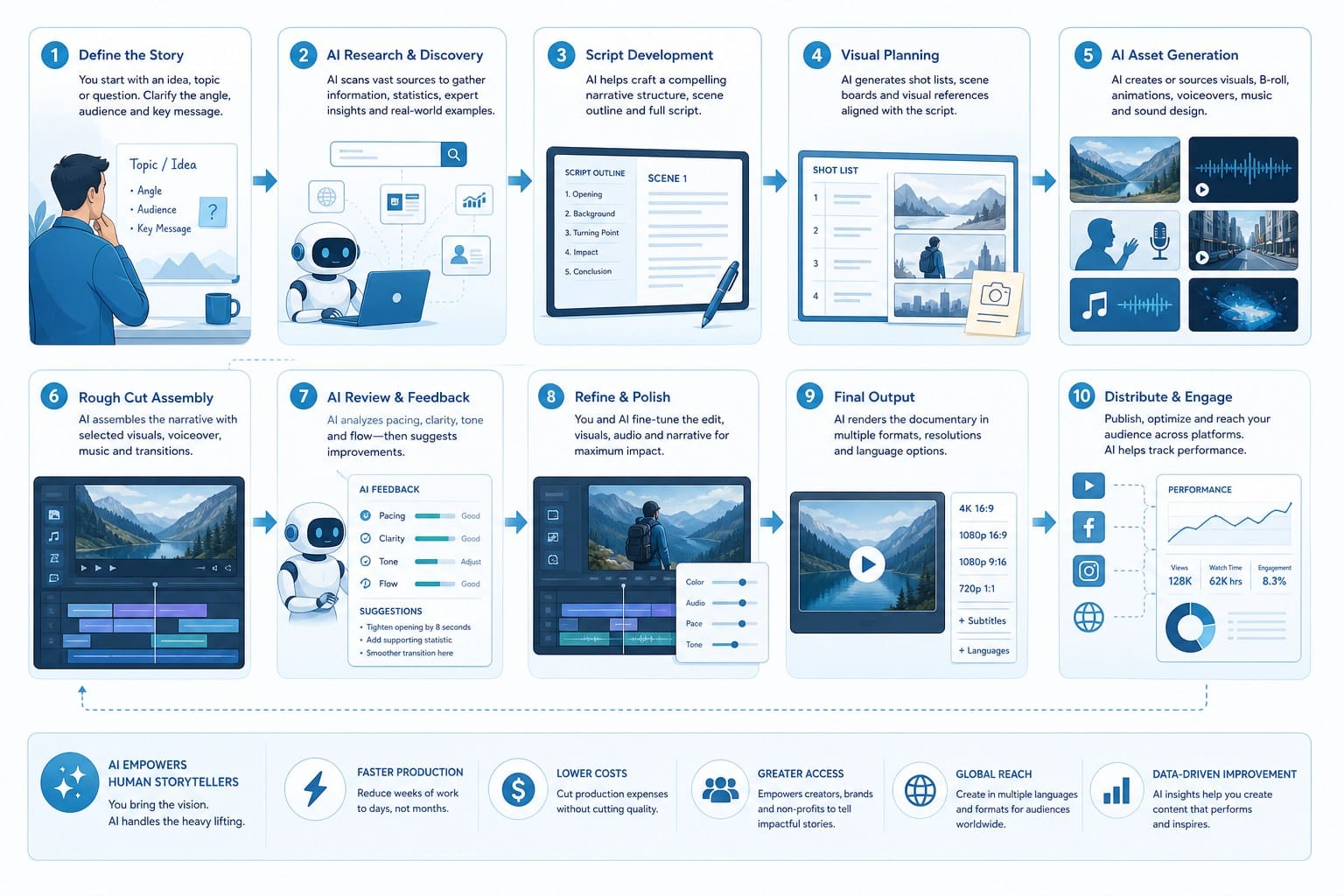
Step one is picking your topic. This sounds simple but it is actually one of the most important decisions you will make. The best YouTube documentaries are built around topics that people are already curious about but that have not been fully explored in video format. Think about unsolved historical events, deep dives into niche industries, the rise and fall of a company, or explainer-style content about something most people do not understand. You can also take a trending news story and give it documentary treatment with context, background, and analysis.
Once you have your topic, you enter it as a prompt or a rough script into the platform. Cliptude takes that input and automatically researches the subject, pulling together relevant information to build out a structured script. This is not just a summary. The AI builds a narrative with a beginning, middle, and end. It considers pacing, hooks, transitions between sections, and how to keep the viewer watching from one segment to the next. A good documentary script has a clear question it is trying to answer, and the narration guides the viewer toward that answer in a satisfying way.
Step two is footage sourcing. This is where a lot of manual workflows fall apart. Finding the right video clips to match every line of narration is time-consuming and legally complicated. Stock footage libraries are expensive and hard to search efficiently. Cliptude automatically sources footage that matches the script. The platform pulls relevant visuals for each section and syncs them to the narration. If a section of the script is talking about a historical event, the footage will reflect that. If it is covering a scientific concept, you might see relevant motion graphics or animation to illustrate the idea.
Step three is motion graphics and animation. This is a feature that separates truly polished YouTube documentaries from flat, boring slideshows. Motion graphics add professionalism. They highlight key statistics, show timelines, visualize data, and keep the viewer visually engaged even during sections where raw footage might be limited. Cliptude generates these automatically as part of the editing process, which means you do not need to know how to use After Effects or any other motion design tool.
Step four is the full edit. The platform assembles everything, adds music, syncs audio to visuals, and produces a finished video file. The output is something you can upload directly to YouTube or make minor adjustments to before publishing.
One thing I want to be clear about is that this process is not magic and it is not zero-effort. You still need to review the output, make sure the narrative makes sense, and check that the final video meets your standards. AI speeds up the production enormously, but the creative judgment still comes from you. The best results come when you treat the AI-generated draft as a starting point and refine it from there.
For creators who are already comfortable writing scripts and just want help with footage and editing, you can also paste in your own script and let the platform handle everything from that point forward. This is a great option if you have a specific angle on a topic and want to maintain full control over the narrative voice.
If you want to see how this kind of AI workflow applies to other formats and languages, this article on how to create Urdu YouTube videos with AI gives a useful look at how the same technology adapts across different production needs.
The credit-based pricing model that Cliptude uses is also worth mentioning here. Instead of paying a flat monthly fee whether you use the platform or not, you pay for what you actually produce. For solo creators and small teams that might have active production months and slower months, this kind of usage-based model is practical. You are not locked into paying for capacity you are not using.
Here is a quick breakdown of the types of content you can produce with this kind of workflow. Long-form documentary videos in the 15 to 40 minute range are the obvious use case for YouTube. But the same pipeline works for YouTube Shorts if you want to repurpose clips from a longer video. It also works for educational animations, explainer videos in whiteboard or stickman style, and listicle-format content. All of these formats work well on YouTube and can be adapted for TikTok and Instagram Reels with minor adjustments.
The key takeaway from this step-by-step breakdown is that AI does not replace your creative input. It replaces the tedious, time-consuming technical work that slows you down. That shift is what makes it possible to produce YouTube documentaries at a pace that was simply not realistic before.
Tips for making AI-generated documentaries that people actually watch
Producing a video quickly with AI is only half the battle. The other half is making sure that video earns real watch time when it goes live. YouTube's algorithm rewards videos that hold attention. It does not matter how fast you produced something if viewers are clicking away after 30 seconds. Here are the practices that make the difference between a video that performs and one that gets ignored.
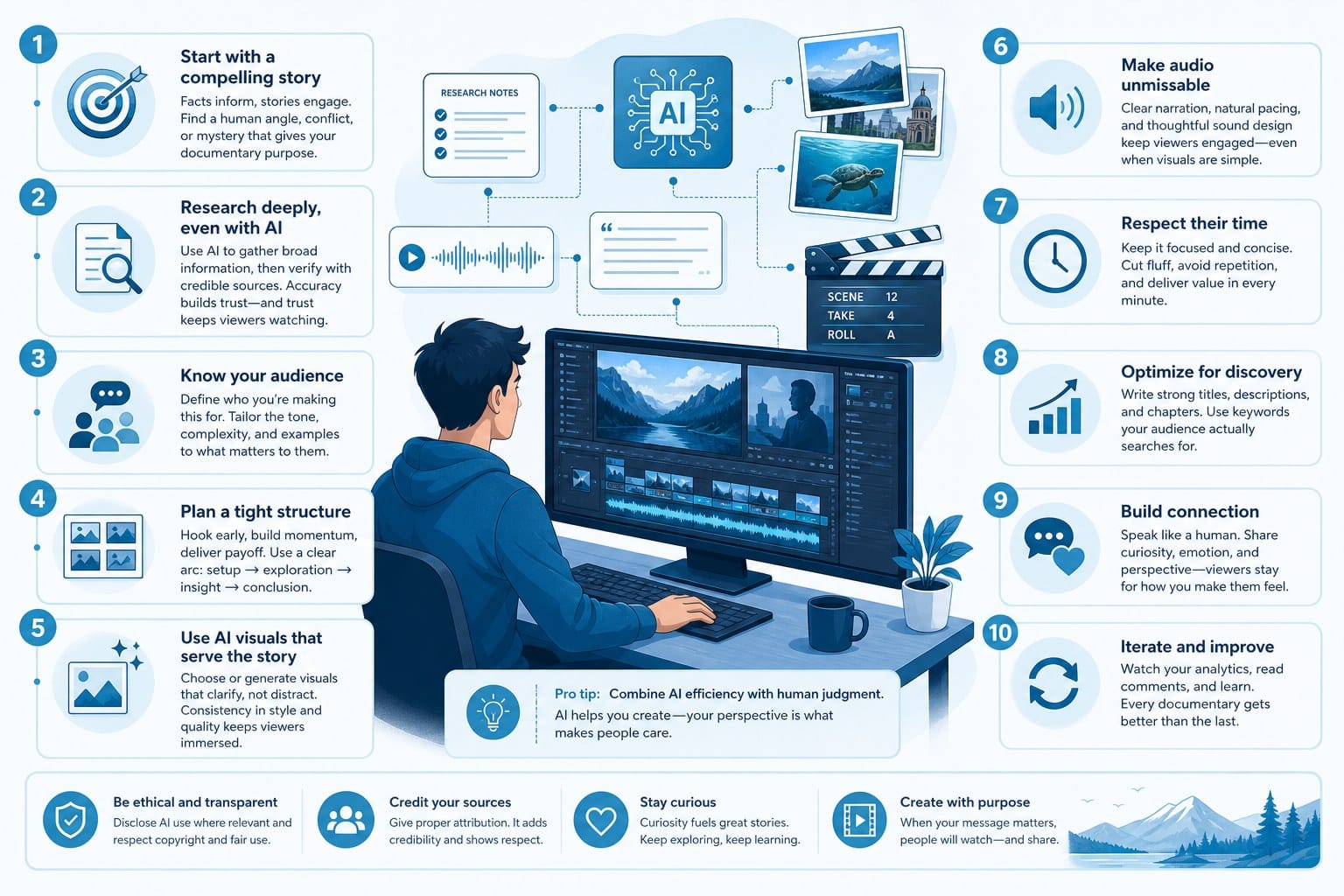
Start with a strong hook. The first 30 to 60 seconds of any YouTube documentary are the most important. You need to give viewers a reason to stay. The most effective hooks present a mystery, a surprising fact, or a question that feels urgent. Something like opening with a shocking statistic, a counterintuitive claim, or a specific moment in history that most people do not know about. When you write your initial prompt or script for an AI platform, front-load the most compelling detail you have. The AI will build the opening from your input, so if your prompt is vague, the hook will be weak.
Choose specific, searchable topics. Broad topics are harder to rank for and harder to watch. A documentary called something like "The history of food" is not very compelling. A documentary about why one specific agricultural collapse changed the course of a war, or how a small town in the Midwest became the center of a massive fraud case, is much more watchable. Specific topics also tend to have a more natural narrative arc, which makes them easier to script and easier to follow.
Use chapter markers. YouTube allows you to add chapter markers to your videos by including timestamps in your description. Documentaries with chapters feel more intentional and professional. Viewers can navigate to the sections that interest them most, which can actually increase overall watch time because people come back to rewatch specific segments. When you are reviewing your AI-generated script, look for natural breaking points where one chapter ends and another begins. These usually correspond to shifts in the narrative, like moving from background context to the main event to the aftermath.
Pay attention to narration tone. The voiceover in a documentary sets the emotional tone of the entire video. A flat, monotone narration will lose viewers quickly even if the footage is great. When working with AI-generated narration, listen to the output and ask whether it sounds like something a real person would say. The best documentary narration has rhythm. Some sentences are short and punchy. Others are longer and more detailed. If the AI output sounds robotic or overly formal, adjust the script to include more varied sentence length and natural phrasing before regenerating.
Match the visual pacing to the script. One of the things that separates good YouTube documentaries from mediocre ones is how well the visuals respond to what is being said. During moments of tension or build-up, the editing should feel faster. During explanatory sections, it can slow down and let visuals breathe. When you review an AI-generated video, check whether the footage cuts feel appropriate to the emotional pacing of the narration. Most platforms give you some ability to adjust timing, and small changes here can make a big difference.
Build a posting schedule you can actually maintain. One of the biggest advantages of using AI to produce content is the ability to post consistently. YouTube's algorithm heavily favors channels that publish regularly. A channel that posts one documentary per week will almost always outperform a channel that posts one documentary per month, even if the monthly video is technically better. The goal is to find the pace you can sustain without sacrificing quality. For most solo creators using an AI workflow, one video per week is achievable. For some, two per week is realistic. Start conservatively and scale up as you get comfortable with the process.
Repurpose your content. A 20-minute YouTube documentary contains a lot of usable material. You can pull a two-minute highlight and post it as a YouTube Short. You can extract the most surprising fact or moment from the video and turn it into a 30-second TikTok or Instagram Reel. This repurposing strategy multiplies your output without multiplying your workload. You produce one documentary and get five to ten pieces of content from it. This approach is something more creators are leaning into, and AI makes it faster because you can generate short-form clips from the same script that produced your long-form video.
If you are thinking about scaling this kind of content production beyond just one channel, this guide on how influencers and content creators can scale video output with AI covers the bigger picture strategy in more detail.
Think carefully about thumbnail and title. This is not something AI handles automatically in most workflows, and it matters enormously. Your thumbnail and title are what get someone to click in the first place. For YouTube documentaries, thumbnails that feature text overlays, dramatic imagery, and a clear sense of tension or mystery tend to perform well. Your title should be specific, searchable, and give a strong sense of what the viewer is about to learn. Spend real time on this part even if everything else in your workflow is automated.
Do not skip the final review step. AI-generated videos are good, and they are getting better all the time. But they are not perfect. Watch the full output before you publish. Check for any claims that seem off, any footage that feels out of place, any transitions that are jarring, or any section where the pacing drags. A quick 30-minute review pass can catch the issues that would hurt your viewer retention if left in.
Finally, think about the commercial side from day one. If you are building a faceless channel focused on YouTube documentaries, you should know what your monetization path looks like before you invest heavily in production. Ad revenue is the most common route, but it requires you to hit YouTube's monetization thresholds first. Sponsorships, affiliate links in descriptions, and licensing your videos for commercial use are all options that can generate revenue earlier in your channel's life. Cliptude includes full commercial rights with your generated content, which means you own what you produce and can use it however makes sense for your business model.
Making high-quality YouTube documentaries with AI is genuinely possible right now. The tools exist, the process is learnable, and the opportunity for creators who act on it early is real. The creators who are building consistent, polished faceless channels today are doing it with AI workflows, and they are growing faster than those who are still doing everything manually.
Ready to take the next step?
If you are ready to start producing YouTube documentaries without a camera, a crew, or a background in video editing, Cliptude gives you everything you need in one place. From research and scripting to footage sourcing, motion graphics, and final export, the platform handles the technical work so you can focus on finding great topics and building an audience. Visit Cliptude to see how it works and start creating.



