
YouTube description generator: a practical guide

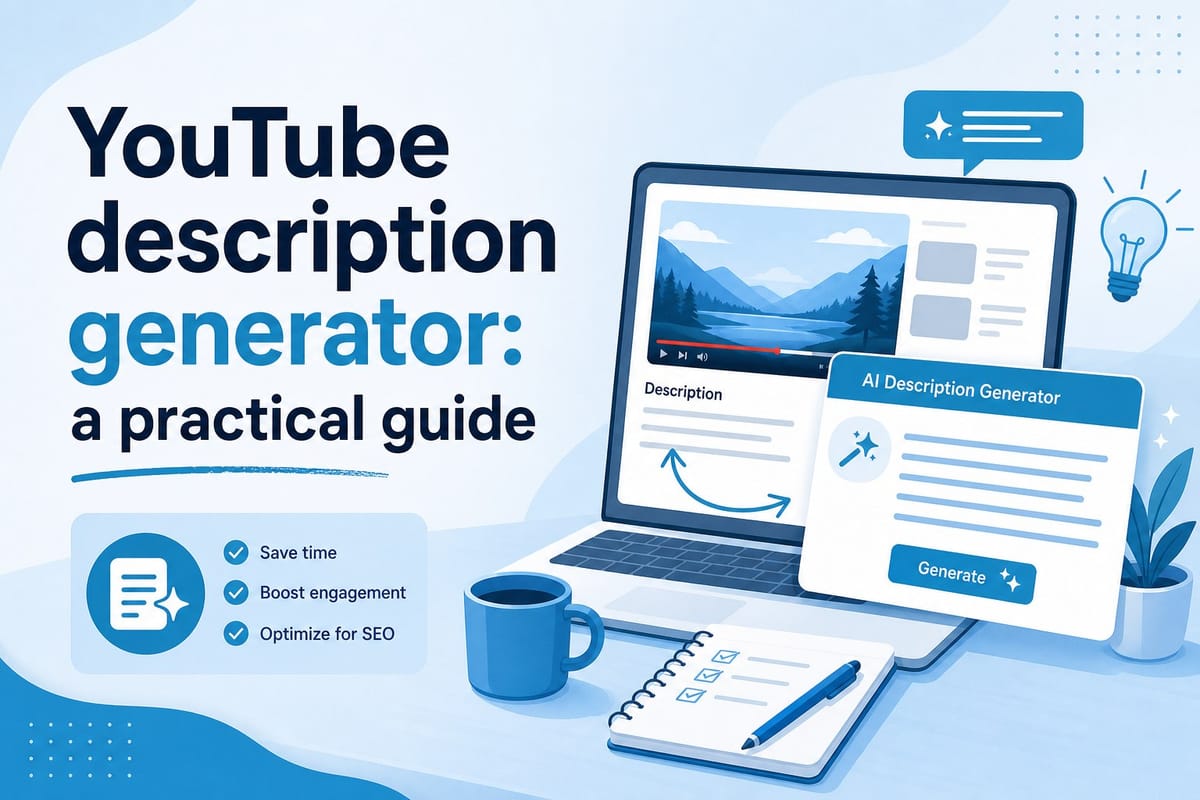
Table of contents
1. What a YouTube description generator actually does
2. How to use a YouTube description generator for the best results
3. Fitting description generation into a full video production workflow
If you have ever uploaded a YouTube video and stared at the description box wondering what to type, you are not alone. Most creators spend more time editing their video than writing the text that goes beneath it. That is a problem because the description is one of the most important places YouTube looks when deciding how to rank and recommend your content. A youtube description generator can take that blank-page stress away and help you write descriptions that actually work for search. In this guide, I will walk you through what these tools do, how to use them well, and how to fit them into a broader content workflow so your channel grows faster with less effort.
What a YouTube description generator actually does
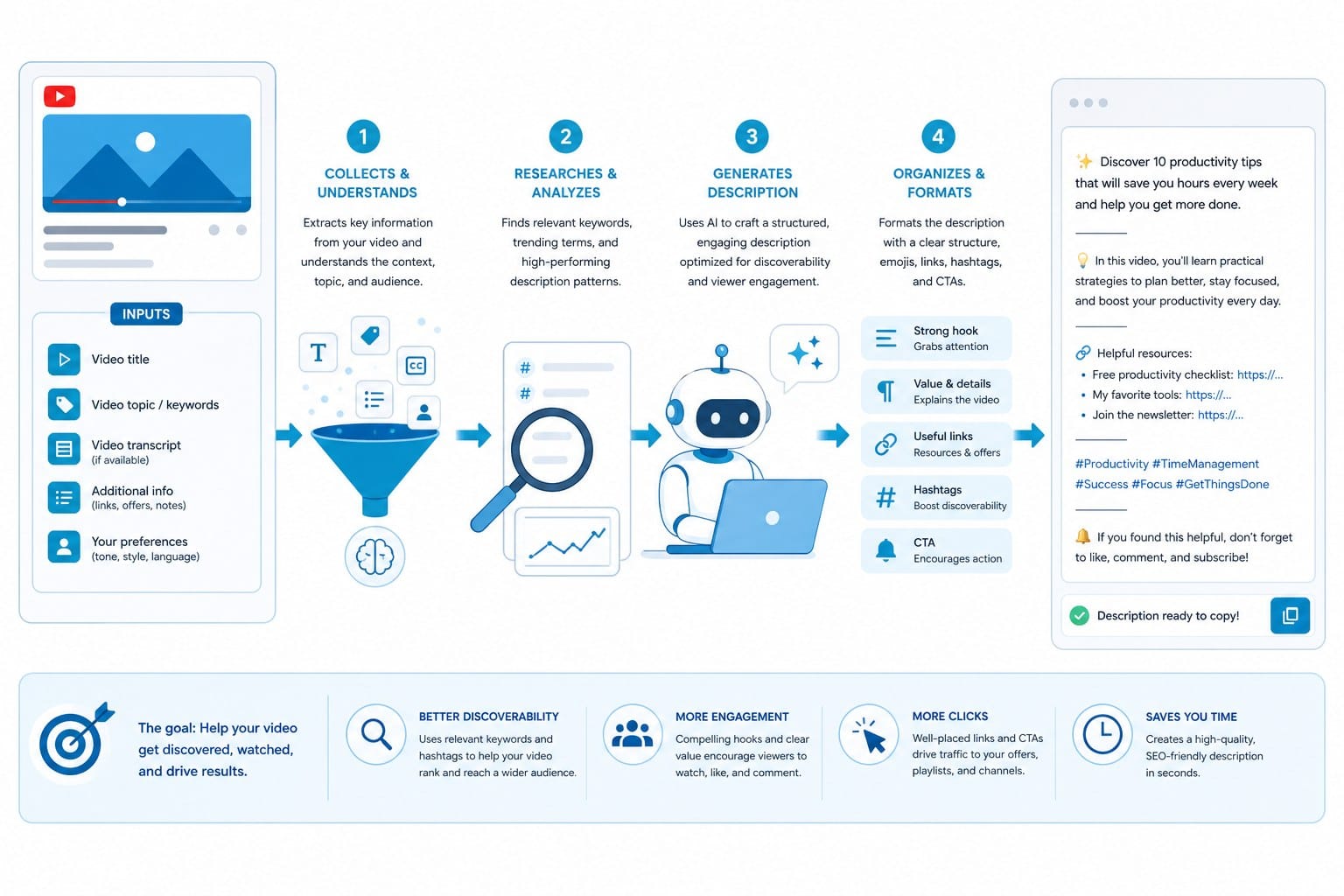
A YouTube description generator is a tool, usually powered by AI, that takes information about your video and turns it into a ready-to-use description. You give it inputs like your video title, topic, target keyword, or a short summary of what the video covers. The tool then produces a draft you can copy, edit, and publish.
The idea sounds simple, but the output quality depends heavily on what the tool was built to do. Some generators are basic templates that swap your keyword into a pre-written block of text. Others use large language models that understand context, tone, and structure. The better ones can write a hook for the first two lines, add relevant keywords naturally, include timestamps if you give them, and finish with a call to action.
Let me break down the three parts every strong YouTube description should have.
The first two lines matter the most. YouTube shows roughly 125 characters before the viewer has to click 'show more.' Those two lines are your pitch. They need to tell the viewer what the video covers and why they should keep watching. A good generator will front-load the most useful information here instead of wasting space on generic filler.
The middle section is where keywords and context live. This is where you can go deeper. You might summarize the main points of the video, mention who the video is for, or list resources you talked about. Generators that are trained on YouTube content tend to understand that this section should feel natural, not like a keyword dump. Stuffing 'best travel vlog tips 2024' into a sentence five times in a row will not help your ranking and may actually hurt it.
The final section handles housekeeping. Timestamps, links to related videos, social media handles, and a subscribe reminder all belong here. Some generators will prompt you for this information and format it properly. Others leave it out entirely and expect you to add it manually.
So when you compare description generators, look for those three layers. A tool that only gives you a keyword-rich paragraph without a hook or a call to action is doing about a third of the job.
Why does the description matter for search? YouTube is owned by Google, and both platforms use the text around your video to understand what it covers. Your title, tags, and description all feed into that understanding. A well-written description that naturally includes your target keyword and related terms gives the algorithm more confidence that your video matches what a searcher is looking for. Closed captions also play a role, but the description is the one piece of text you have complete control over at upload time.
I also want to mention that descriptions are indexed by Google Search, not just YouTube search. That means a well-optimized description can help your video appear in regular Google results, especially for informational queries. If your channel covers educational or documentary-style content, this is a significant traffic source that many creators overlook.
For faceless channel creators producing long-form documentary or listicle videos, writing descriptions can feel like extra homework after the hard work of production is done. That is exactly where a generator saves real time. You can produce more videos, optimize each one properly, and not burn out doing repetitive writing tasks.
How to use a YouTube description generator for the best results
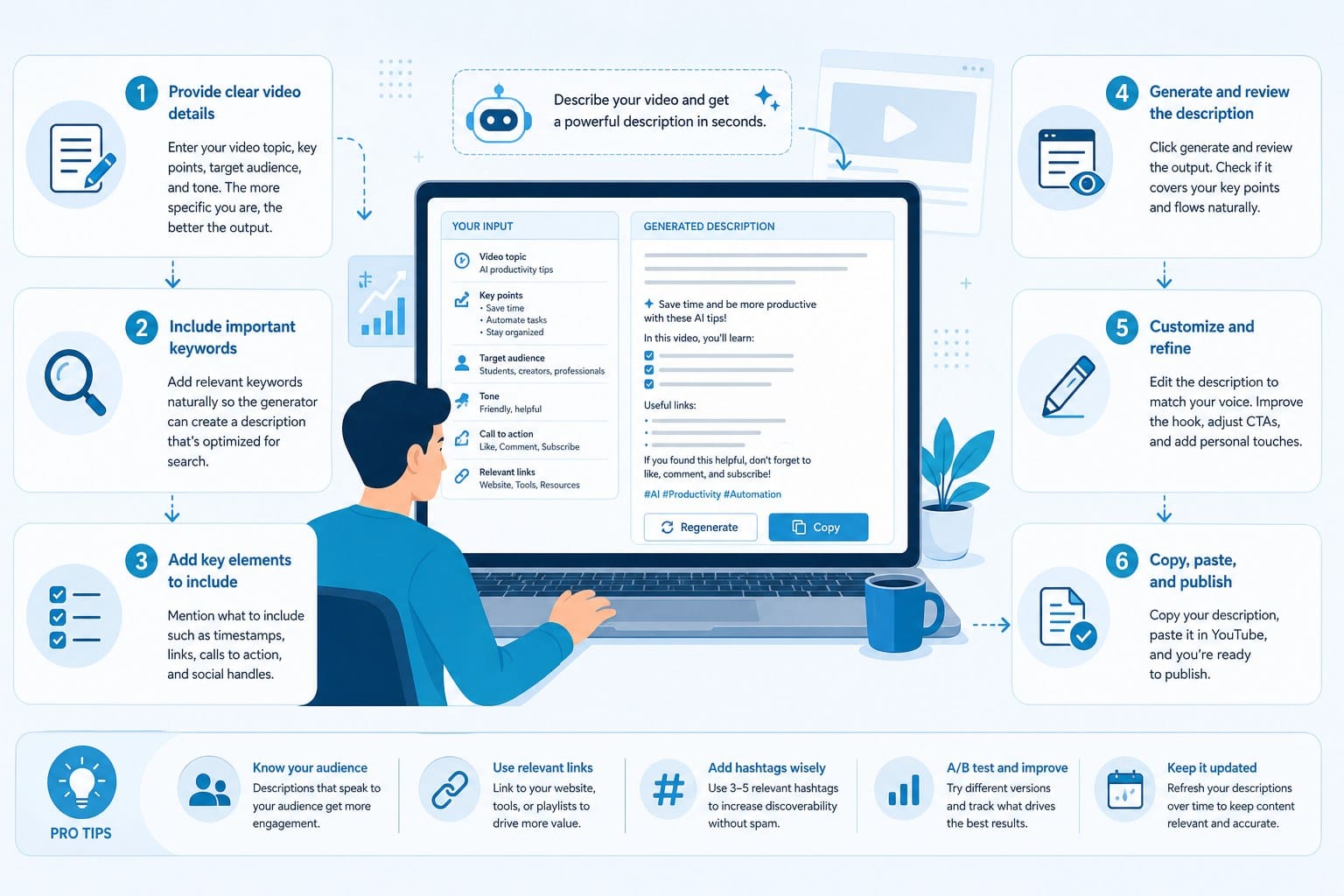
Using a generator well is not as simple as typing your video title and copying whatever comes out. The quality of your output depends on the quality of your input. Here is a practical process I recommend.
Start with a clear brief. Before you open any tool, write down three things: the main topic of your video, the primary keyword you want to rank for, and the single most useful thing a viewer will take away after watching. Those three pieces of information are the foundation of a good description. If you hand them to a generator, the output will be much more targeted than if you just paste in your video title.
For example, say your video is a 20-minute documentary about the history of neon signs. Your topic is neon sign history. Your keyword might be 'history of neon signs' or 'how neon signs are made.' Your viewer takeaway is understanding why neon signs became a cultural icon and why they faded from popularity. With those three inputs, a generator can write a first paragraph that hooks the viewer and signals to YouTube exactly what the video is about.
Choose a generator that fits your content format. Not all generators handle all formats equally. A tool trained mostly on vlog content may produce descriptions that feel casual and short, which is a poor fit if you produce 30-minute educational documentaries. Look for tools that let you select a tone or video type. 'Documentary' and 'educational explainer' are different from 'daily vlog' and should produce different descriptions.
Edit before you publish. I treat generator output as a strong first draft, not a finished product. Read through what the tool produces and ask yourself these questions. Does the first sentence make someone want to watch? Does the keyword appear naturally without feeling forced? Are there any claims in the description that are not actually in the video? That last point matters a lot. If your description promises information your video does not deliver, viewers will leave quickly, and a high bounce rate tells YouTube your video did not satisfy the search intent.
Add your own layer of personalization. Generators cannot know your specific style, the timestamp breakdowns of your video, or the links you want to include. After the generator gives you a draft, I add timestamps, links to my other relevant videos, and any specific resources I mentioned on screen. This takes five minutes and makes the description dramatically more useful to actual viewers.
Use the generator to test different angles. One underused strategy is to run the same video brief through a generator two or three times with slightly different keyword focuses and compare the results. You might find that a slightly different framing produces a hook that feels stronger. Some tools let you regenerate with different tones or lengths, which makes this easy to experiment with.
Think about keyword variations. Your main keyword is the starting point, but YouTube's algorithm also picks up on related terms. A generator that is trained on search intent will often include synonyms and related phrases naturally. For example, a description about 'how to invest in index funds' might also include phrases like 'passive investing,' 'stock market for beginners,' and 'ETF explained' because those terms are all closely related to the topic. This kind of natural variation helps your video show up for a wider set of searches without any extra effort.
Pay attention to length. YouTube allows up to 5,000 characters in a description, but that does not mean you need to fill all of it. For most videos, 200 to 400 words is enough to give the algorithm strong signals and give viewers useful context. Very long descriptions often bury the important information and can look like spam to someone reading on a mobile screen. A good generator will produce a description in that range by default. If yours consistently outputs three sentences, push it for more. If it outputs walls of text, trim it.
For creators scaling content on platforms like YouTube Shorts, TikTok, or Instagram Reels, descriptions work a bit differently. Short-form content has less room, and the first line does almost all the work. A generator tuned for short-form will write sharper, punchier descriptions that fit smaller screens and shorter attention spans. If you produce both long-form and short-form content, make sure the tool you use can handle both without blending the styles.
I also find it useful to save a few good descriptions as templates for my own channel. After using a generator for a dozen videos, patterns start to emerge. You will notice that certain structures perform better for your specific audience. Save those structures and use them as starting prompts for future generator sessions. Over time, you build a library that makes each new description faster and better.
If you are working on click-worthy titles alongside your descriptions, how to use a clickbait text generator to boost video clicks covers the title side of the equation and pairs well with the description work we are talking about here.
Fitting description generation into a full video production workflow
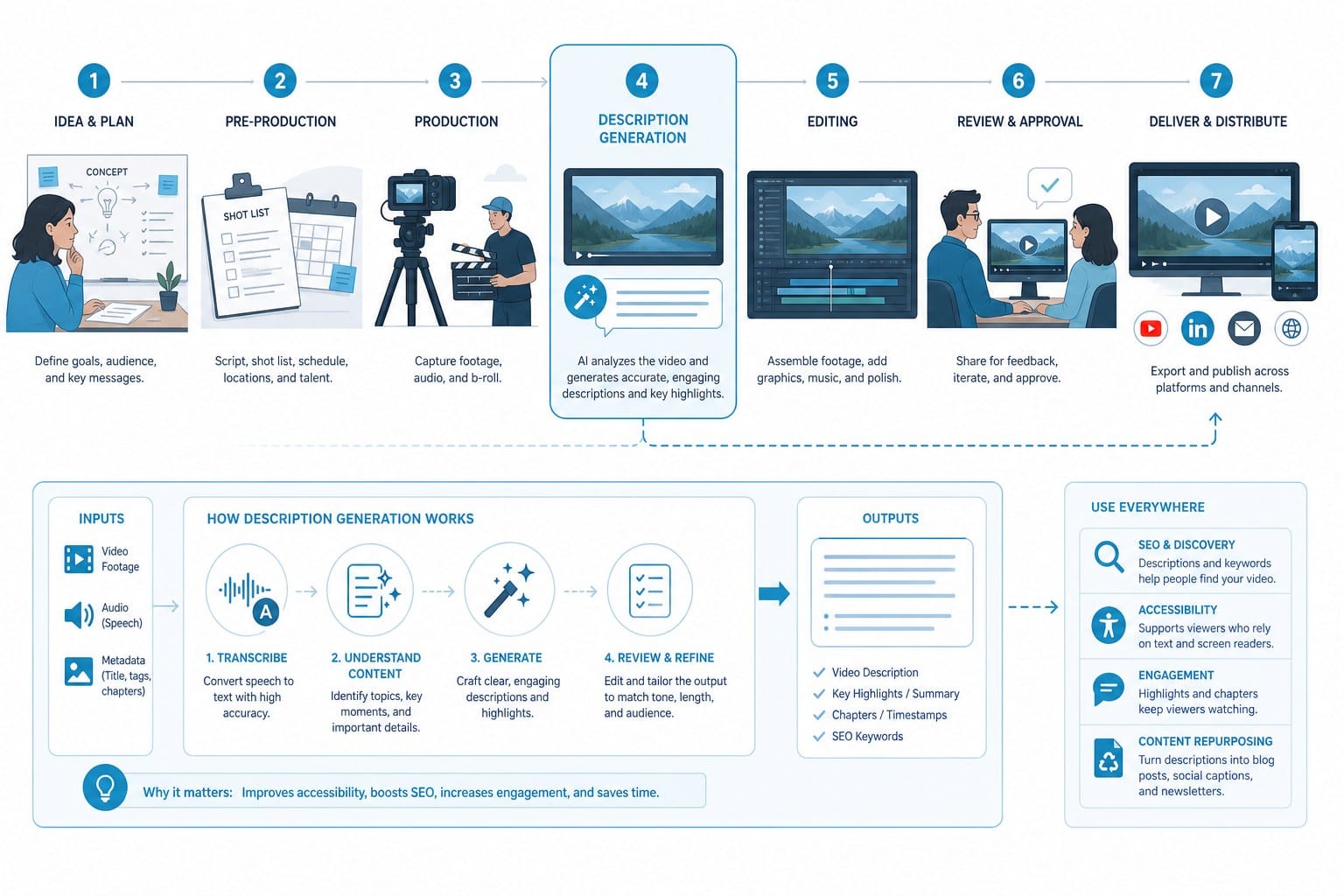
A youtube description generator is most powerful when it is part of a system, not just a last-minute step before you hit publish. Let me walk through how to integrate description writing into your broader production process so it saves you time instead of creating more steps.
Write the description before you finalize the video. I know this sounds backward, but writing your description early has a real benefit. It forces you to clarify what your video is actually about. If you cannot summarize your video in a clear, useful paragraph, that is a sign the video itself might need a tighter focus. The description becomes a creative brief. You can even read it back to yourself before recording or generating your video to make sure the content matches what you promised.
For creators using AI video platforms, this step is built into the process naturally. When you start a project with a prompt or script, you already know your topic, your angle, and your target viewer. That information transfers directly to your description generator. You are not starting from scratch after a long editing session. You are working with information you already thought through.
Batch your descriptions. If you produce videos on a regular schedule, try writing descriptions in batches. Spend one session generating and editing descriptions for five or ten upcoming videos. Because the mental work is similar across all of them, you get faster as you go. Batching also means you are not interrupting your upload momentum by stopping to write one description at a time.
Connect your description to your thumbnail and title. These three elements work together. A viewer sees your thumbnail first, reads your title, and if they click, they may skim your description before watching. All three should tell a consistent story. If your thumbnail shows a dramatic before-and-after and your title is 'I tried this for 30 days,' your description should open by grounding that promise. A generator helps most when you give it context that matches what is already working in your thumbnail and title.
Use descriptions to support your internal linking strategy. YouTube recommends videos partly based on viewer behavior, but it also picks up on textual relationships between videos. Including the names of related videos you have made or topics you cover in other content can help the algorithm understand your channel's overall theme. A generator will not know your back catalog, but you can prompt it to include a line like 'watch my other video on X' and then fill in the specific link yourself. This small habit, done consistently, can improve how YouTube surfaces your older content to new viewers.
Monitor and iterate. After you publish, check YouTube Studio analytics to see how viewers find your videos. If search traffic is low for a video you expected to rank, the description is one of the first things to revisit. Go back in, run the topic through the generator again with a different keyword focus, and update the description. YouTube re-indexes descriptions when you update them, so this is a legitimate optimization strategy, not just busywork.
For creators who are building faceless channels around documentary or educational content, the volume game is real. Producing one video a week means 52 descriptions a year. Producing three a week means 156. Without a system, that writing load becomes a bottleneck. A well-used generator cuts that time down to a fraction while keeping each description genuinely useful.
Consider how your description generator fits with the rest of your production stack. If you are already using an AI platform to research, script, source footage, and edit your videos, adding a description generator to that stack means you are automating almost every text-heavy task in your workflow. Platforms like Cliptude handle the video production side of this, turning a simple prompt into a polished video complete with motion graphics and footage. Pairing that kind of production automation with a solid description workflow means you can go from idea to fully optimized published video with minimal manual work.
This matters especially for solo entrepreneurs and small media teams who are not professional writers or editors. You do not need to be either to produce content that ranks and performs. You need good tools and a repeatable process.
One more thing worth mentioning is multilingual content. If you are producing videos for audiences that speak languages other than English, your description strategy needs to match. A description written in English will not help you rank in Spanish, Hindi, or Urdu YouTube searches. Some generators support multiple languages, and some AI video platforms can produce content in those languages from the start. If you are curious about producing content in Urdu specifically, free Urdu AI video generator for creators is worth a read alongside this guide.
Finally, keep a simple quality checklist for every description you publish. I use four questions. Does the first line hook the viewer and include the main keyword naturally? Does the body paragraph give useful context without repeating the title word for word? Does the description include timestamps and links where relevant? Does it end with a clear call to action? If the answer to all four is yes, the description is ready. If not, one quick edit pass usually fixes it.
The goal is not a perfect description. The goal is a description that is better than what most creators in your niche are publishing, done consistently across every video you upload. A youtube description generator, used well, makes that standard achievable for any creator regardless of writing experience.
Ready to take the next step?
If you are serious about scaling your YouTube output without burning hours on production and optimization, Cliptude is worth a look. The platform handles the full video creation process from research and scripting to footage, motion graphics, and editing, so you can focus on growing your channel rather than getting stuck in the technical details. Visit Cliptude to see how it works and start producing content that is built to perform.



