
AI stickman animation video maker for YouTube creators

Table of contents
1. Why stickman animation works so well on YouTube
2. What an AI stickman animation video maker actually does
3. How to build a YouTube channel with AI stickman videos
Stickman animation has a way of making complex ideas feel simple and fun. Whether you are explaining how a stock market crash happens, walking viewers through a history lesson, or just telling a story with personality, stickman videos grab attention fast. The problem is that traditional animation takes time, skill, and money that most solo creators do not have. That is where an AI stickman animation video maker changes everything. Instead of spending days in animation software, you describe what you want, and the AI handles the heavy lifting. In this article, I will walk through how these tools work, what to look for, and how platforms like Cliptude make it possible to produce polished animated content without touching a single frame manually.
Why stickman animation works so well on YouTube
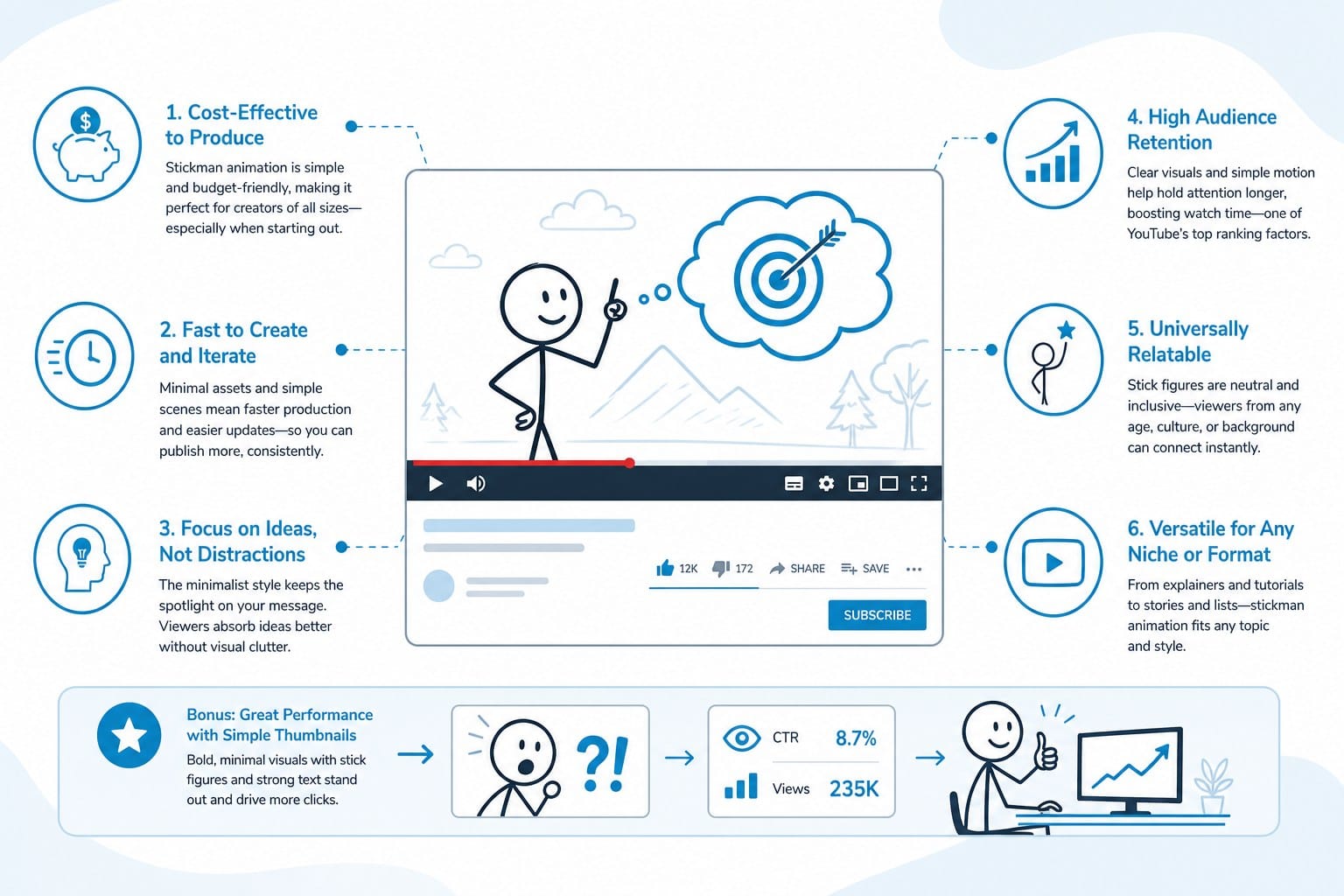
Stickman animation has been a staple of online video for a long time, and there are real reasons why it keeps showing up. The style is clean, fast to follow, and strips away visual noise so the viewer focuses on the message. When you watch a stickman character run, fall, or point at a diagram, your brain fills in the emotion and context without needing hyper-realistic detail. That cognitive shortcut is exactly what makes the format powerful for educational and explainer content.
YouTube channels built around history, science, personal finance, and self-improvement do especially well with this format. A video explaining how inflation works, for example, becomes much easier to follow when a stickman character walks through a grocery store and watches prices rise in real time. The abstract concept gets a visual anchor, and viewers stay engaged longer because they are watching something happen rather than listening to someone describe it.
Longer watch time is more than just a vanity metric. It signals to the YouTube algorithm that your content is valuable, which leads to better recommendations and more organic reach. Educational animation channels often outperform talking-head channels in average view duration because the format keeps the eye busy without overwhelming the brain. Viewers who came for one video tend to stay for several, which compounds your growth over time.
For faceless YouTube channels, stickman animation is a natural fit. You never have to appear on camera, you do not need a professional studio, and you can cover almost any topic without worrying about sourcing hard-to-find footage. A history channel can illustrate the fall of ancient Rome without licensing a single stock photo. A personal finance channel can show a character building savings and paying off debt without hiring actors. That flexibility is one reason so many creators building faceless channels that make money without appearing on screen turn to animation as their primary format.
The format also travels well across platforms. A stickman explainer video you create for YouTube can be clipped into a YouTube Short, trimmed for Instagram Reels, or repurposed for TikTok. The visual style holds up at smaller sizes because the characters and scenes are simple by design. That reusability means every video you produce has more potential reach than a single platform would give you alone. One piece of content, published thoughtfully across multiple surfaces, multiplies your audience-building effort without multiplying your production workload.
Consider a creator running a channel about world economics. They publish a fifteen-minute video explaining how hyperinflation destroyed the Weimar Republic. The full video goes on YouTube. A sixty-second clip showing the stickman character wheelbarrowing cash to the grocery store goes on Shorts and TikTok. A still frame with a caption goes on Instagram. The same production effort powers four separate pieces of content. That leverage is hard to achieve with live-action footage but easy with animation because every scene is already clean and visually self-contained.
Production cost is the final piece worth examining. Hiring a professional animator to create even a two-minute stickman video can run several hundred dollars and take a week or more depending on the studio. For a solo creator aiming to publish two or three videos per week, that math falls apart fast. AI tools have changed the economics entirely. The next section breaks down exactly how those tools work and what separates a genuine AI animation platform from a basic drag-and-drop editor.
Before moving on, it is worth addressing one concern creators sometimes raise about animation quality. Early AI video tools produced results that looked noticeably rough, with mismatched visuals and robotic voiceovers that viewers could spot immediately. That gap has closed significantly. Current platforms generate scripts, match scenes to narration, apply consistent visual styling, and produce voiceovers that sound natural. The output is not identical to a hand-crafted studio production, but it is more than good enough to build a loyal audience when the content itself is accurate, interesting, and well-structured. Quality comes from editorial judgment as much as production polish, and AI handles the production so you can focus on the judgment.
What an AI stickman animation video maker actually does
The phrase 'AI stickman animation video maker' covers a wide range of tools, so it helps to break down what these platforms actually do. At the basic end, you have tools that let you drag and drop pre-built stickman characters onto a timeline and manually add text. Those are animation editors. Useful for some purposes, but not really AI tools in any meaningful sense. True AI video makers go several steps further and handle production layers you would otherwise have to manage yourself.
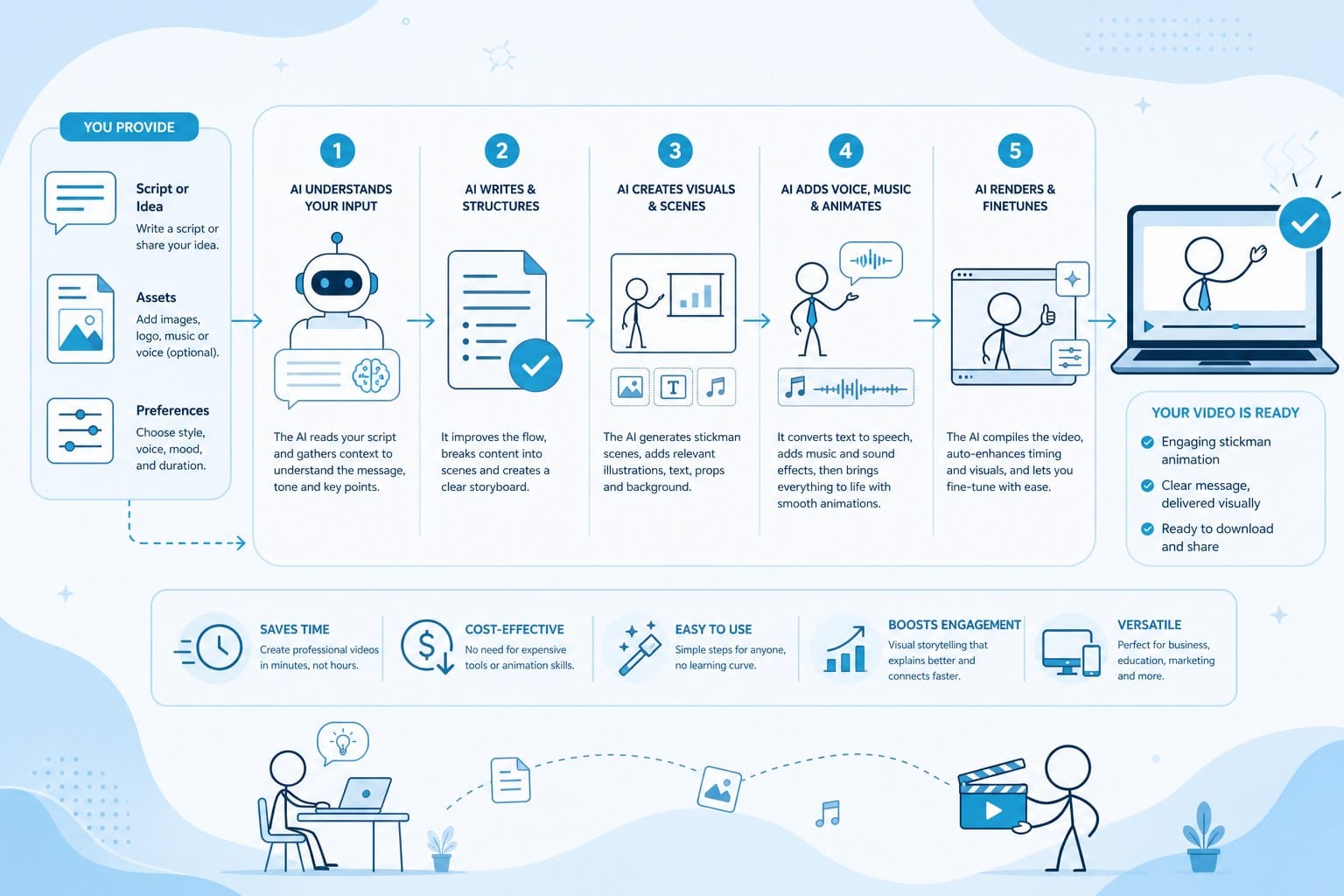
A genuine AI stickman animation video maker starts with your idea and works outward from there. You might type a prompt like 'explain how the human immune system fights a virus using stickman characters' and the platform will generate a script, break that script into scenes, match animation-style visuals to each scene, add a voiceover, layer in background music, and produce a finished video file. That is a fundamentally different workflow from building every scene by hand, and the difference in time investment is dramatic.
Cliptude works on exactly this principle. You start with a prompt or an existing script, and the platform researches the topic, writes the content, sources appropriate visuals and motion graphics, and edits everything into a polished video. For animation-focused content, the motion graphics and illustrated scenes do the storytelling work that would otherwise require a dedicated animator on retainer. The output is a complete video ready to upload, not a half-finished project that still needs hours of work.
Here is what the production pipeline typically looks like when you use a capable AI video platform for animated content.
First, the AI generates or accepts a script. This is the foundation of everything. A strong platform either writes the script from your prompt or lets you paste in your own. The script determines pacing, scene breaks, and the logical flow of the animation. If the script is accurate and well-structured, the video will be too. If the script meanders or skips important context, no amount of visual polish will fix the underlying problem. This is where your editorial judgment matters most, even when you are leaning heavily on AI for production.
Second, the platform matches visual elements to each segment of the script. For animation-style videos, this means pulling in motion graphics, illustrated scenes, or stickman-style visuals that align with what the narration is explaining. Some platforms use curated libraries of pre-built animation assets organized by topic and emotion. Others generate visuals dynamically based on the content of each scene. Either way, the key is that this matching happens automatically rather than requiring you to find, license, and place every graphic by hand.
Third, audio gets layered in. This typically includes an AI voiceover that reads the script, background music that fits the tone, and sound effects that enhance the animation where appropriate. Most platforms offer multiple voice styles so you can match the narration to your channel's personality. A history channel might prefer a calm, authoritative voice. A science channel aimed at younger viewers might work better with something more energetic. Having that choice without hiring a voice actor for every video matters for channels publishing at volume.
Fourth, the video is edited and exported. Transitions, text overlays, pacing adjustments, and formatting for the target platform all get handled before you receive the final file. What you download is ready to upload. You are not inheriting a rough cut that needs another two hours of editing before it meets your standards.
For creators who want to scale output, this pipeline is the difference between publishing one video a week and publishing four or five. The AI handles the repetitive production tasks so you can focus on choosing topics, reviewing quality, and engaging with your audience. That is a meaningful shift in how a solo creator spends their time.
One important feature to verify in any AI animation tool is commercial rights. If you are monetizing a YouTube channel through AdSense, sponsorships, or digital products, you need to own what you publish. Cliptude gives creators full commercial rights to their videos, which means you can run ads, accept brand deals, and use the content in any business context without worrying about licensing restrictions or takedown risks.
It is also worth thinking about how different platforms handle the scope of what they automate. Some tools focus narrowly on one step, like script generation or voiceover, and leave the rest to you. Others handle the entire process end to end. If you want to understand how the broader landscape of AI video tools compares and which features actually drive results for YouTube creators, this breakdown of Pictory AI vs InVideo alternatives gives a useful frame of reference for evaluating what matters and what is just a feature list.
Pricing structure is another practical consideration that affects how useful a tool actually is for growing creators. Cliptude uses usage-based credit pricing, which means you pay for what you produce rather than a fixed monthly subscription regardless of how much you actually use the platform. For a creator who is just starting out or who has a variable publishing schedule, that model is more forgiving than paying a flat monthly rate and feeling pressure to produce content just to justify the cost.
The combination of a complete production pipeline, full commercial rights, and flexible pricing is what separates a serious AI video platform from a simple animation editor. If you are building a YouTube channel around animated content, you need a tool that handles the full job. Cobbling together five separate tools to cover script, visuals, voiceover, music, and editing creates its own overhead and introduces more points where the workflow can break down.
A note on what AI animation tools do not replace. They do not replace editorial judgment about which topics deserve coverage, which claims need fact-checking, or which videos are genuinely serving your audience versus just filling a calendar slot. The creators who build sustainable channels with AI tools treat the AI as a production assistant that dramatically lowers the cost and time of making each video. They still invest real thought in what to make and why. The tool handles the how.
How to build a YouTube channel with AI stickman videos
Understanding the tools is one thing. Building an actual channel strategy around AI animation is another. This section walks through how to approach it practically, from picking a niche to publishing consistently and eventually turning that audience into real income.
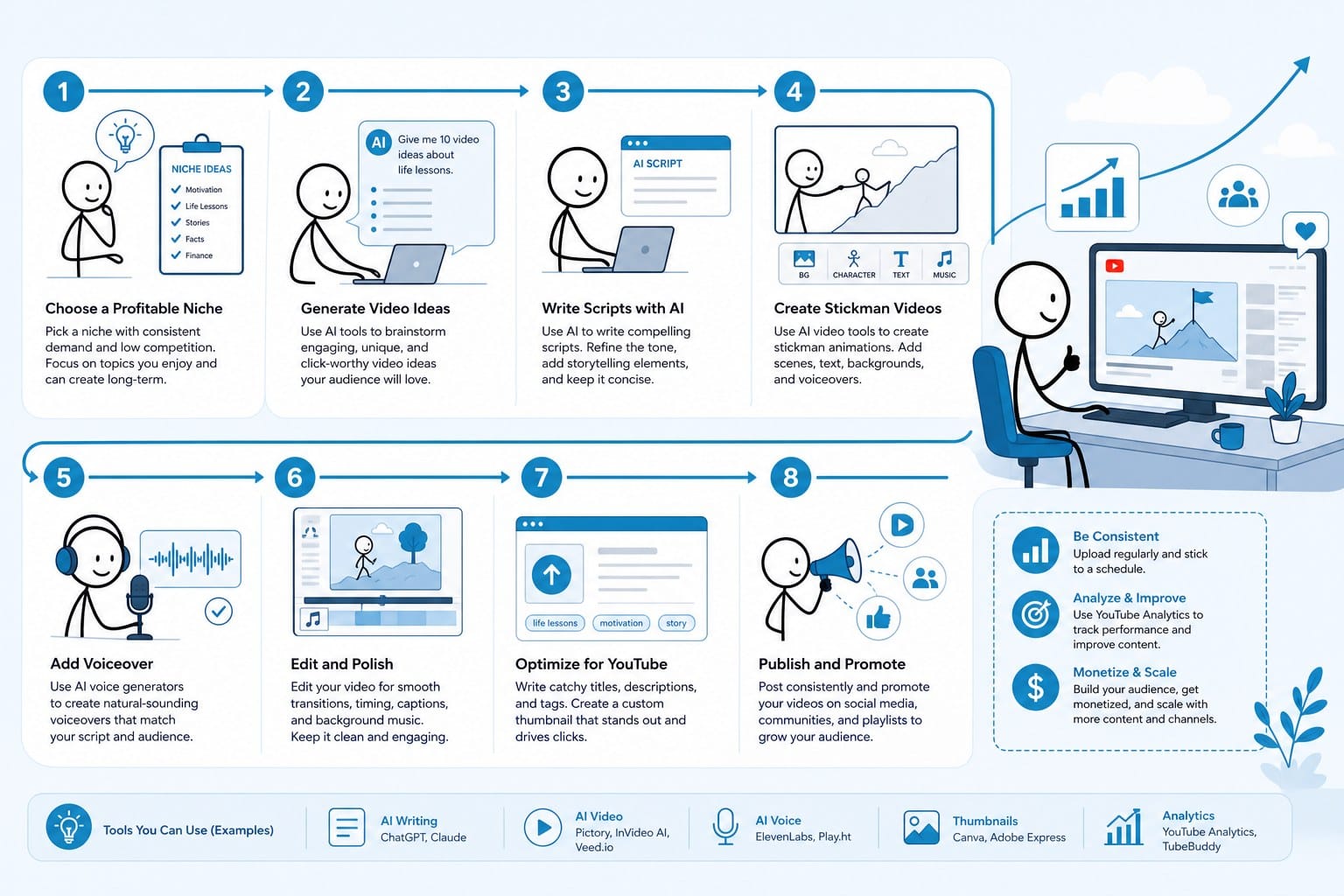
The first step is choosing a niche where animation genuinely adds value. Not every topic benefits equally from the stickman format. The niches that tend to perform best are ones where the subject matter is abstract, complex, or difficult to visualize with real footage. Personal finance, world history, science concepts, philosophy, self-improvement, and business strategy all fit this profile. These topics become more accessible when a simple character acts them out visually, and the absence of real footage is never a problem because there is no expectation of it in the first place.
Avoid niches where the audience expects polished live-action content, such as travel vlogs, cooking channels, or product reviews. Animation works when the idea is the star, not the setting or the presenter. If viewers came for a location or a personality, a stickman character will feel like a shortcut rather than a creative choice.
Once you have a niche, think carefully about your content calendar. Animation-style channels tend to do well with consistent, topic-driven videos that build a growing library over time. A channel covering economic history might publish one video per week on events like the Great Depression, the 2008 financial crisis, or the OPEC oil embargo. Each video is self-contained but contributes to a library that keeps growing. Viewers who find one video and enjoy it will watch others, which builds watch hours and subscriber counts steadily rather than in unpredictable spikes.
Here is a practical weekly workflow for producing content using an AI stickman animation video maker like Cliptude.
Start by identifying your topic on Monday. Look at what is generating discussion in your niche, what questions people are asking on Reddit or Quora, and what keywords have genuine search volume with manageable competition. A topic like 'how did the Roman Empire actually collapse' or 'what caused the 2008 housing crash' gives the AI a clear, well-defined subject to work with and gives viewers a clear reason to click.
On Tuesday, submit your prompt or script to Cliptude. If you have strong opinions about how the topic should be framed, write the script yourself or outline the key points and let the AI fill in the structure. If you prefer to let the platform draft the full script, review the output carefully before moving forward. AI-generated scripts are a useful starting point, not a finished product you can skip evaluating. Check for factual accuracy, logical flow, and whether the framing matches your channel's voice. A small error in a historical explanation can damage your credibility with exactly the audience you are trying to build.
By Wednesday, you should have a draft video to review. Watch it fully and note any sections where the animation feels disconnected from the narration, where the pacing drags, or where a scene transition is abrupt. Most AI platforms allow adjustments at this stage before rendering the final version. Take the time to make those adjustments rather than publishing something you already know has weak spots.
Thursday is for final edits, thumbnail creation, and preparing your video description and tags. Your thumbnail matters enormously for click-through rate, especially for animated content where the visual style immediately signals what kind of channel you are running. A good thumbnail for a stickman video might show a recognizable scene from the video with bold, readable text that teases the core question. Keep the text short enough to read in two seconds at small size because that is exactly how most viewers will encounter it.
Friday is publishing day. Upload the video, add end screens and cards pointing to related videos in your library, and respond to early comments within the first few hours. Early engagement, measured by comments, likes, and shares in the first day, signals to the YouTube algorithm that real viewers are interacting with the content. That signal influences how aggressively YouTube distributes the video to new viewers.
That five-day cycle produces one solid long-form video per week. If you want to publish two or three, the AI platform makes that possible without hiring additional help because the time per video is dramatically shorter than manual animation would require. The fixed costs of your creative workflow, topic research, editorial review, thumbnail design, stay roughly the same while output scales.
Shorts are another channel-building opportunity worth building into your strategy from the start. A fifteen-minute explainer video contains multiple distinct scenes that can be clipped into sixty-second highlights. Those clips, formatted vertically, can drive traffic back to the full video and help you grow on YouTube Shorts simultaneously. The AI YouTube Shorts automation tools available today make this repurposing process much faster than doing it manually, and the payoff is a presence in both the long-form and short-form parts of the platform, each feeding the other.
Monetization is the goal for most creators, and animated channels have several distinct paths to revenue that compound well over time.
YouTube AdSense is the most common starting point. Once a channel reaches 1,000 subscribers and 4,000 watch hours, it qualifies for the YouTube Partner Program and can start earning from ads. Animation channels often perform well in this program because the format tends to attract viewers who watch complete videos rather than clicking away after thirty seconds. Higher average view duration means more ad impressions per viewer, which translates directly to higher revenue per thousand views.
Sponsorships become available sooner than many creators expect. Brands in finance, productivity, education, and technology actively seek channels that explain things clearly to engaged, topic-specific audiences. A channel with 10,000 subscribers focused tightly on economic history or personal finance can often secure sponsorship deals worth more per video than AdSense alone would generate at that size. The key is that your audience is specific and trusts your content, which makes your recommendation worth something to a relevant brand.
Digital products are a third revenue stream that suits educational animation channels particularly well. If your channel covers a subject deeply across dozens of videos, you have already demonstrated expertise that viewers value. That expertise can be packaged into a guide, a beginner course, a resource kit, or a template collection. A channel built on stickman explainers about personal finance might sell a budgeting workbook or a step-by-step investing guide. The animated videos build familiarity and trust with the audience over time, and that trust converts into product sales at a meaningful rate.
Affiliate marketing rounds out the picture. If your content regularly references tools, books, or services that your audience would genuinely benefit from, affiliate links let you earn a commission when viewers purchase through your recommendation. The important word there is genuinely. Recommending products purely for the commission, especially on an educational channel where trust is the primary asset, erodes that trust quickly. Recommend things you would stand behind regardless of whether a commission existed.
Scaling a channel requires both volume and consistency. One of the clearest advantages of using an AI stickman animation video maker is that you can sustain a publishing pace that would be physically impossible with manual animation. A solo creator using Cliptude can realistically produce three or four polished animated videos per week while also generating Shorts from existing footage. That output level, sustained across six to twelve months, builds the kind of video library and subscriber base that drives income at multiple levels simultaneously.
Quality has to stay in the picture alongside quantity. The AI handles the production workload, but the editorial decisions, what topics to cover, which claims to verify, how to structure an argument so it actually lands with viewers, still belong to you. The channels that grow and keep growing are the ones where a human is clearly thinking about the audience's experience, not just feeding prompts into a tool and uploading whatever comes out.
Pay close attention to your analytics as you build. YouTube Studio shows you which videos are generating the most watch time, where viewers are dropping off within each video, and which topics are consistently bringing in new subscribers versus holding steady with your existing audience. That data is your roadmap. If videos about economic history consistently outperform videos about science topics, that is a clear signal to focus more energy where the audience engagement is strongest. AI tools make testing multiple directions faster and cheaper because the cost of producing each video is lower, so you can experiment without betting the channel on a single approach.
The creators who build lasting channels with AI animation tools are the ones who use the technology to remove production friction while keeping editorial standards high. They treat every video as a real commitment to their audience, not a content unit to check off a list. The AI stickman animation video maker handles the frame-by-frame work. You handle the thinking that makes viewers come back.
Ready to take the next step?
If you are ready to start building an animated YouTube channel without spending hours on manual production, Cliptude gives you everything you need in one place. From script to finished video, the platform handles the research, animation, voiceover, and editing so you can focus on growing your audience. Visit Cliptude to see how the AI video pipeline works and start creating animated content that stands out.



