HeadCast AI alternatives for AI-narrated video creation

Table of contents
1. What HeadCast AI does and where it starts to feel limiting
2. What to actually look for in a HeadCast AI alternative
3. Why Cliptude stands out as a full-production HeadCast AI alternative
If you have been using HeadCast AI to narrate your videos and you are starting to feel its limits, you are not alone. A lot of creators reach a point where they need more than a talking head or a voiceover layer dropped onto static slides. They want full videos, not just narrated presentations. That gap is exactly why searching for a solid HeadCast AI alternative has become so common among faceless channel owners, solo entrepreneurs, and content teams trying to scale output without hiring editors or appearing on camera. This article walks through what HeadCast AI actually does, where it falls short for certain creator types, and what your best options look like depending on what you are trying to build.
What HeadCast AI does and where it starts to feel limiting
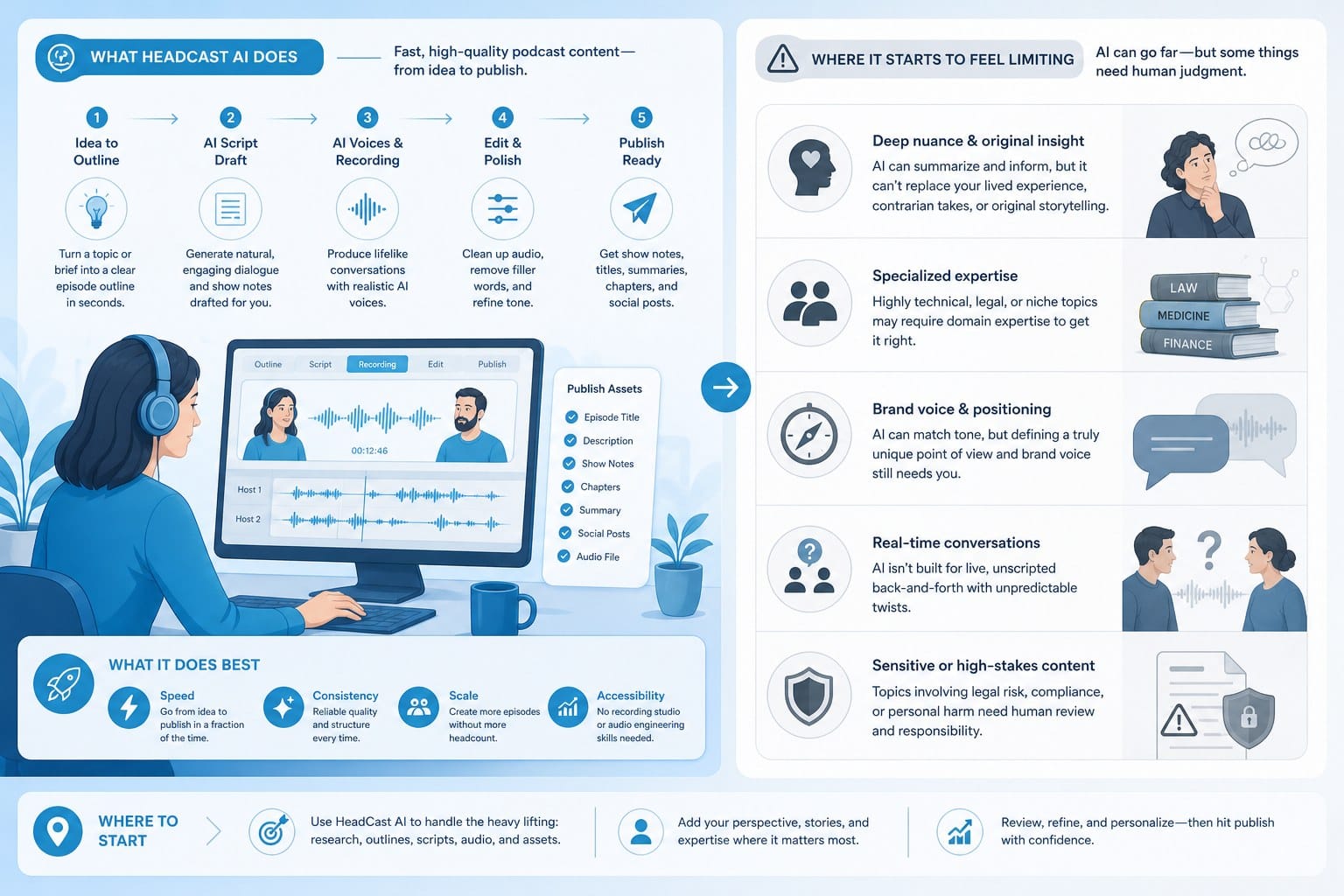
HeadCast AI is built around a pretty specific idea: you paste in a script or some text, and the tool generates a video where an AI avatar reads that content aloud. The result looks a bit like a talking-head video, except no real person had to show up on camera. For certain use cases, that works well. Corporate training modules, internal announcements, and simple explainer clips are good examples. The avatar speaks, the slides or text appear behind it, and the message gets delivered.
But here is where things start to get complicated for creators with bigger ambitions.
If you are running a faceless YouTube channel focused on documentary-style content, listicles, or educational deep dives, a talking avatar is only one small piece of what you need. You still need footage. You still need motion graphics. You still need a script that is actually researched and written, not just imported from somewhere else. You still need the whole thing edited together in a way that holds a viewer's attention for eight, ten, or even twenty minutes. HeadCast AI does not handle any of that. It narrates. It does not produce.
That distinction matters a lot depending on the type of channel you are building. A creator making five-minute corporate explainers might be perfectly happy with what HeadCast AI offers. A creator trying to publish two documentary-style videos per week on YouTube, complete with stock footage, text overlays, background music, and smooth transitions, is going to run into walls quickly.
Consider what a typical production day actually looks like when you rely on a narration-only tool. You pick a topic. Then you spend one to two hours researching it, pulling together facts, statistics, and story beats. Then you spend another hour or two drafting and editing a script. Then you source footage, which means searching a stock library manually, previewing clips, downloading the ones that fit, and organizing them in a folder. Then you open an editing program and start assembling everything. Then you bring in the narration layer from your tool. Then you add music, sound effects, transitions, and titles. By the time you export and upload, you have easily spent a full workday on a single ten-minute video.
A narration tool like HeadCast AI handles maybe thirty minutes of that work. The rest still falls on you.
There is also the question of output formats. HeadCast AI is designed primarily for presentation-style or talking-head-style video. It is not built to produce vertical short-form content for TikTok or Instagram Reels. It does not handle animation formats like whiteboard or stickman videos. And it does not give you the kind of automated research and scripting pipeline that lets you go from a topic idea to a finished video without touching a keyboard for hours.
Another limitation worth flagging is creative control over the visual layer. When you use a talking-head-style tool, the visual output is basically the avatar plus whatever background or slide template you pick. That is a constrained canvas. Creators who want their videos to feel cinematic, or who want to match a specific aesthetic for their channel, often find that constraint frustrating after a few months. The avatar becomes a visual signature, but not necessarily a good one. It signals AI-generated content in a way that some audiences respond to and others do not.
There is also a scale problem baked into the format. Talking-head videos can hold a viewer's attention for a few minutes when the content is new or the presenter is charismatic. But if the AI avatar is doing all the talking and the visual layer never changes, watch time starts to drop off. YouTube's algorithm pays close attention to watch time and audience retention. A video that loses viewers at the two-minute mark is going to struggle to grow, no matter how good the script is.
For creators building channels with educational, documentary, or entertainment content, the visual pacing of a video matters as much as the script. Cutting between footage clips, text overlays, and animated graphics keeps viewers engaged in a way that a static avatar cannot replicate. That is not a knock on HeadCast AI specifically. It is just a structural limitation of the format it was built around.
There is also the question of topic range. Some subjects are well-served by a talking-head format. Product demos, software walkthroughs, and direct-address content make sense with an avatar. But a video about the history of ancient Rome, or a breakdown of how black holes form, or a documentary about deep-sea creatures, needs footage, illustrations, and motion graphics to work. No avatar is going to carry that kind of content on its own.
None of this means HeadCast AI is a bad tool. It means it is a specialized tool. And if your needs have grown beyond what it was designed to do, it makes sense to look at what else is out there. The good news is that the AI video space has expanded enormously, and there are now platforms built to handle the full production pipeline rather than just one slice of it. The next section breaks down exactly what to look for when you start comparing options.
What to actually look for in a HeadCast AI alternative
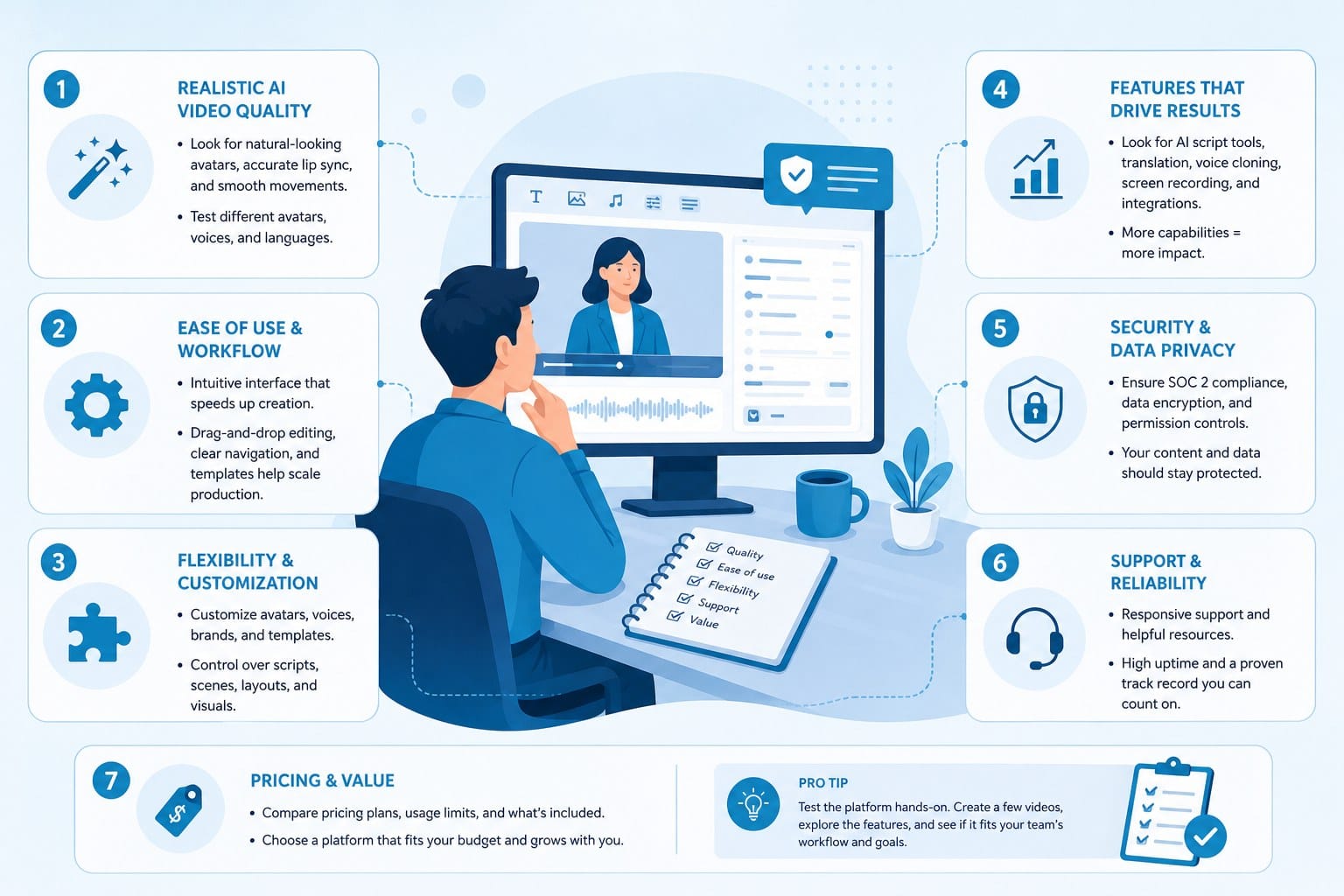
Before you start signing up for free trials, it helps to get clear on what you actually need. The features that matter most to a solo entrepreneur making product explainer clips are different from the features that matter to a faceless YouTube creator publishing documentary content three times a week. Getting specific about your use case before you evaluate tools saves a lot of time and prevents you from switching to something that solves a different problem than the one you actually have.
Here are the key categories to think through carefully.
Script generation and research automation
If you are producing high-volume content, writing every script from scratch is a bottleneck. The best alternatives do not just convert text to video. They start from a topic or a prompt and build out a full, researched script before the video production process even begins. That saves hours per video and makes it realistic to publish consistently without burning out.
For faceless channels in particular, this matters a lot. The script is the backbone of every video. A platform that handles research and scripting as part of its core workflow removes a huge chunk of the production burden before you have even touched footage or audio. If you are comparing two tools and one requires you to bring a finished script while the other builds the script for you, that is not a minor convenience difference. It is a difference of two to four hours per video.
Ask specifically how the research layer works. Does the tool pull from reliable sources? Does it structure the information into a coherent narrative arc, or does it produce a loose collection of facts? Can you edit the script before production begins? These questions matter a lot when you are producing content that needs to be accurate and engaging, not just informative.
Footage sourcing and visual assembly
This is probably the single biggest differentiator between a narration tool and a full production platform. A narration tool gives you a voice. A video production tool gives you a finished visual product. The difference is everything.
Look for platforms that automatically source and sync relevant footage to your script. Some tools pull from licensed stock libraries and match clips to the content being discussed at each point in the video. This is the feature that separates a true video production platform from a glorified text-to-speech tool. For creators who want their videos to look like they were put together by a real editor, automated footage sourcing is non-negotiable.
Pay attention to how the matching works. Some platforms pull clips based on keyword matching, which produces generic results. A clip of a person typing on a keyboard is technically footage, but it probably is not what you want behind a script about the Byzantine Empire. Better platforms use contextual understanding to find footage that actually fits the subject matter being discussed at each moment in the video.
Also check the licensing. Stock footage used in monetized YouTube videos needs to be commercially cleared. If the platform does not explicitly state that all footage is cleared for commercial use, that is a problem you do not want to discover after you have already built a channel.
Motion graphics and animation support
Not every video needs talking heads or stock footage. Some of the most popular educational channels on YouTube use whiteboard animation, stickman animation, or kinetic text. If you create in one of those formats, or if you want to, you need a platform that supports them natively.
This is especially true for creators making math explainers, history content, science breakdowns, or any topic where illustrating a concept matters more than showing footage of it. A video explaining compound interest is clearer with an animated chart than with stock footage of people looking at laptops. A video about plate tectonics needs illustrated diagrams, not generic nature clips.
The ability to generate animation from a script, without needing After Effects skills or a motion designer on staff, opens up a huge range of content types. It also gives you a distinctive visual style that can set your channel apart from the dozens of other faceless channels using the same stock footage from the same libraries.
Short-form and long-form flexibility
Some platforms are built exclusively for short clips. Others focus on long-form. The best HeadCast AI alternative for most creators is one that handles both, because the content landscape rewards creators who can repurpose and publish across multiple formats.
A documentary-style video might be fifteen minutes long on YouTube. The same content, clipped and reformatted, might become three or four Shorts or Reels. A platform that handles both formats without requiring you to redo the work saves a significant amount of time and makes cross-platform publishing a realistic part of your workflow rather than an extra project.
Vertical format is not just a resize. The pacing, the text placement, the hook structure, and the visual rhythm of a sixty-second vertical video are different from a fifteen-minute horizontal one. Look for platforms that understand that difference and produce each format appropriately, not platforms that just crop the frame and call it a Short.
Voice quality and language support
This matters more than it might seem. AI voiceover has improved dramatically, but there is still a wide range of quality across platforms. Listeners notice stiff, robotic delivery, and it affects how they perceive the credibility and professionalism of the content. Test the voices on a few different content types before committing to a platform.
Language support is also worth checking if you are creating content for audiences that speak something other than English. A platform that only produces clean, natural-sounding output in English but struggles with other languages is going to limit you if you ever want to expand your reach. Regional language support, in particular, is an area where platforms vary significantly.
For creators producing content in Marathi, Urdu, Hindi, Spanish, or any other language with a large online audience, the ability to generate high-quality video in that language without losing production quality is a real competitive advantage. Many creators in those markets are still using manual production methods because the AI tools they have tried do not handle their language well. A platform that solves this problem serves a significantly underserved audience.
Commercial rights and monetization terms
This one gets overlooked until it matters. If you are monetizing your channel, running ads, or licensing your content, you need to know that everything generated by your AI video platform is commercially cleared. Some tools have licensing restrictions buried in their terms of service that make monetization complicated or technically prohibited. Always check the terms before you commit to a platform for commercial use.
Specifically look for explicit statements about commercial use rights for AI-generated video content, stock footage used in production, voice output, and music or sound effects included in the final export. If a platform is vague about any of these, ask their support team directly and get a clear answer in writing.
Pricing structure and usage model
Monthly subscription models can get expensive fast when you are producing high volumes of content. Usage-based or credit-based pricing can be more efficient for creators who have variable output, since you pay for what you actually produce rather than a flat seat fee that may or may not match your actual usage in a given month.
On the other hand, if you are publishing five or more videos per week and you know your volume is consistent, a flat subscription with unlimited or high-volume production might be more economical. The right answer depends on your production rhythm. Run the numbers for your actual publishing schedule before you decide which pricing model makes more sense for your situation.
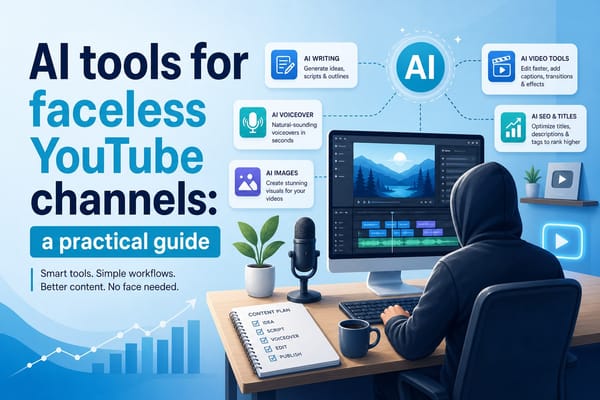
For a broader look at the tools that support faceless content creation across the full workflow, the AI tools for faceless YouTube channels: a practical guide covers a wide range of options worth knowing about, with breakdowns of what different tool categories actually do well.
Why Cliptude stands out as a full-production HeadCast AI alternative
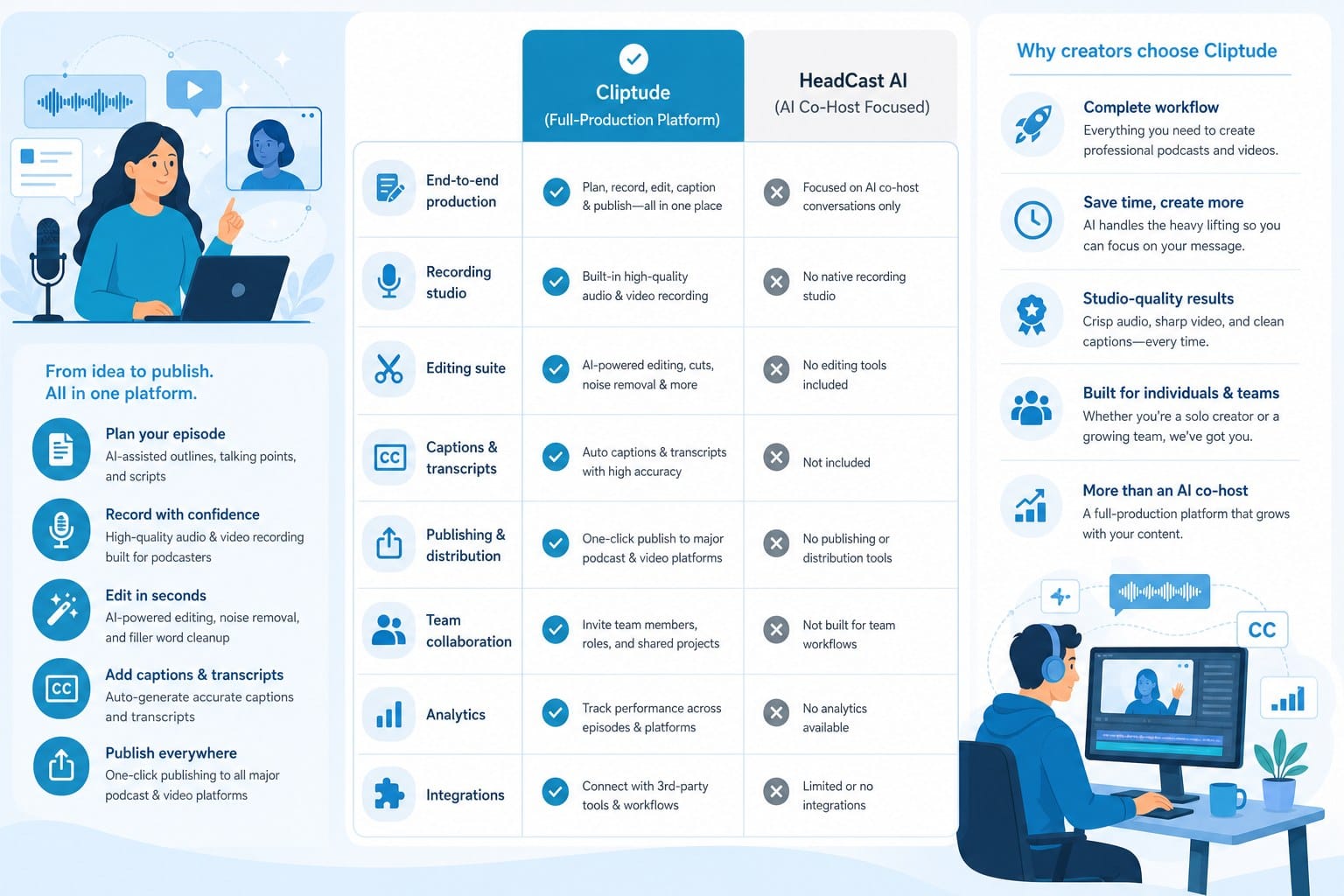
Most alternatives to HeadCast AI solve one part of the problem. They improve the avatar, or they offer better voices, or they give you more template options. Cliptude takes a different approach entirely. Instead of building a better narration layer, it builds the whole video. That is not a marketing claim about being all-in-one. It is a description of how the production pipeline actually works inside the platform.
Here is what that actually looks like in practice.
From prompt to finished video
You start with a prompt or a script. If you have a topic in mind but have not written anything yet, Cliptude handles the research and scripting automatically. It pulls together the information needed for your subject, structures it into a usable script, and uses that as the foundation for the entire video. That is a fundamentally different starting point than pasting a finished script into a narration tool.
This matters most for high-volume creators. When you are trying to publish three to five videos per week, the research and scripting phase is the work that eats the most time. Removing that bottleneck does not just save hours. It changes what a solo creator or small team can realistically produce in a week.
Consider the math. If the average research and scripting session takes three hours per video, and you are publishing four videos per week, that is twelve hours per week spent on scripting alone before you have touched a single frame of footage. A platform that handles that step cuts twelve hours of weekly work from your schedule. Over a month, that is roughly fifty hours back.
Footage that actually fits
From there, Cliptude sources footage that fits the content. It does not give you a library to browse manually. It identifies and places relevant clips based on what is being said in each section of the script, using contextual matching rather than simple keyword lookup. That means the visual layer of your video actually tracks with the content, which is what separates a professional-looking production from something that feels randomly assembled.
For educational and documentary-style channels, this is the feature that makes or breaks the viewing experience. When a viewer hears a narrator talking about the construction of the Great Wall of China and they see footage of the Great Wall of China, the content lands. When they see generic footage of construction workers because the keyword matched, the content loses credibility. Contextual footage matching is the difference between those two outcomes.
All footage used in Cliptude productions is commercially cleared, which covers the monetization question for creators running AdSense-enabled channels or working with brand partners.
Motion graphics without a motion designer
Cliptude generates motion graphics as part of the production process. If your video calls for text overlays, data visualizations, animated titles, or graphic transitions, those get created and placed automatically based on the content and pacing of the script. For creators who want a polished final product without spending hours in an editing program, this removes a significant production step.
This feature is especially valuable for educational content. A video explaining the causes of World War One is better with animated maps, timeline graphics, and labeled text callouts than it is with talking heads and plain stock footage. Generating those graphics manually requires either design skills, a motion design program, or a freelancer. Cliptude builds them into the production automatically.
Animation formats for illustrated content
If you create whiteboard videos, stickman animations, or other illustrated styles, Cliptude supports those formats natively. For educational creators who have built an audience around a specific visual style, the ability to maintain that style consistently across dozens of videos without hiring an animator is a real advantage.
Whiteboard and stickman formats have shown strong engagement in certain categories, particularly math, science, history, and finance content. The visual simplicity of the format keeps the focus on the concept being explained rather than on production value. For creators in those categories, having animation support built into the same platform that handles scripting and footage sourcing removes a tool from the stack and simplifies the whole workflow.
Short-form and long-form from the same platform
For short-form creators, Cliptude handles YouTube Shorts, TikTok videos, and Instagram Reels in addition to long-form content. That flexibility means you can use one platform for your entire output rather than stitching together multiple tools with different interfaces, different export settings, and different pricing models.
The short-form production is not just a cropped version of the long-form output. The platform understands that vertical content requires different pacing, different text placement, and a different hook structure. A sixty-second video built for Shorts from the ground up performs differently than a cropped clip from a fifteen-minute YouTube video, and the tool accounts for that.
For creators who publish across multiple platforms, this matters a lot. YouTube, TikTok, and Instagram each reward consistent publishing. A platform that lets you produce content natively for all three formats without duplicating effort makes cross-platform consistency achievable for a solo creator.
Regional and multilingual production
For creators producing content in languages beyond English, Cliptude supports multilingual production without sacrificing output quality. This is an area where many AI video platforms fall short. They were built primarily for English-language content and handle other languages with noticeably lower quality in the voiceover, the script structure, or both.
For creators targeting regional audiences, the ability to produce in your language at the same quality level as English-language output changes what is possible. A Hindi-language educational channel, an Urdu-language documentary channel, or a Marathi-language finance channel can build a real audience in an underserved market. The AI video generator for Marathi content creators post shows how this applies in a specific regional context, and the AI video generator in Urdu: how to create videos in your language article walks through the same idea for Urdu-language creators. These are real production use cases, not edge cases, and the platform is built to handle them.
Who Cliptude is actually built for
One more thing worth mentioning is the type of creator Cliptude is designed for. It is not primarily built for corporate training videos or HR onboarding modules. It is built for content creators: people running YouTube channels, building short-form followings, producing documentary content, and monetizing AI-generated video. That focus shows up in the feature set and in the output quality. The videos it produces are built for audiences that choose to watch, not audiences that have to watch.
That distinction shapes everything from how the scripts are structured to how the footage is matched to how the pacing is handled. Corporate training content and entertainment or educational YouTube content have different standards and different viewer expectations. A platform tuned for one does not automatically work well for the other.
To put this in concrete terms: imagine you want to build a faceless YouTube channel covering world history. With a narration-only tool, you would need to research each topic yourself, write a full script, manually search and download stock footage, edit everything together in a video editing program, add music and sound design, and then use the narration tool to add a voiceover layer on top of all that. That is a full production day for a single ten-minute video at minimum, and that estimate assumes you are experienced with the editing software and you do not have to redo anything.
With Cliptude, you give it a topic, something like the fall of the Roman Empire, and the platform builds the script, sources and places the footage, generates motion graphics and text overlays, adds narration, includes background music, and delivers a finished video ready to publish. The same amount of work that used to take a full day now takes a fraction of that time.
That kind of output speed changes what is possible for solo creators and small teams. Publishing three videos per week becomes realistic instead of exhausting. Building multiple channels in parallel becomes feasible instead of overwhelming. Scaling a faceless content business without hiring a full production team stops being a distant goal and starts being a practical strategy you can execute this month.
The pricing model uses credits rather than a flat monthly subscription, which works better for creators who are still scaling. You pay for what you actually produce rather than committing to a price point that only makes sense if you are running at full production volume every single month. As your output grows, the economics adjust accordingly.
If you have been using HeadCast AI and you have been frustrated by how much work still falls on your plate after the narration is done, that frustration points directly at the gap Cliptude fills. A tool that handles the whole pipeline does not just save time. It changes the ceiling on what you can build as a solo creator or small team.
The best HeadCast AI alternative for most content creators is not a tool that does the same thing slightly better. It is a tool that does more of the job, so you can spend less time in production and more time on the parts of your business that actually require your judgment: choosing topics, understanding your audience, and building a channel people come back to.
Ready to take the next step?
Ready to move beyond narration tools and start producing full AI-generated videos from a simple prompt? Cliptude handles everything from research and scripting to footage sourcing, motion graphics, and final editing, so you can publish more without adding to your workload. Visit Cliptude to see what full-pipeline AI video creation looks like in practice.