AI tools for faceless YouTube channels: a practical guide

Table of contents
1. Understanding what a faceless channel actually needs from AI
2. The types of AI tools that actually move the needle for faceless creators
3. Building a sustainable workflow with AI tools for your faceless channel
Running a faceless YouTube channel used to mean hiring a team: a scriptwriter, a voiceover artist, a video editor, a motion graphics designer. For most solo creators, that budget simply does not exist. Today, AI tools for faceless YouTube channel production have changed that math completely. I can now go from a topic idea to a finished, publish-ready video without ever sitting in front of a camera, and without needing years of editing experience to pull it off. This guide breaks down exactly which types of tools you need, what each one actually does in the production process, and how to put them together into a workflow that scales. Whether you want to publish long-form documentaries, quick listicle videos, or animated explainers, there is a practical path forward, and I will walk through all of it.
Understanding what a faceless channel actually needs from AI
Before jumping into specific tools, it helps to understand what a faceless YouTube channel production pipeline looks like from start to finish. Most creators think the hard part is editing. It is not. The hard part is doing every single step consistently, week after week, without burning out or spending a fortune.
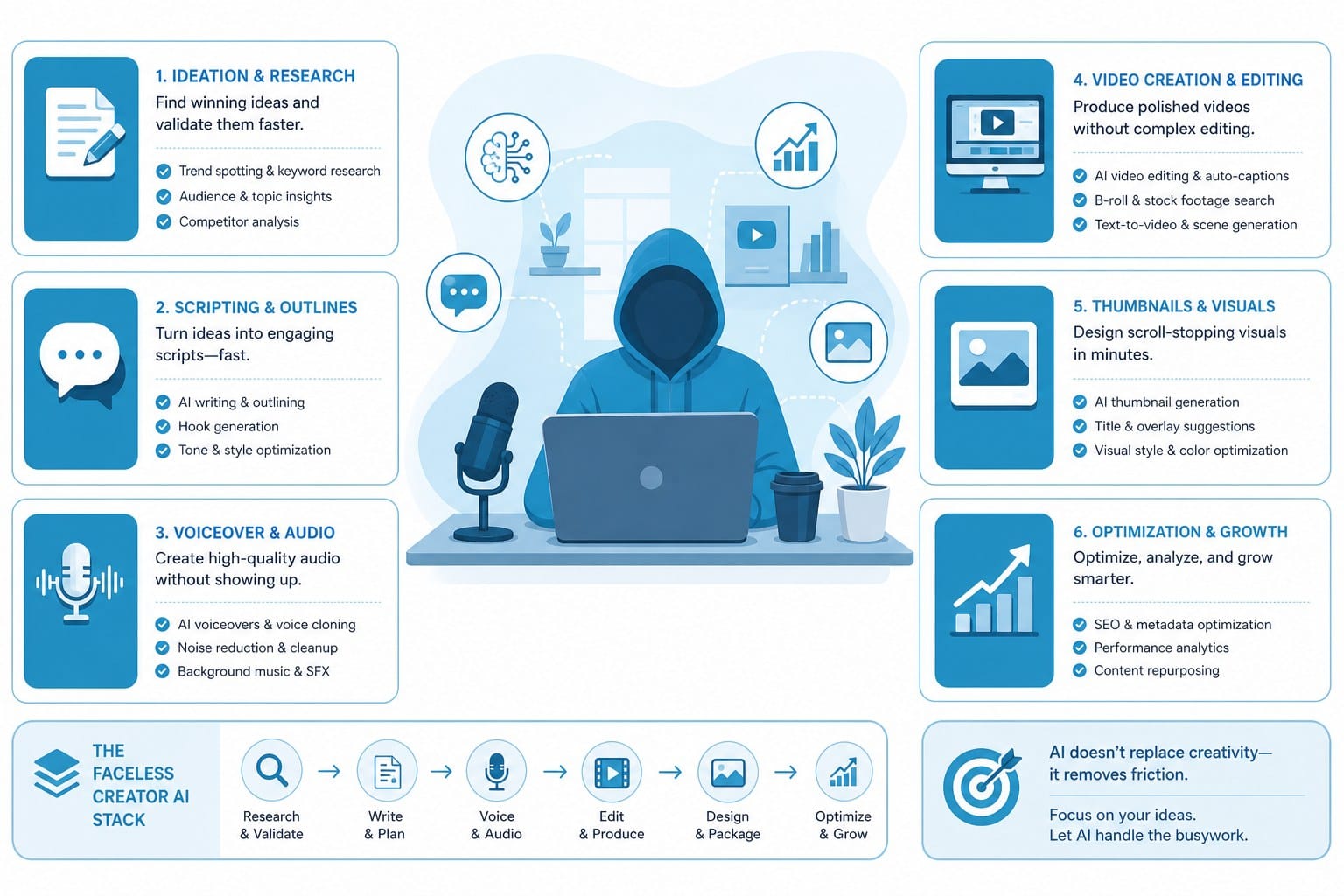
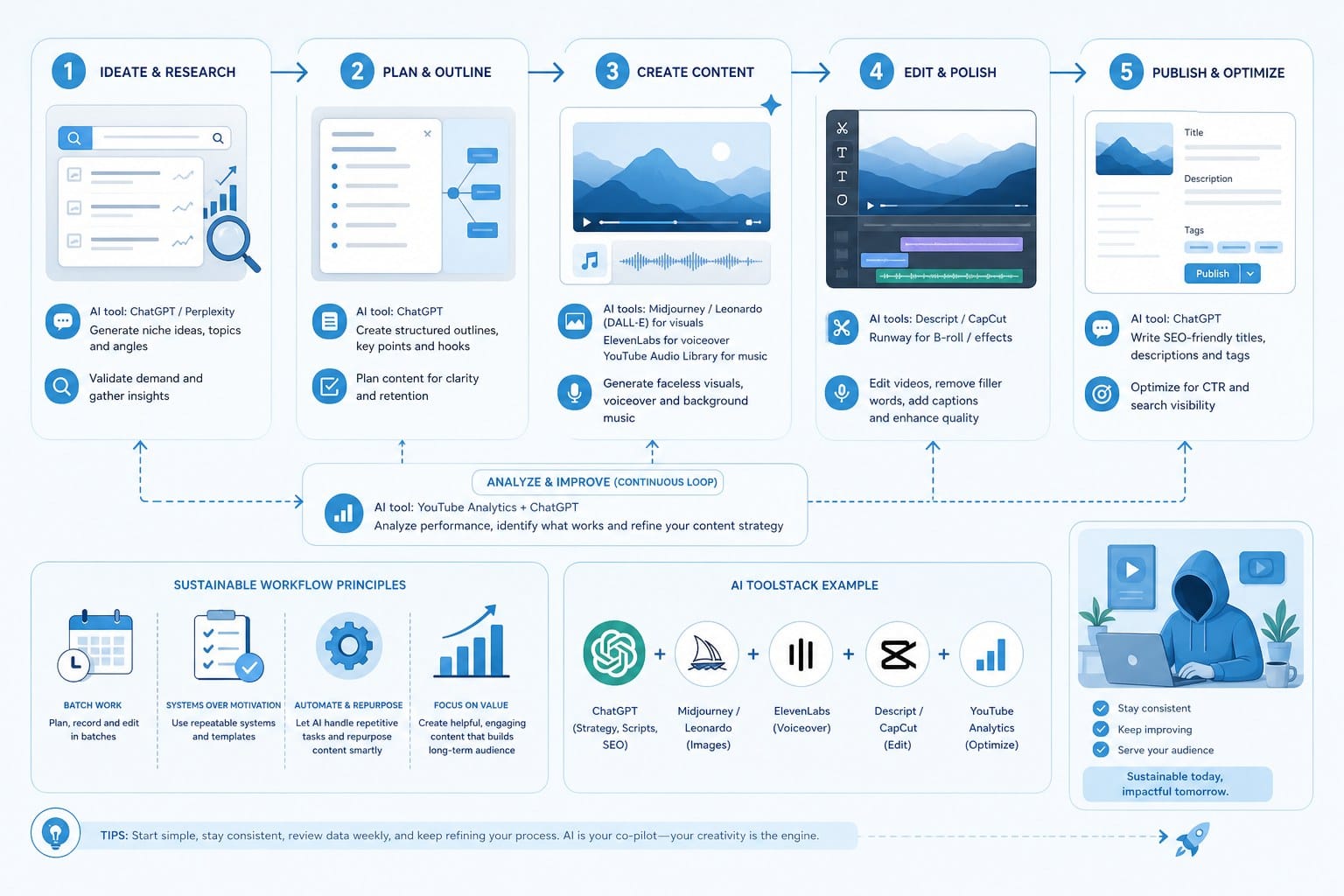
A typical faceless video needs six things: a topic worth covering, a well-researched script, a voiceover, relevant footage or visuals, motion graphics or text overlays, and a final edit that holds attention. Miss any one of those steps, and the video either does not get made or does not perform. AI tools solve this by handling large chunks of that work automatically.
Here is what each production stage actually demands.
Research and scripting. A faceless channel lives or dies by its script. If the information is shallow or the story has no structure, viewers leave early, and YouTube stops recommending the video. AI writing tools can pull together factual research, structure a narrative arc, and write in a consistent voice. The key word there is consistent. When I produce multiple videos per week, maintaining the same tone manually is exhausting. A well-prompted AI script tool handles that.
For listicle channels, this matters enormously. A video titled "10 engineering disasters that changed the world" needs accurate facts, a logical order, and a hook in the first 30 seconds. AI can draft that entire structure in minutes. I still review and edit the script, but the heavy lifting is done.
Voiceover. This is the most obvious faceless channel need. AI text-to-speech has improved dramatically. Modern AI voices do not sound robotic anymore. They handle pacing, emphasis, and natural pauses in ways that actually work for documentary and educational content. Some voices even carry a conversational warmth that keeps viewers engaged for 10 to 15 minutes at a time.
The thing to watch for is naturalness at the sentence level. Good AI voiceover tools let me adjust pacing, add pauses around specific words, and choose a voice that fits the channel's tone. A true crime channel needs a different energy than a science explainer channel.
Footage and visuals. Stock footage used to cost real money. For a faceless channel covering topics like history, science, finance, or technology, finding relevant clips that actually match the script was a time sink. AI-powered video platforms now automatically match footage to script content, pulling from licensed stock libraries so I do not have to search clip by clip.
This is where the difference between basic tools and more capable platforms becomes obvious. Some tools give me a blank canvas and expect me to assemble everything myself. Others read my script, understand what each section is talking about, and pull appropriate footage automatically. For high-volume creators, that automation is not a luxury; it is what makes scaling possible.
Motion graphics and text overlays. Faceless channels in the documentary and explainer space rely heavily on on-screen text, data visualizations, lower thirds, and animated graphics. These are what make a video look polished and professional rather than like a slideshow with music. Creating motion graphics manually in a program like After Effects requires significant skill and time.
AI tools now generate these graphics automatically based on the script content. For channels doing Vox-style explainer content, understanding how to create Vox style graphics for your videos is genuinely useful, because that visual style is what makes complex information feel clear and watchable.
Final editing. Trimming clips, syncing audio, adjusting pacing, adding transitions, color grading. These tasks alone can eat four to six hours of a solo creator's day. AI-driven editing cuts that dramatically by auto-syncing voiceover to footage, handling basic transitions, and flagging pacing issues.
When I think about the full pipeline, the best outcome is a tool or combination of tools that handles all of these stages in one place, so I am not constantly exporting and importing between five different apps. That fragmented workflow is where most solo creators lose time.
The types of AI tools that actually move the needle for faceless creators
Not every AI tool marketed to YouTube creators is worth the subscription. I want to focus on the categories that actually solve real problems in the faceless channel workflow, and I will be specific about what to look for in each one.
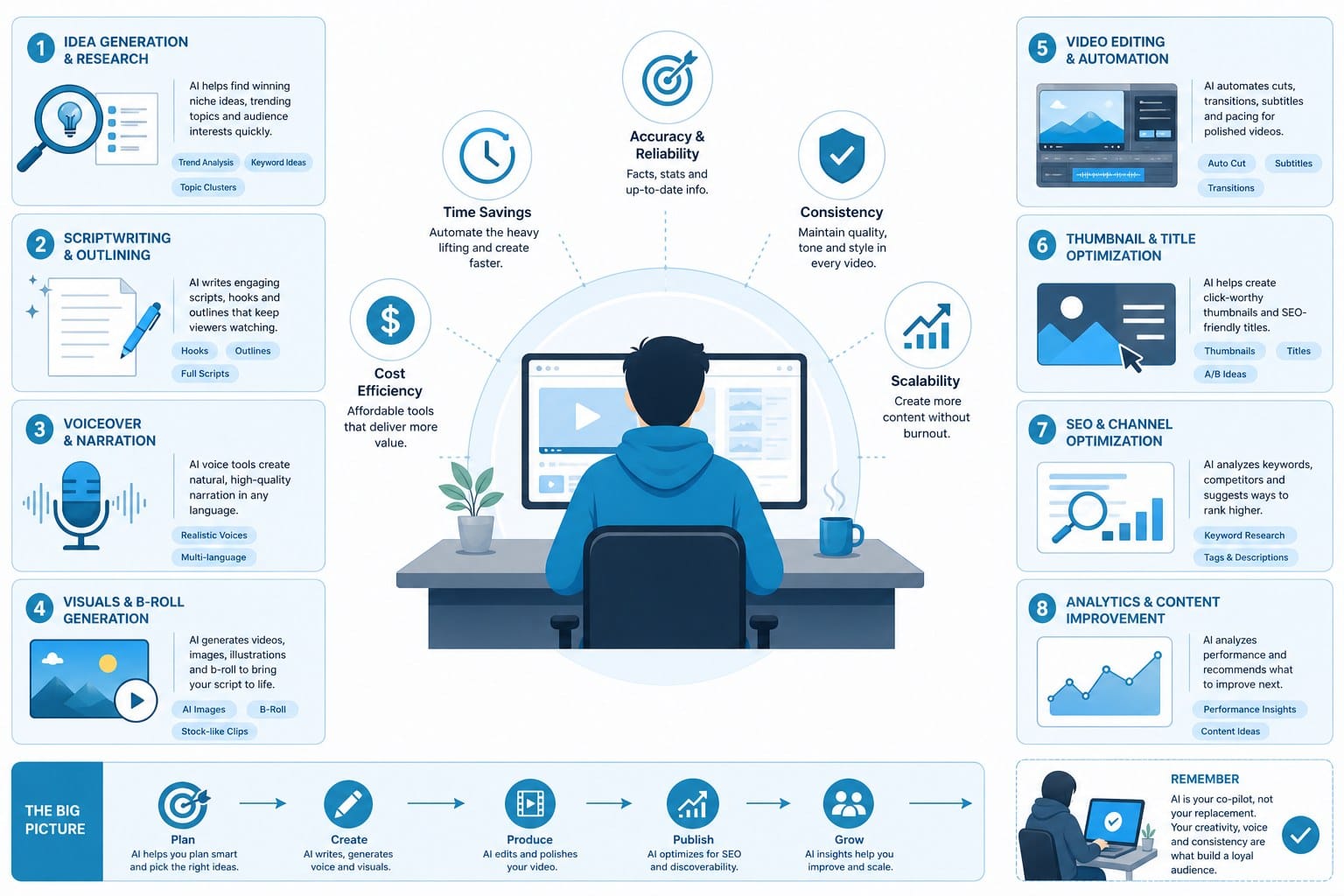
All-in-one AI video generation platforms. This category has grown the most in the last two years, and for good reason. An all-in-one platform takes a prompt or a script and handles research, scripting, footage sourcing, voiceover, motion graphics, and editing in a single workflow. For faceless channel creators, this is the category that offers the biggest time savings.
Cliptude is built exactly for this use case. I start with a prompt or a finished script, and the platform automatically researches the topic, writes or refines the script, sources and matches footage from licensed libraries, generates motion graphics, adds voiceover, and produces a finished video. It supports documentary formats, listicle videos, YouTube Shorts, animated explainers including stickman and whiteboard styles, and music videos. The credit-based pricing model means I only pay for what I actually produce, which makes it practical for creators at different output volumes.
What I appreciate about this approach is that it addresses the full pipeline rather than just one piece. A standalone voiceover tool is useful, but it does not solve the footage problem or the editing problem. An all-in-one platform addresses all of them together.
For creators building documentary-style content specifically, the automatic footage sourcing is a major advantage. Finding clips that visually match a script about, say, the construction of the Suez Canal or the collapse of Enron requires either an expensive stock subscription with hours of searching or a platform that handles the matching automatically.
AI scriptwriting tools. Even if I use an all-in-one platform, understanding what makes a good AI script tool is worth knowing, because the script drives every other part of the video.
The best AI scriptwriting tools for YouTube do three things well. First, they structure content for video rather than for articles. A YouTube script needs a strong hook in the first 30 seconds, clear section breaks that work as retention points, and a conclusion that drives engagement. Second, they maintain a consistent voice across multiple videos. Third, they can be prompted with enough specificity that the output does not feel generic.
For faceless channels doing educational or documentary content, I want a tool that can handle factual depth. A script about the history of the Federal Reserve or the science of black holes needs accurate information, not vague summaries. The best tools let me feed in source material and work from it, rather than generating content from scratch.
AI voiceover and text-to-speech tools. The quality ceiling for AI voiceover has risen significantly. Modern tools offer a wide range of voices, accents, and tones. For faceless channels, voice choice is a branding decision. A calm, measured voice works for history and documentary content. A faster, energetic voice works better for gaming or tech content.
What separates a good AI voiceover tool from a basic one is control. I want to be able to adjust pacing, add natural pauses, emphasize specific words, and preview changes instantly. Some tools also let me clone a custom voice, which is useful if I want to build a channel around a specific audio identity without ever recording myself.
For long-form content, consistency matters. A voiceover that sounds natural in the first two minutes but becomes monotonous by minute eight is going to hurt retention. Testing a voice across a full-length script, not just a 30-second sample, before committing to it for a channel is worth the extra step.
AI image and motion graphics generators. For channels doing animated explainer content, whiteboard videos, or stickman animations, AI image generation tools open up options that used to require a dedicated motion designer. I can generate custom illustrations, diagrams, and graphic elements that match my specific topic without paying for custom artwork or using generic clip art that viewers have seen a thousand times.
Understanding concepts like vox texture explained: what it is and how it works in video is useful here because that visual language, using texture, color, and typography to make data feel tangible, is something AI graphics tools can now replicate at scale.
AI thumbnail generators. I am including this because thumbnails are part of the production workflow and they directly affect click-through rate. AI thumbnail tools use pre-tested visual patterns, bold typography, and contrast-optimized designs to generate options quickly. For a solo creator without graphic design experience, this removes a bottleneck that used to require hiring a designer or spending two hours in Canva per video.
AI channel research and SEO tools. Finding topics that have real search demand, low enough competition for a newer channel to rank, and enough viewer interest to hold watch time is a research problem. AI tools built specifically for YouTube keyword research analyze search volume, competition, and trend direction to surface topic ideas that actually have a path to views. For faceless channels built around passive income from AdSense or affiliate partnerships, picking the right topics is as important as producing good videos.
What to watch out for. Not every AI tool delivers on its promises. Some generate footage that is clearly mismatched to the script, producing a video about cybersecurity that shows random office stock footage instead of anything technology-related. Others produce voiceover that sounds fine in a demo but awkward at full speed during a 12-minute video.
I also want to flag the platform compliance issue. YouTube has policies around AI-generated content, and while AI videos are allowed, there are specific rules about disclosure and content authenticity. Using AI tools that produce unique, editorially meaningful content, rather than spinning low-effort mass output, is what keeps a channel on the right side of those policies. For more detail on this, how to avoid YouTube inauthentic content flags with AI video covers the specifics of what YouTube looks for and how to stay compliant.
Building a sustainable workflow with AI tools for your faceless channel
Having access to good AI tools is one thing. Building a workflow that lets me consistently produce quality content without burning out is another. This section is about the practical side of putting it all together.
Start with a content strategy before touching any tool. The biggest mistake I see faceless channel creators make is starting with the tool and working backward to the content. It should be the other way around. Before I produce a single video, I need to know what my channel is about, who it is for, and what format makes the most sense for that audience.
A channel about personal finance for people in their 20s is going to look very different from a channel about military history. Personal finance might lean toward animated explainers with clear data visuals, quick pacing, and punchy titles. Military history might lean toward documentary-style long-form content with stock footage and a measured, authoritative voiceover. The AI tools I use should match the format I have chosen, not the other way around.
I also want to think about monetization early. AdSense requires consistent output and audience growth. Affiliate marketing needs content that naturally connects to products people want to buy. Sponsorships become possible at a certain subscriber threshold. Knowing which monetization path I am targeting shapes how I prioritize content volume versus content quality in my workflow.
Build a repeatable production template. Once I have chosen a format, I want to build a template I can reuse for every video. For a documentary-style channel, that template might look like this: a 60-second hook, three to five main sections each running four to six minutes, a brief summary, and a call to action to subscribe. For a listicle channel, it might be a consistent countdown structure with a teaser of the top item at the start.
AI tools are most powerful when I give them a template to work within. If I prompt an AI scriptwriting tool with a clear structure, word count target, and tone guide, the output is significantly better than a vague prompt like "write me a video about volcanoes." I want to build that template once and reuse it, refining it over time based on what my analytics tell me about retention and engagement.
Set a realistic publishing schedule based on your production capacity. One of the promises of AI tools for faceless YouTube channel production is that they let me produce more content, faster. That is true, but "faster" is relative. Even with an all-in-one platform handling most of the production, I still need time to review scripts for accuracy, listen to voiceover for quality, and check that footage matches the content.
For a solo creator, a realistic schedule with good AI tooling might be two to three videos per week for shorter content, or one long-form video per week for documentary-style channels. Trying to push beyond that without a team usually results in quality slipping, which hurts channel performance more than publishing less frequently.
I would rather publish one strong 15-minute documentary per week than three rushed eight-minute videos that viewers abandon halfway through. Watch time and retention are the signals YouTube uses to decide whether to recommend content, and no production volume goal is worth sacrificing those.
Use AI for research but verify facts before publishing. Faceless channels in the educational and documentary space have a trust relationship with their audience. If a video contains factual errors, that trust breaks quickly, and it is very hard to rebuild. AI tools are excellent at pulling together information and structuring it, but they can generate inaccurate details, especially for specific historical events, statistics, or scientific claims.
My workflow includes a fact-checking step where I verify any specific claims, dates, statistics, or quotes against reliable sources before the script is finalized. This takes maybe 20 to 30 minutes for a well-researched topic, but it protects the channel's credibility over the long term.
Track performance and iterate. AI tools give me the ability to produce content at a pace that was not previously possible for a solo creator. That means I can test more ideas and get real data faster than a creator who takes two weeks to produce each video. I should be using that advantage.
I want to look at retention curves for each video, specifically where viewers drop off, to understand whether the pacing, topic, or format is working. I want to look at click-through rates on thumbnails to see which visual styles perform best. And I want to look at which topics drive the most views relative to how much effort went into producing them.
Over time, that data tells me which content formats and topics to double down on and which to drop. AI tools let me run those experiments faster because production time per video is lower.
Think about channel identity even without being on camera. One of the concerns I hear from new faceless channel creators is that without a face and a personality on screen, it is hard to build a loyal audience. That concern is understandable but solvable.
Channel identity in a faceless format comes from consistent visual style, consistent voice and tone, a recognizable intro or music bed, and a point of view that shows up in which topics the channel covers and how it covers them. A history channel that always finds the overlooked human story inside a major event has a point of view. A finance channel that always focuses on what regular people can actually do with the information has a point of view. AI tools can help maintain that consistency in voice and visual style once I have defined it.
Consider commercial rights from the start. If I ever want to license videos, run paid promotions using my content, or monetize through platforms beyond YouTube, I need to make sure the AI tools I use grant full commercial rights to the content they help produce. This is not universal across all AI platforms. Some reserve rights to outputs or restrict commercial use in their terms of service.
Cliptude is built with this in mind, offering commercial rights to the content creators produce on the platform. For creators building a business around their channel, not just a hobby, that matters.
A realistic picture of what AI tools can and cannot do. I want to be honest here. AI tools for faceless YouTube channel production are genuinely powerful, and they have lowered the barrier to entry significantly. But they are not magic. The channels that succeed with AI tools are the ones where the creator is making real editorial decisions: choosing meaningful topics, maintaining quality standards, reviewing output before publishing, and building a consistent audience relationship over time.
AI handles the production labor. The strategy, the taste, the editorial judgment, and the audience relationship still come from me. That combination, human judgment plus AI production capacity, is what actually produces a channel worth watching.
For creators who are just starting out, the advice is simple. Pick a niche, choose a format, build a template, and start producing. The first ten videos will not be perfect. That is fine. The feedback from real viewers is more valuable than any amount of planning, and with AI tools handling the production workload, I can get to that feedback faster than any previous generation of YouTube creators could.
Ready to take the next step?
If you are ready to start building your faceless channel without the production headaches, Cliptude is worth exploring. The platform handles research, scripting, footage sourcing, motion graphics, and editing from a single prompt, so you can focus on strategy and growth instead of spending your time in an editing timeline. Visit Cliptude to see what your first video could look like.