
How to make AI YouTube videos in Hindi with the right tools

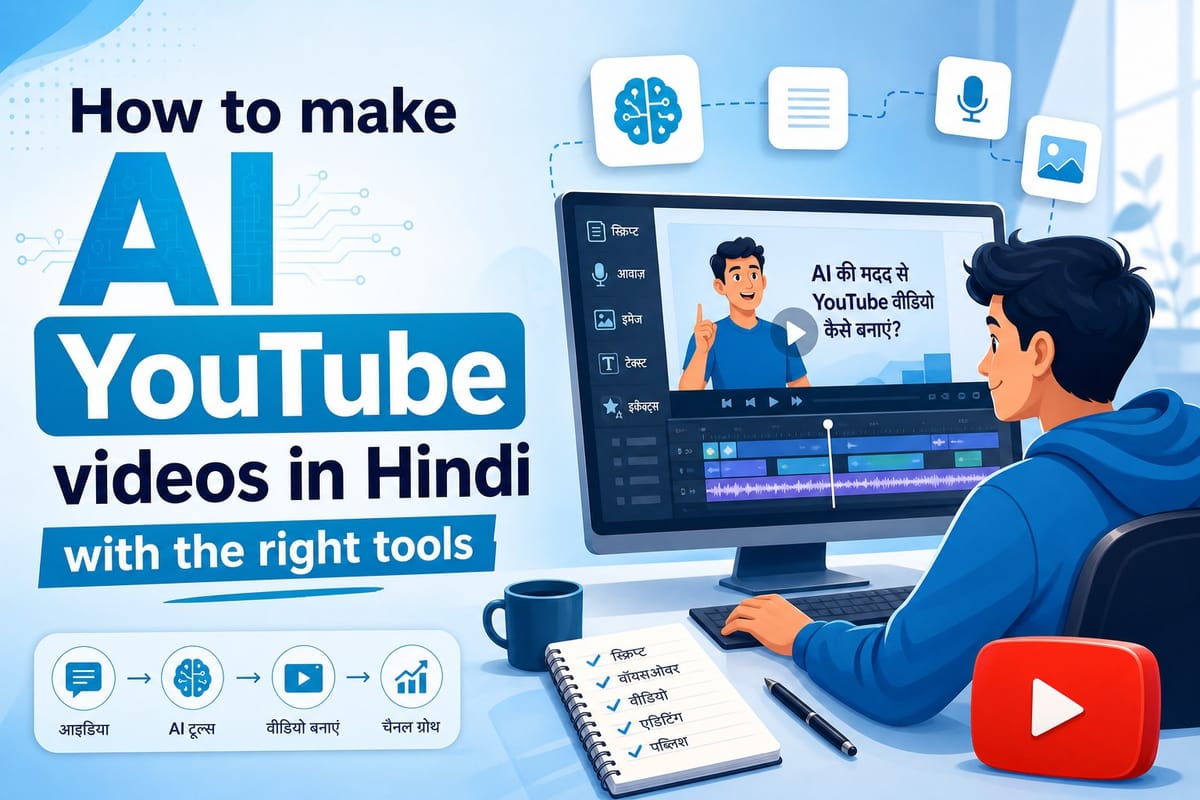
Table of contents
1. Why Hindi YouTube channels are a massive opportunity right now
2. The right tools for an ai youtube video maker hindi workflow
3. How to actually set up and scale your Hindi YouTube production
If you want to grow a Hindi YouTube channel but you do not have a camera, a recording studio, or video editing skills, you are not alone. Thousands of creators in India and across the Hindi-speaking world are looking for a smarter way to produce videos at scale. The good news is that an ai youtube video maker hindi workflow is now genuinely within reach for anyone with a laptop and an idea. In this article, I will walk you through exactly how to build that workflow, what tools actually matter, and how Cliptude fits into the picture for creators who want professional-quality output without a full production team.
Why Hindi YouTube channels are a massive opportunity right now
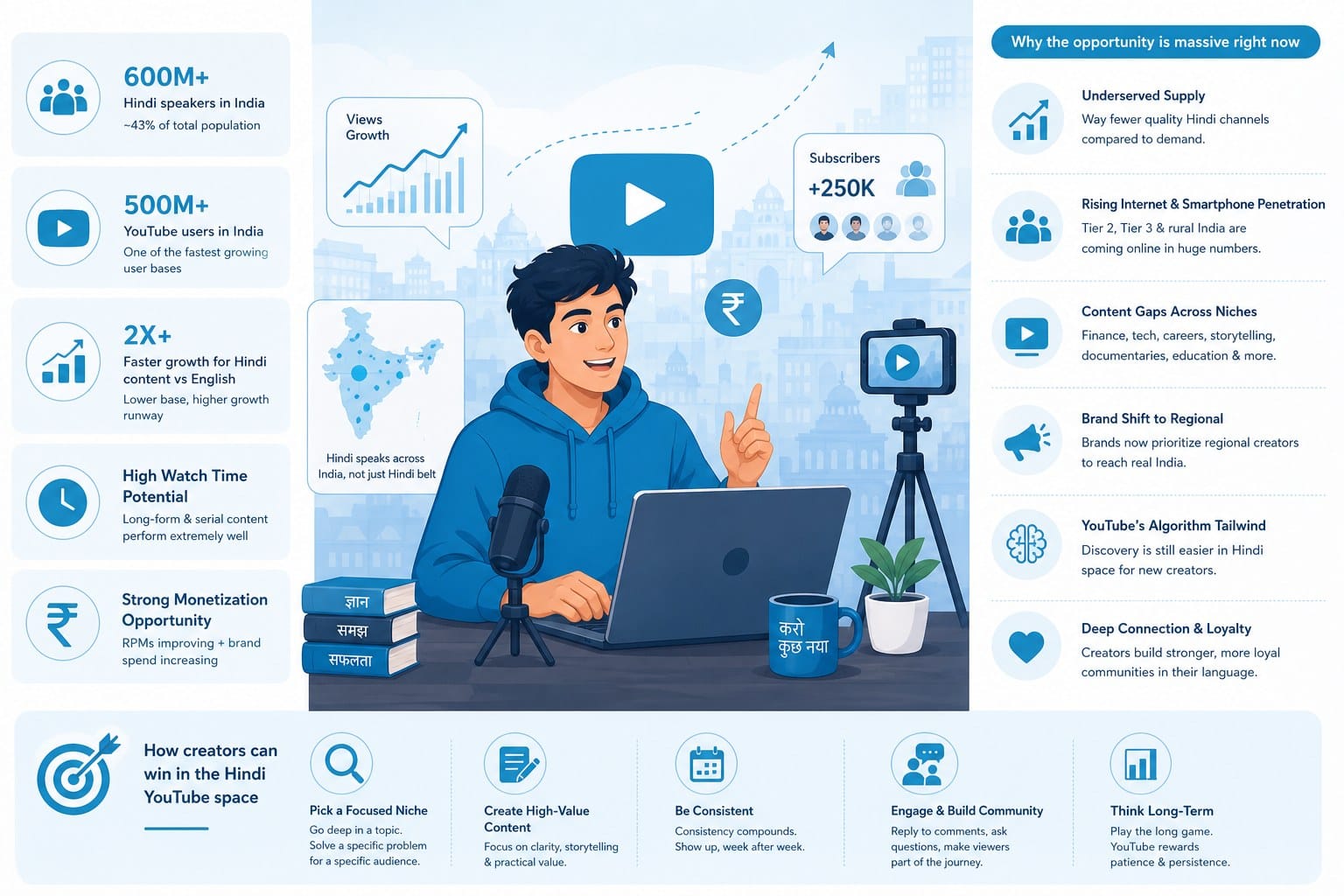
Hindi is the most widely spoken language in India and ranks among the top five most spoken languages in the world. YouTube in India has seen explosive growth over the past several years, and a huge portion of that growth is driven by viewers who prefer content in Hindi over English. Topics like personal finance, history documentaries, motivational content, science explainers, and true crime perform incredibly well in the Hindi market.
The creator economy in Hindi is still less saturated than English YouTube. That means a channel producing consistent, well-made videos in Hindi has a real shot at ranking, getting recommended, and building an audience faster than a comparable English-language channel competing in a much more crowded space.
The challenge has always been production. Making a good YouTube video takes research, scripting, voiceover recording, footage sourcing, editing, and graphics work. For a solo creator or a small team, that process can take days per video. When your entire content plan depends on you finishing each video manually, scaling becomes nearly impossible.
This is exactly the gap that AI video tools are built to close. Instead of spending 20 hours on a single 10-minute video, you can use an AI-powered platform to handle most of the heavy lifting automatically. You focus on the idea and the direction, and the tool handles the rest.
The question is not whether AI video tools work. They do. The question is which tools are actually suited to Hindi content, and how you structure your workflow to get the best results. Let me break that down step by step.
Before you pick any tool, you need to understand what kind of Hindi YouTube content you want to make. That decision shapes every other choice. Faceless documentary channels, for example, need stock footage, motion graphics, and a strong narration track. Educational explainer channels often work better with animation formats like whiteboard or stickman video. Listicle channels need fast cuts, text overlays, and punchy visuals. Shorts channels need vertical format and quick pacing.
Each of these formats has different requirements from an AI video maker. Some tools are great for short clips but struggle with long-form content. Some handle English well but fall apart when you try to produce Hindi audio or text on screen. Knowing what you want to build before you start testing tools will save you a lot of wasted time.
For Hindi specifically, you also need to think about script language. Do you want the script written in Devanagari script, or do you prefer Hinglish, which is the mix of Hindi vocabulary written in Roman script that a lot of YouTube creators use? Many Hindi channels record audio in spoken Hindi but write their titles, descriptions, and on-screen text in either Devanagari or Hinglish depending on their audience. Your AI tool needs to support whichever approach fits your channel style.
The right tools for an ai youtube video maker hindi workflow
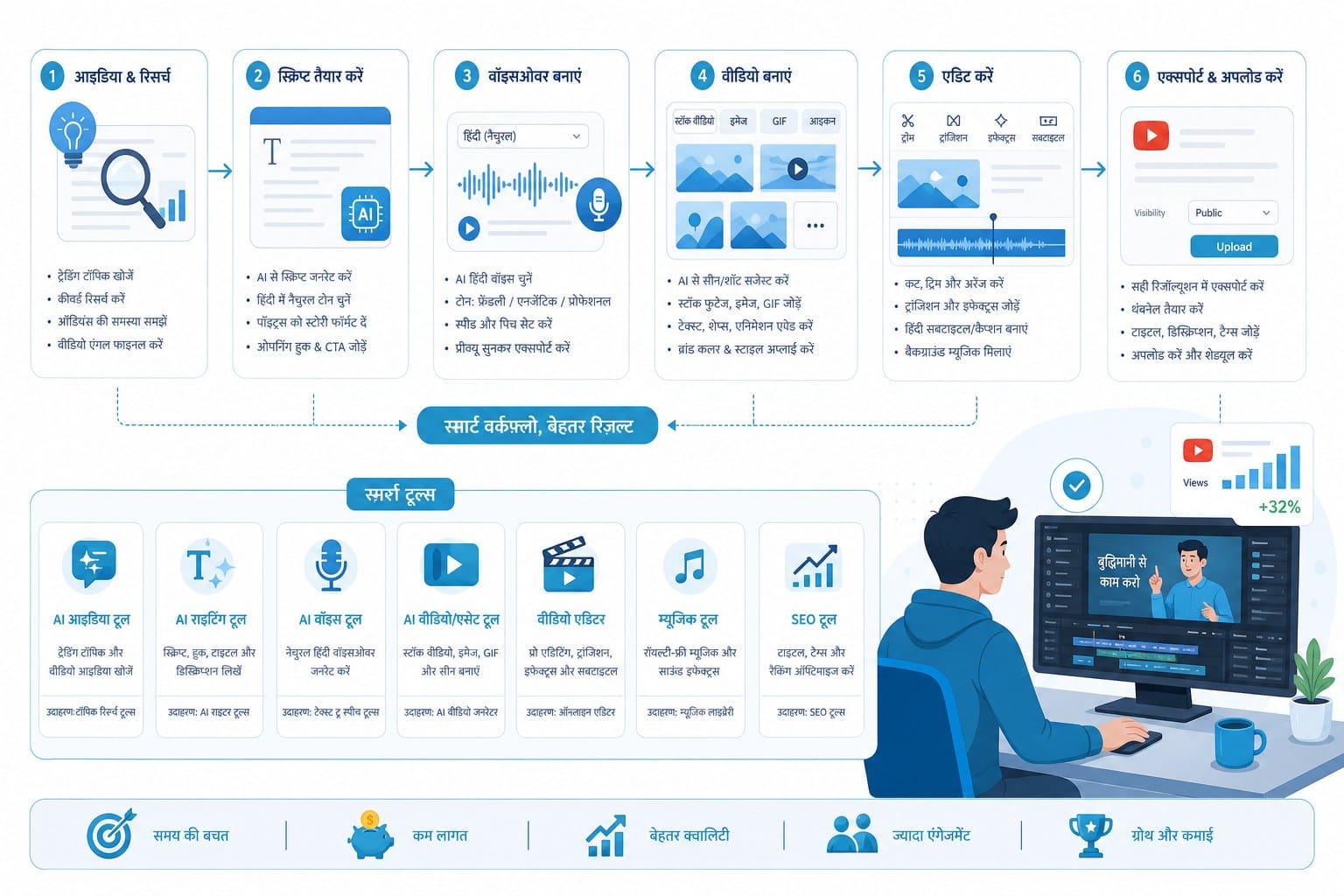
Building a Hindi AI video workflow usually involves combining a few different tools unless you find a platform that handles multiple steps in one place. Here is how I think about the stack.
First, you need a tool that can take a topic or a script and turn it into a finished video with footage, graphics, and narration. This is the core of any ai youtube video maker hindi setup. Cliptude is built specifically for this. You give it a prompt or a script, and it automatically handles research, scripting, footage sourcing, motion graphics, and editing. The output is a polished video you can upload directly to YouTube or use as a starting point for further customization.
For Hindi creators, the workflow typically looks like this. You start by writing your script in Hindi, either in Devanagari or in Hinglish transliteration depending on your style. You can write this yourself or use an AI writing assistant to draft it. Then you bring that script into Cliptude, where the platform takes over the visual production side. It sources relevant footage, generates motion graphics, and assembles the video according to your script structure.
One thing I want to be honest about here: most AI video platforms are optimized primarily for English-language content. Hindi support varies depending on which tool you use and which specific features you need. For narration in Hindi, you will often get the best results by recording your own voiceover or using a dedicated Hindi text-to-speech tool and then bringing that audio into your video project. The visual side of production, which is where Cliptude shines, is largely language-agnostic because it works with footage and graphics rather than language-specific text rendering in the video itself.
For the voiceover component specifically, there are several Hindi text-to-speech tools available that produce natural-sounding narration. You generate the Hindi audio file separately, then use it as the narration track in your video project. This two-step approach gives you more control over the audio quality and lets you use the best tool for each job.
For on-screen text in Hindi, you need a tool that supports Devanagari fonts properly. If you are using Cliptude for the video production and want to add Hindi text overlays, check whether your post-production step supports Devanagari rendering. Most professional video editors do, and free tools like DaVinci Resolve also handle Unicode fonts including Devanagari without issues.
Now let me talk about the different video formats and how they map to tools. If you want to produce documentary-style videos for your Hindi channel, you need a platform that can source B-roll footage, handle long-form scripts of 1500 words or more, and produce a clean edited video with proper pacing. Cliptude is well-suited to this format. You input your documentary script, and the platform handles the footage research and assembly automatically. This is a huge time saver compared to manually searching stock footage libraries for every scene.
If you want to produce animation-style content, like whiteboard explainers or stickman videos, the approach is a bit different. Animation formats are popular for educational Hindi channels covering topics like history, science, and economics. I have written more about this format in detail in my article on AI stickman animation video maker for YouTube creators, which walks through how AI animation tools work and where they fit in a YouTube production workflow.
For Hindi YouTube Shorts or Reels, you want vertical format video with quick pacing, bold text overlays, and short duration. AI video tools that support both long-form and short-form output give you more flexibility. You can often take a longer documentary video and use the platform to clip it into multiple Shorts, which multiplies your content output from a single production session.
For music video content in Hindi, which includes everything from Bollywood-style lyric videos to AI-generated visuals set to original music, there are dedicated tools for this format as well. If you are interested in that content category, my article on AI music video generator: create professional videos from a prompt covers the specific workflow in detail.
Pricing is a real consideration for Hindi creators, especially those who are just starting out and have not yet monetized their channel. Many AI video platforms charge monthly subscriptions that can feel expensive before you have revenue coming in. Cliptude uses usage-based credit pricing, which means you pay for what you actually produce rather than a flat monthly fee whether you use the tool or not. For a creator who is building up their channel and producing a variable number of videos each month, this kind of pricing model is more practical.
I also want to address the question of commercial rights, because it matters for anyone planning to monetize their Hindi YouTube channel. When you use AI-generated footage, graphics, or audio in your videos, you need to make sure you have the rights to use that content commercially. Cliptude provides full commercial rights for content produced through the platform, which means you can monetize your videos through YouTube's Partner Program, brand deals, or any other channel without licensing concerns on the production side.
How to actually set up and scale your Hindi YouTube production
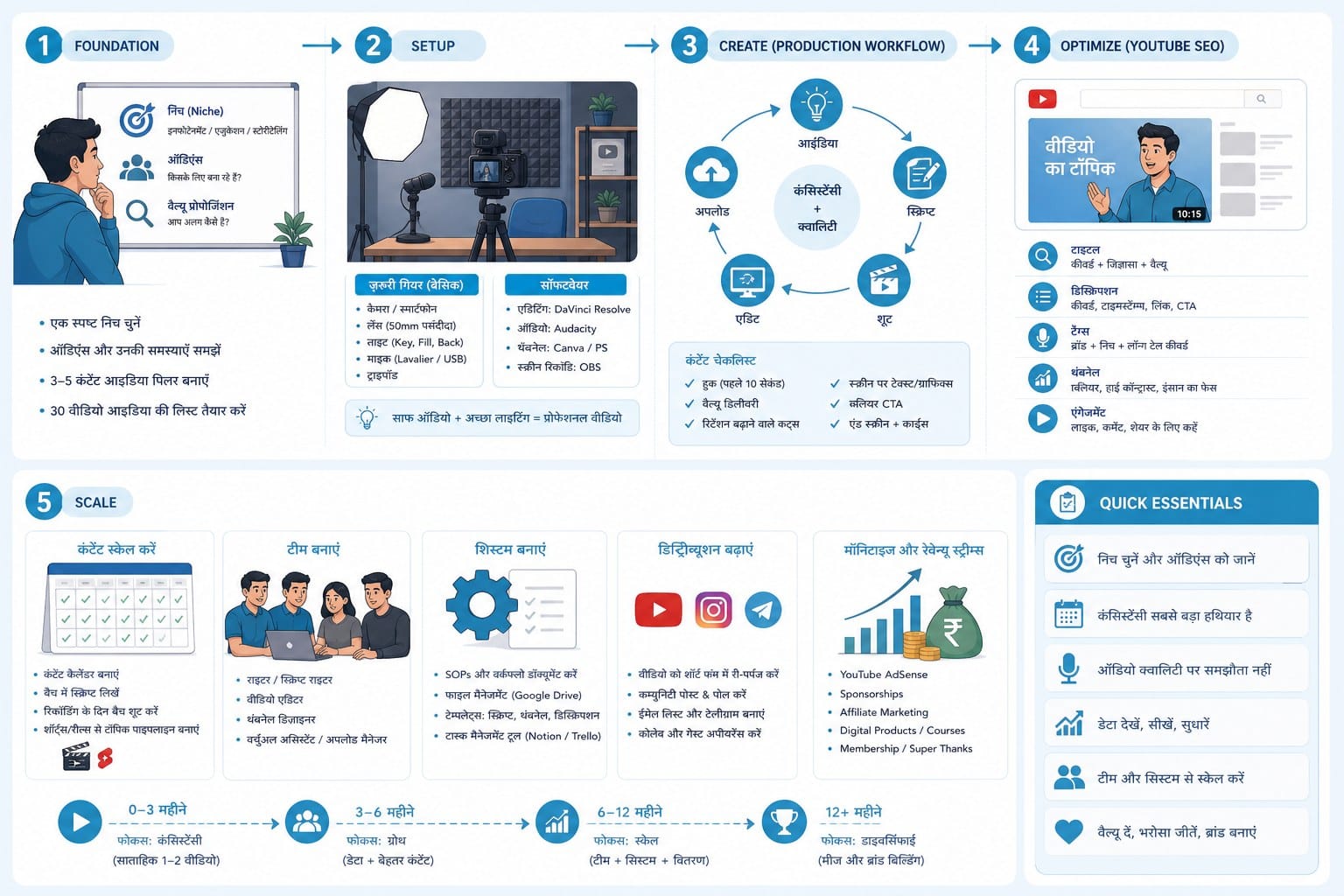
Let me walk through a practical production process you can start using right now. I will assume you are building a faceless Hindi YouTube channel focused on documentary or educational content, which is one of the most popular formats for Hindi creators.
Step one is defining your niche and content plan. Pick a specific topic area where there is clear audience demand in Hindi. Good examples include Indian history, personal finance explained in simple Hindi, science and technology explained for a general audience, or true crime stories from India. Do basic keyword research using YouTube's search bar autocomplete and the YouTube Studio analytics if you already have a channel. Look for topics that have a lot of search volume but relatively few high-quality Hindi videos covering them well.
Step two is building a script library. Batch your scriptwriting so you are always working ahead. If you publish two videos per week, write scripts for the next four to six videos before you produce the first one. This gives you a buffer and means production never gets blocked because you do not have a script ready. You can write scripts in Hindi yourself, use an AI writing assistant to draft them in Hindi based on your topic prompts, or work with a Hindi-language freelance writer. The important thing is having a consistent script format that works well with your AI video production tool.
For a typical 8 to 12 minute Hindi documentary video, your script will be roughly 1200 to 1800 words of narration. Structure it clearly with an opening hook, three to five main content sections, and a closing. Keep your sentences relatively short and direct. Hindi narration sounds better when the sentences are not too long or complex, and shorter sentences also give the AI more natural places to match visuals to the narration.
Step three is production using Cliptude. You bring your script into Cliptude, and the platform handles the visual side automatically. It researches and sources relevant footage, generates motion graphics where needed, and assembles the video according to your script structure. The key here is writing a clear, specific script that gives the AI enough context to source relevant visuals. If your script says something generic like "India has a long history," the tool has less to work with than if it says "The Mughal Empire reached its peak extent under Emperor Aurangzeb in the late 17th century." Specific, concrete script writing produces better AI video output every time.
Step four is adding your Hindi narration. Depending on your setup, you have a few options here. If you have a good microphone and you are comfortable recording in Hindi, your own voice will always give the most natural result. Record your narration in sections matching your script, then sync it to the video timeline. If you prefer not to do your own voice, use a Hindi text-to-speech service to generate the narration audio and import it into your video.
Step five is final review and upload. Watch the complete video through before you upload it. Check that the visuals match the narration, that the pacing feels right, and that any on-screen text is correct. Add your Hindi title card, your channel watermark if you use one, and make sure your thumbnail matches the video's topic. Your YouTube title and description should be written in Hindi or Hinglish depending on your channel style, and should include the key terms your target audience would actually search for.
Now let me talk about scaling this process. Once you have produced three or four videos using this workflow, you will have a clear sense of how long each step takes and where the bottlenecks are. The goal is to get to a point where you can produce two to four videos per week with a small team or even on your own.
Batching is the key to scaling. Instead of producing one video from start to finish, batch all your scripting for the week in one session, all your Cliptude production runs in another session, and all your narration recording in a third session. This approach is much more efficient than switching between tasks repeatedly.
You can also repurpose your long-form documentary videos into Shorts. Take the most interesting 30 to 60 second segment from each video, add bold on-screen text, and publish it as a Hindi Short. This multiplies your content output without proportionally multiplying your production time. Many Hindi creators have grown their channels significantly through Shorts because the format gets pushed aggressively by YouTube's recommendation algorithm.
Monetization is a topic I want to address directly because it is on every creator's mind. Hindi YouTube channels can qualify for the YouTube Partner Program under the same requirements as any other channel: 1000 subscribers and 4000 watch hours in the past 12 months. Once you are in the Partner Program, you earn ad revenue from your videos. Hindi content often has lower CPM rates than English content, but the volume of the Hindi-speaking audience is large enough that successful Hindi channels can still generate significant revenue.
Beyond ad revenue, Hindi channels can monetize through brand sponsorships from Indian brands and companies targeting Hindi-speaking consumers, affiliate marketing for products popular in the Indian market, and selling digital products like courses or ebooks. If you want a thorough look at the monetization question for AI-generated content specifically, I recommend reading my article on Can you monetize AI-generated YouTube videos, which covers the current YouTube policies and practical considerations in detail.
One mistake I see Hindi creators make when they first start using AI video tools is expecting the output to be perfect without any input on their part. AI video tools are not magic boxes where you type a topic and get a broadcast-quality video with no effort from you. They are powerful production tools that amplify your creative direction. The quality of what you put in, meaning your script, your topic choice, your structure, directly determines the quality of what comes out. Treat the AI as a very capable production team that needs clear direction from you, and you will get much better results than if you treat it as a fully autonomous content factory.
Consistency is more important than perfection when you are building a Hindi YouTube channel. A video that is 80 percent as good as your ideal but published on schedule beats a video that is 100 percent perfect but takes three weeks to produce. Your audience rewards consistency with loyalty and algorithmic visibility. Use AI tools to hit your publishing schedule reliably, then gradually improve your production quality as you learn what works best for your specific audience and format.
If you are serious about building a faceless Hindi YouTube channel at scale, Cliptude gives you a genuine shortcut on the most time-consuming parts of video production. The platform is at cliptude.com, and the usage-based pricing means you can start small and scale your production as your channel grows.
Ready to take the next step?
Ready to start producing Hindi YouTube videos without spending days on each one? Head to Cliptude at cliptude.com to see how the platform turns your scripts and prompts into polished, ready-to-upload videos. Sign up, bring your first Hindi script, and see what your channel can look like when production stops being the bottleneck.



