
Text to video: create polished YouTube content with AI

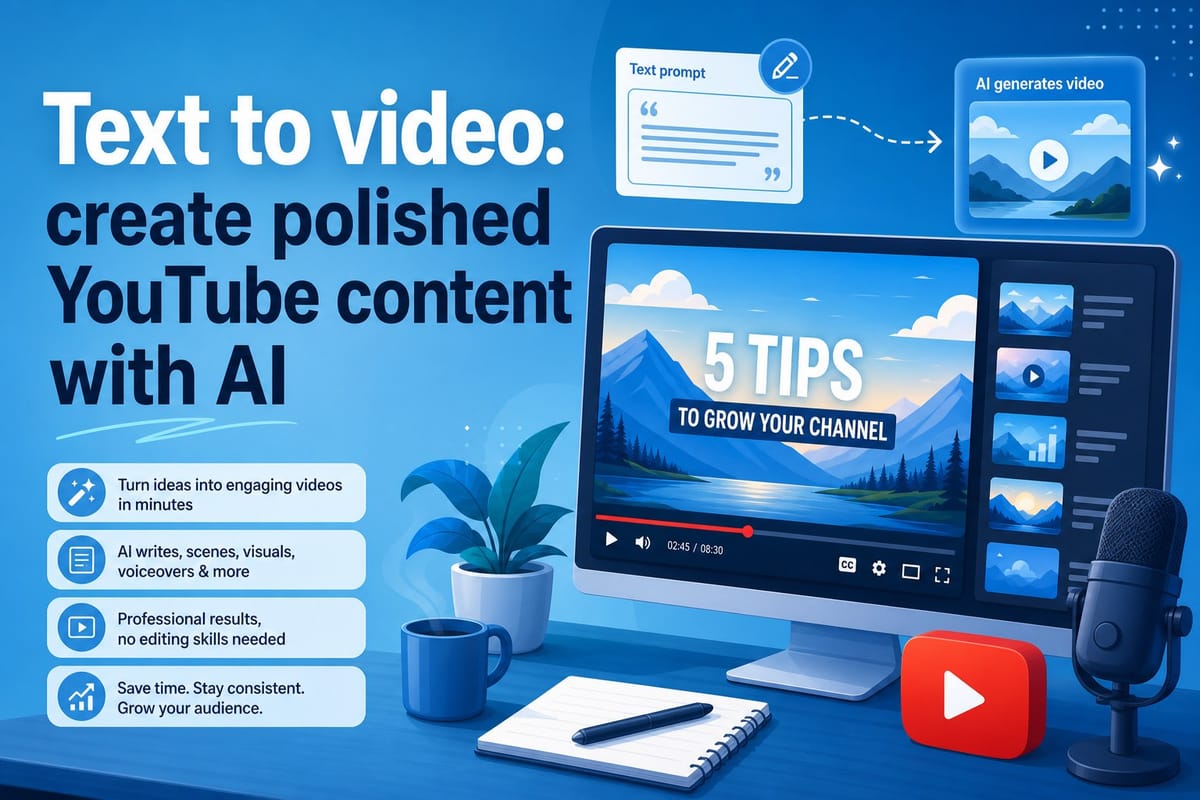
Table of contents
1. What text to video actually means and how the technology works
2. How to use text to video to build a consistent YouTube content operation
3. Getting quality right: what separates good AI video from forgettable content
I want to be honest with you: most people who try to start a YouTube channel quit within the first few months. Not because they lack ideas, but because producing video is genuinely hard. You need a script, footage, voiceover, graphics, music, and editing, and that is before you even think about publishing consistently. Text to video technology has changed that equation in a meaningful way. Instead of spending 20 or 30 hours on a single upload, creators can now go from a written prompt or script to a finished, polished video in a fraction of the time. In this article, I will walk you through exactly how that works, what you should realistically expect from the technology, and how to use it to build a YouTube channel you can actually sustain.
What text to video actually means and how the technology works
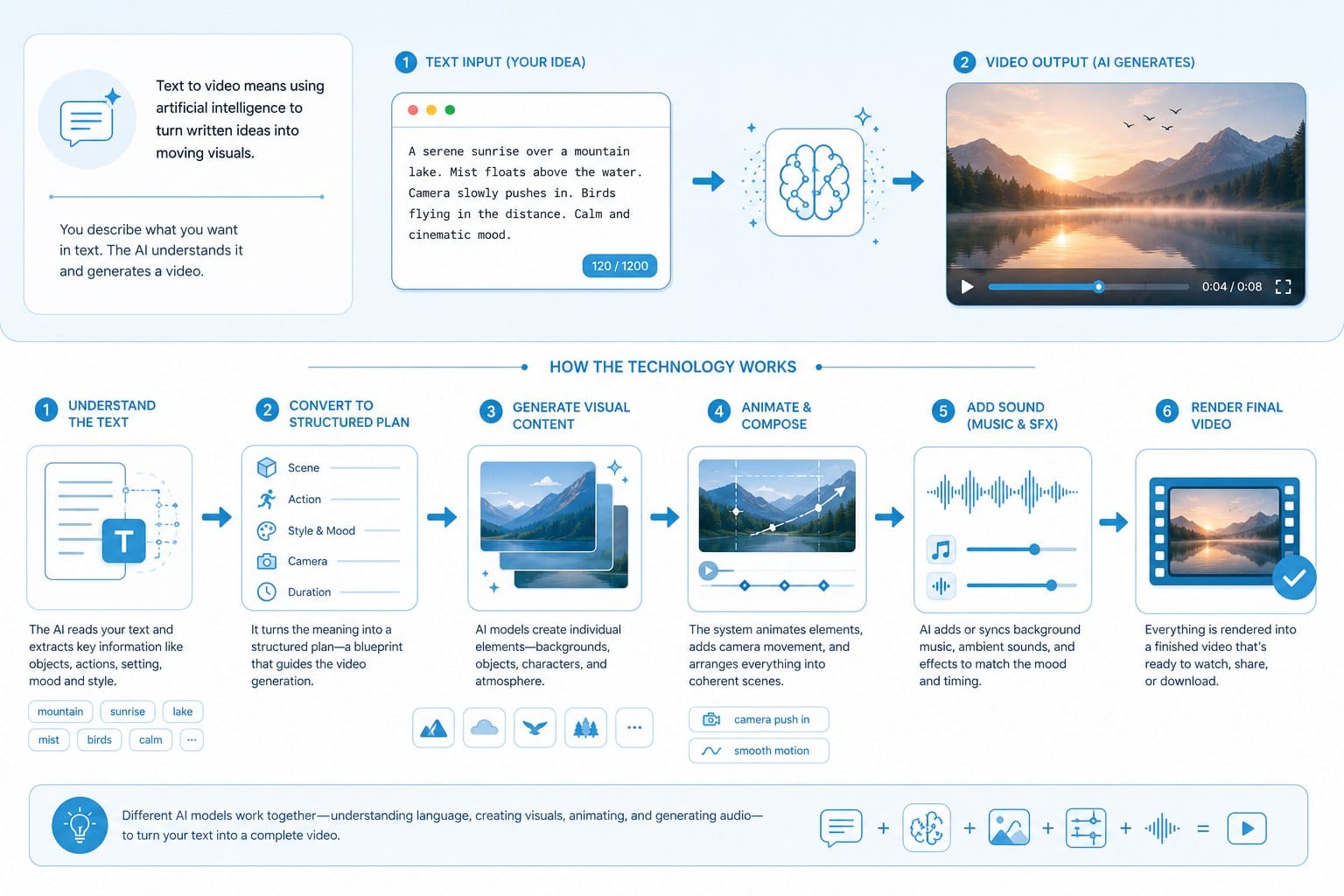
Text to video is a form of generative artificial intelligence that takes a natural language description or a full written script as its input and produces a video as its output. You type something in, and the system builds a video around it. That is the core idea, but the reality of how modern platforms implement it is a lot more interesting than that simple definition suggests.
Under the hood, most advanced text to video systems rely on what researchers call video diffusion models. These models learn from enormous datasets of existing video footage, motion patterns, visual styles, and audio. Over time, they develop the ability to generate new video content that matches a written description. Think of it like this: the model has studied millions of hours of video and learned what a "documentary about the Amazon rainforest" or a "whiteboard explainer about compound interest" should look and feel like. When you give it a prompt, it draws on that knowledge to construct something new.
This is different from older, simpler tools that just slapped stock footage clips together based on keywords. Modern text to video systems can generate motion graphics, animate sequences, match visual pacing to a voiceover, and maintain consistent visual style across a multi-minute video. The gap between what these tools produced two years ago and what they produce today is enormous.
Here is something worth understanding clearly, though. Not all text to video outputs are the same quality. There is a real risk of producing what some people in the industry call "slop," which is AI-generated content that looks generic, lacks effort, and does not give viewers any real reason to watch it. The difference between slop and something genuinely good comes down to how the tool is built and how the creator uses it.
A platform like Cliptude is built to address exactly that problem. Rather than just stitching together random clips, it handles research, scripting, footage sourcing, motion graphics generation, and editing as an integrated process. The goal is a finished video that holds up to comparison with content that a human editor spent days putting together. That is the standard worth holding AI video tools to.
For YouTube specifically, text to video is particularly powerful because the platform rewards consistency and volume. Channels that upload regularly tend to grow faster. Most solo creators simply cannot produce enough content by hand to compete at that level. AI changes the math entirely.
Let me give you a concrete example. Say you want to create a faceless documentary channel about historical events. Before AI tools, you would need to research the topic for several hours, write a script, record or commission a voiceover, source archival footage, edit everything together, and add titles and music. That process might take a full weekend for a single 10-minute video. With a purpose-built text to video platform, you can input your topic or script, and the system handles the research, sources appropriate footage, generates motion graphics, and assembles the video. You still review and refine the output, but the heavy lifting is done.
This is not science fiction. It is the workflow that a growing number of faceless YouTube creators are already using to run channels that generate real income. The key is choosing the right tool and understanding what quality actually looks like in this space.
It is also worth separating text to video from some related but different technologies. Deepfakes, for instance, use AI to manipulate existing footage of real people. That is a separate category with its own ethical and legal concerns. Text to video in the context of YouTube content creation is about generating new visual content from a written prompt, not about altering footage of real individuals. Most serious content creation platforms draw a clear line here, and creators should too.
Another related technology is text to image, which generates still images from written prompts. Text to video is a harder technical problem because it adds time, motion, continuity, and often audio into the mix. That is why progress in this space has been so closely watched and why the tools that do it well represent a significant leap forward for content creators.
If you are running a channel focused on education, history, finance, science, or any topic-driven niche, text to video gives you a real production advantage. You can match the visual quality of much larger channels without matching their budgets or team sizes.
How to use text to video to build a consistent YouTube content operation
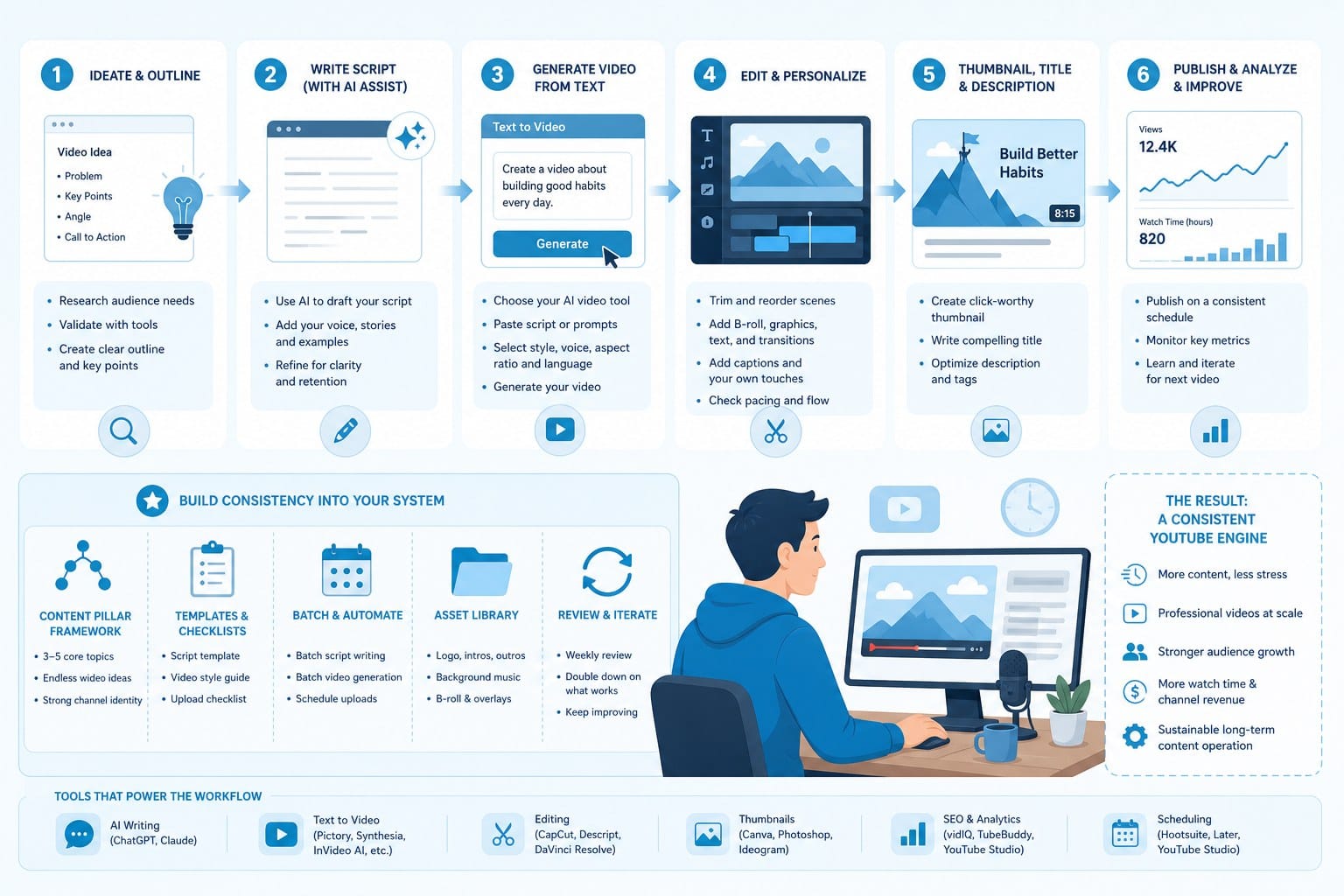
Consistency is the single biggest predictor of YouTube channel growth, and it is also the hardest thing for solo creators to maintain. Life gets in the way. Editing takes longer than expected. Research piles up. Text to video tools are most valuable when you use them to build a system, not just to make a one-off video.
Here is how I would approach building that system from scratch.
Start with your niche and content format. The clearer you are about what your channel covers and what format your videos take, the better your AI outputs will be. A channel about personal finance documentaries has a much easier time with a text to video workflow than a channel that posts a random mix of vlogs, rants, and tutorials. The more consistent your format, the more efficiently you can move from prompt to finished video.
Once you know your niche, develop a content calendar. This does not need to be complicated. A simple list of 10 to 20 video topics you want to cover over the next month or two is enough. Having that list ready means you can batch your video creation instead of starting from scratch each time. Batching is one of the most effective ways to stay consistent without burning out.
Next, think about your scripting approach. Most text to video platforms can work from either a simple prompt or a full written script. If your channel involves complex arguments or detailed explanations, writing a full script first and then feeding it to the platform gives you more control over the final message. If you want the AI to handle more of the creative work, a detailed prompt works well. For example, instead of typing "video about black holes," you might write: "A 10-minute educational documentary explaining how black holes form, what happens at the event horizon, and what scientists have learned from recent telescope observations. Tone is curious and accessible. Audience is general viewers with no physics background."
That level of detail gives the system enough to work with and produces a much better result than a vague one-line prompt.
Now let me walk through what a realistic production session might look like using a platform like Cliptude. You open the platform, select your video type (documentary, listicle, explainer, short, animation), and enter your prompt or script. The platform researches the topic, builds a script if you have not provided one, sources footage that fits the content, generates any needed motion graphics or animations, adds voiceover, and assembles the edit. You then review the output, make any adjustments, and export.
For a standard 8 to 12 minute documentary video, this process can realistically take under an hour of your actual time, even if the platform takes longer to process in the background. Compare that to a traditional editing workflow where 8 minutes of finished video might take 15 to 20 hours of work.
The format options matter a lot depending on your channel strategy. If you are focused on long-form content, documentary and listicle formats tend to perform well on YouTube because they match viewer intent. People searching for "history of the Roman Empire" or "top 10 unsolved mysteries" are looking for something they can settle in and watch. Text to video tools that support long-form output with proper narrative structure and pacing give you a real edge in these niches.
If you are focused on Shorts or Reels, the dynamic changes. You need fast pacing, strong hooks in the first two seconds, and clear visual storytelling. A good text to video platform should be able to adapt its output format to these requirements, not just spit out the same video at a different aspect ratio.
For educational or explainer content, animation formats like whiteboard or stickman videos can be extremely effective. They work well for topics that are hard to illustrate with real footage, like explaining how algorithms work or breaking down a legal concept. If your channel covers this kind of material, look for a platform that supports these animation styles natively.
One more thing worth mentioning: commercial rights. If you plan to monetize your channel, either through YouTube's Partner Program, brand deals, or selling the content itself, you need to confirm that your text to video platform grants you full commercial rights to the output. Some tools retain licensing restrictions that could create problems if your channel grows. Platforms designed for professional content creators typically include commercial rights as part of the standard offering.
Building a faceless channel with AI tools is a real and growing business model. Creators are running channels in niches like true crime, world history, science, technology, and personal finance without ever appearing on camera, and they are generating significant monthly revenue. The workflow I have described here is what makes that possible at scale. You can read more about how this applies to specific language communities and content styles in articles like how to create Kannada YouTube videos with AI and Nepali content creation made easy with AI video tools, which show how these tools are being used across very different audiences.
Getting quality right: what separates good AI video from forgettable content
I want to spend real time on this section because it is the thing most articles about text to video skip over. There is a version of AI video that performs well and builds an audience, and there is a version that gets ignored or actively hurts your channel's reputation. Understanding the difference is the most important thing I can teach you here.
The core issue is that AI-generated video has a reputation problem in some corners of the internet. Viewers have developed an eye for content that looks rushed, generic, or like it was assembled without any thought. If your videos look like a keyword was typed into a machine and whatever came out was published without review, your audience will notice and they will not come back. Worse, YouTube's algorithm may struggle to recommend content that gets poor audience retention signals.
So what does quality actually look like in this context?
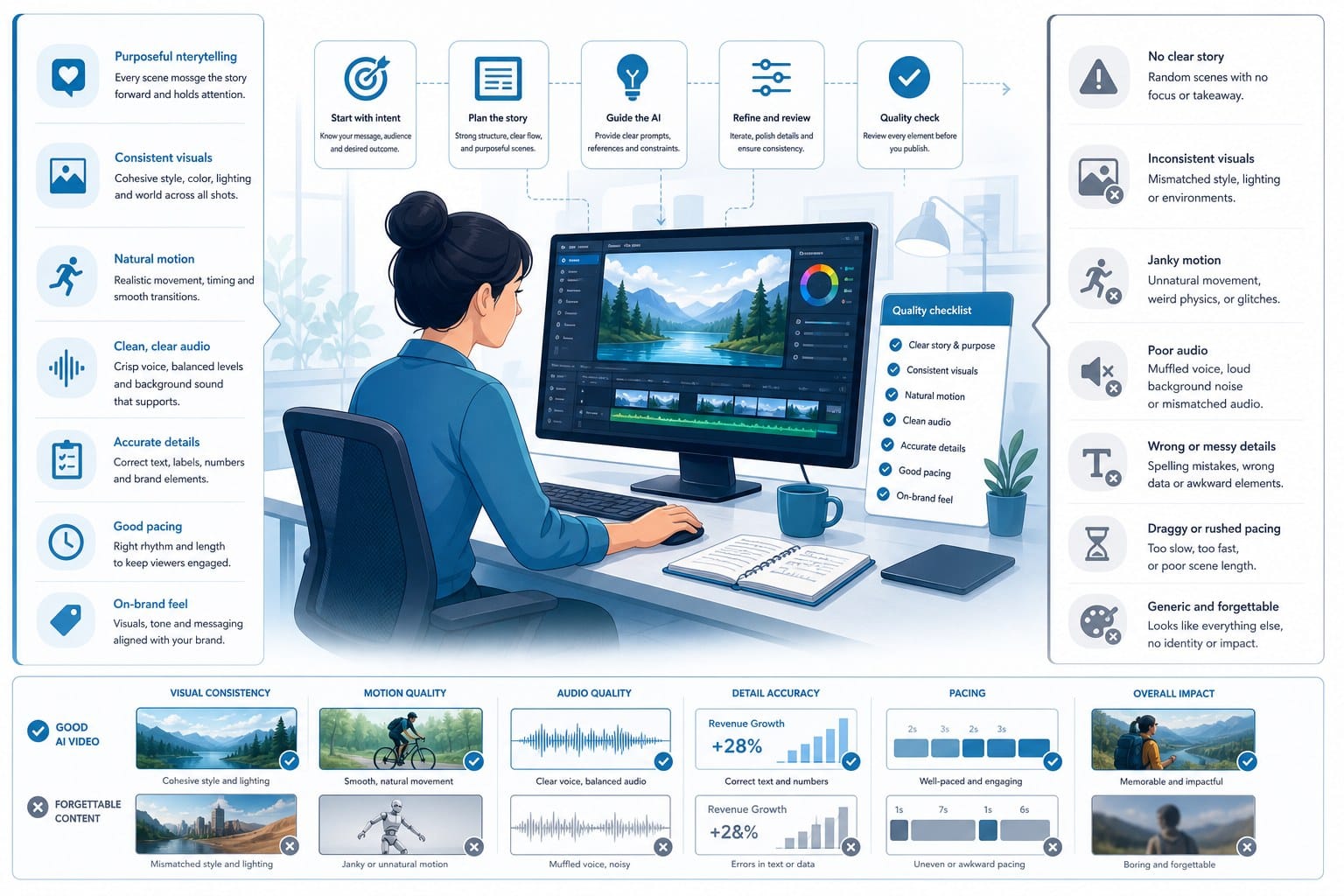
First, the script matters more than anything else. Even the best footage and graphics cannot save a poorly structured script. A good AI-generated video needs a clear opening that tells viewers exactly what they are going to learn or experience, a middle section that delivers on that promise in an organized way, and a close that gives the viewer something to take away or act on. If you are using a platform that generates scripts automatically, review them before producing the video. Check for logical flow, factual accuracy, and tone. Fix what needs fixing. This step alone separates channels that grow from channels that stagnate.
Second, footage selection and visual variety matter a lot. A video that shows the same type of shot over and over, or uses footage that clearly does not match the script, feels lazy to viewers even if they cannot articulate why. Look for tools that source contextually relevant footage and mix visual styles appropriately throughout the video, not just grab whatever is easiest.
Third, pacing is one of the hardest things to get right and one of the most important. Educational content, for example, needs time for ideas to land. A documentary about a historical event needs to let tension build. A listicle video needs to move quickly enough to keep energy up without feeling rushed. Good text to video platforms understand pacing as a production value, not just a technical parameter.
Fourth, audio quality and voiceover delivery affect perception of credibility more than most creators realize. A robotic or monotone voiceover will undermine even excellent visuals. Look for platforms that offer natural-sounding AI voices with appropriate variation in tone and emphasis. Some creators also record their own voiceover and let the platform handle everything else. That combination can produce excellent results.
Fifth, thumbnails and titles are outside the video itself but they are part of the same quality conversation. A great video with a bad thumbnail will not get clicked. Most text to video workflows end at the video file, so you will need to handle thumbnail design separately. This is worth the extra effort.
Here is something I think is underappreciated: the best use of text to video is not to replace your creative judgment, it is to execute your creative judgment faster. You still make the decisions about topic, angle, tone, and message. The AI handles the time-consuming production work. That division of labor is what produces content that feels intentional rather than automated.
Let me give you a specific example of what this looks like in practice. Say you want to make a documentary about the rise and fall of Kodak. You decide on the angle: the story is really about how a company that invented the digital camera chose not to develop it because it threatened their film business. That angle is your creative decision. It is specific, interesting, and counter-intuitive enough to hold a viewer's attention. You feed that angle into the platform along with any additional context about tone and audience. The system builds around your idea. The result is a video that has a point of view, not just a collection of facts about Kodak.
Channels that operate this way produce content that stands out. Channels that just type generic prompts and publish whatever comes out tend to get lost.
For creators interested in documentary-style content specifically, the workflow I have described here scales very well. A single creator can realistically produce and publish multiple documentary videos per week using a platform built for this purpose. If you want to go deeper on that specific format, how to create YouTube documentaries with AI in minutes walks through the process in detail.
I also want to address the question of monetization directly, because it is the goal for most of the creators reading this. YouTube monetization through the Partner Program requires 1,000 subscribers and 4,000 watch hours, or 10 million Shorts views in the past 90 days depending on your format. That threshold is reachable much faster when you can publish consistently. Channels that publish two to four videos per week grow their watch hours much faster than channels that publish once a month.
Beyond ad revenue, AI video content can open doors to sponsorships, affiliate marketing, course sales, and licensing. If you own full commercial rights to your content, which you should confirm before choosing a platform, you can use that content in multiple ways without legal complications.
The usage-based pricing model that some platforms use, including Cliptude, is worth understanding in this context. Rather than paying a flat monthly fee regardless of how much you produce, you pay based on how many videos you create. For creators who are scaling up, this can be more efficient than a subscription that caps your output or charges you the same amount whether you make two videos or twenty.
One final point: the text to video space is moving fast. What is possible today is significantly more advanced than what existed 18 months ago, and the trajectory is continuing upward. Creators who learn to work effectively with these tools now are building skills and workflows that will compound in value as the technology improves. The creators who figure this out early have a real head start on the ones who wait until AI video becomes completely mainstream.
If you are serious about building a YouTube channel without the traditional production burden, text to video is not a shortcut. It is a different kind of production process, one that rewards creative thinking and strategic consistency just as much as traditional video production does, but removes the technical and time barriers that stop most people from getting started.
Ready to take the next step?
If you are ready to start building your YouTube channel with AI, Cliptude is built specifically for creators who want polished, long-form video content without a production team. From documentaries to animations to Shorts, the platform handles research, scripting, footage, graphics, and editing from a single prompt or script. You keep full commercial rights to everything you produce. Try it and see how many videos you can create this week.



