
Thumbnail text generator: how to create click-worthy titles fast


Table of contents
1. What a thumbnail text generator actually does
2. How to use thumbnail text well across different video formats
3. Pairing thumbnail text with a full AI video workflow
I want to tell you something most creators find out the hard way: your thumbnail text matters just as much as the video itself. You can spend hours editing a polished video, but if the text on your thumbnail is boring, too small, or just confusing, people scroll right past it. That is where a thumbnail text generator comes in. These tools help you write short, punchy title text that stops people mid-scroll and makes them want to click. In this article, I will walk you through what a thumbnail text generator actually does, how to use one well, and how pairing it with a full AI video workflow can save you serious time.
What a thumbnail text generator actually does
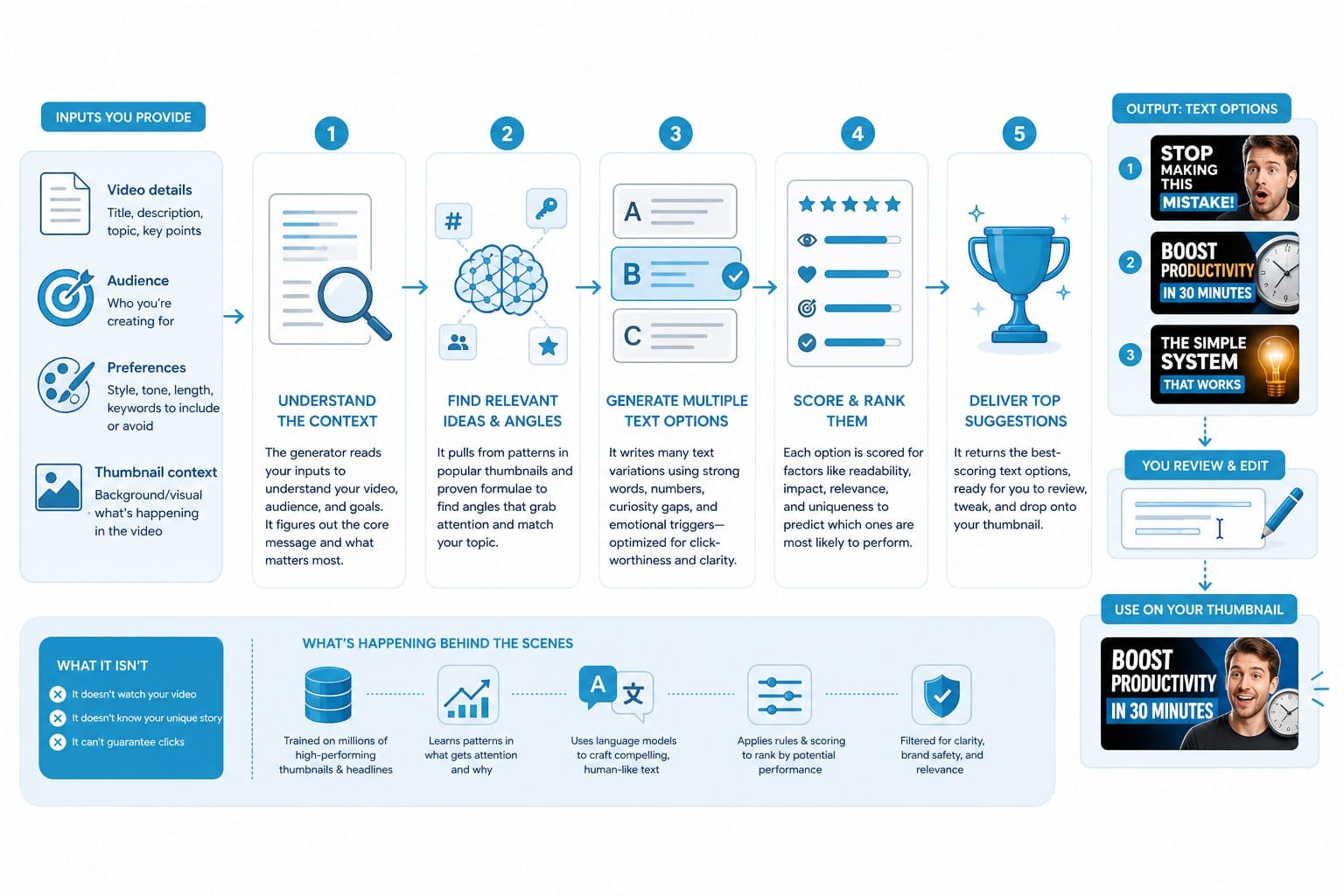
A thumbnail text generator is a tool that takes a topic, title, or script and suggests short text lines designed to grab attention on a thumbnail image. The goal is simple: give viewers a reason to click before they even watch a single second of your video.
Most people think of thumbnails as a design problem. They focus on colors, faces, and contrast. But the text layer on a thumbnail is often what seals the deal. A face can create curiosity, but a sharp line of text tells the viewer exactly why they should care right now.
Here is how these tools generally work. You feed in some information, usually your video title, topic, or a few key points from your script. The generator then outputs short phrases, often three to six words, that are designed to create urgency, curiosity, or a clear promise. Some tools give you a list of variations so you can test which one performs best.
For faceless YouTube channels especially, this is a big deal. When you do not have a recognizable face on camera to draw people in, your thumbnail text has to do extra heavy lifting. A faceless documentary channel about true crime, history, or finance lives and dies by the quality of its thumbnails.
Let me give you a concrete example. Say you are making a video about why most people fail to save money. A generic thumbnail might just say "Saving Money Tips." A thumbnail text generator might suggest something like "Why You're Always Broke" or "The Saving Mistake Nobody Talks About." Both are short. Both are easy to read at a glance. But the second two create a question in the viewer's mind that only your video can answer.
That psychological hook is what good thumbnail text is built on. It is not about being clickbait. It is about making a clear, honest promise that the video delivers on.
There are a few formats that work well for thumbnail text:
- A bold question: "Why Did This Happen?" - A surprising number: "7 Things No One Tells You" - A strong contrast: "Rich vs. Poor Habits" - A direct callout: "Stop Doing This Now" - A cliffhanger: "The Truth Comes Out"
A thumbnail text generator helps you produce several versions of these quickly so you are not staring at a blank canvas trying to come up with something clever from scratch. That is valuable time saved, especially if you are running multiple channels or publishing content every week.
It is also worth knowing what these tools cannot do on their own. They can suggest text, but they do not know your specific audience as well as you do. You still need to review the output and pick the phrase that fits your channel's tone. A finance channel and a gaming channel might get the same suggestion from a generator, but the one that clicks with your audience depends on how well you know them.
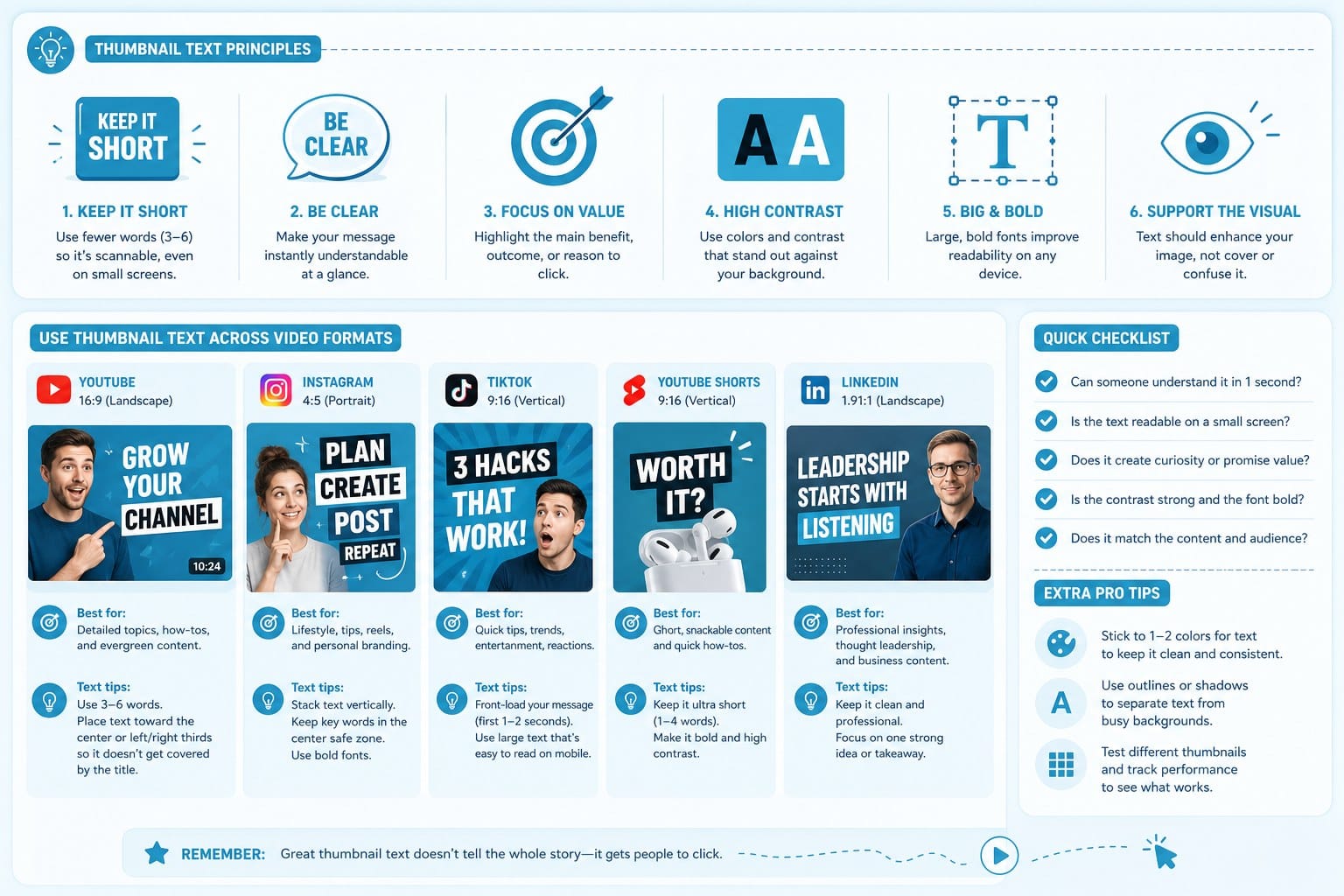
Another thing to keep in mind is readability. Thumbnail text needs to be legible on a small screen. Most viewers are on mobile. A generator that pushes you toward shorter, punchier phrases is actually doing you a favor, because four bold words are always easier to read than a full sentence squeezed into a corner.
Finally, good thumbnail text works with your thumbnail image, not against it. If your image already tells part of the story visually, your text only needs to add the emotional hook or the missing detail. If you are showing a dramatic explosion in a history video, the text does not need to describe the explosion. It can say something like "Nobody Saw This Coming."
When you use a thumbnail text generator as a starting point and then apply your own judgment, you end up with better thumbnails faster than if you try to write everything from scratch every time.
How to use thumbnail text well across different video formats
Understanding the tool is one thing. Knowing how to apply it well across different types of content is another. Thumbnail text strategy actually changes depending on the format of your video, the platform you are publishing on, and the audience you are targeting.
Let me break this down by format because the rules shift in ways that matter.
For long-form YouTube documentaries, your thumbnail text should hint at a revelation or a high-stakes outcome. Viewers who watch 20-plus-minute documentaries are looking for depth and payoff. Text like "The Cover-Up That Changed Everything" or "What History Books Got Wrong" sets up that promise. A thumbnail text generator is great for brainstorming these kinds of reveal-style phrases because it pulls from patterns that have worked across thousands of titles.
For YouTube listicle videos, numbers work really well. "5 Mistakes That Cost Creators Thousands" is specific and concrete. It tells you exactly what format the video uses and what is at stake. Thumbnail text generators often suggest numbered formats because data shows they consistently improve click-through rates on this type of content.
For YouTube Shorts, TikTok, and Instagram Reels, the thumbnail or cover frame needs to work harder in a smaller space with less time to make an impression. Short-form content thumbnails often appear as tiny preview tiles in feeds. That means your text needs to be even shorter and bolder. Two or three words that create immediate curiosity are better than a full phrase here. Something like "This Works" or "Wait For It" can perform surprisingly well on short-form platforms when paired with a compelling visual.
For educational and explainer videos, especially those using animation formats like whiteboard or stickman style, the thumbnail text usually does best when it names a pain point or a clear outcome. "Finally Understand Taxes" or "This Is How Algorithms Work" speaks directly to a viewer who has been confused about a topic and wants clarity. This format attracts people who are motivated by learning, so a promise of understanding tends to outperform shock-value text.
Here is a practical workflow I recommend for using a thumbnail text generator effectively:
First, write your video title as clearly as you can before you start generating thumbnail text. The title tells you what the video is about. The thumbnail text is not the same as the title. It is a shorter, more emotional version of the promise your title makes.
Second, run your topic or title through the generator and collect at least five to eight variations. Do not stop at the first suggestion. The first output is rarely the best one.
Third, narrow the list down to two or three options. Ask yourself which one would make you stop scrolling if you saw it on someone else's channel. If none of them do that, generate more.
Fourth, test your top choice against one alternate. If you are on YouTube, you can use A/B thumbnail testing to see which version gets more clicks over time. Thumbnail testing is one of the most reliable ways to improve your channel's performance, and it is something a lot of creators skip because they do not want to put in the extra work.
Fifth, keep a record of what worked. After a few months, you will start to see patterns. Maybe your audience responds best to question formats. Maybe specific numbers like three or seven outperform others. That data makes your next round of thumbnail text generation even faster and more targeted.
One thing I want to address directly is the concern about sounding like clickbait. There is a real difference between clickbait and a well-written hook. Clickbait makes a promise the video does not deliver. A strong thumbnail hook makes a promise the video absolutely keeps. Viewers are smart. If they click on your thumbnail and the video does not deliver on what the text promised, they leave quickly and your watch time suffers. Good thumbnail text is honest. It just presents the honest promise in the most compelling way possible.
Another piece of practical advice: do not overcrowd your thumbnail with text. One strong line is almost always better than two lines competing for attention. A thumbnail text generator will give you options, but your job is to pick the one strongest line, not to use all of them at once.
Font choice matters too, even though that is outside the scope of what a text generator handles. Once you have your text, make sure it is displayed in a bold, clean font with enough contrast against the background to be readable in thumbnail size. Drop shadows and outlines help a lot when your image background is busy.
For creators running faceless channels or producing content at scale, thumbnail text generation is one of those small but compounding improvements. You save maybe 15 to 20 minutes per video. Across 50 videos a year, that is real time saved, and the quality often improves because you are pulling from a larger pool of options instead of going with the first thing that comes to mind.
Creators who are also using AI tools to handle other parts of video production, like scripting, footage sourcing, and editing, get the most out of thumbnail text generation because it fits naturally into a streamlined workflow. When every step of your production process is faster and more consistent, the end result is a channel that publishes more often with higher quality, which is exactly what growth on YouTube rewards.
Pairing thumbnail text with a full AI video workflow
Thumbnail text is one piece of a much larger puzzle. If you are serious about growing a YouTube channel or building a content business, you need a system where every part of production works together. That means scriptwriting, footage selection, motion graphics, editing, and yes, the text on your thumbnail all need to follow a consistent strategy.
The good news is that AI tools have made this kind of full-stack content production accessible to creators who are working alone or with very small teams. I want to walk you through how this fits together in a real workflow.
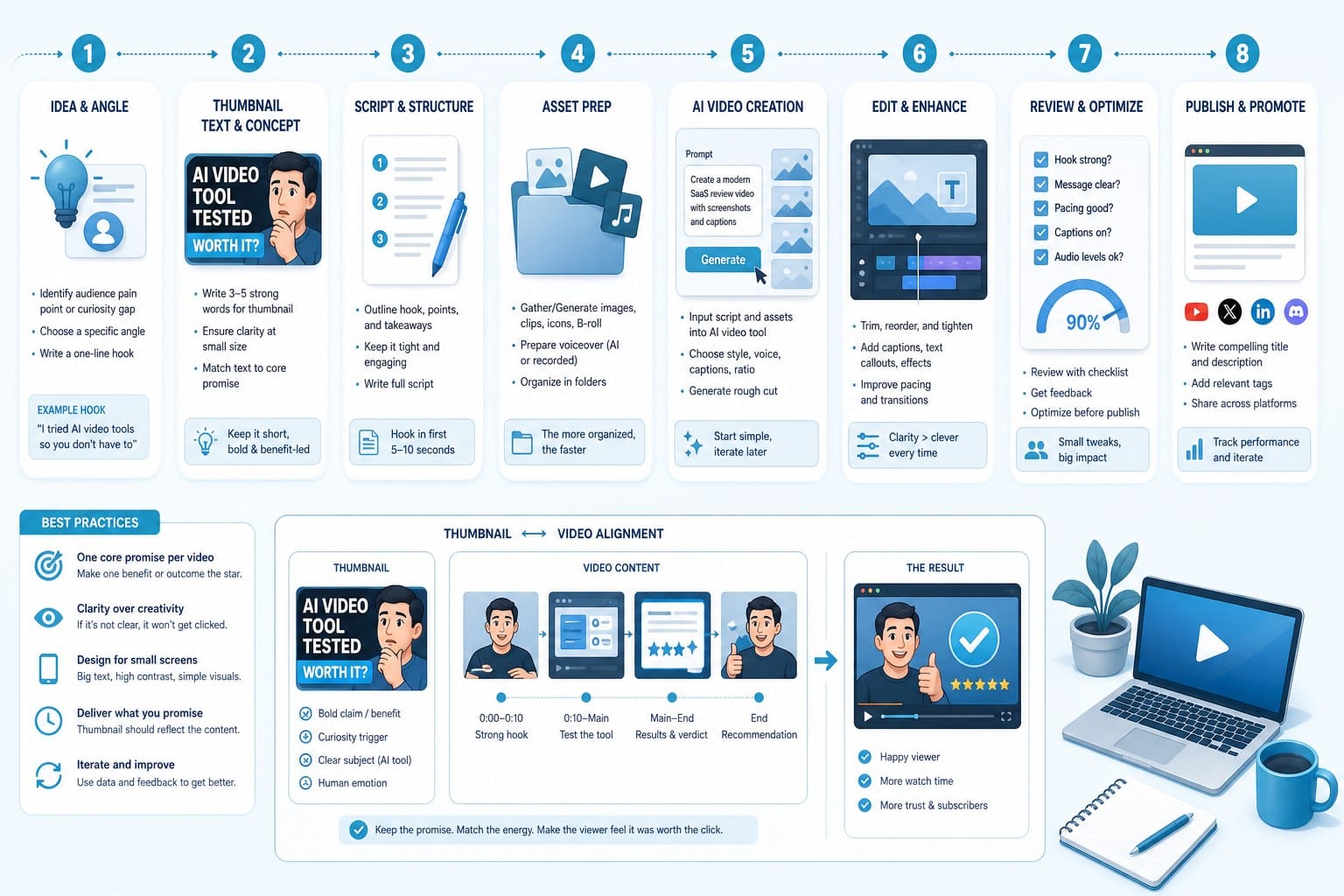
Start with the idea. You identify a topic that your target audience cares about. This might come from keyword research, trending news, or a question you keep seeing in comments. That idea becomes the seed for everything else.
From there, a good AI video platform can take that idea and generate a full script. Not a rough outline, but an actual script structured for video. This is where tools like Cliptude come in. Cliptude handles the full production pipeline from a simple prompt. You give it a topic or script, and it researches the subject, writes the narration, sources relevant footage, generates motion graphics, and edits the final video. That covers a massive portion of the traditional video production workload.
For creators interested in what this kind of AI-powered production looks like in practice, the article on text to video: create polished YouTube content with AI goes deeper into how the workflow plays out from prompt to published video.
Now here is where thumbnail text fits back into this workflow. Once you have your script or at least a clear title and main argument, you run those through a thumbnail text generator to get your hook options. Because your script is already written, you have clear material to draw from. The generator is not working blind. It is pulling from a specific, concrete promise your video makes.
This sequence matters. Thumbnail text written before the script is done tends to be vague because you are not sure yet what the strongest angle of the video is. Thumbnail text written after the script is done tends to be more specific and more honest because you know exactly what the video delivers.
For channels producing documentary-style content, the strongest thumbnail text usually comes from the single most surprising or emotionally resonant moment in the video. If your 20-minute documentary has one jaw-dropping reveal, that is your thumbnail text anchor. Everything else on the thumbnail builds around that moment.
For creators scaling content across multiple formats, including long-form YouTube, Shorts, and social media clips, each format might get slightly different thumbnail text even if it draws from the same video. A clip repurposed for TikTok might use a two-word hook while the full YouTube video uses a six-word phrase. The thumbnail text generator can help you adapt the same core message across formats quickly.
Another advantage of using AI tools throughout the workflow is consistency. When you handle everything manually, the quality of your thumbnails, scripts, and editing varies based on your energy level, time pressure, and creative momentum on any given day. When you use tools that generate consistent, high-quality outputs, the floor of your content quality rises. Your worst video of the month is not drastically worse than your best one.
This matters more than most creators realize. YouTube's algorithm rewards watch time, click-through rate, and consistency. A channel that publishes strong content every week will always outperform a channel that publishes brilliant content once a month. AI tools make it possible to be consistent without burning out.
For solo entrepreneurs and small teams especially, this is the real value of building an AI-assisted workflow. You are not replacing creativity. You are removing the parts of production that eat time without adding creative value. Writing the same type of thumbnail text from scratch every week is not where your creative energy is best spent. Reviewing and refining AI-generated suggestions is much faster and still requires your judgment.
I also want to mention that for creators considering different platforms for AI video production, there are real differences in what each tool handles. Some focus only on short clips. Some require existing footage. Cliptude stands out because it handles the full pipeline including research, scripting, footage sourcing, and editing, which means it is genuinely useful for producing the kind of long-form documentary and educational content that faceless YouTube channels depend on. You can read more about how it compares to other platforms in this piece on a Vidrush alternative for AI-powered video creation.
Pricing is also worth thinking about when you are building a production workflow. Usage-based credit pricing, like what Cliptude uses, means you are only paying for what you actually produce. That is a significant advantage for creators who are ramping up and do not want to commit to a large flat monthly fee before they know what their publishing volume will be.
If you are curious about how similar platforms handle pricing and whether free options exist, the article on is Vid Rush free to use gives a useful reference point for understanding how credit-based models work in this space.
The bottom line on building a full AI video workflow is this: every tool you add should reduce friction at a specific step in production. A thumbnail text generator reduces friction at the hook-writing step. An AI video platform like Cliptude reduces friction at the scripting, footage, graphics, and editing steps. When these tools work together, you can realistically go from idea to published video in a fraction of the time it would take with a traditional production setup.
For creators who want to monetize AI-generated video content, having commercial rights to the final output is essential. Cliptude provides full commercial rights, which means the videos you produce can be used to generate ad revenue, sold as content, or repurposed without legal complications.
The creators who build sustainable channels in 2025 and beyond are going to be the ones who treat content production like a system rather than a series of one-off creative efforts. Thumbnail text is one small but important node in that system. Get it right consistently, and it compounds over time into meaningfully better click-through rates and faster channel growth.
Ready to take the next step?
If you are ready to stop producing videos one painful step at a time, Cliptude can handle the heavy lifting. From script to final edit, the platform builds polished YouTube videos from a simple prompt, so you can focus on strategy and growth instead of production bottlenecks. Visit Cliptude to see how the full AI video workflow works and start producing content that actually gets clicked.



