Cliptude AI: the text-to-video platform that does it all

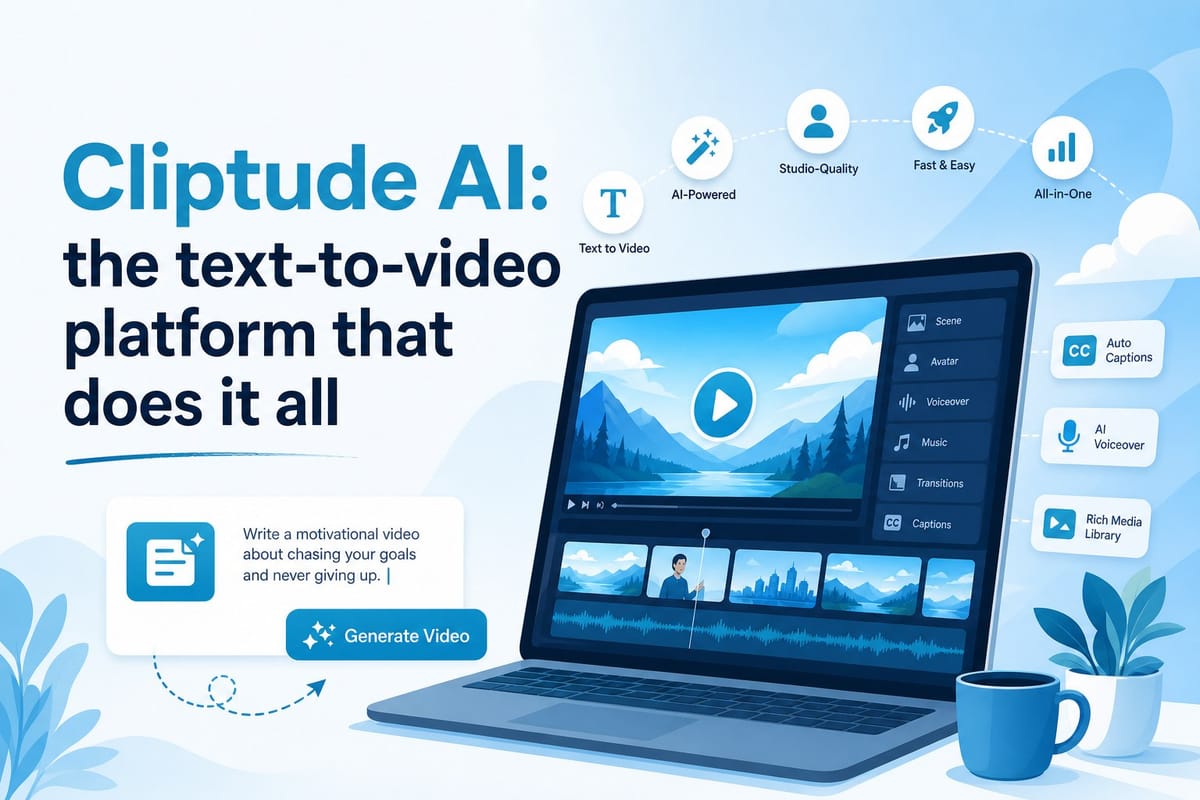
Table of contents
1. What Cliptude AI actually does from prompt to finished video
2. Who gets the most value from using Cliptude AI
3. Special formats that set Cliptude AI apart from standard video tools
There is a specific kind of frustration that comes from having a solid video idea and no clear path to a finished product. You know what you want to say. You can picture how it should look. But between that vision and a publish-ready file sits a wall of tasks: research, scripting, footage sourcing, graphics, voiceover, editing, and formatting for each platform. Most creators either hire out those steps, which gets expensive fast, or they grind through them manually, which burns time they could spend on strategy and ideas. Cliptude AI was built to knock that wall down. It takes a text prompt or a finished script and handles the entire production pipeline, from pulling research and writing scenes to sourcing B-roll, generating motion graphics, recording voiceover, and assembling the final cut. The output is a polished, platform-ready video with full commercial rights attached. In this article I want to walk through exactly what Cliptude does at each stage, who benefits most from using it, and what formats it supports that you genuinely cannot find bundled together anywhere else.
What Cliptude AI actually does from prompt to finished video
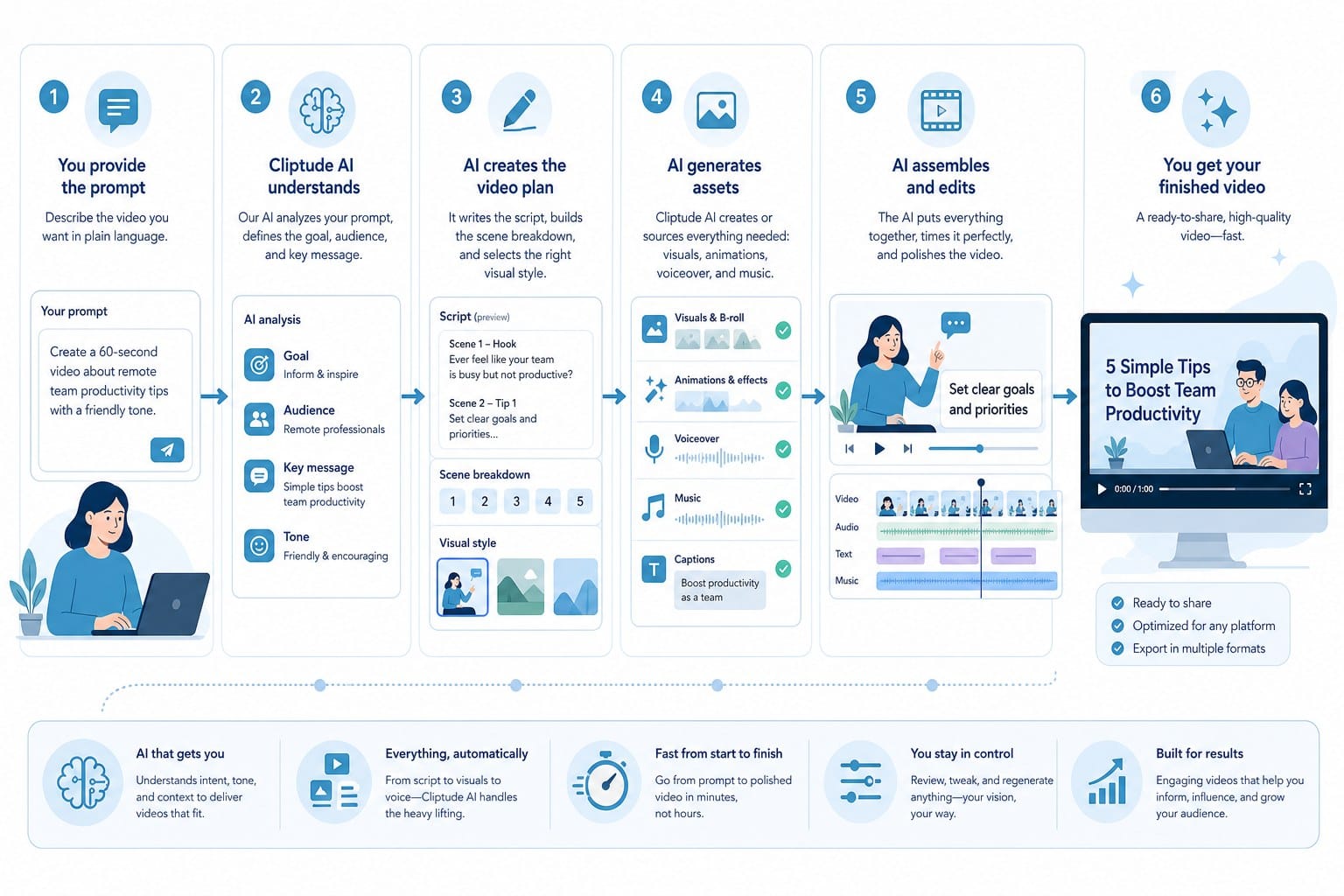
Most AI video tools solve one piece of the production puzzle and leave the rest to you. Some generate scripts but hand you a blank timeline afterward. Others edit clips but expect you to arrive with footage already in hand. A few handle voiceover but nothing else. Cliptude AI is different because it covers every stage of production inside a single workflow. You give it a prompt or a script, and it carries the work forward from there without requiring you to switch platforms, hire collaborators, or learn new software for each step.
Here is what that pipeline actually looks like in practice.
Research comes first. When you type a prompt like "the history of the Berlin Wall" or "how lithium batteries actually work," Cliptude does not just rephrase whatever surfaces at the top of a search result. It builds factual context around the topic to give the script a solid foundation. For documentary-style content, educational videos, and anything where accuracy matters to your audience, this research layer is not a minor feature. It is what separates a video that holds viewer attention through the full runtime from one that feels shallow and gets skipped.
Script writing follows. The script is structured to match the format you are producing. A ten-minute YouTube documentary has a different architecture than a sixty-second Reel, and Cliptude adjusts the pacing, scene length, and narrative structure accordingly. Each scene is laid out clearly so the production steps that follow have a logical framework to work from. The writing is built for narration, which means the sentences read naturally when spoken rather than sounding like they were pulled from a written article.
Footage sourcing happens automatically. Rather than dropping you into a stock library and asking you to find clips that match each scene, Cliptude pulls relevant video footage to fit the content. For faceless YouTube channels in particular, this matters enormously. The entire visual experience of a faceless channel depends on high-quality B-roll, and sourcing it manually is one of the most time-consuming steps in the traditional production workflow. Automating it does not just save hours on a single video. It changes the math on how many videos you can realistically produce each week.
Motion graphics are generated for each video. This is one of the more impressive parts of the platform. Cliptude produces animated elements including maps that show geographic context, text overlays that reinforce key points, and transitions that give the video a polished, broadcast-quality feel. These are not generic template fills. They are generated to match the specific content of the video. For history channels, geopolitics channels, and science content especially, animated maps and graphics are what elevate a video from watchable to genuinely professional.
Voiceover is handled without a separate subscription. Using open-source voice models, Cliptude generates a narration track that follows the script. You do not need a microphone, a recording room, an audio interface, or a third-party voice tool. The voiceover is produced as part of the same workflow and synced to the visual timeline automatically.
Final editing assembles everything into a finished cut. Music, pacing, scene cuts, graphics timing, and voiceover sync are all handled in the assembly stage. The finished file is ready to upload rather than ready for another round of editing.
The output formats cover a wide range of content types. Long-form YouTube documentaries, listicle videos, YouTube Shorts, TikTok clips, Instagram Reels, whiteboard animations, stickman animations, and music videos are all supported natively. Each format is treated as a distinct content experience rather than a resized version of the same template. I will go deeper on the animation and specialty formats in the third section because they represent a specific category of capability that is genuinely hard to find anywhere else.
Pricing uses a credit-based system tied to your actual production volume. You pay for what you produce rather than committing to a flat monthly subscription that runs whether you use it or not. For solo creators managing lean budgets and for small teams whose output fluctuates week to week, that alignment between cost and usage is a real practical advantage. You can start building and previewing content for free, which means you can test the full workflow before spending anything.
All content produced on Cliptude includes full commercial rights. That means every video you generate can be monetized on YouTube, used in paid advertising campaigns, included in client deliverables, or licensed to brands without any licensing conflicts. For creators whose income depends on ad revenue, sponsorships, or selling content services, knowing your output is legally clear is not a secondary consideration. It is a business requirement, and Cliptude builds it in by default.
The clearest way to summarize what Cliptude does is this: it replaces a five-person production team with a single text input. The researcher, scriptwriter, footage editor, graphics designer, and voiceover artist are all handled inside the platform. For someone with no editing experience, the output looks like it came from a team. For an experienced creator who knows exactly what they want, the platform gets them there in a fraction of the time it would take to do each step manually or to coordinate across multiple specialized tools.
If you want to see how the full pipeline compares to other options currently available, Vidrush AI alternatives worth switching to in 2025 gives a useful breakdown of where Cliptude fits in the current landscape and what distinguishes it from tools that only cover part of the workflow.
Who gets the most value from using Cliptude AI
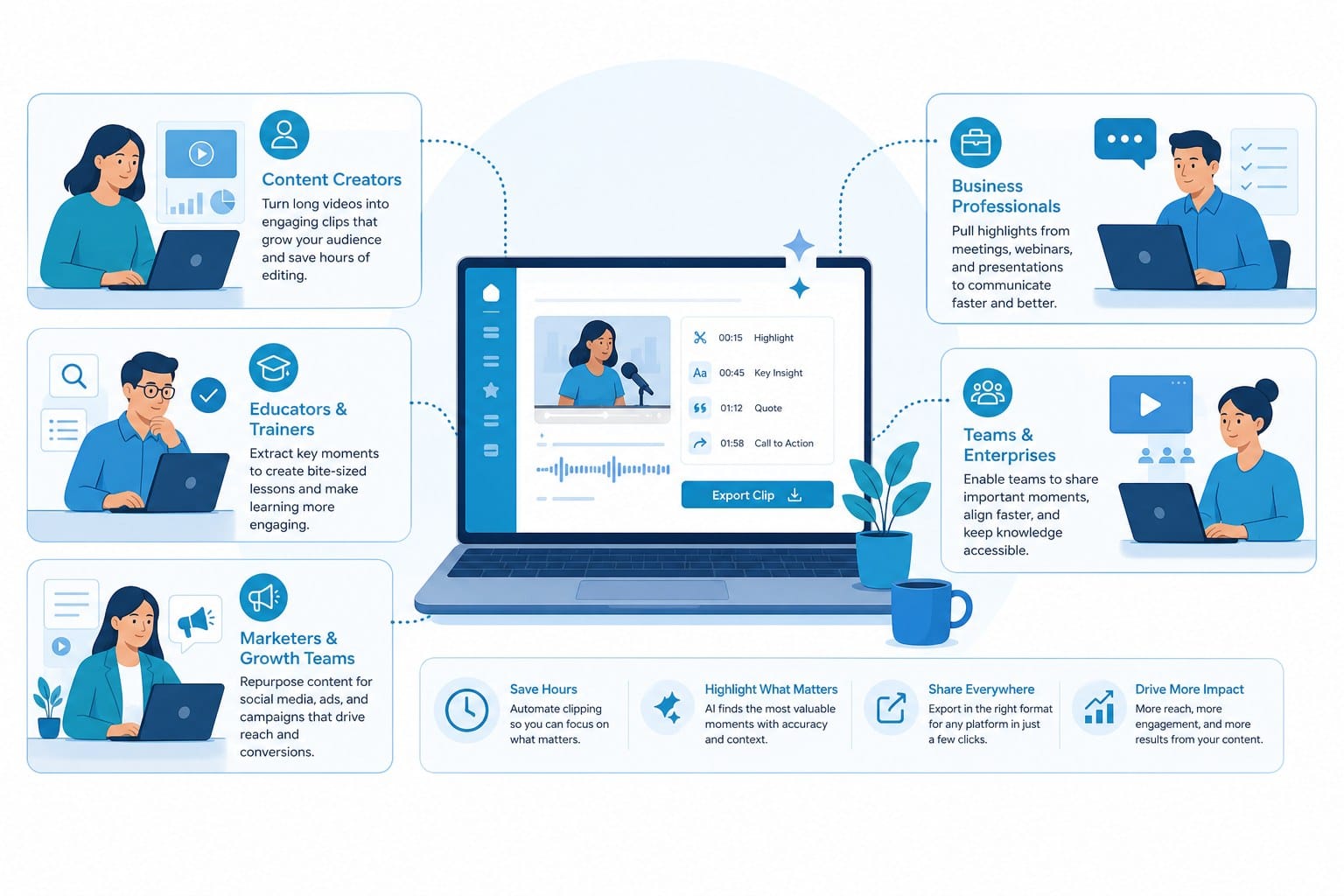
Cliptude is not a general-purpose tool designed to appeal to every possible use case at once. It is very specifically built for people who want to produce high volumes of professional video content without a full production team supporting them. The platform is most useful when you have a clear content strategy, a consistent publishing goal, and a bottleneck somewhere in the execution layer that keeps you from meeting it. Let me walk through the audiences where that fit is clearest.
Faceless YouTube channel creators are the most direct fit. A faceless channel is built around a topic or a format rather than a personality. The creator never appears on camera. The appeal of the model is that you can grow an audience through the quality and consistency of the content itself. But faceless channels are extremely labor-intensive to run the traditional way. A history channel, a true crime channel, a finance channel, or a nature documentary channel each requires a full production stack for every video: research, scripting, B-roll sourcing, voiceover recording, graphics, editing, and formatting. Doing all of that yourself is a part-time job on top of whatever else you are doing. Hiring it out is expensive enough to eat the channel's revenue for months. Cliptude makes it possible for one person to handle the entire workflow by handling most of the work automatically. You focus on the idea and the strategy. The platform handles the execution.
Creators scaling short-form content across multiple platforms are another group with a lot to gain here. TikTok, Instagram Reels, and YouTube Shorts all reward volume and consistency. The algorithm picks up on channels that post frequently and penalizes those that go quiet for days at a time. But producing five to ten quality short videos per week the traditional way means spending most of your working hours on editing rather than on creating. Cliptude lets you batch content by feeding multiple prompts into the platform and letting it run. You spend your time on ideas, hooks, and content strategy rather than on timelines and export queues. That is a fundamentally different way to operate, and for creators whose growth depends on posting volume, the difference in output potential is significant.
Solo entrepreneurs and small media teams represent a third major use case. Consider someone who runs a consulting business and wants to publish educational content on YouTube to build authority in their niche. They know the subject matter deeply. They understand what their audience needs to hear. But they have never edited a video and do not have the time to learn. Cliptude bridges that gap. They write out their ideas in plain language, choose a format, and get back a finished video that is professional enough to represent their brand credibly. No production company required. No freelancer marketplace required. Just a text input and an export.
For small media teams, the value shows up differently. A team of two or three people managing content for a brand or a media property can use Cliptude to increase their output without increasing headcount. The platform handles the mechanical production steps that would otherwise consume a junior editor's full workday, freeing the team to focus on editorial decisions, client relationships, and content quality.
Educational content creators who use animation formats have a particularly strong case for using Cliptude. Whiteboard videos and stickman animations have been effective teaching tools on YouTube for years. The style signals to the viewer that they are about to learn something, and the visual format helps clarify concepts that are hard to explain with words alone. Producing these animations traditionally requires either specialized software with a steep learning curve or a skilled freelance animator. Cliptude generates both formats directly from a text prompt. If you teach mathematics, science, personal finance, coding, language, or any subject where visual explanation adds clarity, you can produce polished animated explainer videos at a pace that was not achievable before. For a detailed look at how the stickman animation format works specifically, AI stickman animation maker that turns text into videos instantly walks through the process clearly and shows what the output actually looks like.
Marketers and creators building content businesses are the final group I want to highlight. Because Cliptude includes commercial rights with every video it produces, you can use the output in paid advertising, client deliverables, sponsored content, and YouTube monetization programs without worrying about whether the footage or audio was licensed appropriately. For anyone selling video content as a service, that clarity is essential. You are not wondering whether stock clips sourced automatically carry commercial restrictions. You are not checking whether the voice model's terms allow monetized use. The platform handles both, and the rights are included.
For creators building an agency model around AI-generated video, Cliptude makes it possible to deliver polished content to multiple clients without maintaining a full team for each one. The usage-based pricing scales with output, so the cost of producing ten videos for a client is predictable and proportional rather than fixed regardless of volume.
Across all of these audiences, the shared problem is the same: the idea is not the obstacle. The execution is. Having a great concept for a video does not help you much if you cannot get from that concept to a finished, platform-ready file without spending days on production. Cliptude removes that bottleneck by automating the execution layer. What remains for the creator is the work that actually requires human judgment: deciding what to cover, choosing the angle, understanding the audience, and knowing what the finished video should accomplish.
The usage-based credit model fits this range of users well because different creators operate at very different volumes. A solo creator publishing twice a week has very different needs than a small team producing daily content for a brand. Rather than forcing everyone into a subscription tier that either costs too much for low-volume users or too little to support high-volume ones, Cliptude ties costs directly to output. That is a more honest pricing structure for a tool used by creators at every scale, and it makes the platform accessible to people who are still building rather than those who have already arrived.
Special formats that set Cliptude AI apart from standard video tools
The most crowded part of the AI video market is the basic segment: tools that take a prompt, generate a voiceover, pair it with stock clips, and export a slideshow-style video with text on screen. That category has dozens of entrants and most of them produce similar results. Cliptude competes in a different layer because it supports formats that require more sophisticated generation and that serve specific creative needs that basic tools cannot address. Those formats are worth understanding in detail because they open up content categories that many creators have avoided simply because production was too hard or too expensive.
Documentary-style videos are one of the clearest differentiators. A proper documentary is not a clip reel with narration over it. It has a narrative structure that builds across the runtime. It uses supporting graphics and maps to give the viewer context. It paces scenes deliberately rather than cutting uniformly every few seconds. It has a consistent voice and tone that holds the whole thing together. Producing that kind of content manually requires a producer who understands story structure, an editor who can handle pacing, a graphics team for the visual elements, and a voiceover artist who can carry the narration. Cliptude handles all of those elements automatically within a single workflow.
For a channel built around history, science, geopolitics, nature, or current events, the ability to produce full documentary-style videos from a text prompt changes what is operationally possible. You can cover a complex topic like the collapse of the Soviet Union or the physics of black holes and get back a structured video that researches the subject, narrates it clearly, and reinforces the key points with motion graphics. The result is content that feels produced rather than assembled, and that distinction matters for audience retention and channel growth.
Listicle videos are another format that works exceptionally well on the platform. Listicles consistently rank among the most-watched content on YouTube because the format is easy to follow and delivers satisfying payoffs at regular intervals. But they are repetitive to produce because every item on the list needs its own footage, voiceover treatment, and graphic element. Applying consistent formatting across ten or fifteen items while keeping the visual variety high enough to hold attention is tedious work in a traditional editor. Cliptude handles that repetitive structure systematically and efficiently. The output is a listicle that moves through each item with consistent polish rather than the uneven quality that shows up when a creator is rushing through the later items after spending too much time on the first few.
Music videos represent one of the more creative use cases on the platform and one that most AI video tools simply do not support. If you are an independent musician or producer and you want to give a track a visual identity, the traditional option is to hire a director and a crew. That is not in the budget for most independent artists. The alternative is usually a static image or a generic audio visualizer, which does the song no favors. Cliptude generates a stylized visual narrative from a text description of the song's mood, theme, and story. The result is a video that fits the music rather than a placeholder. For artists releasing content on YouTube or building a visual identity on social platforms, this opens up a production capability that used to require significant budget and coordination. For a full walkthrough of how the process works, How to make AI music videos from a text prompt walks through the specific steps before you start.
Whiteboard animation has been a staple format on educational YouTube for over a decade. The style is immediately recognizable. The visual of a hand drawing diagrams and text as the narration speaks builds a sense of active explanation that keeps viewers engaged longer than a static slide presentation. Producing whiteboard animations traditionally requires specialized software like VideoScribe, comfort with the tool's interface, and either a lot of time or a substantial freelance budget. Cliptude generates whiteboard-style animation from text. You write out what you want to explain, and the platform produces the animated visual treatment. For educators, tutors, coaches, and subject-matter experts who want to publish video content without learning animation tools, that capability removes a significant barrier.
The format also works for corporate training content, explainer videos for products or services, and onboarding materials. Any situation where you need to explain a process visually and want the result to feel approachable rather than corporate or cold is a good fit for whiteboard animation.
Stickman animation is a related format with its own distinct appeal. The style is immediately playful and disarming. It works well for storytelling, educational content targeted at younger audiences, humor, and any context where you want the visual simplicity to focus attention on what is being said rather than on elaborate imagery. Cliptude generates stickman-style videos from text prompts, which gives creators a visually distinctive format without requiring any animation knowledge or software. For channels that want to stand out in a crowded space by using an unconventional visual style, stickman animation is an option that is genuinely hard to execute any other way at the speed and cost that AI generation makes possible.
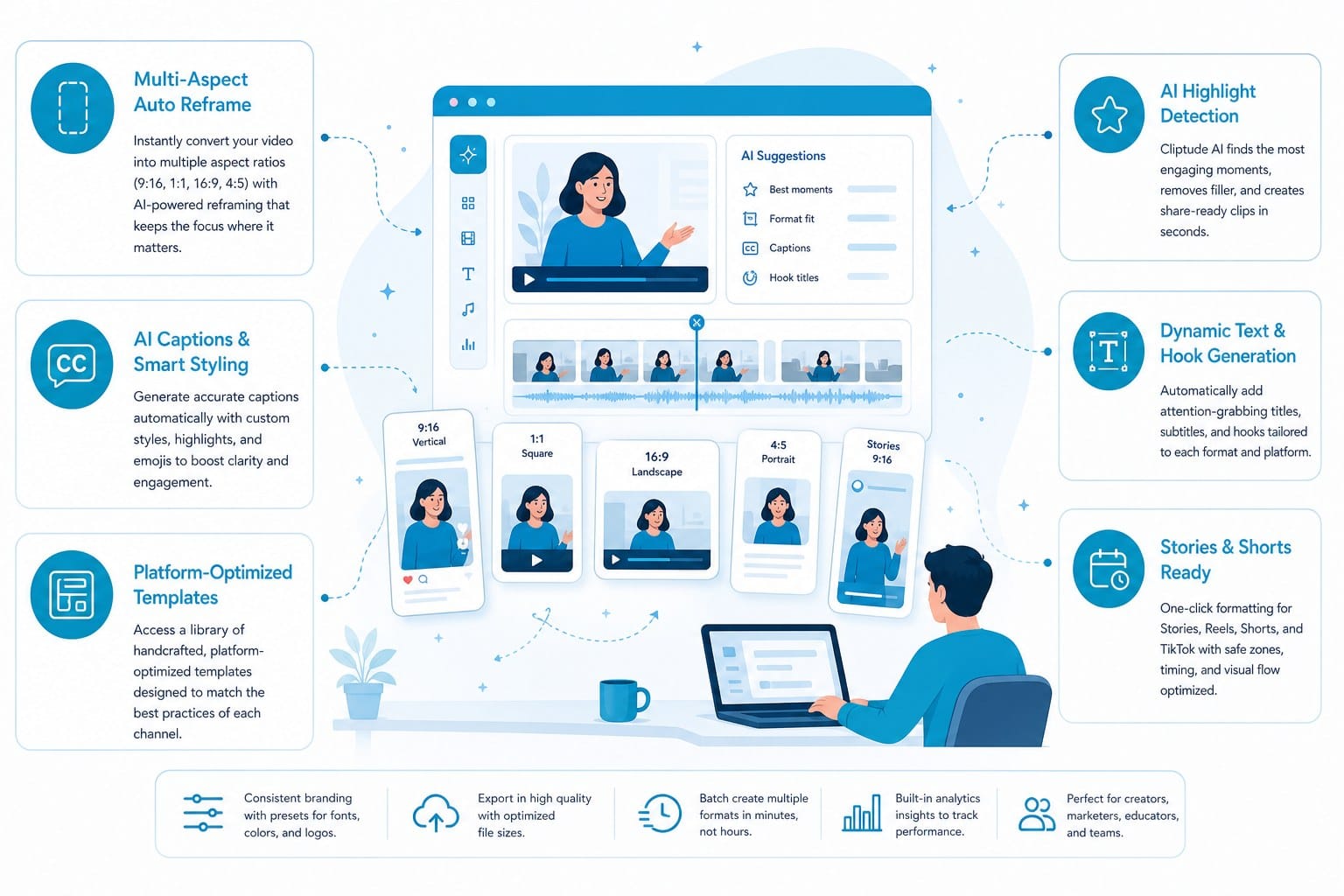
Short-form formats for Reels and Shorts are supported natively rather than as an afterthought. The distinction matters. A lot of tools will produce a long-form video and then offer to crop it to a vertical aspect ratio for Shorts. That approach produces content that was not designed for the short-form experience. The pacing is wrong, the hook does not arrive fast enough, and the information density does not match what works on TikTok or Reels. Cliptude produces short-form content that is built from the start for the format: front-loaded with a compelling hook, paced to hold attention in sixty seconds or less, and structured to deliver a clear payoff before the viewer swipes away.
For creators who want to maintain both a long-form YouTube presence and a short-form social presence simultaneously, being able to produce both from the same platform without adjusting your workflow for each one is a meaningful time advantage. You are not maintaining two separate production pipelines. You are running one platform that handles both.
Motion graphics deserve a final mention because they appear across every format and they are what most consistently separate professional-looking content from amateur-looking content. Animated maps that show where something happened, text animations that highlight key data points, lower-thirds that introduce subjects or sources, and transitions that move between scenes without jarring the viewer: these are the production details that signal effort and quality. When a solo creator or a two-person team can generate these elements automatically as part of the standard production workflow, the gap between their output and content from larger production operations gets much smaller.
That gap closing is ultimately what Cliptude is about. The platform was designed around the full production workflow rather than around a single step in it, and the range of formats it supports reflects how diverse the actual needs of modern video creators are. Whether you are building a faceless documentary channel, scaling short-form social content, producing animated explainers for an educational audience, or releasing music videos as an independent artist, Cliptude gives you the production capability to do it without assembling a team or learning a different tool for every format.
You can build and preview content for free, which means you can test any of these formats before committing credits to a final export. That preview capability is important because it lets you refine the structure and approach before you finalize anything. You are not running blind and hoping the output matches what you planned.
Ready to take the next step?
If video production is the gap between your ideas and your audience, Cliptude is built to close it. You can start building and previewing your first video for free at cliptude.com. Whether you are launching a faceless YouTube channel, scaling short-form content across TikTok and Reels, or producing animated explainers without hiring an editor, the full production pipeline is there from the first prompt to the finished export.