How to make AI music videos from a text prompt

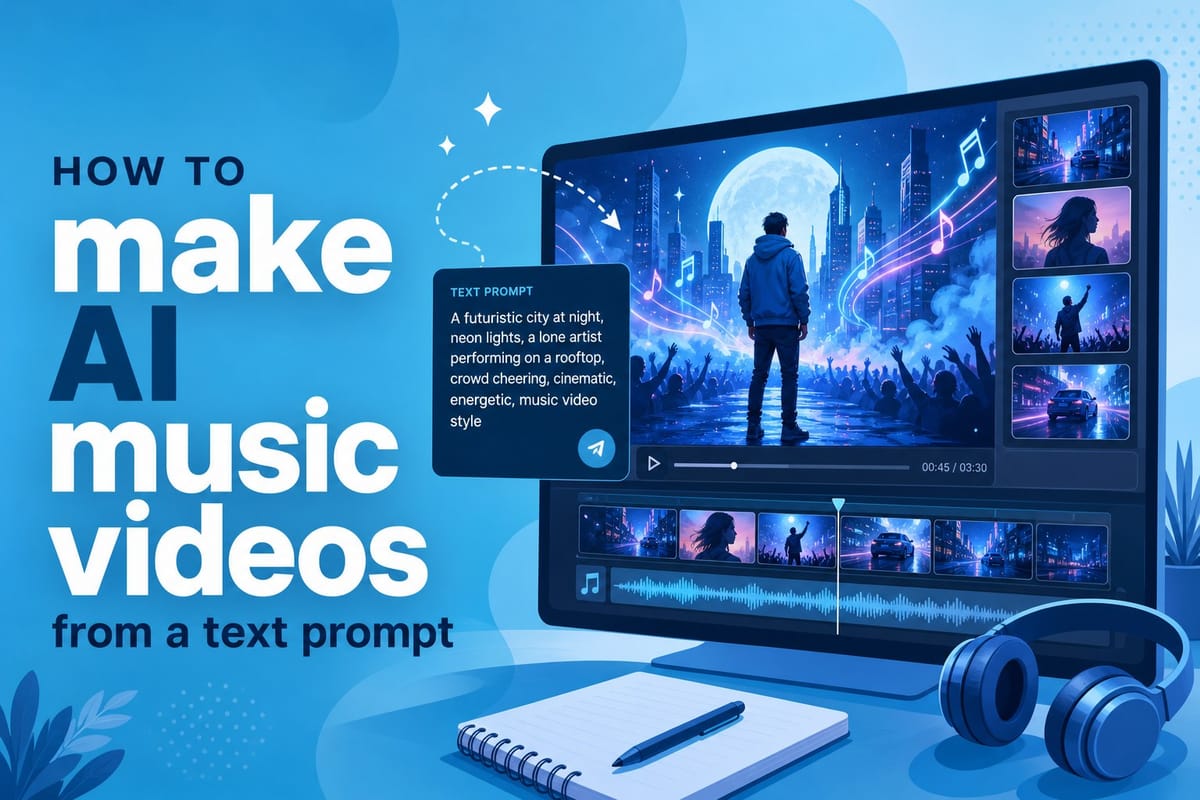
Table of contents
1. What an AI music video maker from text actually does
2. How to write a text prompt that produces great music video results
3. Turning your AI music video into publishable content
Making a music video used to mean hiring a director, renting equipment, booking locations, and spending thousands of dollars before a single frame was shot. That reality has changed fast. Today, an AI music video maker from text can take a short description and turn it into a fully edited visual story in a fraction of the time and cost. In this article, I'll walk you through exactly how the process works, what to expect at each step, and how to get the best results from your text prompts. Whether you're an independent musician with a tight budget, a content creator building a faceless YouTube channel, or a small media team trying to scale output without scaling headcount, the text-to-video workflow is worth understanding in detail.
What an AI music video maker from text actually does
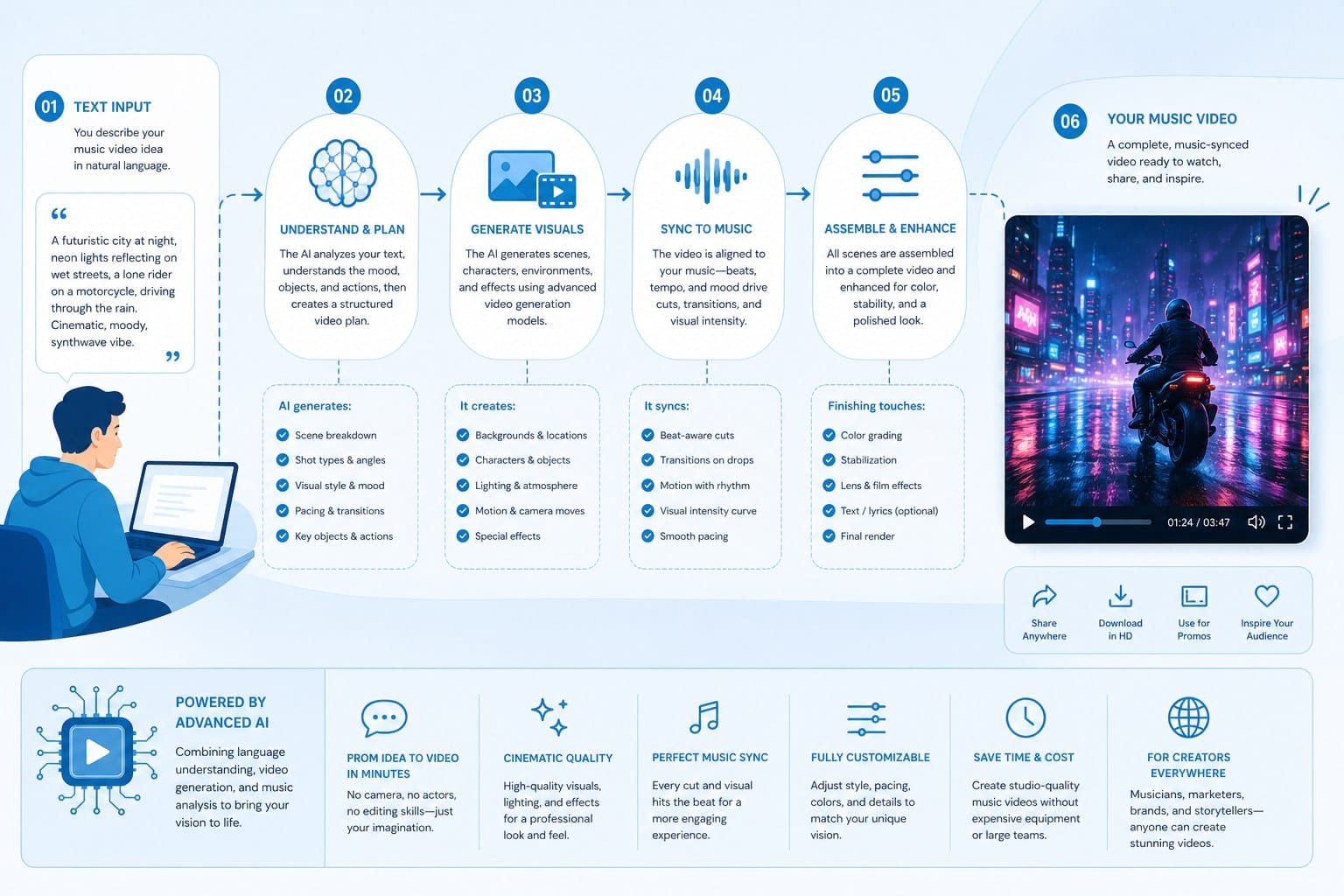
Before you type your first prompt, it helps to understand what is happening behind the scenes. When you feed a text description into an AI video platform, the system does several jobs at once. It reads your words, figures out the mood and style you are going for, selects or generates matching visuals, adds motion, and stitches everything together into a timed sequence. That used to require a whole production team and a week of post-production work. Now it takes minutes.
The core technology pulls from a few different areas working in parallel. Natural language processing reads your prompt and extracts meaning from the words you choose. A separate layer handles visual generation or footage sourcing, depending on the platform's architecture. Another layer manages timing, transitions, and pacing so the final video feels edited rather than randomly assembled. Some platforms also handle color grading and text overlays automatically as part of the same pipeline.
The reason this matters specifically for music videos is that visuals need to feel emotionally connected to the audio. A dark, moody instrumental needs different imagery than a bright, upbeat pop track. The color palette, the pacing of cuts, the lighting quality, the types of shots selected — all of these carry emotional weight. Good AI video tools let you describe that emotional tone directly in your prompt, and the system translates it into a visual language that fits.
For example, if you type something like 'a melancholic journey through an empty city at night, slow pacing, muted blues and grays, cinematic wide shots,' a capable platform will produce something that actually reflects that description. It will not just grab random urban footage and string it together. It will look for or generate scenes that match the emotional weight of those words, the loneliness of empty streets, the weight of slow camera movement, the cool color temperature that reads as quiet and introspective.
Cliptude works this way. When you enter a prompt, the platform researches the concept, scripts a visual narrative, sources or generates footage that fits the description, and then edits the result into a polished video. You do not need to open a timeline editor, manually sort through clip libraries, or know anything about video production software. The AI handles the full pipeline from your words to a finished, downloadable file.
This is especially useful for independent musicians, content creators, and small media teams who want professional-looking visuals without a professional-sized budget. Creators use this approach to produce music video content for YouTube channels, short-form clips for Instagram Reels and TikTok, and longer visual stories that accompany full album releases or EP launches. The same workflow scales from a single track to a full content calendar.
It is also worth understanding what the AI is not doing. It is not reading the audio file and syncing visuals to specific beats automatically, unless the platform has that feature built in. In most cases, the text prompt drives the visual decisions, not the waveform. That means your prompt needs to carry the emotional and rhythmic information that you want the video to reflect. If your track has a big emotional shift at the bridge, you can describe that in your prompt and ask for a visual transition at that point. But the connection between audio and video runs through your language, not through automated audio analysis.
Another practical detail worth knowing: AI-generated music videos come with a different set of rights considerations than traditionally produced content. When you hire a videographer or license stock footage directly, the rights chain can get complicated fast. Platforms like Cliptude offer commercial rights with their output, which means you can use the video for monetization without running into licensing issues on the visual side. That matters a lot if you plan to post on YouTube and run ads against your content, or if you want to sell or license the video for other uses.
For creators building faceless channels or scaling video output without appearing on camera, the AI music video format fits the workflow naturally. You write the prompt, the AI builds the video, you review it, and you publish it. The whole production loop can run in a single afternoon rather than the days or weeks a traditional shoot and edit would require. That speed is not just convenient. It changes what kind of content strategy becomes possible for a solo creator or a two-person team.
The technology is also mature enough now that the output quality has moved past the novelty phase. Early AI video tools produced results that looked visibly artificial or incoherent. The current generation of platforms produces content that holds up in a real publishing context, meaning it looks good at full resolution, the pacing feels intentional, and the visual choices cohere with the emotional brief. That does not mean every prompt produces a perfect video on the first try, but it does mean the baseline quality is high enough to work with seriously.
Understanding the pipeline also helps you set realistic expectations. The AI excels at translating mood, visual style, color, pacing, and setting into footage. It is less reliable at highly specific narrative sequences that require precise story continuity across scenes. If your vision is a precise scene-by-scene story with specific characters and plot events, you may need to prompt in segments and review carefully. If your vision is a mood-driven visual experience that reflects the emotional world of the song, the AI handles that extremely well with a strong prompt.
How to write a text prompt that produces great music video results
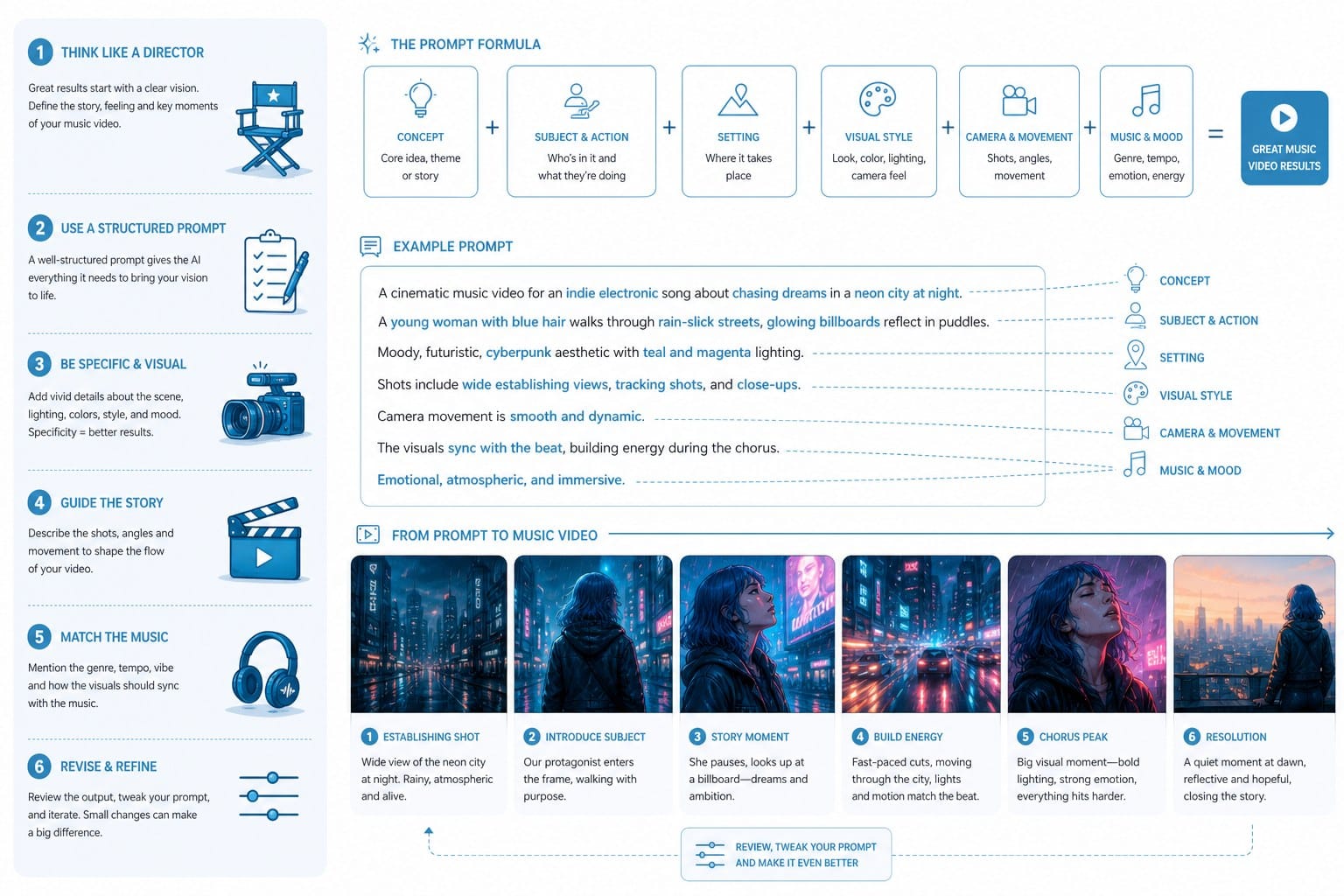
The quality of your output depends heavily on the quality of your input. A vague prompt produces vague results. A specific, well-structured prompt gives the AI enough information to make real creative decisions. Learning to write strong prompts is the single most useful skill you can develop when working with any AI video tool, and it is a skill that improves with practice and attention.
Start with the emotional core of the track. Ask yourself: what does this song feel like? Is it hopeful, angry, dreamy, nostalgic, tense, triumphant, grieving? Name that emotion directly in your prompt. Do not bury it in the middle of a long description. Lead with it, because it anchors every other decision the AI makes. Something like 'nostalgic and bittersweet, like looking back at a summer that ended too soon' gives the system a strong emotional center to build from. Compare that to 'a video for a sad song,' which tells the AI almost nothing it can use.
Next, describe the visual world you want. Think in terms of settings, lighting, and color palette. A desert road at golden hour reads completely differently than a neon-lit alley at midnight. Both could work for different types of music, but you need to be specific about which world you are building. Give the AI a location, a time of day, and a light quality. For instance: 'sun-bleached highways in the American southwest, late afternoon light, warm oranges and faded yellows, long straight roads disappearing into the distance.' That description gives the system enough visual information to make consistent choices across multiple scenes.
Then add movement and pacing cues. Music videos live and die by their rhythm, and you can direct that rhythm through your language. Tell the AI whether you want slow, cinematic camera movements or fast, energetic cuts. Phrases like 'slow drift shots,' 'quick cuts between scenes,' 'long unbroken takes,' 'handheld and urgent,' or 'static wide shots that let the scenery breathe' all give the system direction on how to pace the edit. Without pacing cues, the AI will make its own choices, and they may not match the tempo and energy of your track.
You can also specify a visual style. This is where your prompt can get genuinely specific and start to sound like a real director's brief. Are you going for a 1990s VHS aesthetic with its characteristic color bleed and scan lines? A clean, modern minimalist look with flat color and sharp composition? A dreamlike, slightly surreal quality where reality feels unstable? Film noir with high contrast and deep shadow? A hand-painted animation style? Specifying a visual grammar helps the AI match an existing aesthetic language rather than defaulting to something generic.
Here is a direct comparison of a weak prompt versus a strong one, using the same basic concept.
Weak: 'a music video for a sad song about missing someone.'
Strong: 'a melancholic music video set in a rainy coastal town in late autumn, muted greens and grays with occasional washed-out blues, slow wide shots of empty streets and rain-streaked windows, occasional close-ups of hands holding objects and faces turned away from the camera, quiet and introspective pacing with few hard cuts, film grain texture throughout, 2.39:1 cinematic aspect ratio, the feeling of waiting for someone who is not coming back.'
The second prompt gives the AI a full picture. It knows the mood, the setting, the color palette, the pacing, the shot types, the visual texture, the aspect ratio, and the emotional subtext. The output will be far more coherent and intentional than anything generated from the first prompt. You are essentially writing a director's brief, and the AI is executing it.
For animation-style music videos, your prompt can go in a completely different direction. If you want a stylized animated look rather than live-action footage, describe that explicitly and in detail. What kind of animation? Flat 2D with bold outlines? Painterly textures that look hand-drawn? Geometric and abstract? Fluid and organic? The more specific you are about the animation style, the more consistent the output will be. Platforms like Cliptude support different visual formats, including animation approaches that work well for abstract or conceptual music that does not fit naturally into a live-action visual world. For a deeper look at how AI translates descriptive language into animated visuals, the approach explored in the AI stickman animation maker that turns text into videos instantly is a useful reference point for understanding the mechanics behind text-to-animation pipelines.
Also think about what your music video needs to accomplish beyond representing the song. Is it promoting a new release and needs to feel fresh and attention-grabbing? Is it building a long-term visual identity for an artist and needs to feel consistent with previous content? Is it creating shareable short-form content and needs to work in the first two seconds without sound? Your goal affects how you structure the prompt and where you put your emphasis.
A short-form clip for TikTok needs fast energy, a strong visual hook immediately, and enough visual contrast to stop someone mid-scroll. A long-form YouTube music video can build slowly, let the setting establish itself, and let the emotional tone develop over several minutes. Those are different briefs, and a good prompt reflects that difference explicitly rather than leaving it to chance.
Do not be afraid to iterate. Your first prompt will rarely produce your best result. Generate a version, watch it carefully, and note what works and what does not. Where did the output feel generic or disconnected from your vision? Add more specificity in those areas. Where did elements conflict with each other and produce visual incoherence? Remove or clarify those parts of the description. Treat prompt writing as a creative skill that improves with deliberate practice, because it genuinely does. Experienced prompt writers produce consistently better outputs not because they know secret formulas, but because they have trained themselves to describe visual experiences in precise language.
One practical habit worth developing: write your prompt before you even open the platform. Take five to ten minutes with a blank document and describe your vision in plain language, as if you were briefing a director who has never heard your track. Include the emotion, the setting, the palette, the pacing, the style, and the intended effect on the viewer. Then paste that complete description into Cliptude and let the system build from it. Starting with a clear written brief almost always produces better results than typing directly into a prompt box and editing on the fly, because the brief forces you to think through the vision before the AI starts making decisions.
You can also use structure within your prompt to guide the AI through different phases of the video. If your track has a clear verse-chorus-bridge structure with distinct emotional shifts, you can describe each phase separately. Something like 'the opening section is quiet and tentative, sparse visuals with lots of negative space / the middle section builds in intensity with faster cuts and more saturated color / the final section opens up into wide, expansive shots as the tension releases' gives the AI a roadmap for how the visual energy should move across the runtime. This approach works especially well for longer videos where a single static mood would feel flat.
Finally, pay attention to what other creators are doing with AI music video tools. Not to copy their prompts, but to build your own visual vocabulary. When you see an AI-generated video that works emotionally, try to reverse-engineer the description that might have produced it. What setting? What palette? What pacing? What style reference? That kind of analytical viewing will make you a better prompt writer faster than any tutorial, because you are learning to see in the language the AI understands.
Turning your AI music video into publishable content
Getting a strong AI-generated music video out of the platform is step one. Getting it in front of an audience is step two, and that part involves deliberate decisions about format, optimization, and distribution strategy. A well-made video that nobody finds does not serve your goals, so the publishing side of this workflow deserves the same attention as the production side.
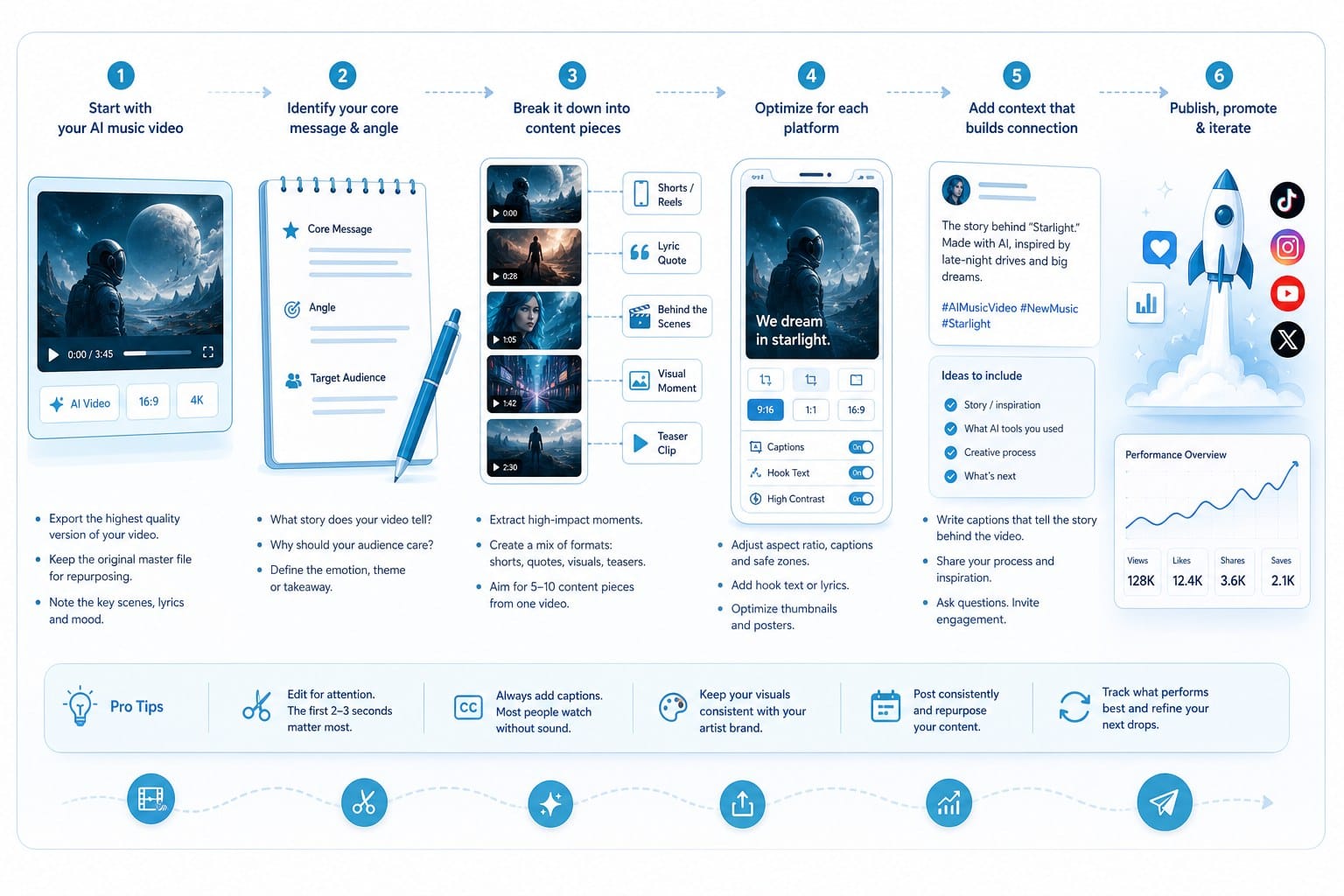
Start by thinking about aspect ratio and length before you generate the video, not after. YouTube standard uploads are 16:9 widescreen. YouTube Shorts, TikTok, and Instagram Reels all use 9:16 vertical. The compositional choices that work in widescreen often do not translate directly to vertical without feeling cramped or poorly framed. Some creators run both formats from a single concept, adjusting the prompt slightly for each platform's needs and generating separate versions. If you plan to publish on multiple platforms, decide on your primary format first and adapt for secondary channels with separate prompts tailored to those formats.
For YouTube specifically, the length of your music video affects how the algorithm treats it and where it surfaces in recommendations. A video under sixty seconds may be treated as a Short even if you upload it as a standard video, which puts it in a different discovery pool. Full song videos typically land between three and five minutes, which sits comfortably in YouTube's standard content category and benefits from the same recommendation engine as other long-form content. If you are building a music-focused channel with a consistent publishing cadence, keeping your video lengths predictable also helps train viewer expectations and builds a pattern of return visits.
Once your video is out of Cliptude, review it carefully against a short quality checklist before publishing. Watch it with the actual audio track playing and check whether the visual pacing feels emotionally connected to the music at each section. Look for moments where the visuals feel disconnected from the song's energy or where the imagery feels generic relative to what you described in your prompt. Check that the color palette stays consistent across the full edit rather than shifting in ways that feel unintentional. If any text overlays are present, read them for accuracy and check the timing against the audio.
If anything feels off after that review, go back to your prompt and revise the specific areas that did not land. The iteration cycle with AI video is much faster than traditional editing because you are adjusting language rather than cutting clips on a timeline. A refined prompt can produce a substantially better result in the time it would take a traditional editor to trim a single scene. That speed of iteration is one of the format's real practical advantages.
For SEO on YouTube, your title, description, and tags all function as separate signals to the algorithm, and they matter independently of the video content itself. Use the artist name, song title, and relevant genre or mood keywords in your title. Write a description that gives genuine context for the track and the visual concept — not keyword stuffing, but a real explanation of what the song is about and what the video represents. Add timestamps if the video has distinct sections, such as a verse, chorus, and bridge that look visually different. Include relevant tags and links to wherever listeners can stream or purchase the track.
Thumbnails have a significant and measurable impact on click-through rate, and this is an area where a small investment of time pays off clearly. Even if the AI generates the video automatically, you will want to create a custom thumbnail for YouTube rather than using the auto-generated frame. Pull a visually strong frame from the video, add the track name and artist name in clean, readable text, and make sure the composition reads clearly at the small sizes the thumbnail appears at in search results and recommendations. A strong, custom thumbnail can meaningfully increase organic clicks compared to an auto-generated one, and that difference compounds over time across a catalog of videos.
For TikTok and Reels, the first two seconds of your video carry a disproportionate amount of weight. The algorithm rewards content that hooks viewers immediately and keeps them watching through to the end, and the first few frames determine whether someone keeps scrolling or stops. When you write your prompt for short-form content, specifically describe a strong visual opening. Something like 'begins with a striking close-up or an unexpected visual before pulling back to reveal the setting' gives the AI direction on how to structure the opening beats. A soft, gradual opening that works in a long-form YouTube context will lose the audience on TikTok before the hook arrives.
Monetization is a real and practical consideration for creators using AI-generated videos at scale. Because Cliptude provides commercial rights with its output, you can run ads against your YouTube videos, include them in sponsored content, license them for other commercial uses, or package them as part of a content offering. This is a meaningful advantage over platforms that restrict commercial use or require expensive license tier upgrades before you can generate revenue from your content. If you are building a channel strategy around consistent music content, the rights clarity removes a significant operational friction point.
For independent musicians specifically, AI music videos open up a publishing strategy that did not exist at this price point a few years ago. You can release a visual for every track rather than only the singles with the largest marketing budgets. You can maintain a consistent YouTube publishing schedule without hiring a videographer for each release. You can experiment with different visual interpretations of the same track to see which concept resonates with your audience before committing to a larger production. That experimental flexibility has real creative and strategic value.
Creators building educational or documentary-style music channels — covering music history, genre deep-dives, artist profiles, or music theory — can use the same text-to-video workflow for that content as well. Cliptude handles multiple video formats beyond music videos, including documentary-style content with narration-driven pacing and animated explainers with a different visual grammar. If you are evaluating how this approach fits your specific use case relative to avatar-based video tools that take a different production approach, articles like Best HeyGen alternative for AI-powered video creation at scale and Best Synthesia alternative for AI video without avatars or green screens offer useful comparisons of the different tools and what each one prioritizes.
The practical takeaway is that the AI music video format is not a novelty or a shortcut for creators who cannot afford real production. It is a genuine content production workflow that serious creators are using right now to publish consistent, high-quality video content without the traditional cost and time barriers. The key is treating it as a craft with real skills involved. Write detailed, specific prompts. Review your outputs with a critical eye. Optimize your publishing strategy the same way you would for any content you are investing time in. When you apply those habits consistently, the results are competitive with traditionally produced video content in both quality and audience response.
Think about volume as a long-term strategy rather than a one-off experiment. One AI music video is a proof of concept. Ten music videos across a quarter starts to build an audience and a recognizable visual identity. Fifty videos over a year creates a catalog that compounds in discoverability over time as each video continues to surface in search and recommendations. The platform's usage-based credit structure means you scale your output when production demands are high and pull back when they are not, without being locked into a fixed monthly cost that does not match your actual workflow. That flexibility matters a lot for solo creators and small teams managing content schedules that do not follow a predictable corporate calendar.
Start with one strong prompt. Review the output. Refine the language. Publish with care. Then build the habit of repeating that cycle consistently, and the cumulative effect on your channel and your music's reach will be real.
Ready to take the next step?
If you are ready to build your first AI music video from a text prompt, Cliptude gives you a fast, full-pipeline way to do it. Head to Cliptude and enter your first prompt. The platform handles research, footage, editing, and output so you can focus on the creative vision rather than the production logistics.