Best HeyGen alternative for AI-powered video creation at scale


Table of contents
1. Why creators outgrow avatar-based video tools
2. What makes Cliptude a genuinely different kind of HeyGen alternative
3. How to decide if Cliptude is the right HeyGen alternative for your workflow
If you have been searching for a HeyGen alternative, you are probably hitting the same wall that a lot of creators run into: you need video at scale, but the tools built around talking-head avatars and lip-sync technology do not fit your workflow. HeyGen is a solid product for what it does. You put in a script, an avatar speaks it, and you get a presenter-style video. That works well for corporate training or product demos. It does not work as well if you are running a faceless YouTube channel, building a documentary series, or trying to produce TikTok and Instagram Reels content that looks like a real team edited it. This article breaks down why the avatar-first approach leaves certain creators behind, how to identify what you actually need from an alternative, and how Cliptude approaches the problem differently by automating the entire production pipeline from a single prompt.
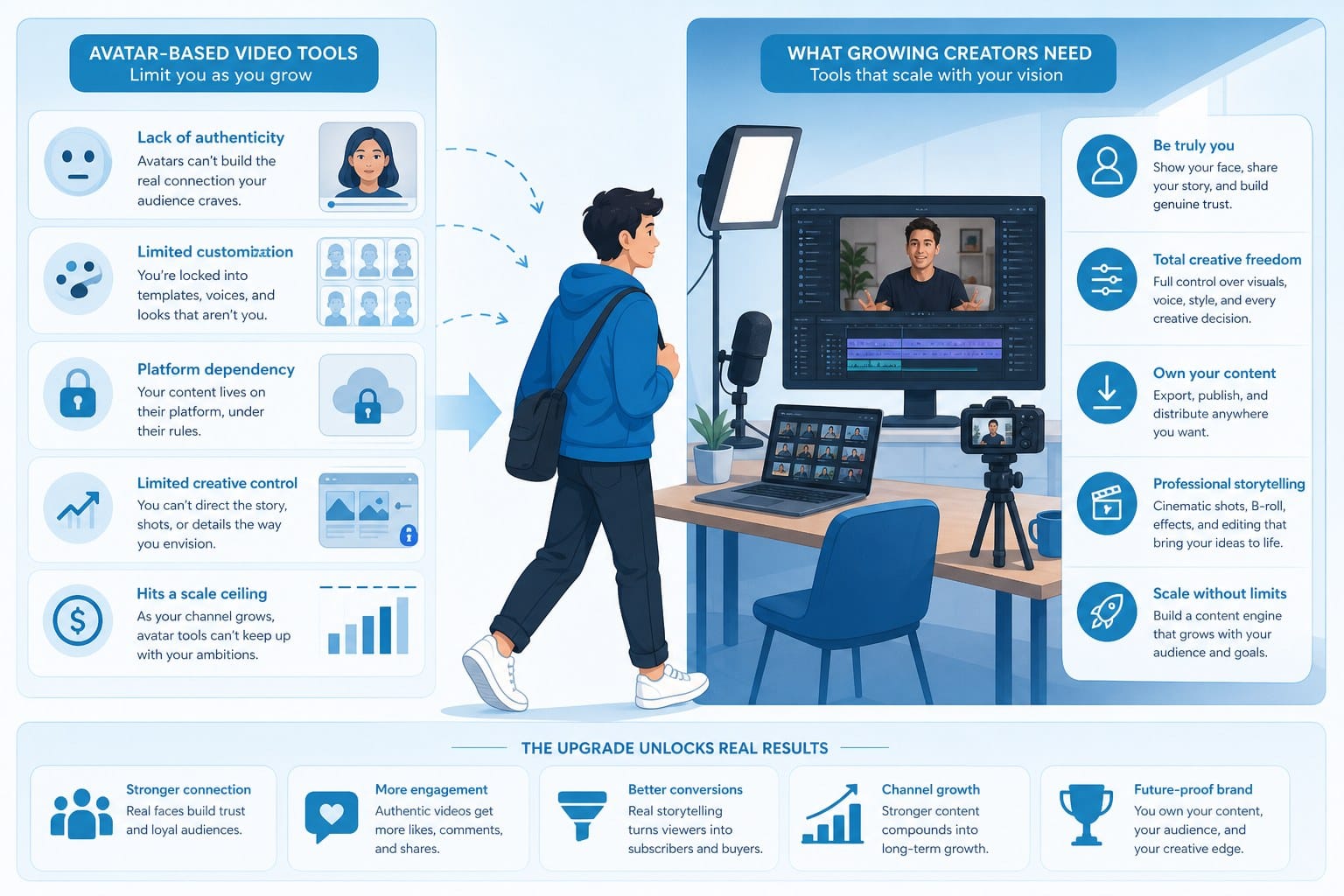
Why creators outgrow avatar-based video tools
HeyGen built its reputation on AI avatars. You write a script, select a digital spokesperson, and the platform generates a video where that avatar delivers your message. For brands that want a consistent on-screen face without hiring an actor, that solves a real problem. The technology is genuinely impressive in that narrow context.
But a large and growing segment of creators does not want an avatar at all. Faceless YouTube channels are built around voiceover narration layered on top of footage, motion graphics, and b-roll. The content carries itself. Nobody is looking at a face. Channels covering history, science, true crime, personal finance, and travel regularly pull millions of views without a single on-screen presenter, human or digital. That is a proven format with a proven audience, and it has nothing to do with avatars.
When you try to use an avatar tool for that kind of content, friction shows up almost immediately. You still have to source footage separately. You still have to edit. You still have to add graphics, transitions, and titles. The avatar handles maybe ten percent of the actual production work, and you are left doing the rest manually. You are paying for one piece of a workflow that has ten pieces.
There is also a format problem that does not get talked about enough. Avatar videos tend to follow a predictable structure: talking head, maybe a slide behind the presenter, some basic text overlays. That format works fine for explainer content aimed at business audiences. It starts to feel thin when you are trying to produce a 15-minute documentary about the fall of the Roman Empire or a fast-cut listicle about the most dangerous hiking trails in North America. Viewers in those niches have been trained by years of high-production YouTube content. They expect editing that matches the energy of the topic, not a static avatar in the center of a plain background.
Scaling is another pressure point. If you want to publish four or five videos a week on a faceless channel, avatar tools get expensive quickly because you are paying per video or per minute of output while still handling the majority of the production work yourself. The per-unit cost goes up as volume goes up, but the amount of work that gets done for you does not increase proportionally.
Solo creators who have tried to build faceless channels using avatar platforms often end up frustrated because the time savings are smaller than expected. They still spend hours sourcing footage on stock sites, writing detailed visual descriptions, editing in a separate timeline, and going back to redo transitions that do not match the tone of the narration. The avatar sits in the middle of a fragmented workflow without connecting any of the pieces around it.
The root issue is that avatar tools were designed for a specific creative brief: replace the human presenter. That is a legitimate use case. It is just not the use case that defines faceless YouTube channels, short-form content operations, or solo entrepreneurs who need a full video and not just a talking head.
When you are running that kind of operation, what slows you down is not the presenter. It is the research, the scripting, the footage search, the edit, the graphics, the export, and the constant context-switching between separate tools for each step. An avatar does not touch any of those bottlenecks. A true HeyGen alternative for this type of creator would need to go deeper into the production process and handle the parts that actually take time.
It is also worth thinking about what happens when your content strategy evolves. Channels that start with short explainers often want to move into longer documentary formats, or branch from one platform to another, or experiment with animation instead of live footage. Avatar-based tools tend to lock you into one format. The more your creative ambitions expand, the more the tool starts to feel like a constraint rather than a resource.
Format flexibility, automation depth, and production completeness are the things that separate a genuine alternative from a lateral move. Switching from one avatar platform to another avatar platform does not solve any of the underlying workflow problems. What changes the equation is moving to a platform that automates the whole process rather than just one visible piece of it.
What makes Cliptude a genuinely different kind of HeyGen alternative
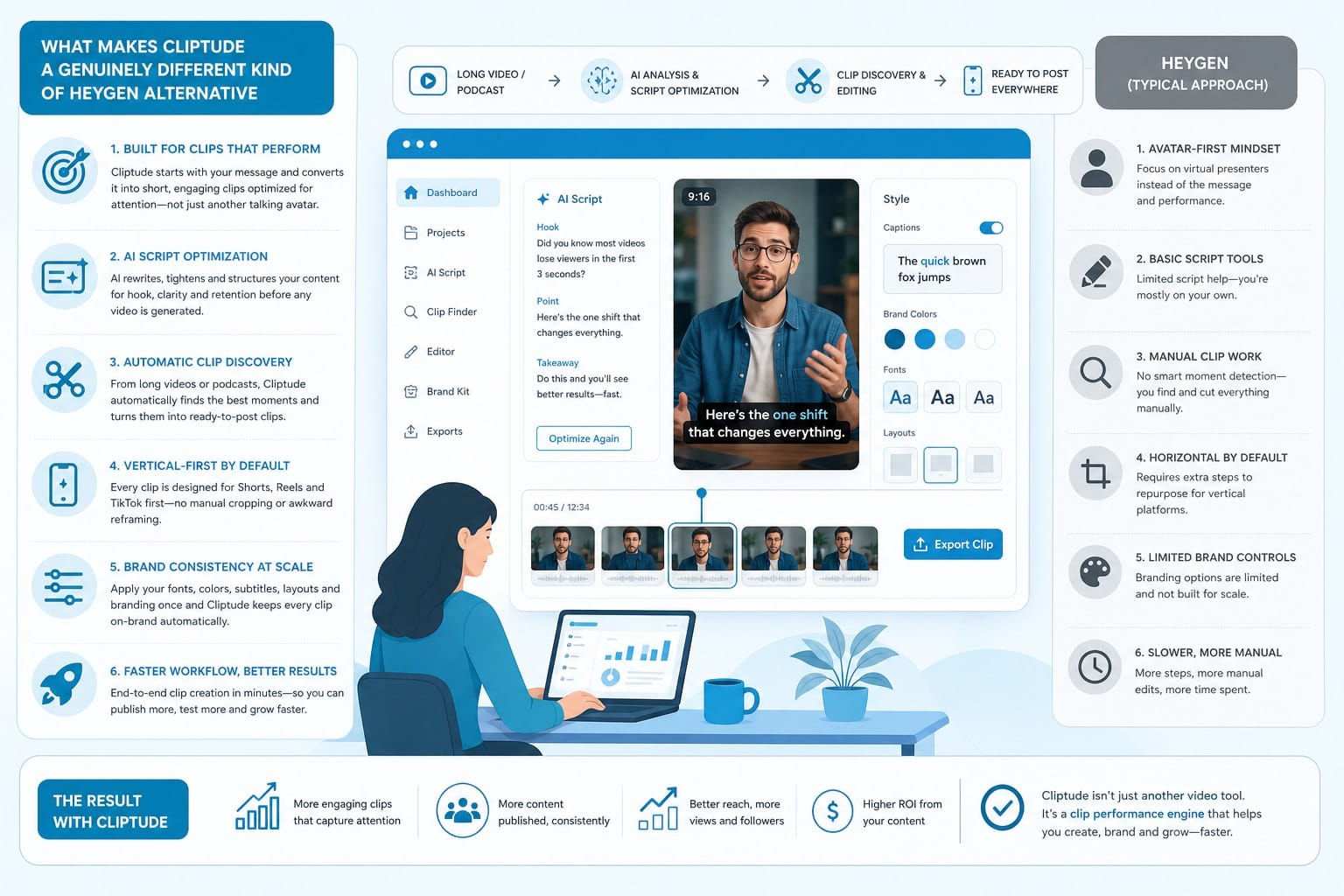
Cliptude starts from a different assumption than HeyGen. Instead of asking you to pick a spokesperson and write a script, it asks you what you want to make. You describe the video, paste in a topic, or provide a prompt, and the platform takes over everything that comes after.
That means research, scripting, footage sourcing, motion graphics, editing, transitions, narration, and final export. The output is a finished video, not a rough cut that still needs three more hours of work.
Here is what that looks like in a concrete example. Say you want to produce a 12-minute documentary-style video about the construction of the Panama Canal. You enter that as a prompt. Cliptude researches the topic, develops a script with a logical narrative arc, sources relevant footage and archival imagery, generates motion graphics to illustrate key engineering and geographic concepts, adds narration, and edits everything into a cohesive video with transitions, chapter titles, and pacing that fits the documentary format. You review the output, make any changes you want, and export. The process that used to take a full day of work collapses into something much shorter.
The same pipeline adapts to shorter formats. If you are producing YouTube Shorts, TikTok clips, or Instagram Reels, Cliptude adjusts the format automatically. The editing rhythm shifts to match what performs in short-form. The aspect ratio changes. Text placement and pacing adjust to what those platforms reward. You do not manually reconfigure anything. You describe what you want, and the output fits the platform.
For creators who use animation instead of live footage, Cliptude supports whiteboard and stickman animation formats natively. These styles are popular in educational content because they are visually simple, easy to follow, and do not require the creator to source video footage. A channel that explains cryptocurrency concepts, historical events, or scientific processes using animated visuals can produce that content through Cliptude without learning animation software or hiring a motion designer.
The credit-based pricing model changes the economics of scaling in a way that flat monthly subscriptions do not. Instead of paying a fixed monthly rate that covers a set number of avatar minutes or video exports, you buy credits and spend them on what you actually produce. During a heavy production week where you are building out a content library, you use more credits. During a slower week, you are not paying for idle capacity. For solo creators and small teams with variable schedules, that structure reduces waste and makes budgeting more predictable.
Commercial rights are included in what Cliptude produces. This is a practical detail that gets skipped over in a lot of tool comparisons, but it matters if you are running a monetized YouTube channel or selling video content to clients. The footage and graphics in your videos are cleared for commercial use. You do not have to audit licenses after the fact or worry about a copyright claim appearing on a video that has already been published and started generating revenue.
The clearest way to describe the difference between HeyGen and Cliptude from a workflow perspective is this: HeyGen automates the on-screen presenter. Cliptude automates the production team. Those are genuinely different problems, and they suit different types of creators.
A faceless channel creator does not have a presenter problem. They have a production throughput problem. They need someone to do the research, write the script, find the footage, build the graphics, and assemble everything into a finished video. That is what a production team does in a traditional media operation. Cliptude replicates that function using AI so a single creator or a small team can produce at a volume that would normally require hiring multiple people.
It is also worth being specific about what Cliptude does not try to be. It is not an avatar platform with extra features. It is not a video editing tool that added AI assistance. It was built around the idea that the output should be a complete video, and everything in the platform is oriented toward getting you to that output as efficiently as possible.
For creators comparing options across the AI video landscape, it helps to look at related tools through the same lens. The questions to ask are: where does the automation start, where does it stop, and what are you still doing manually after the tool has done its part? The answers reveal whether you are looking at a true workflow solution or just a faster version of the same fragmented process you already have.
Two comparisons worth reading if you are doing that kind of research are best Synthesia alternative for AI video without avatars or green screens and best InVideo alternative for fully automated AI video production. Both articles dig into what automation depth actually means across different platforms and which creator types each tool genuinely serves. The pattern that comes through across all of those comparisons is the same: tools that automate one stage of production leave you managing the rest, and the creators who benefit most from AI video tools are the ones who find a platform that closes the full loop.
How to decide if Cliptude is the right HeyGen alternative for your workflow
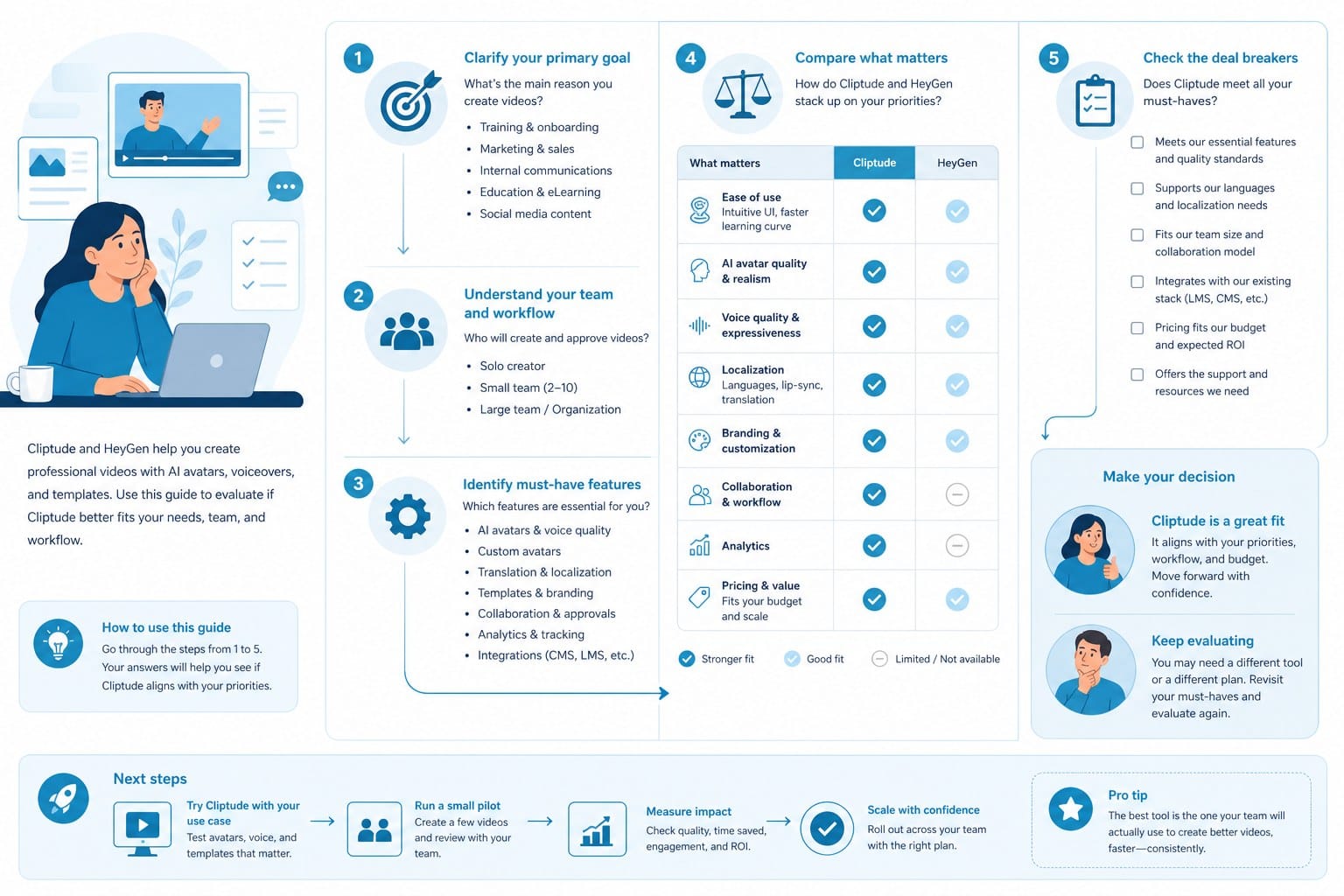
The right HeyGen alternative depends on what part of video production is actually slowing you down and what format your audience expects. Those two questions do more work than any feature comparison.
If your main frustration is that you need a consistent on-screen spokesperson and HeyGen's avatars are not realistic enough or do not match your brand, you are looking for a different kind of tool than Cliptude. Cliptude is not an avatar replacement. There is no digital face to configure, no lip-sync to adjust, no presenter template to choose from. If an on-screen presenter is central to your content format, that is a legitimate need and you should find a platform that addresses it directly.
But if your frustration is that making a single video takes eight to twelve hours because you have to research, write, source footage, edit, add graphics, and export all separately using different tools, then Cliptude is built for exactly that problem. The platform is designed to collapse that process into a fraction of the time by handling every stage in one place.
Here are five specific scenarios where the match is strong.
Scenario one: you are building a faceless YouTube channel in a content-heavy niche like history, science, personal finance, or travel. Your videos need to run 10 to 20 minutes, look polished, and publish consistently, ideally multiple times per week. You do not want to be on camera and you do not want a digital avatar either. You want the video to look like a real editorial or documentary production. Cliptude handles the research and scripting so you are not spending hours on those stages, sources the footage so you are not browsing stock libraries, and edits everything together so the final product looks finished when it comes out. That is a direct match for the platform's core design.
Scenario two: you are producing short-form content for TikTok, Instagram Reels, and YouTube Shorts and you need volume. Posting once a week is not enough to build momentum on those platforms, and producing five or six short videos a week manually is exhausting even for experienced editors. Cliptude's automation means you can generate multiple pieces of short-form content from prompts without going through a full manual edit each time. Format adjustments happen automatically, so you are not reconfiguring aspect ratios and pacing every time you switch between platforms.
Scenario three: you are a solo entrepreneur who wants to use video for marketing or education but you have no video editing experience and hiring an editor is not in the budget right now. You need a tool that produces results without requiring you to learn a complex interface or develop production skills over months. Cliptude's prompt-based workflow means you can describe what you want in plain language and get a finished video back. The learning curve is about describing your content clearly, not about mastering a timeline editor.
Scenario four: you run an educational channel and you use animation to explain complex topics. Whiteboard-style and stickman animation videos perform well in educational niches because they are visually simple and easy to follow regardless of the viewer's background knowledge. Producing them manually usually requires specialized software and a significant time investment. Cliptude supports those animation formats natively, which means you can produce that style of content without learning animation tools or outsourcing the work.
Scenario five: you are thinking seriously about monetization and you are not sure how AI-generated content fits into YouTube's policies. This comes up constantly for creators building with AI tools, and it is worth getting clear on before you invest significant time and credits into a content library. The article can you monetize AI-generated YouTube videos covers how this actually works in detail. The short version is that the platform you use to produce the video matters less than whether the content itself adds value and meets YouTube's monetization policies. Cliptude's commercial rights coverage means the footage and graphics in your videos are licensed appropriately, which removes one category of risk from the equation.
It is also worth being honest about what automated tools cannot do perfectly. If you need very specific creative control over every individual cut, or if your content requires original footage shot specifically for your project, any automated platform will feel limiting at some point. There is no AI video tool today that replaces the creative judgment of an experienced editor working on a highly specific brief.
The question is whether the time you save on the eighty percent of production that can be automated is worth occasionally having less granular control over the remaining twenty percent. For most faceless channel creators and solo producers, that tradeoff is clearly worth it. The bottleneck is almost never the final round of fine-tuning. The bottleneck is the research, scripting, footage sourcing, and initial editing that happens before you even get to fine-tuning. If you can automate those stages, you produce more content, build your channel faster, and direct your creative energy toward strategy and topic selection instead of timeline management.
There is also a compounding effect worth thinking about. A creator who publishes three videos a week instead of one does not just grow three times faster in a simple linear sense. More content means more entry points for new viewers, more data about what performs, faster feedback loops for improving your format, and more material for the algorithm to distribute. The production bottleneck is often the single biggest limiter on channel growth for independent creators, and removing it has effects that go beyond just having more videos in the upload queue.
When you are comparing a HeyGen alternative for your specific situation, the most useful question is: what is actually taking the most time in my current process? If the answer is the avatar or the on-screen presentation, a different avatar tool is probably what you need. If the answer is everything from the research stage through final export, Cliptude is worth a serious look.
The platform is at cliptude.com and the credit-based pricing means you can start with a smaller commitment to test whether the output quality and workflow actually fit what you are trying to build. For creators who have been juggling three or four separate tools to produce a single video, the experience of getting a finished, publish-ready video back from a single prompt tends to be the moment the value proposition clicks into place.
Producing video content at scale without a production team used to require either a large budget or an enormous amount of personal time. AI tools have changed that equation, but only the ones that automate the full pipeline rather than just one visible piece of it. The difference between a tool that replaces your presenter and a tool that replaces your production team is significant. For the creators who need the latter, that distinction is the whole decision.
Ready to take the next step?
If you are ready to stop stitching together research, scripting, footage sourcing, and editing into one exhausting manual process, Cliptude is built to handle all of it from a single prompt. Visit cliptude.com to see how the platform works and start producing polished, publish-ready videos at the scale your channel actually needs.