Cliptude review: AI video creation from prompt to polished edit

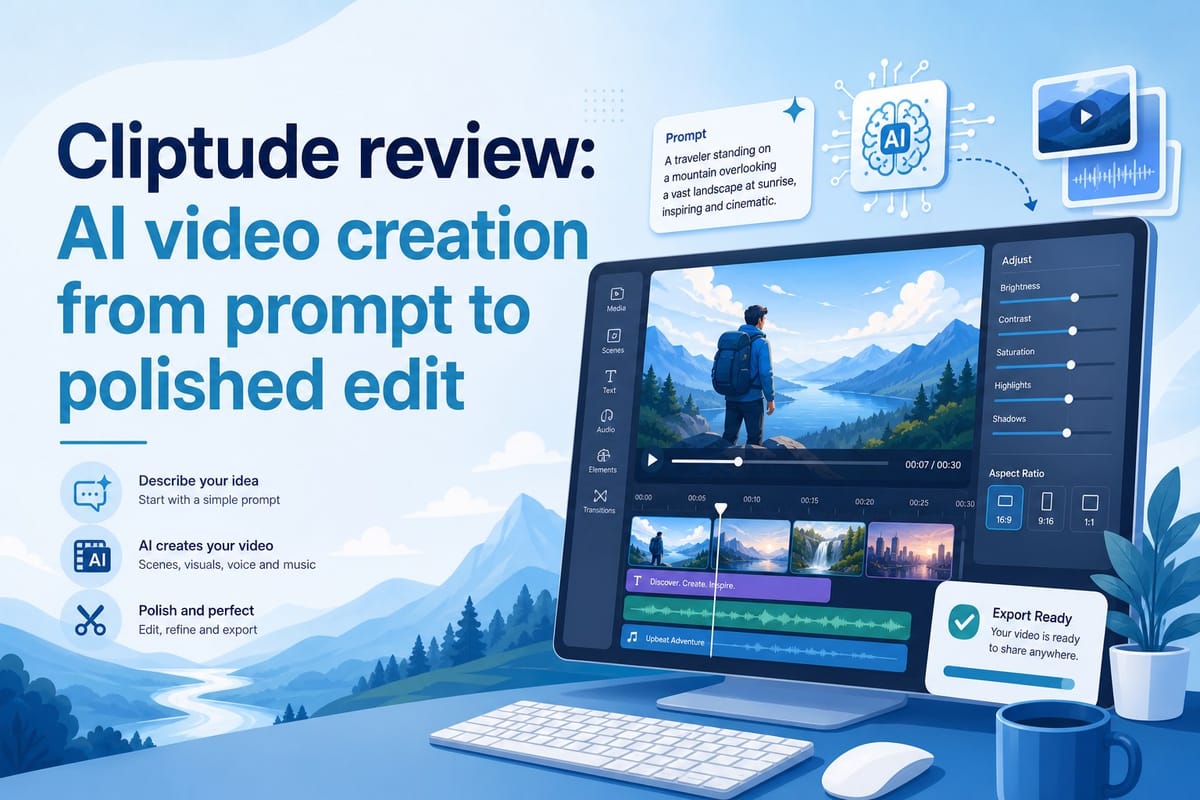
Table of contents
1. What Cliptude is and how it works from prompt to finished video
2. Video quality, format options, and what the output really looks like
3. Who should use Cliptude and how to get the most out of it
I have spent a lot of time looking for a tool that takes a raw idea and turns it into a finished video without requiring me to touch a timeline, record a voiceover, or hunt down stock footage. When I found Cliptude, I was skeptical. AI video tools have made big promises before and delivered shaky results. So I decided to dig in, test the platform across several video formats, and write up exactly what I found. This Cliptude review covers how the tool works, what it actually produces, who it is best for, and where it still has room to grow. If you are running a faceless YouTube channel, trying to scale short-form content, or just want polished videos without hiring an editor, keep reading.
What Cliptude is and how it works from prompt to finished video
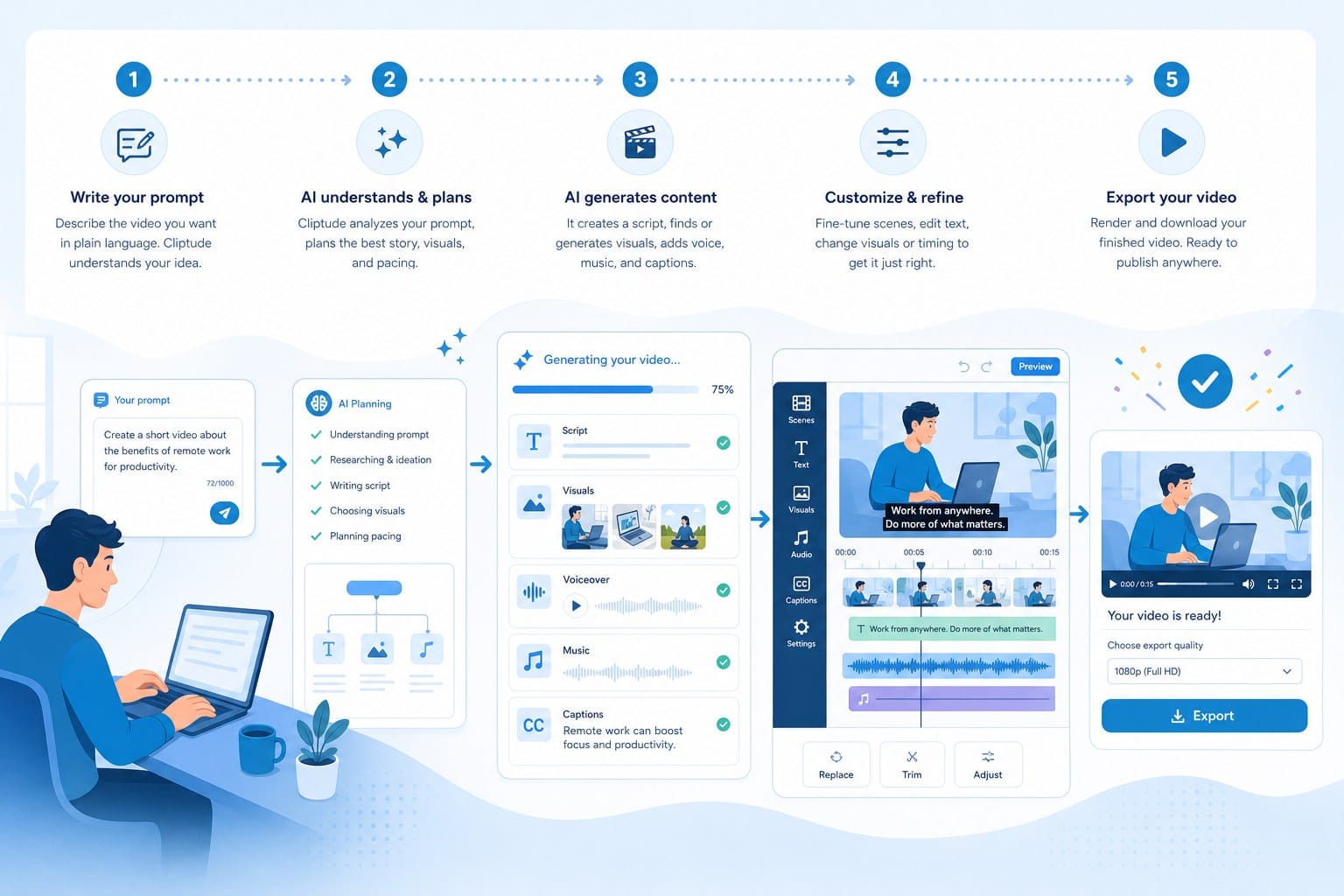
Cliptude is an AI-powered text-to-video platform. You give it a prompt or a finished script, and it handles everything that normally takes hours: research, scripting, footage sourcing, motion graphics, voiceover, and editing. The final output is a polished video ready to upload. That is the core promise, and it is a big one worth examining carefully.
The workflow starts with a simple input. You type a topic — something like "the rise and fall of Blockbuster Video" — or paste in a script you have already written. Cliptude picks up from there. It researches the subject, builds a structured script, pulls relevant footage from its media library, adds motion graphics and transitions, syncs a narrated voiceover, and delivers a complete edit. I did not have to open a single editing application during the entire process.
That might sound too convenient, so let me walk through each stage in more detail.
The research phase matters more than it sounds. Many AI video tools skip this step entirely and just generate a script from whatever the model already knows, which can produce outdated or vague content. Cliptude uses the topic input to inform a structured script with enough factual grounding to hold together. When I tested it on a historical topic I know well — the 2008 financial crisis — the script hit the key events in the right order and did not fabricate details. That is not guaranteed on every topic, and I will get to that caveat shortly, but the research step reduces the most common failure mode in AI-generated content.
The scripting phase produces a video built around a clear arc. There is an opening hook designed to keep viewers watching past the first thirty seconds, a body section that moves through the topic in logical segments, and a close that wraps things up without abruptly cutting off. For YouTube content in particular, that structure matters because watch time and retention are core signals the algorithm uses to decide how widely to distribute your video.
Footage sourcing happens automatically. Cliptude pulls from its own library and matches visuals to the narrative as the script progresses. I noticed the matching was more accurate for well-documented historical topics than for niche or abstract subjects. If you are covering the Apollo program, the footage selection is strong. If you are covering a niche business concept, you may see more generic visuals. That is worth knowing before you pick your content niche.
The motion graphics layer is included automatically. Text overlays, lower thirds, and transitions appear at appropriate moments without you configuring them. These are not flashy or overdone. They look like the kind of clean, functional graphics you would see on a mid-tier YouTube documentary channel — professional enough to signal credibility without distracting from the content.
The voiceover is generated and synced to the edit. I will address voice quality in more depth in the next section, but the synchronization works well. The narration does not drift ahead of or behind the visuals in a way that creates an awkward viewing experience.
The platform supports a wide range of video formats. You can produce long-form YouTube documentaries, listicle videos, educational explainers, animated whiteboard and stickman videos, YouTube Shorts, TikTok clips, Instagram Reels, and music videos. That range matters if you are running multiple channels or testing different content styles before committing to one.
I want to flag one thing early: Cliptude is not a slideshow generator dressed up with AI branding. The output includes real motion graphics, synchronized narration, and scene-by-scene editing that would take a skilled human editor several hours to build manually. For a creator who does not have those skills or that time, the difference is meaningful in both the final product and the hours saved.
Pricing runs on a usage-based credit system. You buy credits and spend them as you create videos. This model suits creators who do not publish every single day, because you pay for what you use rather than a fixed monthly seat. There are no locked-in subscriptions pushing you to generate content just to justify the cost.
Commercial rights are worth calling out specifically. Cliptude grants full commercial rights to the videos you create. That matters if you are monetizing a YouTube channel, selling content to clients, or running paid ads. Some AI video tools place restrictions on commercial use that create legal complications later. Cliptude does not.
For a fuller picture of what the platform covers, the Cliptude AI: the text-to-video platform that does it all overview is worth reading before you start your first project. It lays out the feature set clearly and helps you understand which video types fit your niche before you spend credits experimenting.
The onboarding process is straightforward. After creating an account, you choose a video format, enter your topic or script, pick a visual style, and let the system run. Depending on the length and complexity of the video, generation takes a few minutes. I tested a ten-minute documentary-style video and a ninety-second short. Both came back faster than I expected, and both were immediately watchable without additional editing on my end.
The interface itself is clean. I did not feel lost trying to find settings or figure out what step came next. For solo creators or small teams without a dedicated video person, that simplicity is not a small thing. A complicated interface causes people to abandon tools before they see results. Cliptude does not have that problem.
One practical note on how to get the most out of this stage: treat your prompt like a brief to a writer, not a search query. The more direction you give — the angle you want, the tone, the audience, the key points you want covered — the more focused the output. I tested the same topic with a one-sentence prompt and a detailed paragraph prompt. The paragraph prompt produced a noticeably tighter script. That extra two minutes of setup is worth it.
Video quality, format options, and what the output really looks like
Let me get specific about what the videos actually look like, because that is what most people want to know before committing to a tool like this. I will go format by format and be direct about both the strengths and the gaps.
For documentary-style content, Cliptude performs well. The script it generates is organized with a clear structure: an opening hook, a body that moves through the topic in logical segments, and a close that lands without feeling abrupt. The footage it sources matches the narrative reasonably well on established topics. If I was covering a historical subject, the visuals reflected the era and the people involved. The narration voice sounded natural rather than robotic, which is one of the first things viewers judge — and judge quickly.
I tested a video on the collapse of Enron and one on the history of the internet. Both came back with scripts that were factually coherent, footage that matched the story beats, and narration that sounded like something a real person might record. I would not publish either without reviewing the script first, but neither required a full rewrite.
Motion graphics are included automatically and placed well. Text overlays appear when the narration introduces a name, a date, or a concept that benefits from visual reinforcement. Lower thirds introduce key figures at appropriate moments. Transitions between scenes are clean without being distracting. The overall visual register is professional — not at the level of a produced documentary from a major media outlet, but solidly above what most solo creators produce manually.
The animation formats deserve separate attention. Whiteboard and stickman video styles are genuinely useful for educational and explainer content because they communicate ideas visually without requiring real footage. Many educational YouTubers spend significant time manually building these animations in tools that have steep learning curves. Cliptude handles these formats natively, which is a real time-saver for anyone running a channel that explains processes, breaks down complex systems, or teaches concepts step by step.
For short-form content — YouTube Shorts, TikTok videos, and Instagram Reels — the platform formats the output correctly for vertical viewing from the start. Aspect ratios, text sizing, and pacing are adjusted for the platform. I have seen other tools generate horizontal video and simply crop it to vertical, which often cuts off key visuals and makes the result look like an afterthought. Cliptude builds the short-form version intentionally. The pacing is tighter, the text is larger and readable on a phone screen, and the hook comes earlier to match the expectations of short-form viewers.
The faceless channel use case is where Cliptude's value proposition is clearest. If you want to run a YouTube channel without ever appearing on camera, the entire production pipeline is covered in one tool. You do not need to find a voiceover artist on a freelance marketplace, source footage from three different stock sites with incompatible licenses, write a script in a separate document, and then edit everything together in a timeline. You type a topic and get a video. For creators building faceless channels in niches like history, science, finance, true crime, or geography, that is a genuinely different way of working.
If you are specifically focused on documentary content, the guide on how to create YouTube documentaries with AI automation goes deep on the production process and gives practical advice for getting better results from your prompts. I found it useful for understanding how to frame topics so the script comes back with the right angle and depth.
Now for the honest assessment of limitations, because every tool has them.
Cliptude produces competent, structured, professional-looking videos consistently. It does not produce highly customized content with a unique visual identity developed over months, original interview footage, or bespoke graphics built around a specific brand system. If you are at the stage where you need that level of customization, you likely already have an editing workflow you are satisfied with and Cliptude is not your bottleneck.
Footage matching on niche or abstract topics is the most noticeable weak point. When I tested a video on a specific microeconomic concept, the footage selection was more generic than I would have chosen manually. The script was fine. The visuals were acceptable but not ideal. For topics with a large library of well-documented footage — wars, historical events, famous figures, well-known companies — the matching is strong. For niche subjects, it is sometimes loose.
The voiceover quality is good but not identical to a professional voice actor who has spent time with the script. For most YouTube viewers, particularly on educational or documentary channels, the AI narration is completely acceptable and many will not register it as synthetic at all. For creators whose audience is specifically paying for a distinctive human presence in the narration, it is worth knowing that limitation.
The music video format was the one I was most curious about, because it is less common in AI video platforms. I tested a short music video-style piece and found the visual editing tracked the rhythm of the audio better than I expected from an automated system. The result was more cinematic than I anticipated. For musicians, podcast creators who want a visual version of their audio content, or creators who want a more stylized look for certain videos, this format is worth exploring.
Consistency across videos is one of Cliptude's real strengths that does not get enough attention. When you produce video manually, quality varies based on how much time you had, how tired you were, and whether you had the right footage available. AI-generated output is more uniform. That consistency matters for building an audience that knows what to expect from your channel. A viewer who watches one of your videos and finds it well-structured and watchable is more likely to click on another if the quality does not dip unpredictably.
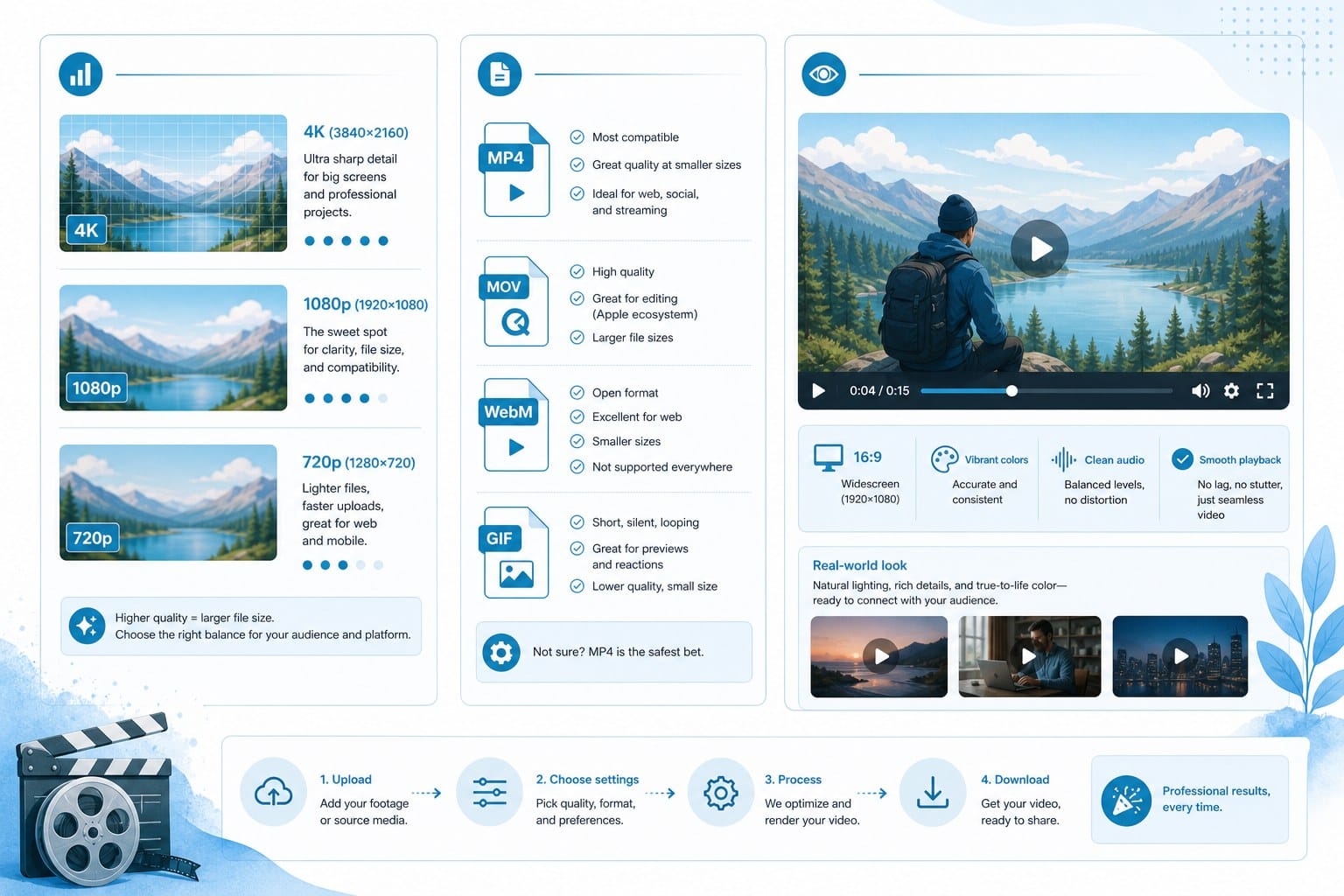
Resolution and export quality came through cleanly in my tests. The final files were ready to upload directly to YouTube without any additional processing. That matters for workflow simplicity, but it also matters for channel performance — YouTube's algorithm processes upload quality as part of how it evaluates and distributes new videos.
One final observation on output quality: the platform handles longer videos better than many competing tools. Some AI video generators that work acceptably on two-minute clips struggle to maintain coherence over ten or twelve minutes. Cliptude's documentary format is built for longer content, and the structure holds up. The script does not start repeating itself, the footage does not loop in a way that feels lazy, and the pacing does not collapse in the second half. For creators whose YouTube strategy depends on longer videos with higher ad revenue per view, that matters.
Who should use Cliptude and how to get the most out of it
After testing Cliptude across several formats and use cases, I have a clear picture of who gets the most value from it and who might need something different. Let me be specific, because "anyone who makes videos" is not useful advice.
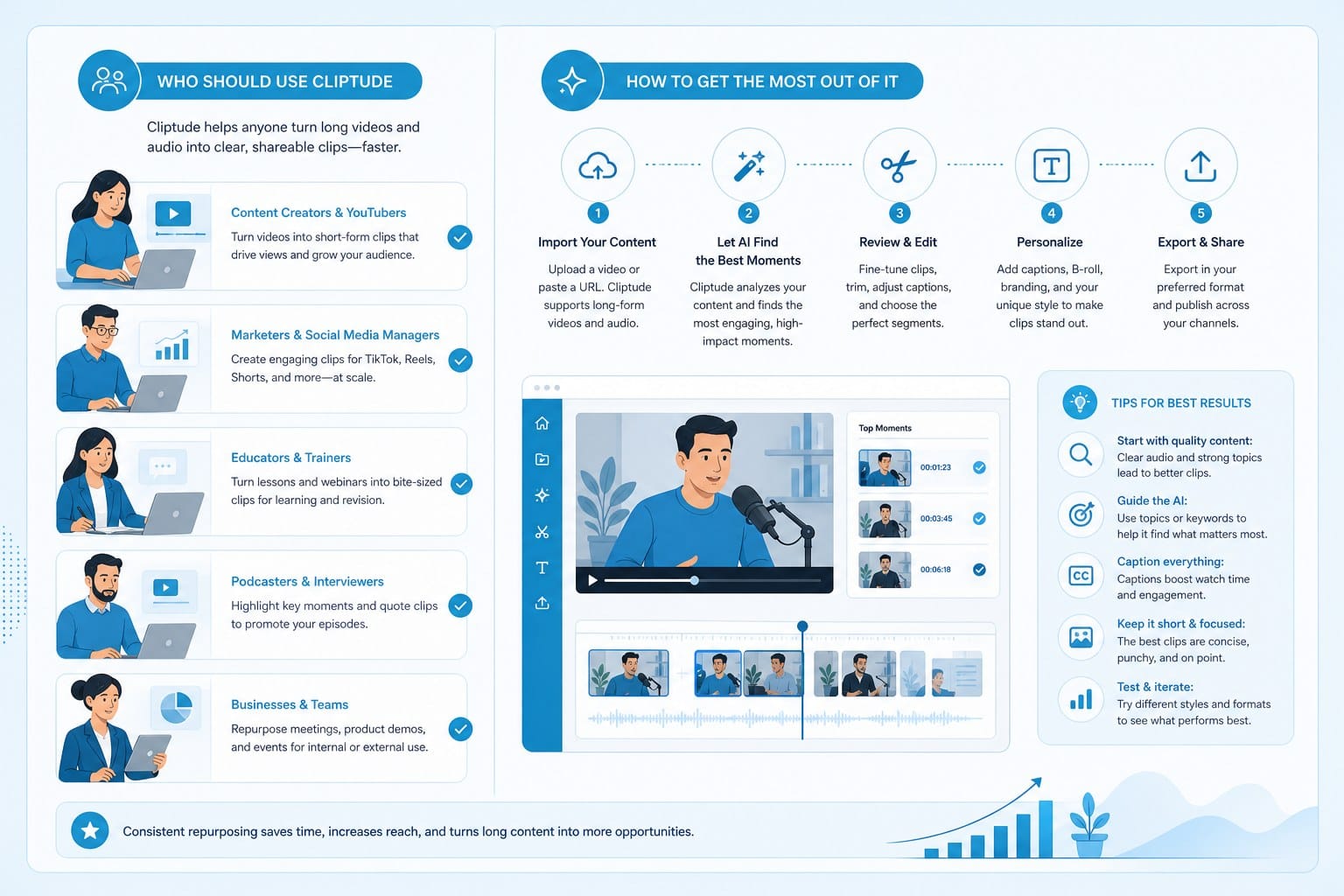
Faceless YouTube creators are the strongest fit for this platform. If your channel covers topics like world history, natural disasters, unsolved mysteries, financial collapses, geopolitical events, or anything that works well with stock footage and narration, Cliptude is built for exactly what you are doing. You can produce multiple videos per week without burnout, without hiring editors, and without being on camera. The research phase means you are not spending hours reading before you can even start writing a script. The editing phase is entirely automated. For someone building a faceless channel in a competitive niche where publishing frequency drives growth, that changes what is possible for a solo creator.
Educational content creators are another strong match. If you produce explainer videos, concept breakdowns, or process walkthroughs, the whiteboard and stickman animation formats give you a visual language that works well for teaching without requiring real footage. Many educational YouTubers manually create these animations in tools like Doodly or VideoScribe, which have learning curves and require real time investment per video. Cliptude handles that entire process automatically.
Solo entrepreneurs and small media teams without video editing experience will find the tool genuinely accessible in a way that most video software is not. You do not need to understand what a render queue is, what color grading means, or how to sync audio to a timeline. You need to know what you want to communicate, and Cliptude handles how to communicate it visually. For a business owner who wants video content to build an audience or explain a product but cannot justify hiring a video team yet, this is a reasonable bridge.
Content creators scaling output for TikTok, Instagram Reels, and YouTube Shorts will benefit from the multi-format support and the speed. If you are trying to stay consistent on three platforms simultaneously while also producing longer YouTube content, the ability to generate short-form videos quickly changes what is achievable for a small operation. You are not choosing between publishing long-form or short-form — you can do both.
Marketers and creators who want to monetize AI-generated content are well-positioned here because of the commercial rights policy. You own what you create on Cliptude. That is not always the case with AI tools, and the distinction matters for anyone building a revenue-generating video operation. Whether you are running YouTube ads, selling channel memberships, or producing content for clients, you do not want ambiguity around who owns the output.
If you have used an AI video tool that did not deliver on its promises and are evaluating alternatives, the article on Vidrush AI alternatives worth switching to in 2025 gives useful context for how Cliptude fits in the broader landscape of platforms competing in this space. It is worth reading if you are coming in with skepticism from a previous bad experience.
Now let me give you practical advice for getting better results once you are inside the platform.
Be specific with your prompt. A topic like "the rise and fall of Blockbuster Video, with a focus on the Netflix rivalry, the failed Redbox partnership, and the leadership decisions that led to bankruptcy" will produce a tighter, more useful script than simply typing "Blockbuster." The model uses your input to frame the story, so the more direction you give upfront, the less revision you need afterward. Think of your prompt as a brief to a writer, not a search query. Include the angle you want, the tone — educational, analytical, storytelling — and any specific points or moments you want covered.
Review the script before generating the full video if the platform gives you that option. It is significantly faster to adjust a sentence in a script than to regenerate a completed video. Catch factual gaps, tonal mismatches, or structural problems at the script stage. This is especially important for topics where accuracy matters, like medical content, legal explanations, or financial advice adjacent material. The AI research phase reduces errors but does not eliminate them, and your review is the last check before the video goes out.
Match your format to your topic deliberately. Long-form documentary content works best for subjects with enough depth to sustain ten or more minutes of narrative. Shorter explainer and animation formats work better for single-concept educational content where you want to teach one idea clearly and move on. Using the wrong format for a topic creates a mismatch that viewers sense even if they cannot articulate exactly what feels off. A twenty-minute animated whiteboard video on a simple concept will lose viewers. A three-minute documentary on a complex historical event will feel rushed and incomplete.
Think about your publishing cadence before buying credits. The usage-based pricing rewards creators who publish regularly but not necessarily every day. If you plan to post two to three times per week, calculate how many credits a typical video costs, multiply by your expected monthly output, and buy accordingly. Buying too few credits creates friction when you are in a productive stretch. Buying too many is not harmful but means money sitting unused.
Pay attention to voiceover style options. The narrator voice sets the emotional register for the entire video. A measured, authoritative tone works for documentary content on serious subjects. A faster, more energetic voice works for listicles, trend content, and anything aimed at a younger short-form audience. Choosing the right voice for your format and audience makes a noticeable difference in how the video feels when you watch it back — and how viewers respond to it.
If you plan to build multiple channels or cover multiple niches, use different style settings for each. The platform's style controls let you create visual and tonal variety between channels. This matters more as you scale, because you want each channel to have a distinct identity even though the same tool is producing all the content.
For creators building in public or sharing their workflows, being transparent with your audience about using AI tools is worth considering. Viewer attitudes toward AI-generated content are evolving, and creators who are upfront about their production process tend to handle the conversation on their own terms rather than having it forced on them later.
One area where I would like to see Cliptude invest further development is deeper visual customization for established channels. The output is clean and professional, but creators who have built a recognizable visual identity — specific color palettes, typography, graphic styles — will find the current customization options limit how closely they can match their brand. For a channel just starting out, this is not a problem. For a channel with fifty thousand subscribers and a developed look, it is worth noting.
That said, most creators reading this review are not at the stage where visual differentiation at that granular level is their main growth lever. Getting a polished, well-structured video out consistently every few days is a more effective growth strategy than spending hours customizing graphic styles for an audience that is still small. Consistency compounds. A channel that publishes reliably every week grows faster than one that publishes perfectly once a month.
The credit-based pricing also gives you the flexibility to experiment with formats before committing to one. You can try a documentary one week, a shorts batch the following week, and an animated explainer the week after that. That kind of low-stakes experimentation is how most successful creators find the format their audience actually responds to, rather than assuming they know in advance.
Cliptude is a practical production tool for people who want to be consistent, professional video publishers without the traditional overhead of editing software, stock footage subscriptions, voiceover contracts, and production time. It handles the parts of video creation that most people find hardest or most time-consuming: research, scripting, footage selection, editing, and motion graphics. What you bring is the topic, the publishing strategy, and the judgment to review the output before it goes live. That division of labor makes sense for a lot of creators operating right now.
If you have been putting off starting a YouTube channel because you do not know how to edit video, Cliptude removes that barrier entirely. If you already have a channel but cannot keep up with the publishing pace you want, the platform changes your capacity without requiring you to hire anyone. The usage-based model means you can test it without a large upfront commitment, the range of formats means you can find the style that fits your niche before scaling, and the commercial rights policy means you can monetize everything you create without legal uncertainty.
Ready to take the next step?
Ready to see what Cliptude can do for your channel? Head to cliptude.com and start your first video today. The process takes a few minutes and the output might change how you think about what is possible as a solo creator.