How to make listicle videos automatically with AI

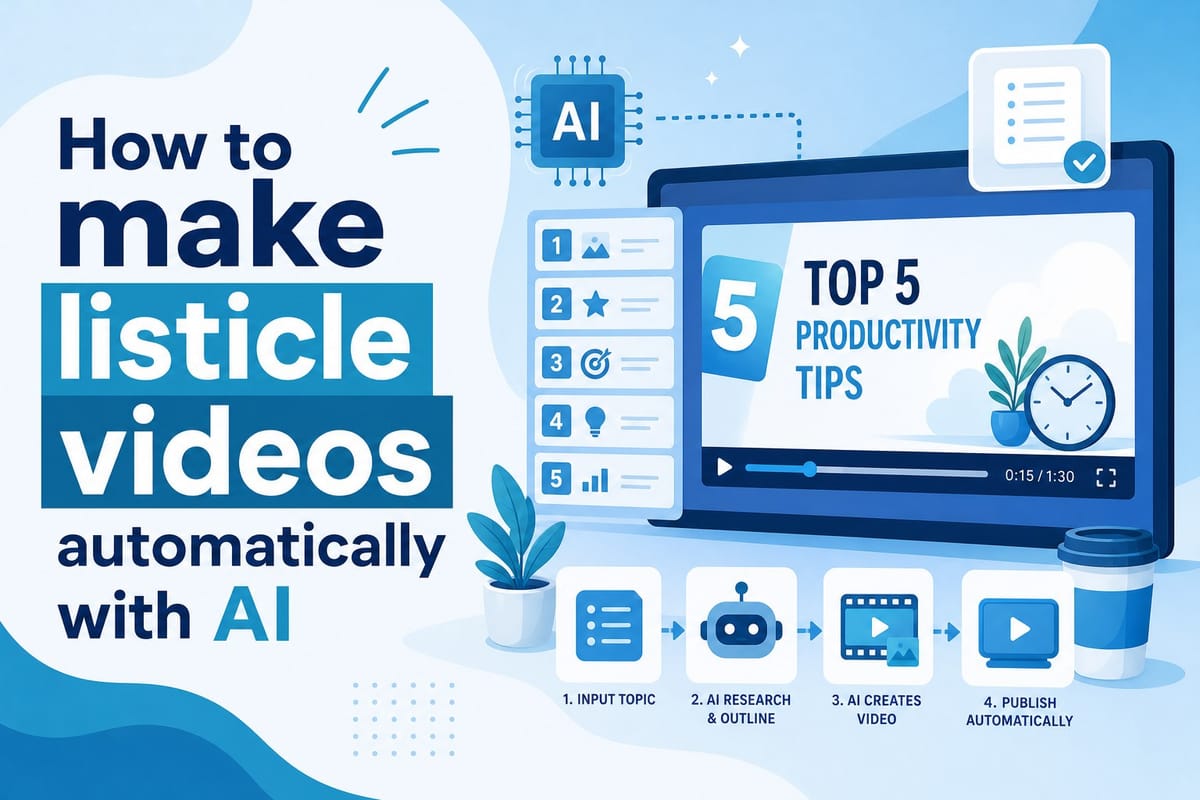
Table of contents
1. Why listicle videos work so well and what makes them hard to produce
2. How an AI listicle video maker handles the entire production pipeline
3. A practical workflow for producing listicle videos at scale
Listicle videos are some of the most-watched content on YouTube. Titles like "Top 10 Unsolved Mysteries" or "7 Countries You Can't Visit" rack up millions of views because people love ranked, bite-sized information delivered in a clear format. The problem is that making these videos the traditional way takes a serious amount of time. You need to research the topic, write a script, find footage, record a voiceover, edit everything together, and add graphics. For a single 10-minute listicle, that process can easily eat up 15 to 20 hours. That is exactly why more creators are turning to an AI listicle video maker to handle most of that work automatically. This article walks you through why the format works, how the automation pipeline handles each production step, and how to use a tool like Cliptude to publish polished listicle videos without touching a camera or an editing timeline.
Why listicle videos work so well and what makes them hard to produce
Before getting into automation, it helps to understand why listicle videos perform so consistently well across nearly every niche on YouTube.
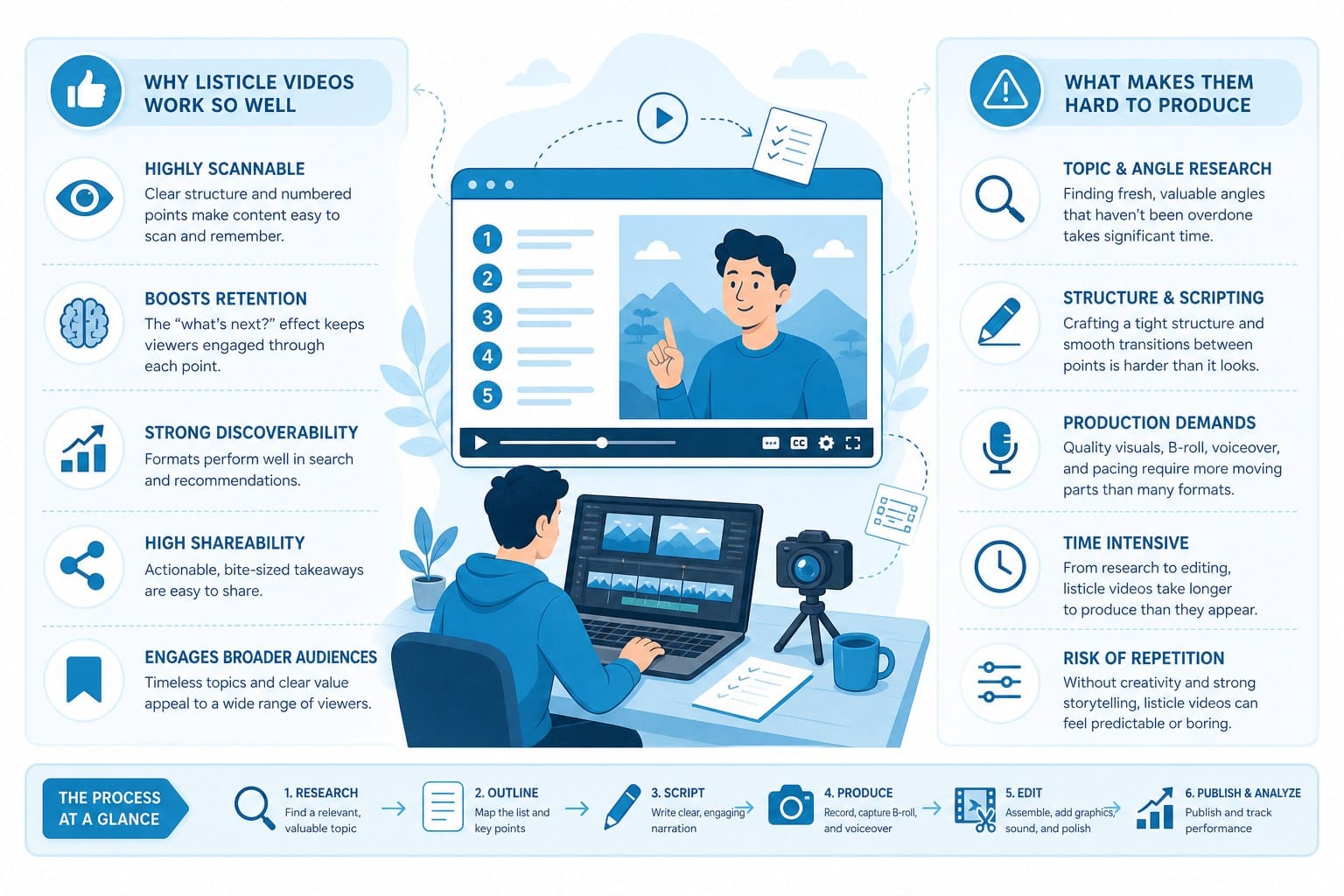
The format is predictable in a good way. Viewers know exactly what they are getting the moment they read the title. A number sets clear expectations, and the video delivers on them one item at a time. That structure keeps watch time high because people want to stay until the end to see every entry. YouTube's algorithm notices that kind of retention and rewards it with broader distribution.
The format also adapts to almost any subject. History channels cover the top 10 ancient civilizations. Finance channels break down the five best passive income strategies. Travel channels list the most dangerous roads in the world. True crime channels count down the most baffling unsolved cases. Cooking channels rank the easiest weeknight dinners. Whatever your channel covers, a listicle version of it probably exists and probably performs well. That versatility is why listicles have become a go-to format for faceless YouTube channels in particular, where the goal is consistent output without an on-camera host.
But producing these videos consistently is genuinely hard work, and the difficulty is worth spelling out in detail because it explains exactly why automation matters.
Research takes longer than most people expect.
A good listicle needs entries that are accurate, interesting, and arranged in an order that makes narrative sense. If you are making a video about the world's deepest caves, you need to verify measurements, confirm geographic locations, and find compelling details for each entry that go beyond what a Wikipedia summary provides. You want facts that surprise the viewer, not just a dry recitation. Doing that research properly for a thorough 10-item list takes two to three hours at minimum, and for specialized or obscure topics it can take longer.
The research phase also includes deciding what not to include. If there are 30 plausible entries for your list, you need to figure out which 10 are most interesting and how to rank them. That editorial judgment takes time and experience.
Scripting a listicle is harder than it looks.
A listicle script is not just a bullet list read out loud. Each entry needs a hook that makes the viewer care about that specific item, a clear explanation of what makes it notable, a detail or two that adds texture and memorability, and a transition that flows naturally into the next entry. The pacing has to feel smooth across the entire video, not just within each segment. The language needs to match your channel's established tone, whether that is conversational and casual or serious and documentary-style.
Writing a tight 1,500-word script that flows well from the first entry to the last takes real skill. Experienced writers still spend two to three hours on a solid listicle script, especially when they are trying to build toward a satisfying number-one reveal.
Footage sourcing is a consistent bottleneck.
Most listicle creators use B-roll footage, stock video, or screen recordings to illustrate each point visually. Finding clips that actually match your topic, confirming that the licensing covers commercial use, downloading the files, and organizing them by script section is time-consuming even for straightforward topics. If your video covers obscure places or historical events, finding relevant footage becomes genuinely difficult. You may end up using footage that is close but not quite right, which hurts the overall quality of the video.
For a 10-item listicle, you typically need 20 to 40 individual clips to keep the visuals varied and engaging throughout. Sourcing that many clips manually can take two to three hours on its own.
Editing is where most of the clock runs.
Even after the research, script, and footage are ready, editing a listicle takes significant time. You need to sync clips to the voiceover at the right moments, cut clips to the correct length, add lower-thirds showing the name and ranking of each entry, include transition effects between items, overlay any text callouts or statistics, and mix in background music at a volume that supports the narration without drowning it out. Then you render, check the output, and fix anything that looks wrong.
Experienced editors who have a polished workflow and pre-built templates still spend four to six hours cutting a single 10-minute listicle. Creators who are newer to editing or who do not have established templates spend considerably more.
Graphics require either design skills or pre-built assets.
Numbers, ranking cards, progress bars, lower-thirds, and visual callouts are standard elements in listicle videos. They make the format feel polished and help viewers track where they are in the list. Creating those elements consistently across an entire video requires either design skills in a tool like Adobe After Effects or Canva, or a library of templates you have already built and can adapt. Neither option is free in terms of time or money.
The total adds up fast.
Research: two to three hours. Scripting: two to three hours. Footage sourcing: two to three hours. Editing: four to six hours. Graphics: one to two hours. That is 11 to 17 hours for a single video, and the high end of that range is realistic for creators who are not yet fully optimized in their workflow. Posting consistently, which is what channels need to grow, means producing multiple videos per week. At 15 hours per video, that math simply does not work for most solo creators or small teams.
Automation does not eliminate every step in this process. It does eliminate the most time-consuming ones and connects the remaining steps into a faster, more manageable workflow. That shift is what makes consistent high-volume production possible.
How an AI listicle video maker handles the entire production pipeline
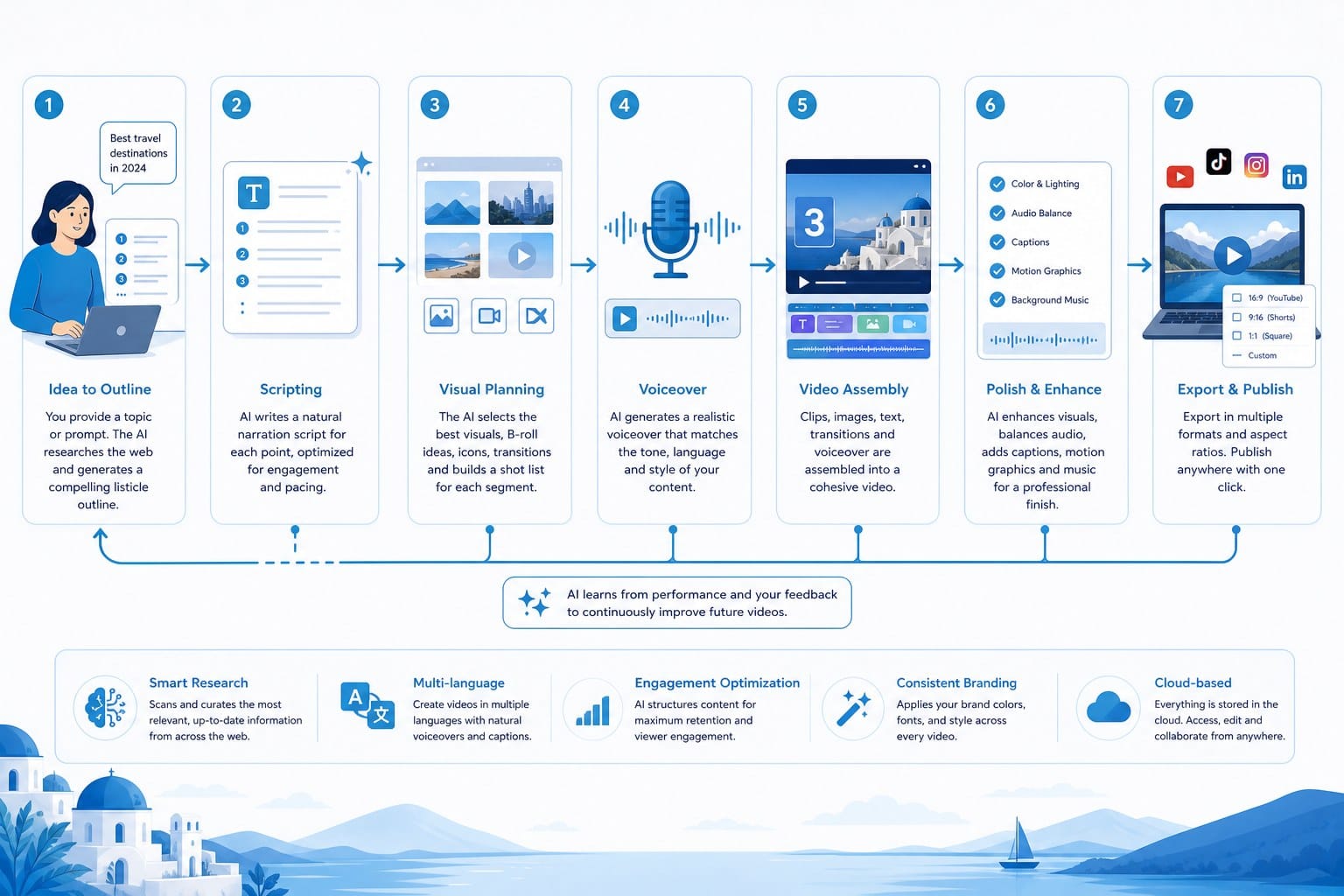
An AI listicle video maker is a tool that takes a topic or a script and converts it into a finished video without requiring you to manually research, edit, or source footage. The best platforms handle every stage of production in a connected workflow rather than just automating one isolated part of the process. Tools that only automate scripting still leave you with hours of editing ahead. Tools that only automate editing still leave you with hours of writing and footage sourcing. A complete platform handles the full pipeline.
Here is how Cliptude approaches this from start to finish.
It starts with a prompt, not a production brief.
You begin by typing a prompt. It can be as simple as "Top 10 abandoned cities around the world" or as detailed as a full script you have already written. The platform accepts both. If you give it a topic, the AI researches the subject, selects the most compelling entries, and writes a complete voiceover script. If you bring your own script, the platform skips the writing step and moves straight into production. That flexibility matters because some creators prefer to write their own scripts while others want the AI to handle everything from the beginning.
The AI-generated scripts are structured for video, not just accuracy. Each entry has a hook, a substantive explanation, and a transition. The pacing is built for narration, so the script does not read like an article or a Wikipedia summary. It reads like something a host would actually say.
Footage is sourced and matched automatically.
Once the script exists, the platform identifies what each section needs visually. For a listicle about abandoned cities, it knows that the segment covering Pripyat needs footage of empty apartment blocks and overgrown streets, while the segment on a ghost town in the American Southwest needs desert imagery and decaying wooden structures. The AI pulls relevant clips from licensed stock libraries and assigns them to the correct script sections without you having to search, download, or organize a single file.
This is one of the most valuable parts of the automation because footage sourcing is one of the most tedious parts of manual production. The AI handles matching, which means you are not spending two hours searching stock sites only to settle for footage that is only loosely related to your topic.
Motion graphics are generated to match the format.
For listicle content specifically, the platform generates the visual elements that define the format. That includes numbered entry cards that appear when each new item is introduced, lower-thirds showing the name and ranking of the current entry, transition animations between items, and any other graphical callouts the script calls for. These elements are generated to match the visual style you select, so the video looks consistent throughout rather than patched together from mismatched templates.
The result is that the video looks like it was designed with a consistent aesthetic from the beginning, which is something manual creators spend real time achieving through templates and established design systems.
Voiceover and audio are handled in the same workflow.
A voiceover is generated from the script using AI narration. You can choose from multiple voices and adjust pacing before the narration is finalized. The narration is then synced to the footage and graphics so that clip cuts happen at the right moments in the script, graphics appear when they are referenced, and the overall timing feels intentional rather than mechanical.
Background music is layered in at a volume level that supports the narration without competing with it. The final audio mix is part of the export, so you are not receiving a video that still needs audio work before it can be uploaded.
The output is a ready-to-upload video file.
The final export is a finished video file. From the moment you submit a prompt to the moment you have a video ready for review, the process takes 10 to 20 minutes depending on the length and complexity of the content. That is not a polished draft that still needs three hours of editing. It is a complete video that needs a quality review pass before publishing.
Compare that to the 15 to 20 hours a manual production takes, and the practical difference is significant. A creator who was producing one video per week manually can realistically produce three or four per week using an AI production workflow without adding more time to their schedule.
Everything happens in one place.
Cliptude handles research, scripting, footage sourcing, motion graphics, voiceover generation, audio mixing, and export inside a single platform. You do not need separate tools for each step. You do not need a stock footage subscription, a separate script editor, a voiceover recording setup, and an editing application all running in parallel. The connected workflow matters especially when you are producing at scale, because context does not get lost between tools.
For faceless channels in particular, this is the core value proposition. You never appear on camera, never record your own voice, and never spend hours in an editing timeline. The platform handles production while you handle topic selection, quality review, and publishing decisions. That division of labor is what makes it realistic for one person to run a productive content operation.
Cliptude also supports formats beyond listicles. The platform handles long-form documentary-style content, YouTube Shorts, animations, whiteboard explainers, and music videos. If your channel primarily publishes listicles but occasionally needs an educational explainer in a different visual style, the same platform covers both. You can read more about how the Shorts workflow operates in this guide on how to scale YouTube Shorts output with AI video automation, and this overview of AI video generators for faceless YouTube channels goes deeper into how automation fits into that broader content strategy.
A note on commercial rights.
Videos produced through Cliptude come with full commercial rights, which means you can monetize them through YouTube AdSense, brand sponsorships, or content licensing without legal complications. For creators who are building a real business around their channel, that clarity matters. You are not producing content and then discovering later that the footage or narration carries restrictions that complicate monetization.
Pricing follows a usage-based credit model rather than a flat monthly subscription. That structure works well for creators who are ramping up production or testing different content strategies before committing to a fixed cost. You pay for what you actually produce rather than paying a monthly fee regardless of output.
A practical workflow for producing listicle videos at scale
Understanding the technology is useful. What most creators actually need is a clear, repeatable process they can follow every week without reinventing the approach each time. Here is a practical workflow for using an AI listicle video maker to produce consistent content without burning out or sacrificing quality.
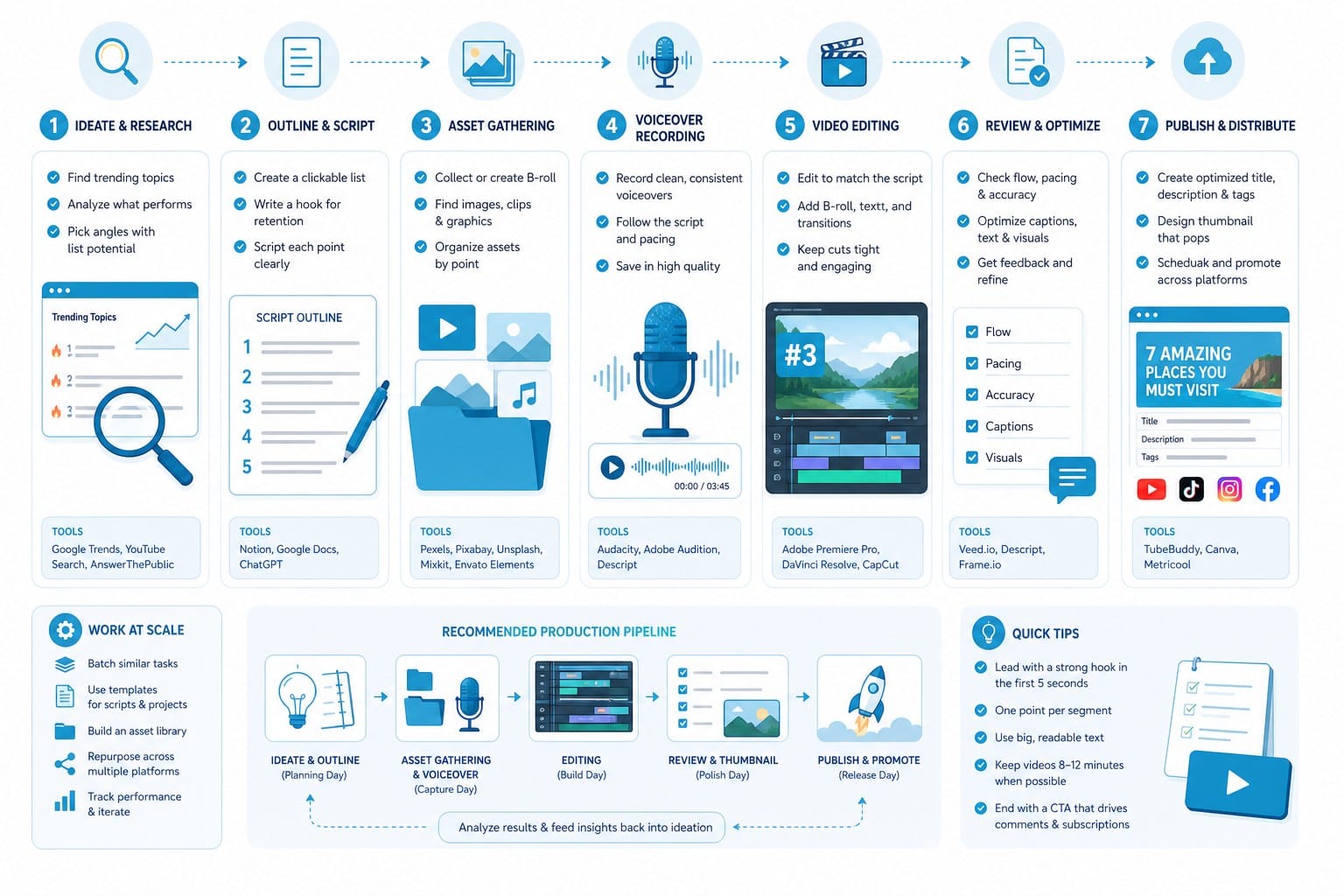
Step one: Build a topic bank before you touch any production tool.
Before you open Cliptude or any other platform, spend one focused hour generating 30 to 50 listicle topic ideas for your niche. The goal is to decouple topic ideation from video production so that you are never sitting in front of a production tool trying to think of what to make next. That kind of decision fatigue slows everything down.
To find strong topics, use YouTube's autocomplete feature. Type your niche keyword followed by "top" or a number and see what suggestions appear. Those suggestions reflect what people are actively searching for. Look at what titles are performing well on channels in your space and pay attention to which ones use strong numbers in the title and a clear hook. Topics like "10 animals that went extinct in the last 100 years" or "8 survival skills most people have never heard of" tend to perform well because they feel either useful or surprising, sometimes both.
For each topic you add to your bank, note whether it lends itself to a countdown format, a flat informational list, or a comparison-style list. That decision shapes the script structure, and knowing it in advance makes your prompts more specific.
Having 30 to 50 topics ready means you can schedule a month or more of content before you start production. You pull from the list, generate the video, review it, and publish. The creative direction step is already done.
Step two: Choose your format before you generate anything.
Listicle videos come in a few distinct variations, and the format you choose affects the script structure the AI produces. A countdown format builds suspense toward a number-one entry, which creates natural retention because viewers want to stay until the end to see what tops the list. An informational format presents entries without ranking pressure, which works better for topics where ranking would feel arbitrary or contentious. A comparison format weighs options against each other, which works well for topics where the viewer is trying to make a decision.
Decide which format fits your topic before you write your prompt, and then include that information explicitly in the prompt. The difference in output is meaningful.
A vague prompt like "top 10 extreme weather events" produces a serviceable but generic script. A specific prompt like "Create a top 10 countdown about the most extreme weather events in recorded history, building suspense toward number one, written in a tone that is informative but dramatic, for an audience that enjoys science and history content" produces a script with a stronger structure, better pacing, and language that fits a specific audience. Specificity is the single most effective way to improve AI output quality without any additional effort.
Step three: Review the script before production begins.
When you submit a prompt in Cliptude, the platform generates the script before moving into full production. This is the most important quality control step in the entire workflow. Read through every entry before approving.
Check that the facts are accurate. AI-generated scripts are generally solid, but a misattributed statistic or a wrong geographic detail can damage your channel's credibility if a knowledgeable viewer catches it in the comments. Spot-checking each entry takes about five minutes for a 10-item list. That five minutes protects the reputation you are building.
Also check that the tone matches what you want. If the script feels too stiff or too casual, adjust it in the script editor before approving. This is faster than editing a voiceover after the fact.
Once the script reads the way you want it to, approve it and let the platform move into full production.
Step four: Review the finished video before publishing.
When the video is ready, watch it from start to finish with your attention on three things: footage accuracy, graphic correctness, and audio quality.
On footage accuracy, confirm that the clips shown actually match what the narration is describing. In most cases they will, but occasionally a clip will show the wrong location or an unrelated visual. If a segment about a specific event is showing generic imagery that could be anything, revise that section.
On graphic correctness, confirm that the numbered entry cards and lower-thirds are displaying the right information at the right times. Check that no entries are mislabeled or that the countdown order looks correct.
On audio quality, confirm that the narration is clear and that the background music is not overwhelming the voice. A good mix keeps the music noticeable but clearly subordinate to the narration.
If something needs adjustment, you can revise and regenerate specific sections without redoing the entire video. That ability to target fixes saves time compared to rendering everything from scratch.
Step five: Schedule and publish consistently.
After your review pass, export the video and schedule it. If you are producing multiple videos per week, stagger your uploads rather than releasing everything at once. Consistency matters more than volume on most platforms. Two to three quality videos per week is more effective for channel growth than publishing seven videos in one week and then going silent for two weeks. A consistent schedule trains both the algorithm and the audience to expect new content from you on a regular basis.
For creators who want to add formats beyond listicles, the same production workflow applies. If your channel wants to publish educational animations or whiteboard explainers alongside your ranked content, Cliptude supports those formats as well. This walkthrough on an AI whiteboard animation maker that turns a prompt into an explainer video shows how that format works if you want to branch into that style without adding complexity to your workflow.
Additional practices that improve output quality over time.
Beyond the core workflow, a few habits make a consistent difference in the quality and performance of your videos.
Build a consistent visual style and stick to it. When you produce your first few videos, pay attention to which visual settings and motion graphic styles look best for your niche. Once you find a combination that fits your channel's personality, use the same settings every time. Channels with a recognizable visual identity build audience recognition faster because viewers associate that look with your content before they even read the title.
Look at your performance data after your first 20 to 30 listicle videos. YouTube Studio shows you which videos are getting the most views, the best watch time, and the strongest click-through rates. That data tells you which topics and formats your audience responds to most. When you add new topics to your bank, lean into the themes that your own data supports rather than guessing based on what seems popular on other channels.
Think about thumbnails at the topic selection stage, not after the video is done. Thumbnails and titles together drive click-through rate, which is one of the most important growth metrics on YouTube. For each topic you add to your bank, sketch out a rough thumbnail concept at the same time. Keep the design simple: a bold number, a strong central image, and minimal text consistently outperforms busy, text-heavy designs. If you have a concept in mind early, you are not rushing to design a thumbnail at the last minute before publishing.
For a solo creator, this entire workflow, from topic bank to published video, can run at a pace of three to four videos per week without requiring full-time hours. The AI handles the labor-intensive middle steps. You handle creative direction at the beginning, quality review at the end, and publishing decisions in between. That is a fundamentally different relationship with production than spending 15 hours manually editing a single video.
For small media teams or solo entrepreneurs running multiple channels, the same workflow scales further. Different team members can handle topic research, quality review, and publishing in parallel, with the AI doing the production work in the middle. The bottleneck shifts from production capacity to editorial judgment, which is a much better problem to have.
Listicle videos are not going anywhere. They fit how people consume content online, they perform well across an enormous range of niches, and the format rewards consistent publishing. The barrier used to be the time and skill required to produce them well. With a capable AI listicle video maker handling research, scripting, footage, graphics, and narration, that barrier drops significantly. The work shifts from manual production to creative direction and quality review, which is a better use of any creator's time.
Ready to take the next step?
If you want to start making listicle videos without the hours of manual research and editing, Cliptude gives you a complete production pipeline in one place. From prompt to finished video, the platform handles research, scripting, footage sourcing, motion graphics, voiceover, and audio automatically. Try it with your first listicle topic at cliptude.com and see how fast a polished video comes together.