AI whiteboard animation maker that turns a prompt into an explainer video

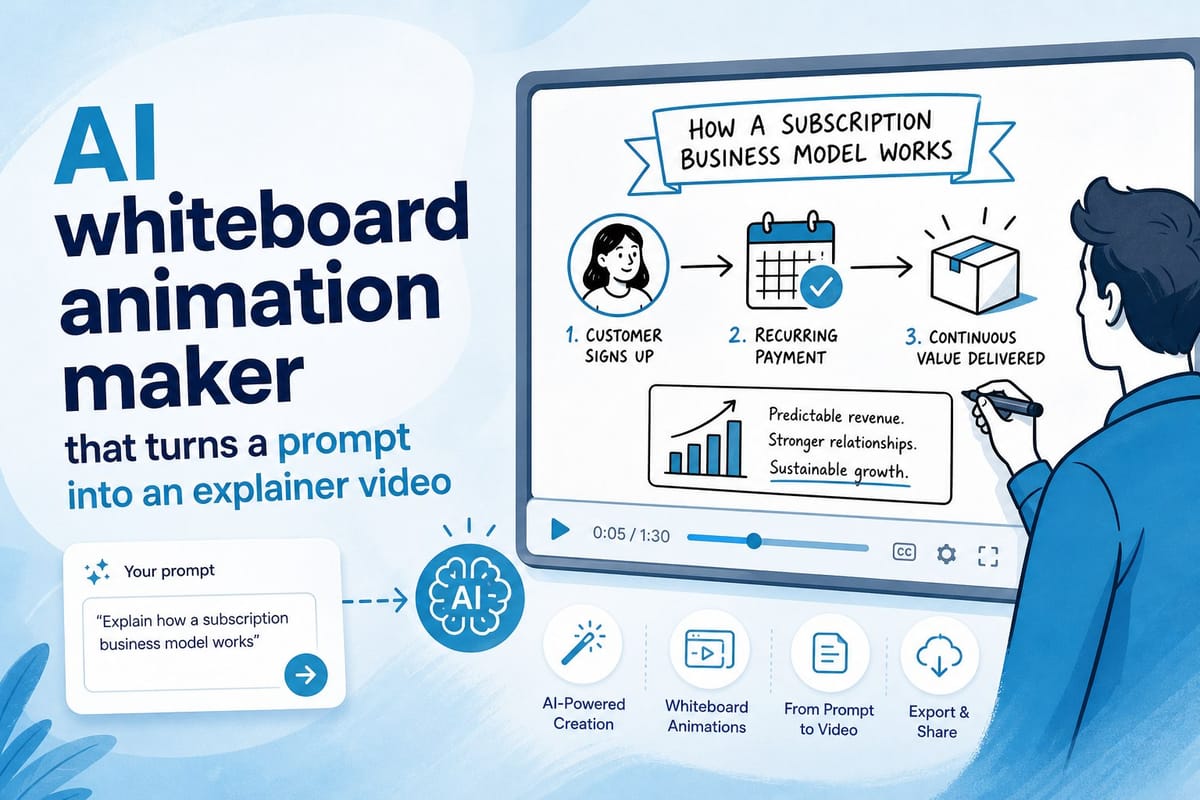
Table of contents
1. What an AI whiteboard animation maker actually does
2. What to look for when choosing an AI whiteboard animation maker
3. How to put Cliptude to work as your AI whiteboard animation maker
Whiteboard animation has always been one of the best formats for explaining a complex idea quickly. You know the style: a hand draws simple images on a white background while a voiceover walks you through a concept step by step. Teachers love it. Marketers love it. YouTube educators swear by it. The problem is that making one the traditional way takes serious time, software skills, and often a freelancer budget that most solo creators simply do not have. A two-minute whiteboard explainer can easily consume six to eight hours of production work before a single frame reaches your audience. That is exactly why an AI whiteboard animation maker is worth paying close attention to right now. Tools in this space have matured fast. You can type a prompt, hit generate, and walk away with a finished explainer video that looks like a small team spent days on it. In this piece I want to break down how these tools actually work under the hood, what separates a useful one from a frustrating one, and why Cliptude stands out as a practical choice for anyone who wants to produce whiteboard and stickman explainer videos at scale without parking themselves in front of an editing timeline for hours on end.
What an AI whiteboard animation maker actually does
Let me start with the basics, because a lot of people carry vague or inflated expectations about what these tools deliver and end up disappointed when reality does not match the mental image.
A traditional whiteboard video involves a person recording a hand drawing on a physical or digital whiteboard surface. Those drawings are synced to a script, the audio is recorded separately by a voiceover artist, and then an editor stitches everything together in post-production. Done properly, a polished two-minute whiteboard explainer can take six to eight hours of combined production work across multiple people. If you are outsourcing it to a freelancer or agency, that time gets billed back to you.
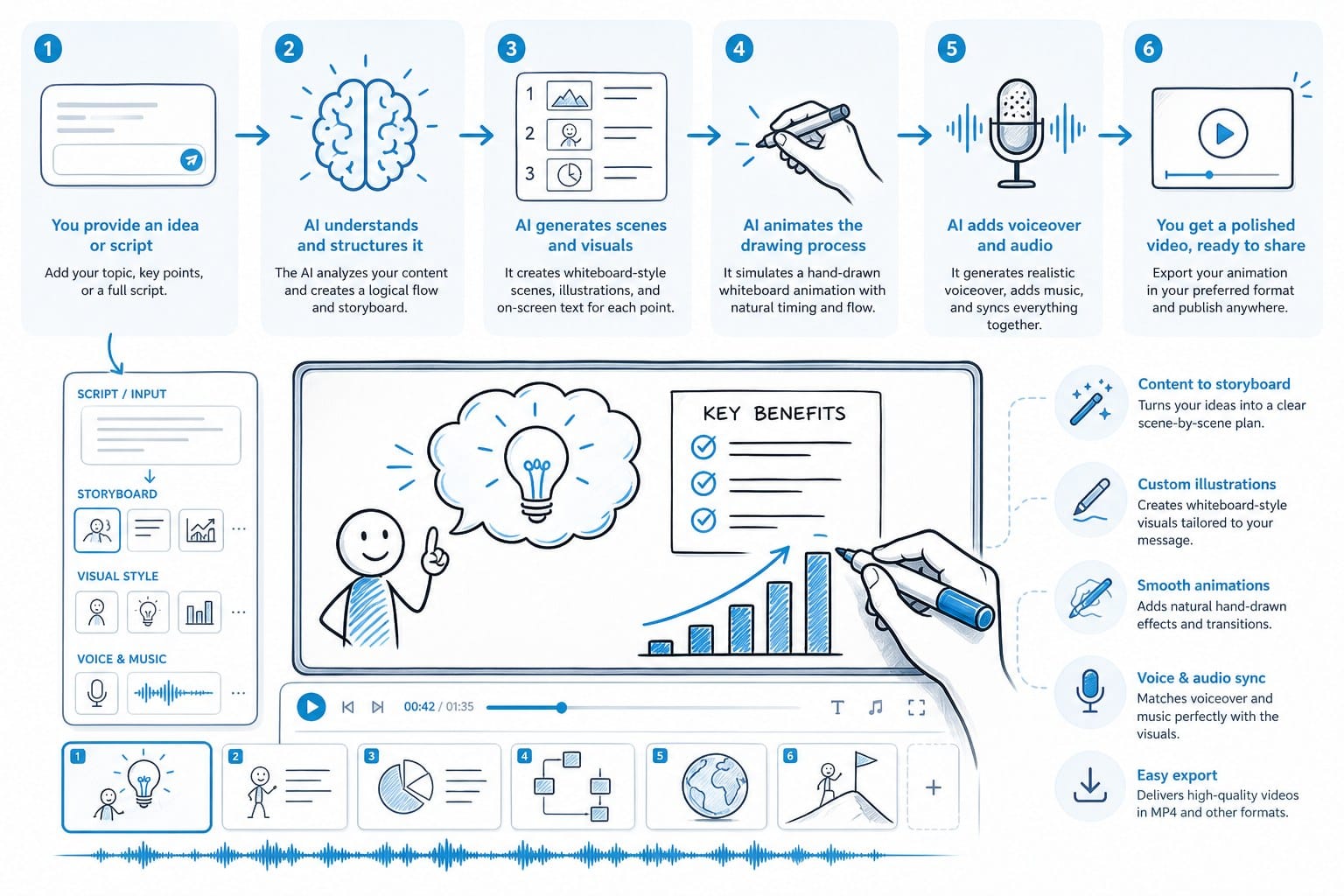
An AI whiteboard animation maker automates most of that pipeline. You give the tool a topic or a script, and it handles the rest. The best platforms in this category do all of the following without requiring you to open a single piece of editing software.
First, they write or adapt the script. This matters more than most people realize going in. A whiteboard video only works when the narration is tight, conversational, and structured around one clear idea per visual beat. Generic AI tools often miss this. They dump paragraphs of dense text into a voiceover track and call it a script. Good AI whiteboard tools know that effective whiteboard narration is built from short punchy sentences that sync naturally with drawing animations, that each line needs to earn its place, and that the listener should never have to rewind to understand what was just said.
Second, they generate the visual elements. This is where the whiteboard style actually comes from. The tool creates line-drawn characters, icons, diagrams, labels, and scene transitions that match the content of the script moment by moment. In a strong implementation, the visuals respond directly to what the narration is describing rather than playing generic stock animations that could belong to any video on any topic. When the script says a character makes a decision, a character at a crossroads appears. When the script describes data growing over time, a bar chart draws itself upward in real time. That specificity is what keeps viewers engaged.
Third, they add voiceover audio. Text-to-speech quality has improved dramatically over the last two years. Modern AI voices sound natural enough that most casual viewers will not notice or care that a human did not record the narration. Many platforms let you choose from multiple voice profiles and adjust pacing, emphasis, and tone to match the subject matter. A measured professional voice for a finance explainer feels different from a warmer, faster voice for a science video aimed at younger audiences, and a good tool gives you that range.
Fourth, they handle timing and sync. This is the technical glue that makes a whiteboard animation feel satisfying to watch rather than awkward. The drawing animation needs to arrive just before or right as the voiceover mentions the concept it illustrates. A tool that gets this wrong produces a video that feels off even when a viewer cannot articulate exactly why. The animation and the audio have to breathe together, and that synchronization has to hold across the full length of the video.
Cliptude does all of this from a single prompt. You describe what you want to explain, choose an animation style such as whiteboard or stickman, and the platform researches the topic, writes the script, generates the visuals, records the voiceover, and delivers a complete video. The whole process takes minutes rather than days. There is no timeline to scrub through, no asset library to hunt in, and no audio track to align by hand.
This is a meaningful shift for anyone running a faceless YouTube channel or producing educational content at volume. If you are already thinking about faceless content strategy, the AI video generator for faceless YouTube channels piece on the Cliptude blog is worth reading alongside this one, because the two formats overlap significantly in both audience and workflow.
Before we talk about Cliptude specifically, though, I want to spend real time on what separates a useful AI whiteboard animation maker from one that wastes your time, your money, and your credibility with an audience.
The difference often comes down to decisions the platform made in design and architecture that are not obvious from a feature list on a pricing page. Understanding those differences will help you evaluate any tool in this space, not just the one I am recommending here.
The easiest way to spot a weak tool is to give it a topic that requires accuracy. Ask it to explain how a vaccine triggers an immune response, or how a country transitions from a fixed to a floating exchange rate. If the script it produces is vague, uses filler phrases to pad length, or makes claims that do not hold up to a basic fact-check, that is a tool that is going to cause you problems the moment you publish something in public.
Strong tools ground their scripts in researched information before they write a single word. That distinction matters enormously for educational content, where getting things wrong damages trust with your audience in a way that is very hard to recover from.
A second signal to watch for is visual coherence across a full-length video. Many AI animation tools look impressive in a thirty-second demo clip and fall apart over five or ten minutes. The visual style shifts, character designs become inconsistent, or the same three animation elements repeat so often that the video becomes visually monotonous. Ask the platform for a longer sample before you commit to it for channel-scale production.
A third thing to watch is output ownership. More on that in the next section.
What to look for when choosing an AI whiteboard animation maker
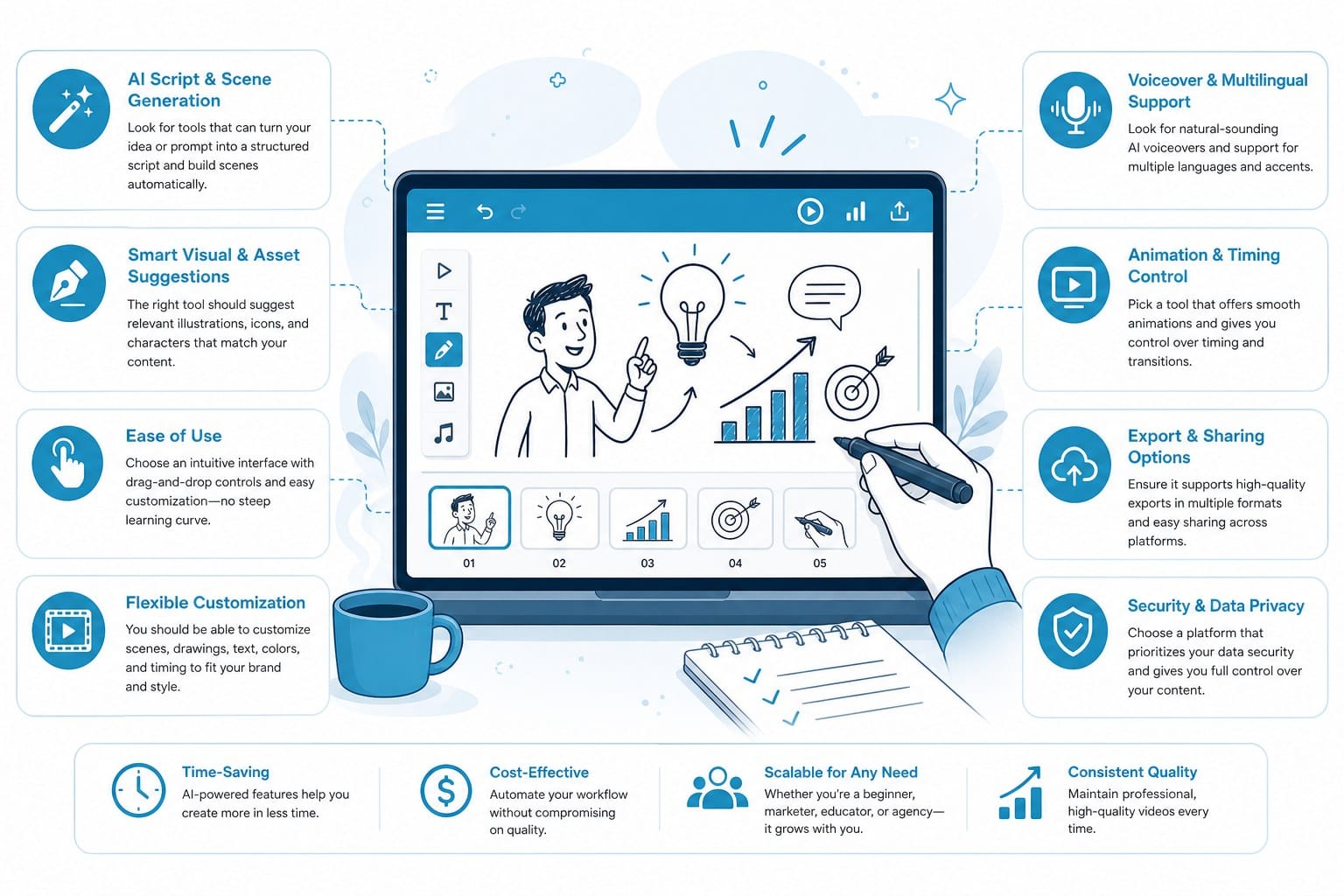
Not all tools are built the same, and the gaps between them are larger than the marketing language usually suggests. I have seen creators get excited about a free AI animation tool, generate a handful of videos, and then hit a hard wall because the output quality collapses at the resolution, length, or subject complexity they actually need. Here is what I think matters most when you are evaluating your options.
Script quality is the foundation everything else rests on. Whiteboard videos live and die by their narration. If the AI generates a generic, surface-level script full of filler phrases and bloated transitions, the animation is not going to rescue it. Look for a tool that consistently produces scripts with a clear structure: a hook that earns viewer attention in the first ten seconds, a logical sequence of supporting points that build on each other, and a clean resolution that gives the viewer something concrete to take away. Beyond structure, the best tools write for the ear rather than the page. That means shorter sentences, natural rhythm variation, and language that is easy to follow on first listen without having to rewind.
Visual variety is what keeps viewers engaged across a full video. A whiteboard animation that draws the same three stick figures in every scene loses attention fast. Strong tools pull from a large library of line-drawn assets and generate new visual elements based on the specific content of each script segment. When the narration mentions a timeline, a timeline should appear. When it describes a person making a choice, a character at a decision point should appear, not a generic checkmark or arrow that could be dropped into any video. The more the visuals feel like they were designed for that specific script, the longer viewers stay.
Voiceover naturalness is a dealbreaker for creators who are building an audience over time. If your explainer videos are going on a YouTube channel where you are trying to earn subscriber loyalty, the voiceover has to sound credible on repeat listens. Robotic or monotone text-to-speech will push down watch time and hurt your channel's standing with the algorithm regardless of how good the visual animation is. Modern AI voices from platforms like Cliptude are built to sound conversational, with natural pauses, appropriate emphasis, and a cadence that holds attention rather than lulling viewers into tuning out.
Output length flexibility matters because different platforms and different topics have different requirements. A two-minute explainer for Instagram Reels has completely different needs from a twelve-minute deep-dive for a YouTube audience that came to learn something substantial. Some AI animation tools cap output at sixty seconds or produce choppy, repetitive results beyond three minutes. If you are building a YouTube channel with long-form educational content, you need a tool that can sustain visual and narrative quality across ten to fifteen minutes of animation without recycling the same assets or losing sync between audio and visuals.
Research integration is something most creators undervalue until they run into the problem it solves. A lot of whiteboard explainers cover topics the creator does not already know in depth. History, science, personal finance, medicine, technology, law. If you have to research the topic yourself before you can write an accurate prompt, you are adding back significant time that the AI was supposed to save you. Cliptude builds automated research into its pipeline, so the platform pulls in accurate context about your topic before the script is written. The result is a finished video that reflects real, grounded information rather than whatever the language model could surface from its training data alone. For factual educational content, that distinction is not a minor convenience. It is the difference between a video you are confident publishing and one you have to review line by line before it goes live.
Commercial rights are non-negotiable if you plan to monetize. This is something a lot of creators overlook when they pick up a free or low-cost AI animation tool in a hurry. If the platform does not explicitly grant you full commercial rights to the output it generates for you, you cannot legally monetize those videos on YouTube, sell them to clients, embed them in paid courses, or use them in paid advertising without potential legal exposure. Cliptude grants full commercial rights to everything you produce on the platform. The videos you generate belong to you and you can monetize them without restrictions or additional licensing fees.
Pricing structure affects how well the tool fits your actual production rhythm. Monthly subscriptions make sense if you are producing videos at a steady, predictable pace every week. But a lot of creators work in bursts. A big content sprint at the launch of a new channel or campaign, followed by a slower period while you analyze what is working. A credit-based pricing model, which is how Cliptude works, means you pay for what you actually produce rather than paying for capacity you are not using during slower periods. That structure makes it easier to scale output up when you need volume and scale back down without burning money on unused subscription capacity.
Breadth of format support is a bonus worth considering if you think your content strategy might evolve. Whiteboard animation is an excellent format, but if your channel or business eventually grows into documentary-style videos, listicle content, short-form vertical videos for Reels or Shorts, or other formats, it helps to have a platform that handles all of those under one roof rather than forcing you to maintain accounts across three or four different tools. Cliptude is built as a full text-to-video platform, not a single-format tool. You can produce a whiteboard explainer on compound interest this week and a documentary-style deep dive on a historical event next week from the same account, using the same credit balance and the same workflow.
If you are already thinking about scaling output across multiple formats and platforms simultaneously, the article on how to scale YouTube Shorts output with AI video automation covers the practical side of that workflow in useful detail and pairs well with what we are talking about here.
For creators who want a direct comparison between platforms before committing, the best Vidu alternative for AI video generation without the limits article on the Cliptude blog offers a side-by-side perspective on what actually separates platforms in this space beyond the surface-level feature lists.
One thing I want to be clear about: no AI whiteboard animation tool will produce perfect output on every prompt without any review. The creators who get the most out of these platforms are the ones who treat the AI as a first-draft engine and a production accelerator rather than a fully autonomous publishing machine. You still bring the editorial judgment. You still decide whether the hook lands, whether the pacing feels right for your audience, and whether the visual choices match your channel's tone. What the AI removes is the grunt work of scripting from scratch, hunting for animation assets, recording or sourcing voiceover, and syncing everything in a timeline. That is where most of the hours go in traditional whiteboard production, and those are exactly the hours these tools give back to you.
How to put Cliptude to work as your AI whiteboard animation maker
Let me walk through what the actual production process looks like so you can picture it clearly before you start.
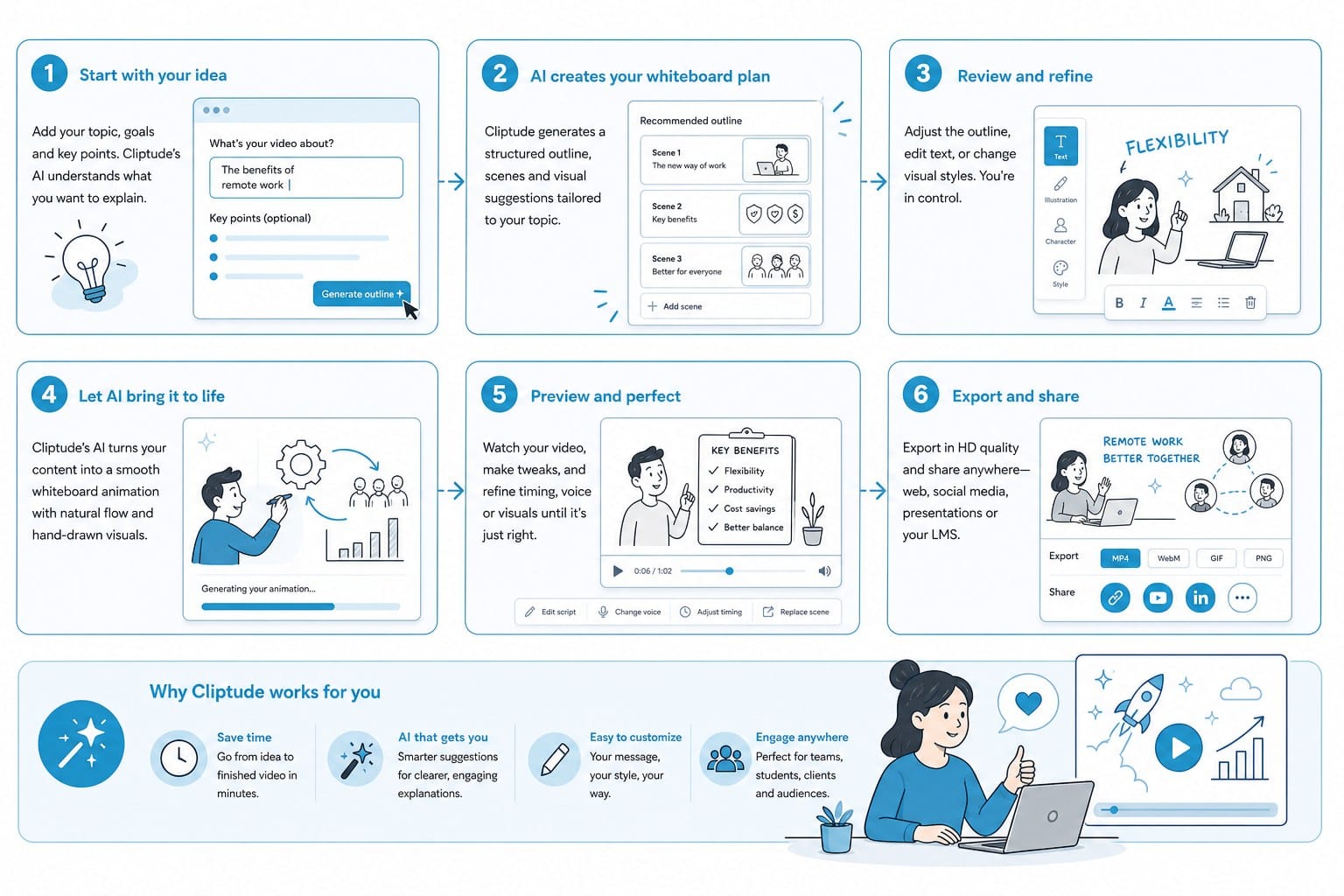
You begin with a prompt. It can be as simple as a single sentence. Something like: explain how compound interest works for someone who has never invested before. Or it can be more detailed: create a seven-minute whiteboard explainer on how the Berlin Wall was built and why it fell, targeting a general adult audience with no prior knowledge of Cold War history. The more specific context you give about target audience, desired length, and tone, the more precisely tailored the output will be. But the tool performs well even with minimal input, which is useful when you are producing at volume and do not want to spend twenty minutes crafting a prompt for every video.
Cliptude takes that prompt and runs it through its research pipeline before anything else happens. This step is what prevents the classic AI problem of generating content that sounds authoritative but contains factual errors. The platform pulls together relevant, accurate information on the topic and uses that as the foundation for the script. For a compound interest explainer, that means the script will correctly describe how interest compounds over time, use realistic numbers in any examples it gives, and avoid the kind of vague hand-waving that makes educational videos feel hollow to anyone who already knows a little about the subject.
Next, the script is written. Cliptude structures the narration specifically for the whiteboard animation format. Short declarative statements rather than long flowing sentences. One clear idea per visual beat so the drawing animation and the narration always feel like they belong together. A hook in the opening ten seconds that gives the viewer a concrete reason to keep watching. A resolution at the end that reinforces the single most important thing the viewer should take away. If you want to review and edit the script before animation begins, you can do that at this stage. Many creators, once they develop a feel for the output quality on their particular topics and audience, let the pipeline run straight through.
Then the animation layer is built on top of the script. The platform generates whiteboard-style visuals that correspond to the content of each script segment rather than dropping in generic animations. When the narration describes interest growing over decades, a chart draws itself on screen in real time. When the script introduces a character who is deciding between two financial choices, a drawn figure appears at a fork in the road. The hand-drawing effect, where each line and illustration appears as if someone is sketching it live in front of the viewer, is applied throughout to maintain the authentic whiteboard feel that makes this format so effective for explanation.
Voiceover is generated and laid in automatically alongside the animation. You can select from available voice profiles to match the tone your content calls for. A finance explainer for adult professionals might call for a measured, authoritative voice that signals credibility. A science video aimed at a younger audience benefits from something more energetic and approachable. The voiceover timing is synchronized with the animation so the visual and audio tracks land together throughout the video. There is no manual sync work required.
The final output is a complete video file with full commercial rights. You can upload it directly to YouTube, cut shorter clips for Shorts or Reels, embed it in a course platform, drop it on a landing page, or hand it to a client as a deliverable. The credit model means you pay for what you produce. If you want to generate a single whiteboard explainer to test the format with your audience, you use the credits for that one video. If you want to produce fifteen videos over a week-long content sprint, you use the credits for those fifteen videos and stop there without paying for unused capacity the following month.
Let me be direct about who gets the most out of this workflow, because different creators use it differently.
Creators running faceless YouTube channels focused on education are perhaps the most natural fit. Whiteboard and stickman explainer videos are among the highest-performing formats for educational channels in terms of search discoverability, watch time retention, and long-term compounding traffic. They perform well in search because the scripts are structured around the kinds of questions people actually type into a search bar. They hold watch time because the visual and audio are always moving forward in sync, which prevents the passive drift that kills watch time on talking-head videos. And they scale efficiently because you are not limited by your own depth of knowledge on any given topic. You can produce an explainer about the mechanics of ocean tides on Monday and one about how antitrust law works on Tuesday without becoming an expert in either subject over the weekend.
Solo entrepreneurs using video to market a product or explain a service also get a lot of mileage out of this format. Whiteboard animation is a highly credible format for business communication. It signals clarity and expertise without requiring you to appear on camera, hire a spokesperson, or invest in studio production. A two-minute whiteboard video on a product landing page that explains how your service works, what problem it solves, and why your approach is different can move a visitor from confused to ready to buy faster than any amount of written copy alone. The format is persuasive because it holds attention long enough to actually make an argument.
Small media teams producing content at volume benefit from the time compression more than any other group. Instead of spending two full days per video across research, scripting, animation sourcing, voiceover recording, and editing, a team can produce multiple polished videos per day from well-crafted prompts. That frees team members to focus on the parts of content production that actually require human judgment: deciding which topics to cover, analyzing performance data, building audience relationships, and developing a content strategy that compounds over time rather than just filling a calendar.
The whiteboard animation format has been around for decades because it works. It holds attention in a way that static images and plain narration do not. It explains complex ideas by building them one drawn element at a time rather than presenting everything at once. It feels authoritative without feeling stiff or inaccessible. What has changed is that producing a high-quality whiteboard video no longer requires a specialized animator, a professional scriptwriter, a voiceover artist, and a video editor working together across multiple days. It requires a clear prompt and a platform built to handle the rest.
Cliptude is built to be that platform for creators and teams who want to produce professional whiteboard and stickman explainer videos at real scale without carrying the traditional production overhead. The research pipeline grounds the content in accurate information. The script generation writes narration that is actually built for the whiteboard format rather than adapted from a blog post. The animation engine produces visuals that respond to the script rather than playing generically in the background. The voiceover synthesis produces natural-sounding audio that holds listener attention. And the final editing step delivers a complete, polished, commercially usable video from a single input with no manual production work between the prompt and the published file.
If you are producing educational content, building a faceless channel, trying to explain a product or service in a format that actually gets watched and shared, or simply looking to bring your production output up to a pace that matches your ambitions, an AI whiteboard animation maker with this kind of full-pipeline automation is worth taking seriously. The format works. The technology is ready. The question is just whether you start using it now or six months from now when your competitors already have.
Ready to take the next step?
Ready to turn your next idea into a polished whiteboard explainer without hiring an animator or learning editing software? Head to Cliptude and start with a prompt. The platform handles research, scripting, animation, and voiceover automatically so you can go from concept to a published, monetizable video faster than you probably expect.