Best Vidai alternatives for AI-powered video creation

Table of contents
1. What to look for in a Vidai alternative
2. Cliptude: a full-pipeline alternative worth knowing
3. How to choose the right tool for your specific use case
Finding the right tool for AI-powered video creation can feel overwhelming. Dozens of platforms promise the same thing: fast, easy, professional video from just a few words. Vidai is one option creators have explored, but it is not the only one, and for many people it falls short in specific areas like video length, automation depth, or content variety. If you have been searching for vidai alternatives that actually handle the full production pipeline, this guide breaks down what to look for and which platforms are worth your time. I will walk through the key features that separate a basic AI video tool from one that can genuinely replace a production team, and I will show you where Cliptude fits into that picture.
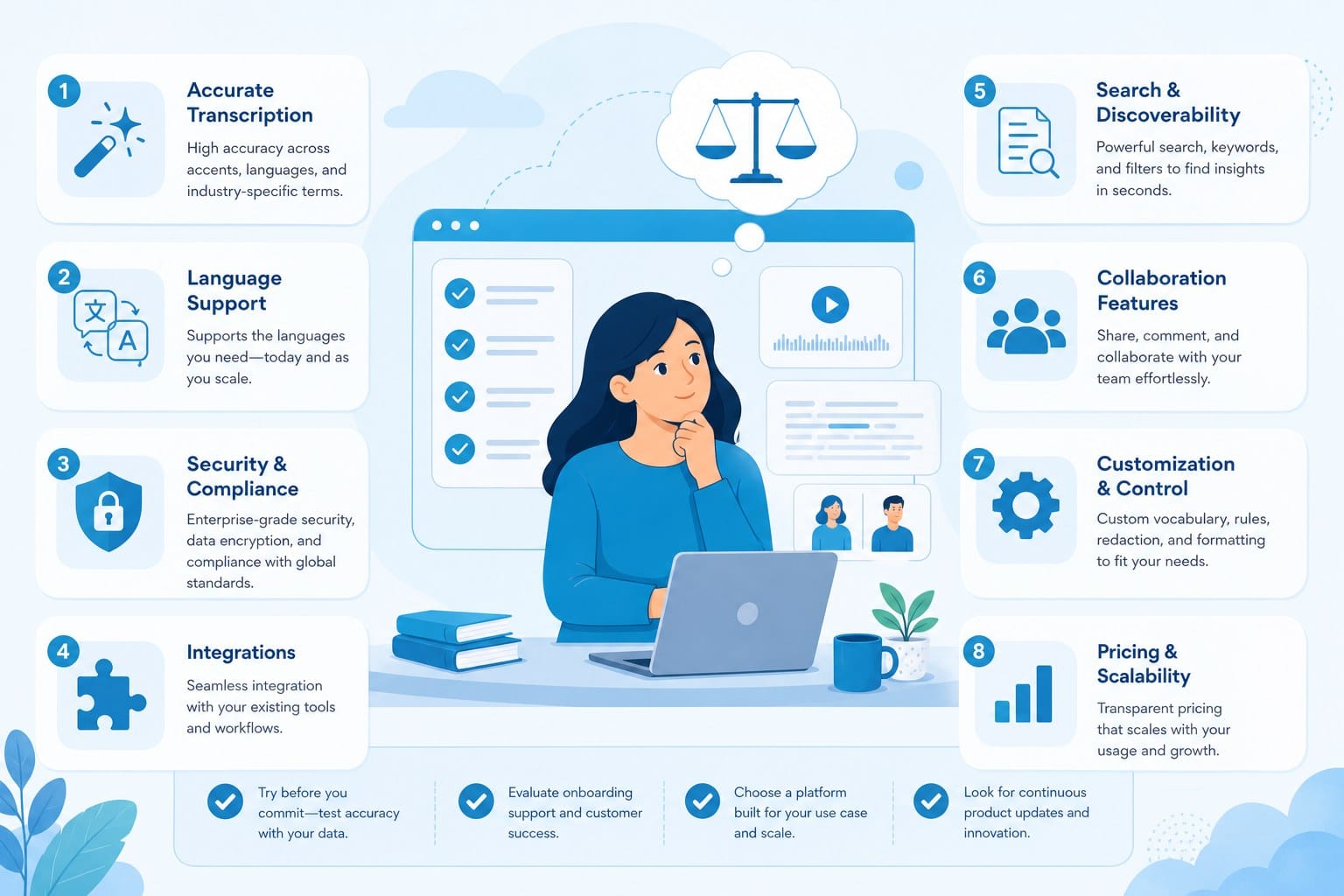
What to look for in a Vidai alternative
Before jumping to a list of tools, it helps to understand what makes an AI video platform genuinely useful versus one that just looks impressive in a demo. Most creators run into the same frustration: a tool handles one part of the process well but leaves everything else to you. You still have to write the script, find stock footage, edit clips together, add captions, and render a final file. That is not automation. That is a slightly faster version of doing it yourself.
A strong vidai alternative should handle research and scripting on its own. When you drop in a topic or a prompt, the platform should figure out what the video needs to say, structure it logically, and produce a script that actually sounds like something a person would watch. Generic AI scripts stuffed with filler phrases do not hold viewer attention, and they do not help with watch time or retention on YouTube.
Footage sourcing is another major factor. Many AI video tools pull from the same small library of overused stock clips. If your faceless YouTube channel covers historical events, science topics, or world news, you need a platform that can find relevant footage or generate visuals that match the narrative. Without that, every video looks like a slideshow with text overlaid on the same ten clips.
Motion graphics and animation matter too, especially for educational content. Whiteboard-style videos, stickman animations, and explainer formats perform well in niches like personal finance, history, science, and how-to content. If you are building a faceless channel around educational topics, you want a tool that can produce those formats without requiring you to open a separate design app and sync everything manually afterward.
Editing automation is where most tools fail. Even platforms that handle scripting and footage often stop short of producing a finished, polished file. You end up with raw clips, a script, and a half-assembled timeline you have to complete yourself. That defeats the purpose of using AI in the first place.
Footage quality and variety deserve their own mention because they affect how professional the final video looks. A platform might claim it sources footage automatically, but if the clips are low resolution, mismatched in tone, or visually unrelated to the script, viewers will notice. The best platforms match footage to the specific language of the script, not just to broad topic keywords.
Narration quality is closely tied to this. Text-to-speech has improved significantly, but there is still a wide gap between AI voices that sound natural and ones that sound robotic. Watch time on YouTube depends heavily on how easy the narration is to listen to. A flat, monotone voice will cause viewers to click away even if the script is excellent. When evaluating any platform, listen to real output samples, not just the polished demos on the homepage.
Caption and subtitle handling is another feature that separates strong platforms from weak ones. Many viewers watch video with the sound off, especially on mobile. Auto-generated captions that are accurate, well-timed, and readable make a real difference in engagement. Some platforms include this automatically; others require a separate step or a third-party tool.
Pricing structure matters, particularly for creators who are just starting out or testing a niche. Paying a flat monthly subscription for features you are not using yet does not make sense when your production volume is low. Usage-based pricing lets you pay for what you actually produce, which is a better fit for creators scaling gradually. It also makes it easier to calculate the real cost per video rather than dividing a subscription fee across a variable number of outputs.
Support and documentation are worth checking before you commit. If you run into a problem during production, you want to know there is a way to get help. Platforms with active communities, detailed tutorials, and responsive support save you time when things do not go as expected.
Keep these criteria in mind as you evaluate any platform. The best vidai alternatives will check most of these boxes, not just one or two. A tool that excels at scripting but produces low-quality footage, or one that looks great in short demos but cannot handle a twenty-minute documentary, is going to create problems the moment you try to use it for real work.
Cliptude: a full-pipeline alternative worth knowing
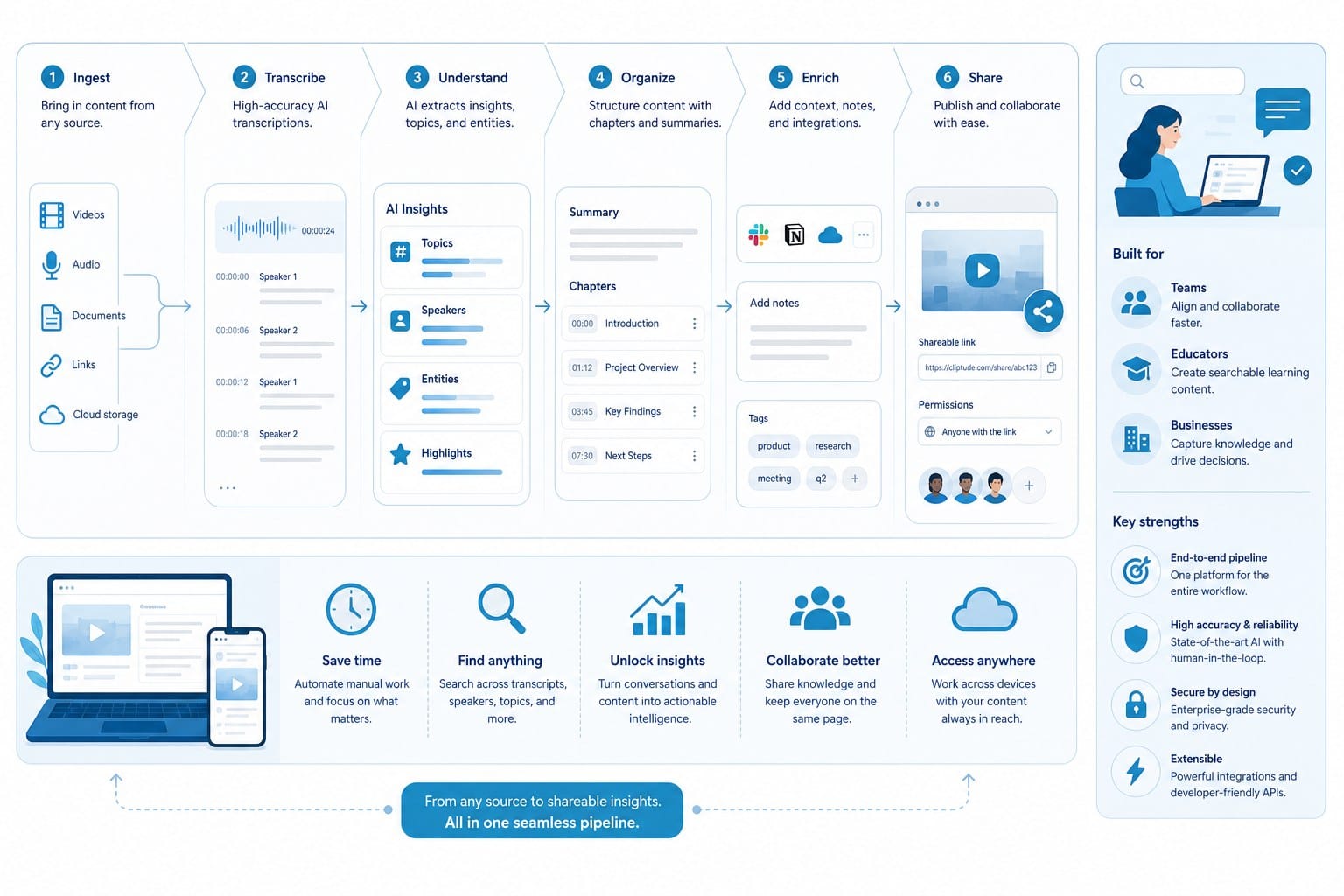
Cliptude is an AI-powered text-to-video platform built specifically for creators who want to produce polished, long-form video content without being on camera or spending hours in an editing timeline. It stands out from most vidai alternatives because it handles the entire production process from a single prompt or script, rather than stopping partway through and handing the remaining work back to you.
Here is what that actually looks like in practice. You enter a topic, something like "the history of the Silk Road" or "five passive income strategies for beginners." Cliptude automatically researches the subject, structures a script, sources footage that matches the content, adds motion graphics where they fit, and delivers a finished video ready to upload. You are not piecing together outputs from five different tools. The whole thing happens in one place.
This matters most for creators running faceless YouTube channels focused on documentaries or listicle-style content. Those formats depend heavily on strong narration, well-paced editing, and visuals that actually support what is being said. A generic AI tool might produce a rough draft you could use as a starting point, but Cliptude is built to produce something you could publish without spending hours fixing it first. If you want to understand how this process works for longer formats, How to create YouTube documentaries with AI automation goes into real detail on the workflow and what to expect from each stage of production.
The research component is worth unpacking because it is not something most AI video tools offer. Many platforms expect you to bring a finished script or at minimum a detailed outline. Cliptude can start from just a topic. It identifies the key points the video should cover, determines how to structure the information for a viewing audience rather than a reading audience, and writes a script calibrated for the format you are producing. That is a meaningful difference in how much upfront work you have to do before the platform starts being useful.
Script quality is also important to look at separately from the existence of a scripting feature. A tool that generates a technically complete script filled with vague claims, repeated phrases, and no clear narrative structure is not saving you time. Cliptude produces scripts built around logical progression, which is especially important for documentary-style content where viewers need to follow an argument or a story across twenty or thirty minutes.
For creators focused on YouTube Shorts, TikTok, or Instagram Reels, the same logic applies. Short-form content needs to be punchy, visually engaging, and edited tightly. Cliptude handles that format as well, which means you can use a single platform to produce both long-form documentaries and short clips for social media. That consistency matters when you are trying to maintain a posting schedule across multiple channels without hiring a separate editor for each format.
Animation formats are another area where Cliptude goes further than most competitors. If you are building an educational channel and want to use whiteboard-style or stickman animation to explain complex ideas, that is built into the platform. You do not need to use a separate animation tool and then try to sync the output with your narration in a third-party editor. It is all handled together, which saves a significant amount of time and keeps the final product looking coherent rather than like footage from two different sources stitched together.
Music videos are also supported, which is less common among AI video tools. This opens up creative options for musicians or content creators who want to produce visual content around audio tracks without hiring a videographer or motion designer. The practical use case here is broader than it might seem at first. Many creators in the lo-fi music, ambient, or instrumental space produce visual content around their audio, and having a platform that handles that natively removes a step that otherwise requires specialized skills or additional software.
The narration quality is consistent enough to publish without needing to swap in a human voiceover, which matters for creators who are trying to keep production costs low. The voices are clear, paced appropriately for the content, and do not carry the flat cadence that makes some AI narration hard to listen to for extended periods.
Footage matching is one of the more technically complex parts of the pipeline, and it is an area where many AI video tools fall short. The clips Cliptude selects are matched to the specific content of the script, not just to broad topic tags. A script about the economic impact of a historical trade route should produce footage that reflects that specific context, not just generic clips of maps and cities.
The pricing model is usage-based credits rather than a flat monthly subscription. This directly affects how sustainable the platform is for different types of creators. If you are producing two or three videos a month while testing a niche, you pay for two or three videos. If you scale up to daily content, the pricing scales with you. You are not locked into a plan that made sense six months ago but no longer fits your current production volume.
Commercial rights are included, which is essential for anyone planning to monetize their channel or sell video production services to clients. Some AI video platforms have vague or restrictive licensing terms that create problems the moment you try to run ads or use the content commercially. Cliptude includes full commercial rights with the content you produce, so you can upload to YouTube, run ads, license the content, or use it in paid campaigns without worrying about violations.
For a more detailed look at how the platform works from start to finish, the Cliptude review: AI video creation from prompt to polished edit covers the full experience including output quality and what you can realistically expect from the finished product. It is a useful reference if you want to see real output before committing to anything.
How to choose the right tool for your specific use case
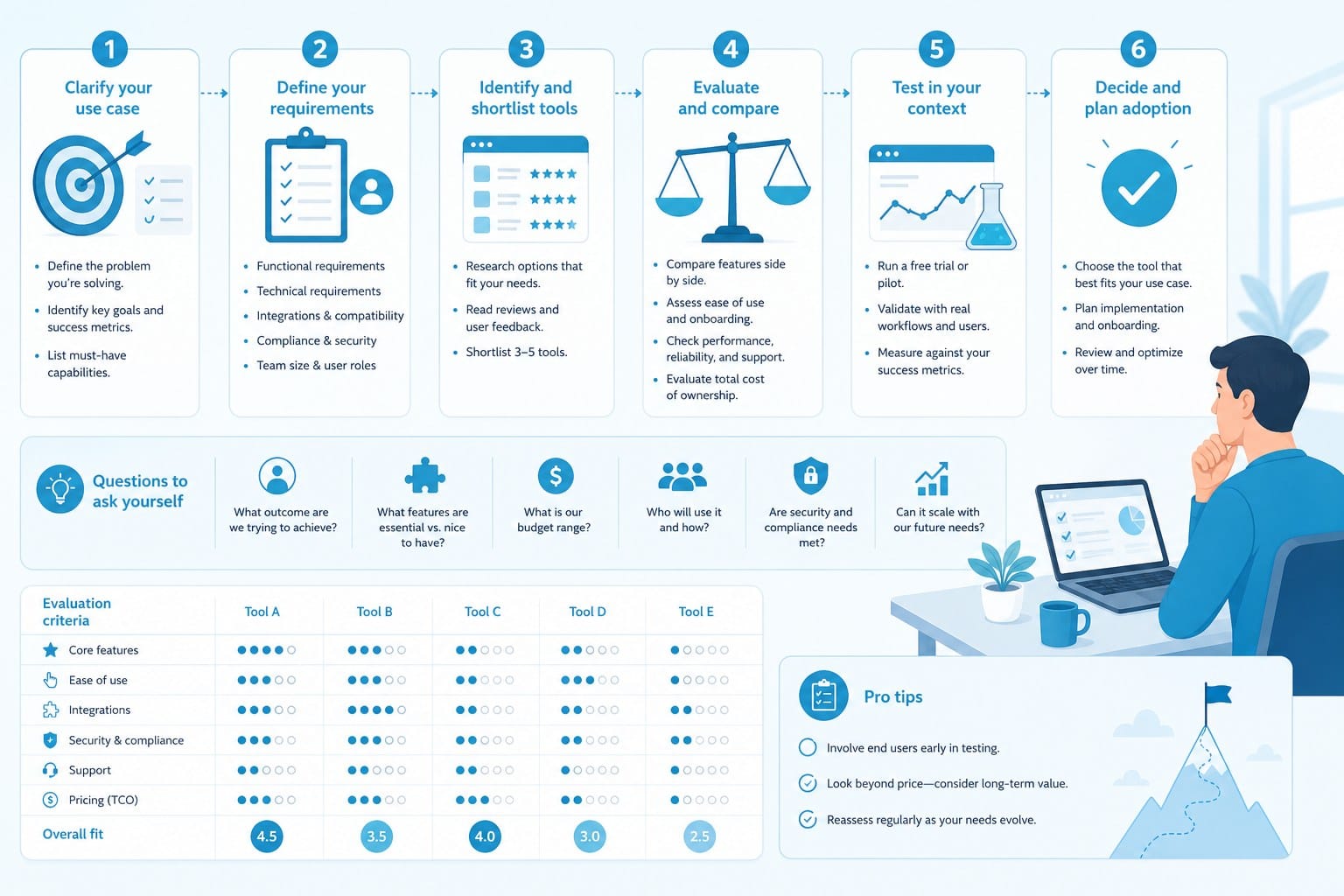
Not every creator has the same needs, and the best vidai alternative for one person might be the wrong choice for someone else. Breaking this down by use case makes it easier to match the right platform to what you are actually trying to build rather than chasing a general recommendation that may not apply to your situation.
If you are running a faceless YouTube channel focused on long-form documentary content, your biggest needs are automated research, strong narration, relevant footage, and an editing workflow that produces a finished file. Channels in niches like history, true crime, science, nature, and world events need visuals that support the narrative, not just generic b-roll dropped in to fill time. The script also needs to be structured well enough to keep viewers watching for ten, twenty, or thirty minutes. That is a high bar, and most AI video tools are not designed to meet it. Cliptude is specifically built around this use case, which is why it handles research and scripting as part of the pipeline rather than leaving that to you.
If you are a content creator focused on short-form video for TikTok or Instagram Reels, your priority is speed and volume. You might need to produce five to ten short clips a week to stay visible on those platforms. In that case, you need a tool that can turn around content quickly without requiring manual editing between each video. Automation depth matters a lot here. A tool that handles seventy percent of the process and leaves the last thirty percent to you might be fine for one or two videos but becomes a bottleneck when you are trying to produce at scale.
Solo entrepreneurs and small media teams often face a different problem. They know what they want to communicate, they might even have a script or a rough outline, but they do not have the technical skills to produce a polished video. They need a platform that takes their input and handles the production side completely. For this group, the ability to upload a script or detailed prompt and get back a finished video is the core value. The less they have to touch the editing timeline, the better.
Educational content creators who use animation formats need a platform that actually supports those formats natively. Whiteboard and stickman animations are specific visual styles that require different production logic than footage-based video. If your channel explains concepts in math, science, finance, or history using animation, you need a tool that understands that style and can produce it without you having to design every frame yourself or use a separate animation platform alongside your video tool.
Creators trying to monetize AI-generated video content through YouTube ad revenue, affiliate marketing, or selling video services to clients need to pay close attention to licensing. Some tools produce content you technically cannot use commercially without upgrading to an enterprise plan or paying additional fees. Always read the licensing terms before you commit to a platform. Vague language around commercial use is a warning sign worth taking seriously. Cliptude includes commercial rights by default, which removes that barrier from the start.
It is also worth thinking about how a platform handles the learning curve. Some AI video tools have steep onboarding processes that require you to understand their internal logic before you can produce good results. Others are built to be intuitive from the first use. If you are not technical and you do not want to spend a week learning a new tool before you can produce a single video, that factor matters as much as any specific feature.
Workflow integration is another practical consideration. If you are already using tools for scheduling, analytics, or content planning, you want your video production platform to fit into that workflow without creating unnecessary friction. A platform that exports cleanly to common formats, plays well with YouTube's direct upload process, and does not require a complicated intermediate step is going to be easier to maintain over time.
For creators who have already explored other automated video platforms and want a broader view of the landscape, Best Tubegen AI alternatives for automated video creation is a useful resource for comparing tools and understanding where each one fits in the market. The same evaluation criteria apply whether you are comparing vidai alternatives or any other category of AI video software: automation depth, output quality, content format support, pricing structure, and licensing terms.
One practical tip: before committing to any platform, produce one test video on a topic you actually care about. Generic demos on a platform's website are always going to show the best possible output. The real test is whether the tool can handle your specific niche, your preferred format, and your expected production volume. Most platforms offer some kind of trial or starter option that lets you do this before you commit to a subscription or a significant credit purchase.
Pay attention to how the finished output holds up at full resolution. Some tools produce videos that look fine in a compressed preview but fall apart when you watch them at full size on a monitor. Download the actual file and watch it the same way your audience would before you decide whether the platform meets your standards.
Another thing worth checking is how the platform handles updates and new features. AI video technology is moving fast, and a platform that is actively improving its models, adding new formats, and responding to user feedback is going to serve you better over the long term than one that has stayed static. Look for a public roadmap, a community where creators share real results, or regular feature announcements. These are signals that the team behind the tool is invested in making it better rather than just maintaining what already exists.
Think about where you want to be six months from now. If you are testing a faceless YouTube channel and hoping to grow it into something that generates consistent revenue, you need a production workflow that can scale without becoming unmanageable. A tool that works fine for two videos a month but falls apart at twenty is going to create problems as your channel grows. Build with scale in mind from the start, and choose a platform that can grow with you rather than one you will have to replace after your audience starts to build.
Channel consistency also depends on production consistency. When every video goes through the same workflow, the output tends to look and feel coherent from one upload to the next. Viewers notice when a channel's production quality shifts dramatically between videos, and it affects how they perceive the channel overall. A single platform that handles the full pipeline makes it easier to maintain that consistency without having to standardize settings across multiple separate tools.
Finally, consider how important transparency is to you in an AI tool. Some platforms are essentially black boxes where you submit a prompt and receive a finished video with no visibility into how the decisions were made. Others give you more control over the script, footage selection, pacing, and narration style. The right balance depends on your preferences and your skill level. Creators who want full control and are willing to spend time refining outputs will want more visibility. Creators who want to maximize automation and minimize hands-on time will prefer a platform that makes strong decisions independently and delivers a polished result.
The market for AI video tools is crowded, but the number of platforms that handle the full production pipeline, support multiple formats, include commercial rights by default, and use flexible pricing is much smaller than the total number of options. That gap is what separates a genuinely useful vidai alternative from one that checks a few boxes on a feature list but leaves you doing significant work on your own.
Ready to take the next step?
If you are ready to see what a full-pipeline AI video tool looks like in action, visit Cliptude and start creating. You can go from a simple prompt to a polished, publish-ready video without writing a word of code or opening a single editing timeline.